1. Киришүү
Thank you for choosing the Moukey MTs8-2 Portable PA System. This manual provides essential information for the safe and efficient operation of your device. Please read it thoroughly before use and retain it for future reference. The MTs8-2 is a versatile portable speaker system designed for various applications, including parties, karaoke, lectures, and outdoor events, featuring an 8-inch subwoofer, 1-inch tweeter, wireless microphone, and multiple connectivity options.
2. Коопсуздук боюнча маанилүү маалымат
- Кубат булагы: Белгиленген кубат адаптерин гана колдонуңуз. Voltage is compatible before connecting.
- Суу жана ным: Do not expose the unit to rain or moisture. Keep liquids away from the device.
- Вентиляция: Вентиляция тешиктерин жаап албаңыз. Агрегаттын айланасында адекваттуу аба агымын камсыз кылыңыз.
- Жылуулук: Аппаратты радиаторлор, жылуулук регистрлери, мештер же жылуулук чыгарган башка аппараттар сыяктуу жылуулук булактарынан алыс кармаңыз.
- Тазалоо: Disconnect from power before cleaning. Use a dry, soft cloth. Do not use liquid cleaners or aerosols.
- Тейлөө: Бул продуктту өзүңүз тейлөөгө аракет кылбаңыз. Бардык тейлөөнү квалификациялуу тейлөө кызматкерлерине тапшырыңыз.
- Жайгашкан жери: Түзмөктү кулап кетпеши үчүн, аны туруктуу, тегиз жерге коюңуз.
- Балдар: Балдар жетпеген жерде сактаңыз. Майда бөлүктөрү муунтуу коркунучун жаратышы мүмкүн.
3. Пакеттин мазмуну
Төмөндө тизмеленген нерселердин баары пакетиңизге камтылганын текшериңиз:
- Moukey MTs8-2 Portable PA System
- Зымсыз микрофон
- Алыстан башкаруу
- Кубаттуу адаптер
- Колдонуучунун Колдонмосу (бул документ)

Image: Moukey MTs8-2 speaker, wireless microphone, and remote control.
4. Продукт бүтүп калдыview
4.1 Негизги өзгөчөлүктөрү
- 80-watt 8-inch subwoofer and 1-inch tweeter for omni-directional stereo sound.
- Built-in Bluetooth 5.0 for wireless audio streaming.
- TWS (True Wireless Stereo) function for connecting two MTs8-2 units.
- Supports USB, TF-card, AUX input, and FM radio.
- Integrated recording function.
- Portable design with pull rod and wheels for easy transport.
- Узак мөөнөттүү колдонуу үчүн кайра заряддалуучу батарея.
- Includes wireless microphone and remote control.
4.2 Башкаруу панели жана туташуулар
Familiarize yourself with the control panel for optimal operation.

Image: Detailed diagram of the MTs8-2 control panel, highlighting various inputs and controls.
- MIC IN: 6.35mm input for wired microphone.
- ЭХО: Rotary knob to adjust microphone echo effect.
- M.VOL: Микрофондун үнүн тууралоо үчүн айланма баскыч.
- САПАР: тышкы аудио түзмөктөр үчүн 3.5 мм көмөкчү киргизүү.
- TF: Slot for Micro TF-card playback.
- USB: Port for USB flash drive playback.
- POWER/Volume: Rotary knob to turn the unit ON/OFF and adjust master volume.
- DC 9V IN: Power input for charging and operating the unit.
- LED дисплей: Shows current mode, track information, and battery status.
- Режим баскычы: Switches between Bluetooth, FM, AUX, USB, and TF modes.
- Ойнотуу/тындыруу/TWS баскычы: Controls playback; long press for TWS pairing.
- Мурунку/Кийинки трек баскычтары: Navigates tracks in media playback modes.
- REC баскычы: Жазуу функциясын баштайт.
5. Орнотуу
5.1 Динамикти заряддоо
- Connect the provided power adapter to the "DC 9V IN" port on the speaker.
- Адаптерди кадимки эле розеткага сайыңыз.
- The LED display will indicate charging status. Allow several hours for a full charge before first use.
5.2 Зымсыз микрофонду орнотуу
The included wireless microphone is pre-paired with the speaker. Simply insert batteries (not included) into the microphone and power it on. It should automatically connect to the speaker.
5.3 Баштапкы күйгүзүү
Rotate the "POWER/Volume" knob clockwise to turn on the speaker. The LED display will light up, indicating the current mode.
6. Иштөө нускамалары
6.1 Күйгүзүү/өчүрүү жана үндү башкаруу
- To power on, rotate the "POWER/Volume" knob clockwise.
- To power off, rotate the "POWER/Volume" knob counter-clockwise until it clicks.
- Adjust the master volume by rotating the "POWER/Volume" knob.
6.2 Режимди тандоо
Press the "Mode" button on the control panel or remote control to cycle through available modes: Bluetooth, FM Radio, AUX, USB, and TF Card.
6.3 Bluetooth жупташтыруу
- Turn on the speaker and switch to Bluetooth mode (the LED display will show "BLUE").
- Enable Bluetooth on your device (smartphone, tablet, etc.) and search for "MTs8-2".
- Select "MTs8-2" from the list of available devices to pair. A confirmation sound will indicate successful pairing.
- Эми сиз аудиону түзмөгүңүздөн динамикке зымсыз агылта аласыз.

Image: Visual representation of a successful Bluetooth connection between a smartphone and the MTs8-2 speaker.
6.4 TWS (чыныгы зымсыз стерео) функциясы
The TWS function allows you to connect two MTs8-2 speakers wirelessly for a stereo sound experience.
- Ensure both MTs8-2 speakers are powered on and in Bluetooth mode, without being connected to any other device.
- On one of the speakers, long-press the "Play/Pause/TWS" button. You will hear a prompt indicating TWS pairing mode.
- The two speakers will automatically search and connect to each other. A confirmation sound will indicate successful TWS pairing.
- Once paired, connect your Bluetooth device to one of the MTs8-2 speakers as described in Section 6.3. Audio will now play through both speakers in stereo.
6.5 USB/TF картасын ойнотуу
- Insert a USB flash drive or TF card (up to 32GB) containing MP3 audio files тиешелүү портко/уячага киргизиңиз.
- The speaker will automatically switch to USB or TF mode and begin playback. If not, press the "Mode" button to select the correct mode.
- Ойноону көзөмөлдөө үчүн "Ойнотуу/Тыным", "Мурунку" жана "Кийинки" баскычтарын колдонуңуз.
6.6 AUX киргизүү
- Connect an external audio device (e.g., MP3 player, laptop) to the "LINE IN" port using a 3.5mm audio cable (not included).
- Press the "Mode" button to select AUX mode.
- Туташкан түзмөгүңүздөн ойнотууну жана үндү башкаруу.
6.7 FM радиосу
- Press the "Mode" button to select FM Radio mode.
- Long-press the "Play/Pause" button to automatically scan and save available FM stations.
- Use the "Previous" and "Next" buttons to navigate through saved stations.
6.8 Microphone Usage and Recording
- Зымсыз микрофон: Ensure the wireless microphone is powered on and connected. Adjust its volume using the "M.VOL" knob and echo effect using the "ECHO" knob.
- Зымдуу микрофон: Connect a wired microphone (not included) to the "MIC IN" port. Adjust its volume and echo as above.
- Жаздыруу: Insert a USB flash drive or TF card. Press the "REC" button to start recording microphone input. Press "REC" again to stop recording. Recorded files will be saved to the USB drive/TF card.
7. Техникалык тейлөө
- Тазалоо: Disconnect the speaker from the power source before cleaning. Use a soft, dry cloth to wipe the exterior. Do not use abrasive cleaners, waxes, or solvents.
- Сактагыч: Узак мөөнөткө колдонулбаганда, динамикти салкын, кургак жерде, тике күн нурунан жана экстремалдык температурадан алыс сактаңыз.
- Батареяга кам көрүү: To prolong battery life, avoid fully discharging the battery frequently. Charge the unit regularly, even if not in use, to maintain battery health.
- Транспорт: Utilize the integrated pull rod and wheels for easy transportation. Avoid dropping or subjecting the unit to strong impacts.

Image: The MTs8-2 speaker being transported using its built-in handle and wheels, demonstrating its portability.
8. Кыйынчылыктарды
| Көйгөй | Мүмкүн себеп | Чечим |
|---|---|---|
| Күч жок | Батарея түгөндү; Кубат адаптери туташтырылган эмес же бузук. | Charge the speaker using the provided power adapter. Ensure the adapter is securely connected to both the speaker and a working power outlet. |
| Үн жок | Volume too low; Incorrect mode selected; Device not paired (Bluetooth); Cable not connected (AUX). | Increase the master volume. Ensure the correct input mode is selected. Re-pair your Bluetooth device. Check AUX cable connection. |
| Bluetooth туташпай жатат | Speaker not in Bluetooth mode; Device too far; Interference; Speaker already connected to another device. | Ensure speaker is in Bluetooth mode. Move device closer to speaker. Disconnect from other Bluetooth devices. Try restarting both speaker and device. |
| Микрофон иштебей жатат | Microphone not powered on; Batteries depleted (wireless mic); Mic volume too low; Incorrect input. | Ensure microphone is powered on and has fresh batteries. Increase "M.VOL" knob. Check if wired mic is securely plugged into "MIC IN". |
| TWS жупташтырылган жок | Speakers already connected to other devices; Not in Bluetooth mode. | Ensure both speakers are in Bluetooth mode and not connected to any other device. Try repeating the TWS pairing process. |
9. Техникалык шарттар
| Өзгөчөлүк | Деталь |
|---|---|
| Модел | MTs8-2 |
| Чыгуу күчү | 80 Ватт |
| Динамик конфигурациясы | 8-inch Subwoofer, 1-inch Tweeter |
| Байланыш | Bluetooth 5.0, AUX (3.5 мм), USB, TF картасы, FM радио |
| Микрофон киргизүү | 6.35mm (for wired mic), Wireless Microphone support |
| TWS функциясы | Ооба |
| Жазуу функциясы | Ооба |
| Power Source | Battery Powered (Rechargeable), DC 9V In |
| Материал | Пластик |
| Өлчөмдөрү (L x W x Y) | 28.5 x 23.5 x 48 см (11.2 x 9.25 x 18.9 дюйм) |
| Салмагы | 4.3 кг (9.5 фунт) |
| Түс | Кара |
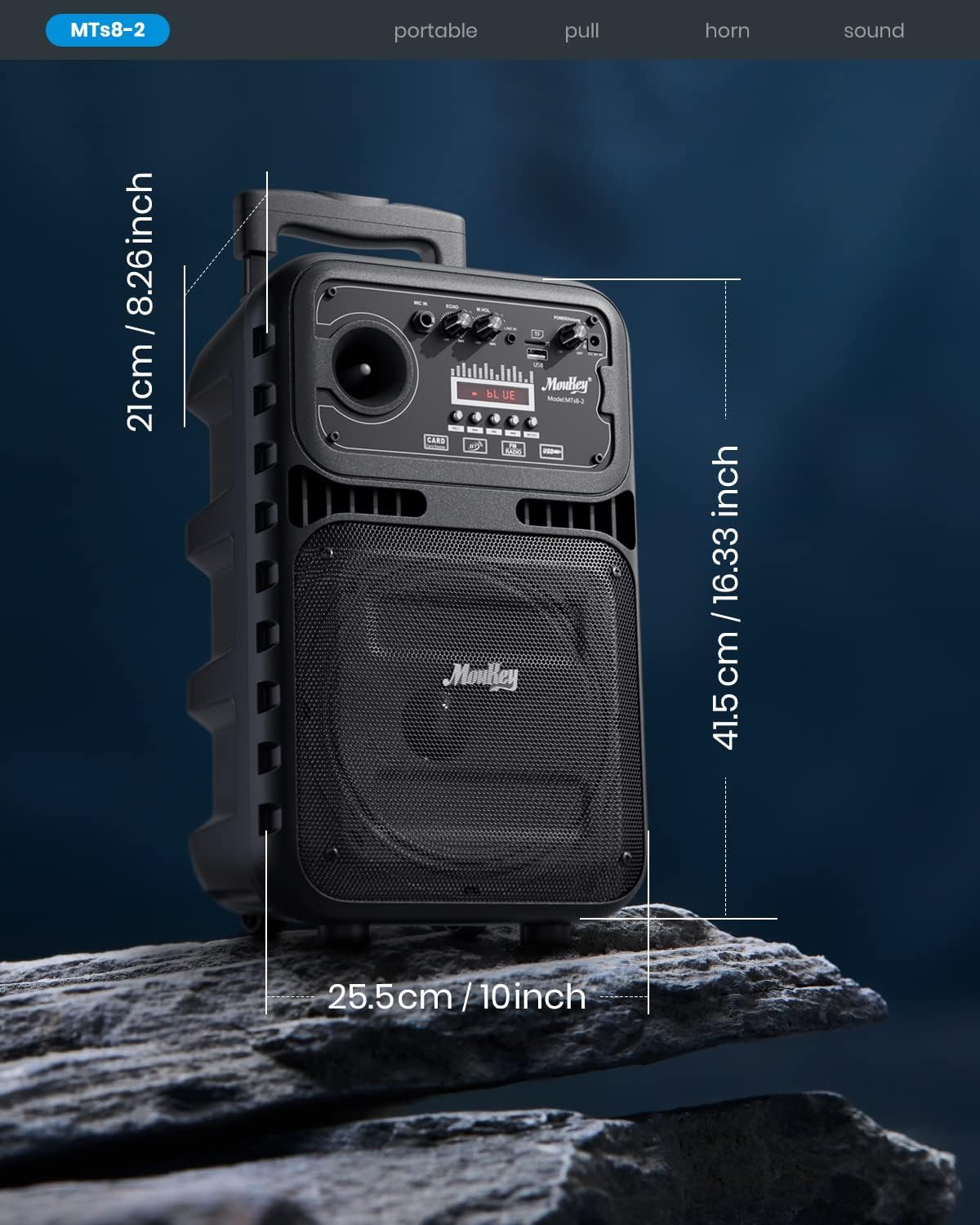
Image: Dimensions of the Moukey MTs8-2 Portable PA System.

Image: Internal components of the speaker, highlighting the 8-inch subwoofer and 1-inch tweeter.
10. Кепилдик жана колдоо
Moukey products are designed and manufactured to the highest quality standards. For warranty information, technical support, or customer service inquiries, please refer to the warranty card included with your product or visit the official Moukey webсайт. Кепилдик дооматтары үчүн сатып алганыңыздын далилин сактап коюңуз.
Онлайн колдоо: Кошумча ресурстар жана көп берилүүчү суроолор үчүн, сураныч, бул жерге кириңиз Amazon'догу Moukey дүкөнү.


