Introduction
This manual provides essential information for the safe and efficient use of your Mophie Universal Wireless Charging Stand. Please read these instructions carefully before use and retain them for future reference.
The Mophie Universal Wireless Charging Stand is designed to wirelessly charge Qi-enabled smartphones in both portrait and landscape orientations. It delivers up to 15W fast charging and is compatible with lightweight phone cases up to 3mm thick.
Пакеттин мазмуну
Пакетиңизде бардык буюмдар бар экенин текшериңиз:
- Mophie Universal Wireless Charging Stand
- Approx. 1.5M Wall Adapter
- Ыкчам баштоо боюнча колдонмо
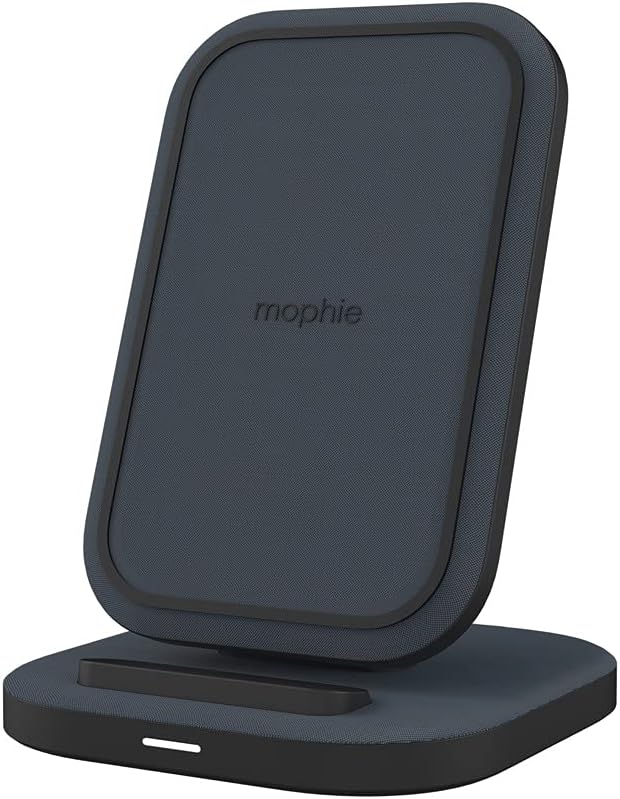
Image: The Mophie Universal Wireless Charging Stand with its power adapter and quick-start guide.
Орнотуу нускамалары
- Кубат адаптерин туташтыруу: Insert the small end of the provided 1.5M wall adapter cable into the power input port on the back of the charging stand.
- Электр кубатына кошуу: Plug the wall adapter into a suitable electrical outlet.
- Жайгашкан жери: Place the charging stand on a flat, stable surface, such as a desk or nightstand. Ensure there is adequate ventilation around the stand.
Image: The Mophie Wireless Charging Stand ready for use, showing the power cable connected.
Иштөө нускамалары
The Mophie Universal Wireless Charging Stand is designed for simple operation.
- Түзмөгүңүздү жайгаштырыңыз: Position your Qi-enabled smartphone directly onto the charging surface of the stand. The phone can be placed in either portrait or landscape orientation.
- Заряддоону текшерүү: Your device should indicate that it is charging. The stand is equipped with an LED indicator (if present, typically a small light on the base) that illuminates to confirm charging.
- Иштин шайкештиги: The stand can charge through lightweight phone cases up to 3mm thick. For optimal charging performance, remove thicker cases or cases containing metal.

Image: A smartphone placed vertically on the Mophie charging stand, indicating active charging.

Image: A smartphone placed horizontally on the Mophie charging stand, indicating active charging.
The stand features 15W тез зымсыз кубаттоо, optimized for compatible Apple and Samsung devices, ensuring quick power delivery.
Техникалык тейлөө
- Тазалоо: Disconnect the power adapter before cleaning. Use a soft, dry, lint-free cloth to wipe the surface of the charging stand. Do not use abrasive cleaners, solvents, or aerosol sprays.
- Сактагыч: Узак убакыт бою колдонулбаган учурда, заряддоочу стендди салкын, кургак жерде, күндүн түз нурунан жана өтө жогорку температурадан алыс сактаңыз.
- Суюктуктардан алыс болуңуз: Заряддоочу стендди суудан жана башка суюктуктардан алыс кармаңыз.

Сүрөт: деталдуу view of the premium fabric finish on the Mophie charging stand.
Проблемаларды чечүү
If you encounter issues with your Mophie Universal Wireless Charging Stand, refer to the following common problems and solutions:
| Көйгөй | Мүмкүн себеп | Чечим |
|---|---|---|
| Түзмөк кубатталбай жатат же жай кубатталууда. |
|
|
| LED indicator is blinking. |
|
|
| Stand feels warm during charging. | Кадимки иштөө. | A slight warmth during wireless charging is normal. If it becomes excessively hot, discontinue use and contact support. |
The Mophie charging stand includes built-in ашыкча заряддан коргоо жана чет объектти аныктоо коопсуз иштешин камсыз кылуу.
Техникалык шарттар
| Модель номери | 401305903 |
| Бренд | Мофи |
| Байланыш технологиясы | Зымсыз (Qi менен шайкеш) |
| Чыгуу күчү | 15 Вт чейин тез кубаттоо |
| Иштин шайкештиги | Charges through lightweight cases up to 3mm thick |
| Киргизүү көлөмүtage | 230 Volts (via included wall adapter) |
| Ampөчүрүү | 0.07 Amps |
| Түс | Кара |
| Элемент Салмагы | 14 унция (болжол менен 397 грамм) |
| Пакеттин өлчөмдөрү | 7.95 x 4.33 x 3.19 дюйм |
| Кабелдин узундугу | Approx. 1.5 meters (wall adapter cable) |
| Шайкеш түзмөктөр | Qi-enabled smartphones including Apple iPhone (11, 12, 13, 14, 15 series, etc.), Samsung Galaxy (S22, S23 series, etc.), Google Pixel (7, 8 series, etc.). |
Кепилдик маалымат
Specific warranty details for the Mophie Universal Wireless Charging Stand are typically provided with the product packaging or available on the official Mophie webсайт. Сатып алууңузга тиркелген документтерди караңыз же сайтка кириңиз mophie.com/support for the most current warranty terms and conditions.
Кардарларды колдоо
For further assistance, technical support, or to inquire about replacement parts, please contact Mophie customer service through their official webсайт:
- Webсайт: mophie.com/support
- Refer to the Quick-Start Guide for any additional contact information.


