Introduction
Сатып алганыңыз үчүн рахматasing the Tzumi 7796 GO Theater Wi-Fi LED Cinema Projector. This manual provides essential information for setting up, operating, and maintaining your projector. Please read it thoroughly before use to ensure proper functionality and to maximize your viewing experience. This projector is designed for versatile use, including home entertainment, outdoor movie nights, and business presentations, offering a portable solution with Wi-Fi and multiple connectivity options.
Маанилүү коопсуздук маалыматы
- l болгондо проектордун объективине тике карабаamp күйүк.
- Проектордун ысып кетишине жол бербөө үчүн анын айланасында жакшы желдетүүнү камсыз кылыңыз. Желдетүүчү тешиктерди жаппаңыз.
- Проекторду суудан же башка суюктуктардан алыс кармаңыз.
- Проектор менен келген кубат адаптерин гана колдонуңуз.
- Проекторду өз алдынча оңдоого аракет кылбаңыз. Бардык тейлөө иштерин квалификациялуу адистерге тапшырыңыз.
- Place the projector on a stable, level surface to prevent damage from falling.
- Чагылган бороондордо же көпкө колдонулбаганда проекторду электр розеткасынан ажыратыңыз.
Пакеттин мазмуну
Бардык буюмдардын бар экендигин текшериңиз:
- Tzumi 7796 GO Theater Wi-Fi LED Cinema Projector
- Алыстан башкаруу
- Кубаттуу адаптер
- Колдонуучунун Колдонмосу (бул документ)
- AV кабели (эгер кошулган болсо)
Продукт бүттүview
Фронт View

Сүрөт: Фронт view of the Tzumi 7796 projector. This image displays the main projection lens on the left side and ventilation grilles along the front and right side of the device. The overall casing is white.
Side View порттор менен
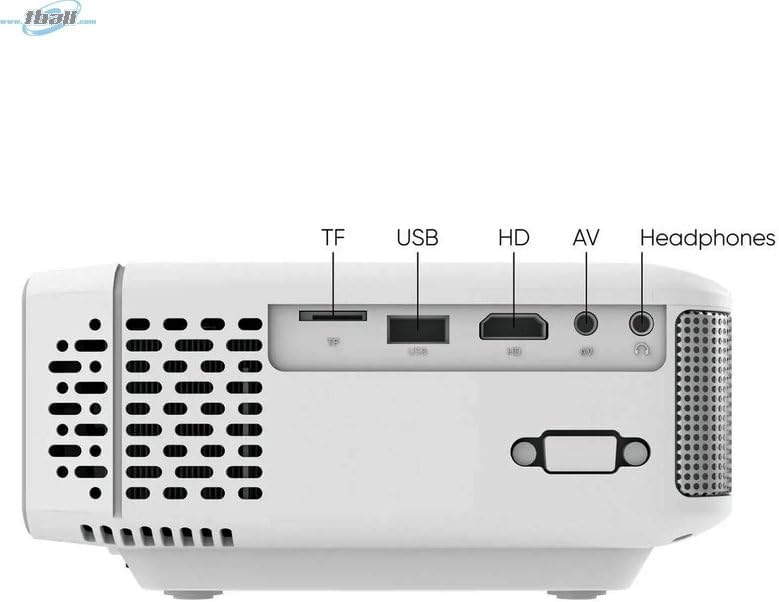
Сүрөт: Side view of the Tzumi 7796 projector highlighting its various input ports. From left to right, these include a TF card slot, a USB port, an HD (HDMI) port, an AV input, and a headphone jack. This side also features ventilation grilles.
Жогорку View Controls менен

Сүрөт: Жогорку view of the Tzumi 7796 projector. This image shows the manual focus and keystone correction dials located near the lens. The central control panel features directional buttons (Up, Down, Left, Right), Home, Option, Back, Power, and Enter buttons for navigation and control.
Арткы View Кубат киргизүү менен

Сүрөт: Арткы view of the Tzumi 7796 projector. This view primarily shows the power input socket on the left side and additional ventilation grilles on the right side.
Орнотуу колдонмосу
1. Жайгаштыруу
Проекторду туруктуу, тегиз бетке коюңуз. Оптималдуу үчүн viewing, position the projector directly in front of your screen or wall. The ideal projection distance will vary based on the desired screen size. Ensure there is adequate space around the projector for ventilation.

Сүрөт: This image illustrates the versatility of the Tzumi 7796 projector, showing it being used in both an indoor home setting and an outdoor movie night environment. This highlights its suitability for various entertainment scenarios.
2. Power Connection
- Connect the power adapter to the projector's power input port (refer to "Rear View with Power Input" image).
- Кубат адаптеринин экинчи учун розеткага сайыңыз.
- Проектордогу кубат индикаторунун жарыгы күйүп турушу керек.
3. Түзмөктөрдү туташтыруу
Проектор ар кандай киргизүү булактарын колдойт:
- HDMI: Connect your laptop, gaming console, or streaming device using an HDMI cable to the HD port.
- USB: Медиа ойнотуу үчүн USB флэш-дискти USB портуна салыңыз fileтүздөн-түз с.
- OF: Use the provided AV cable to connect older devices like DVD players to the AV port.
- TF картасы: Insert a TF (MicroSD) card into the TF card slot to play media files.
- Wi-Fi: For wireless screen mirroring or streaming, connect the projector to your Wi-Fi network (see "Operating Instructions - Wi-Fi Connectivity").
4. Фокус жана негизги ташты тууралоо
- Фокус: айлантыңыз ФОКУС ring near the lens until the projected image is clear and sharp.
- Негизги таш: If the image appears trapezoidal (wider at the top or bottom), adjust the КЕЙСТОН correction dial until the image is rectangular.
Иштөө нускамалары
Күйгүзүү/өчүрүү
- Күйгүзүү: басыңыз Күч проектордун башкаруу панелиндеги же алыстан башкаруу пультундагы баскычты басыңыз.
- Өчүрүү: басыңыз Күч баскычын кайра басыңыз. Суралса, өчүрүүнү ырастаңыз.
Киргизүү булагын тандоо
After powering on, the projector will display its main menu. To select an input source:
- Use the directional buttons on the projector or remote to navigate to the desired input (e.g., HDMI, USB, AV, TF Card, Wi-Fi).
- басыңыз Кириңиз тандооңузду ырастоо үчүн баскычты басыңыз.
Wi-Fi туташуусу
To connect your projector to a Wi-Fi network for screen mirroring or online content:
- From the main menu, navigate to the Wi-Fi or Тармак орнотуулары параметр.
- Тандоо Wi-Fi орнотуу and choose your desired network from the list.
- Экрандагы клавиатура аркылуу Wi-Fi сырсөзүн киргизип, ырастаңыз.
- Once connected, you can use screen mirroring features (e.g., Miracast, AirPlay) or access built-in smart features if available.
Аудио жөндөөлөрү
The projector features two built-in 3W speakers. You can also connect external audio devices:
- Камтылган динамиктер: Audio will play automatically through the projector's speakers. Adjust volume using the remote or control panel.
- Headphones/External Speakers: Connect headphones or external speakers to the 3.5mm headphone jack on the side of the projector. This will typically mute the built-in speakers.
Техникалык тейлөө
Линзаны тазалоо
To maintain optimal image quality, keep the projector lens clean.
- Оптикалык линзалар үчүн атайын жасалган жумшак, түксүз кездемени колдонуңуз.
- Линзаны тегерек кыймыл менен акырын сүртүңүз.
- Avoid using abrasive cleaners or excessive pressure, which can scratch the lens.
Жалпы кам көрүү жана сактоо
- Keep the projector in a cool, dry place when not in use.
- Protect the projector from dust and extreme temperatures.
- Do not expose the projector to direct sunlight for extended periods.
- Сырткы бөлүгүн тазалаңыз casing жумшак менен, гamp кездеме. Катуу химиялык заттардан алыс болуңуз.
Проблемаларды чечүү
| Көйгөй | Мүмкүн себеп | Чечим |
|---|---|---|
| Сүрөт чагылдырылган жок |
|
|
| Сүрөт бүдөмүк |
|
|
| Сүрөт трапеция түрүндө |
|
|
| Үн жок |
|
|
| Wi-Fi туташуу маселелери |
|
|
Техникалык шарттар
- Модел: 7796
- Бренд: Цзуми
- Дисплейдин чечилиши: 1920 x 1080 (Full HD)
- Жарыктык: 1600 Lumens
- Байланыш технологиясы: HDMI, Wi-Fi, USB, AV, TF Card
- Өзгөчө өзгөчөлүгү: Portable
- Сунушталган колдонуулар: Home entertainment, Outdoor movie nights, Business presentations
- Элемент Салмагы: 3 фунт
- Пакеттин өлчөмдөрү: 11 x 9 x 5 дюйм
- Камтылган динамиктер: Two 3W speakers
Кепилдик жана колдоо
For warranty information and technical support, please refer to the documentation included with your purchase or visit the official Tzumi webсайт. Кепилдик дооматтар үчүн сатып алганыңыздын далилин сактаңыз.
Онлайн колдоо: Amazon'догу Tzumi дүкөнүнө баш багыңыз


