Introduction
The BYTECH 3-in-1 Charging Cable (Model BYOPCA103BK) is a versatile USB cable designed for charging and syncing a wide range of electronic devices. It features a standard USB Type-A connector on one end and a multi-connector head on the other, providing Lightning, USB Type-C, and Micro USB compatibility. This cable offers a convenient solution for users with multiple device types, ensuring high-speed charging and data transfer.
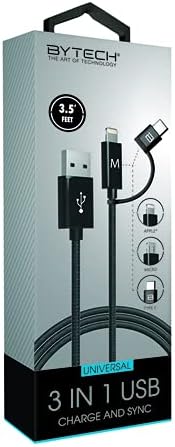
Image: The BYTECH 3-in-1 Charging Cable, showcasing its universal compatibility with various device types.
Орнотуу жана туташуу
Using the BYTECH 3-in-1 Charging Cable is straightforward. Follow these steps to connect your devices:
- Identify the USB-A End: Locate the standard USB Type-A connector. This end typically connects to a power adapter (wall charger), a computer's USB port, or a power bank.
- Кубат булагына/Компьютерге туташуу: Insert the USB Type-A end firmly into a compatible USB port on your charging device or computer.
- Select the Appropriate Device Connector: The other end of the cable features three integrated connectors:
- Чагылган: For Apple iPhone, iPad, and iPod devices.
- USB Type-C: For newer Android smartphones, tablets, laptops, and other USB-C enabled devices.
- Микро USB: For older Android smartphones, tablets, power banks, and various other electronic gadgets.
- Түзмөгүңүзгө туташуу: Carefully insert the chosen connector into the charging/data port of your electronic device. Ensure it is inserted correctly to avoid damage.
- Байланышты текшерүү: Your device should indicate that it is charging or connected for data transfer.
Иштөө нускамалары
This cable supports both charging and data synchronization, depending on the connected device and power source.
Заряддоо
- Connect the USB-A end to a compatible USB wall adapter, car charger, or power bank.
- Connect the appropriate device connector (Lightning, USB-C, or Micro USB) to your smartphone, tablet, or other compatible device.
- The cable is designed for high-speed charging, ensuring efficient power delivery to your device.
Маалыматтарды синхрондоштуруу
- Connect the USB-A end to a USB port on your computer (PC or Mac).
- Connect the appropriate device connector to your smartphone or tablet.
- Your computer should recognize the connected device, allowing you to transfer files, photos, videos, and other data. Follow your device's specific instructions for data transfer.
Техникалык тейлөө жана кам көрүү
To ensure the longevity and optimal performance of your BYTECH 3-in-1 Charging Cable, please follow these maintenance guidelines:
- Ийилгенден качыңыз: Do not excessively bend or crimp the cable, especially near the connectors, as this can damage internal wires.
- Туура ажыратуу: Always pull from the connector head, not the cable itself, when unplugging from a device or power source.
- Кургак кармоо: Protect the cable from moisture and liquids. Do not use it in wet environments.
- Акырын тазалоо: If necessary, wipe the cable and connectors with a soft, dry cloth. Avoid using harsh chemicals or abrasive materials.
- Сактагыч: Store the cable in a cool, dry place, away from direct sunlight and extreme temperatures. Coiling it loosely can prevent tangles and damage.
- Үзгүлтүксүз текшерүү: Periodically check the cable and connectors for any signs of wear, fraying, or damage. Discontinue use if damage is observed.
Проблемаларды чечүү
If you encounter issues with your BYTECH 3-in-1 Charging Cable, try the following solutions:
- Түзмөк кубатталбай жатат:
- Кабелдин эки учу тең бекем туташтырылганын текшериңиз.
- Башка кубат адаптерин же USB портун колдонуп көрүңүз.
- Test the cable with a different device to rule out a device-specific issue.
- Check if the correct connector (Lightning, USB-C, Micro USB) is being used for your device.
- Жай кубаттоо:
- Ensure your power adapter provides sufficient output (e.g., 5V/2A or higher for faster charging).
- Заряддоо учурунда түзмөктү көп колдонуудан алыс болуңуз.
- Түзмөгүңүздөгү фондо колдонулуучу тиркемелерди жабыңыз.
- Маалыматтарды өткөрүү маселелери:
- Ensure the USB-A end is connected to a computer's data-enabled USB port, not just a charging port.
- Check your device's settings to ensure it's set to "File Transfer" or "MTP" mode, not just "Charging."
- Try restarting both your device and computer.
- Кабелдин бузулушу: If the cable appears frayed, bent, or damaged, discontinue use immediately and replace it.
Техникалык шарттар
| Өзгөчөлүк | Деталь |
|---|---|
| Бренд | Bytech |
| Модель аты | 3 in 1 |
| Элемент моделинин номери | BYOPCA103BK |
| Туташтыргыч түрү | USB Type-A, USB Type-C, Lightning |
| Кабель түрү | USB |
| Шайкеш түзмөктөр | Ноутбук, персоналдык компьютер, планшет, смартфон |
| Өзгөчө өзгөчөлүк | Жогорку ылдамдык |
| Сунушталган Колдонуулар | Электрондук түзүлүштөрдү заряддоо |
| Түс | Кара |
| Connector Gender | Эркектен эркекке |
| Форма | Жалпак |
| Pins саны | 8 |
| Ички/тышкы колдонуу | Indoor |
| Элементтердин саны | 1 |
| Кардар пакетинин түрү | coiled in protective tubing |
| Максималдуу томtage | 5 вольт |
| Сырткы материал | Plastic/Rubber |
| Өндүрүүчү | BYTECH |
| UPC | 805112034765 |
| Пакеттин өлчөмдөрү | 7 x 5 x 3 дюйм |
| Элемент Салмагы | 1 фунт |
| ASIN | B09BBK4X64 |
| Дата биринчи жеткиликтүү | 27-июль, 2021-жыл |
Кепилдик жана колдоо
For warranty information or technical support regarding your BYTECH 3-in-1 Charging Cable, please refer to the manufacturer's official webсайтка же кардарларды тейлөө бөлүмүнө кайрылыңыз. Сатып алуу квитанциясын кепилдик дооматтары үчүн сатып алуунун далили катары сактаңыз.
Manufacturer: BYTECH
Кошумча жардам алуу үчүн, иш сапары менен www.bytechintl.com (мисample link, actual link not provided in input).


