Introduction
The GN ReSound ONE Premium Charger Case is an advanced charging solution designed specifically for GN ReSound rechargeable hearing aids. This compact and portable case allows you to conveniently recharge your hearing aids, ensuring they are always ready for use. It features a robust design and can store multiple full charges, providing extended power on the go.
Кутуда эмне бар
Сураныч, пакеттин мазмунун текшерип, бардык буюмдар бар экенин текшериңиз:
- 1x GN ReSound ONE Premium Charging Case
- 1x USB заряддоо кабели
- 1x Кубат булагынын сайгычы (адаптер)
- 1x Cleaning Kit (including brush and cloth)
- 1x Колдонуучунун колдонмосу (бул документ)
Продукт бүттүview
Familiarize yourself with the components of your ReSound ONE Premium Charger Case.

1-сүрөт: Жогорку view of the open charger case, highlighting the two hearing aid compartments and the five LED battery indicator lights in the center.
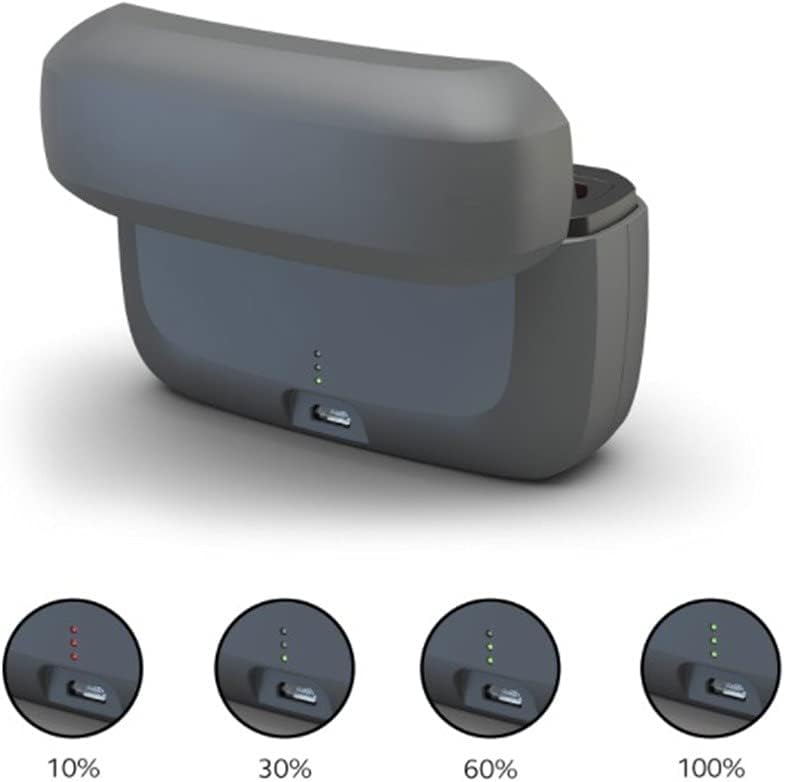
2-сүрөт: Каптал view of the charger case with the lid open, illustrating the USB charging port and the LED indicators displaying various charge levels (10%, 30%, 60%, 100%).

Figure 3: The compact charger case and two ReSound ONE hearing aids shown in a travel-friendly context, emphasizing portability.
Жайгашуу
Before first use, ensure the charger case is fully charged.
- Алгачкы заряддоо: Connect the provided USB charger cable to the charging port on the back of the case. Plug the power supply plug into a standard 110V wall outlet. The LED indicator lights on the case will illuminate to show the current charge level. All five lights will be green when fully charged.
- Угуучу аппараттарды орнотуу: Open the lid of the charger case. Gently place your ReSound ONE hearing aids into their respective charging compartments. Ensure they are seated correctly.
- Автоматтык заряддоо: Once the hearing aids are correctly placed, they will automatically begin charging. The indicator lights on the case will show the charging status.
Иштөө нускамалары
Using your ReSound ONE Premium Charger Case is straightforward:
- Daily Charging: For optimal performance, place your hearing aids in the charger case every night. A full charge typically takes a few hours.
- Portable Power: The charger case holds enough power for up to three full charges of your hearing aids, making it ideal for travel or when you don't have access to a power outlet.
- Заряддын абалын текшерүү: The five LED lights on the case indicate the remaining battery life of the charger case itself. Each light represents approximately 20% of the charge. When charging hearing aids, the lights will also indicate their charging progress.
- Коопсуз кубаттоо: The case is designed with safety features to prevent overcharging, protecting your hearing aids and extending their battery life.
Техникалык тейлөө
Proper maintenance ensures the longevity and optimal performance of your charger case:
- Тазалоо: Use the provided cleaning cloth to wipe the exterior of the charger case. For the charging contacts inside, use the small brush to gently remove any dust or debris. Do not use liquid cleaners directly on the charging contacts.
- Сактагыч: Заряддоочу кутучаны салкын, кургак жерде, күн нуру түз тийбеген жана өтө жогорку температурадан алыс сактаңыз.
- Нымдуулуктан качыңыз: Keep the charger case away from water and excessive humidity. If it gets wet, disconnect it from power immediately and allow it to dry completely before use.
Проблемаларды чечүү
If you encounter issues with your charger case, try the following solutions:
| Көйгөй | Мүмкүн себеп | Чечим |
|---|---|---|
| Hearing aids not charging. | Hearing aids not properly seated; dirty charging contacts; charger case battery empty. | Ensure hearing aids are correctly placed. Clean charging contacts with the provided brush. Recharge the charger case. |
| LED indicator lights not working. | Charger case battery empty; faulty cable/adapter. | Charge the case. Try a different USB cable or power adapter. |
| Case not holding charge. | Battery degradation (after long use); extreme temperatures. | Ensure charging in a moderate temperature environment. If issues persist, contact customer support. |
If the problem persists after trying these steps, please contact ReSound customer support.
Техникалык шарттар
| Өзгөчөлүк | Деталь |
|---|---|
| Бренд | ReSound |
| Модел | ONE Premium Charger Case |
| Түс | Кара |
| Элемент Салмагы | 10.5 унция (0.298 кг) |
| Пакеттин өлчөмдөрү | 5.83 x 5.59 x 2.32 дюйм |
| Киргизүү көлөмүtage | 240 вольт |
| Output Voltage | 240 вольт |
| Шайкештик | All ReSound ONE hearing aids |
Кепилдик жана колдоо
The GN ReSound ONE Premium Charger Case comes with a manufacturer's warranty. Please refer to the warranty card included in your packaging or visit the official ReSound webдеталдуу кепилдик шарттары жана шарттары үчүн сайт.
For technical support, troubleshooting assistance, or to inquire about replacement parts, please contact ReSound customer service through their official webсайт же продукт документациясында көрсөтүлгөн байланыш маалыматы.
Көбүрөөк маалыматты жана колдоо булактарын төмөнкү даректен таба аласыз: www.resound.com


