1. Киришүү
The ION Audio Boombox Deluxe Stereo is a versatile audio system designed to provide a range of listening experiences. It combines classic audio playback options with modern connectivity, featuring an AM/FM radio, a cassette player, Bluetooth streaming, and USB/Micro SD card playback. This manual provides detailed instructions for setting up, operating, and maintaining your device.

Сүрөт 1: Алдыңкы view of the ION Audio Boombox Deluxe Stereo, showcasing its dual speakers, cassette deck, and radio tuner display.
2. Кутуда эмне бар
- Boombox Deluxe Unit
- Электр кабели
- Ыкчам Старт Жетекчиси
3. Орнотуу
3.1 Агрегатты кубаттоо
The Boombox Deluxe can be powered using the included AC power cable or by batteries for portable use. Insert the AC power cable into the AC IN port on the back of the unit and plug it into a standard wall outlet. For battery operation, open the battery compartment (typically on the bottom or back) and insert the required D-cell batteries (not included), ensuring correct polarity.
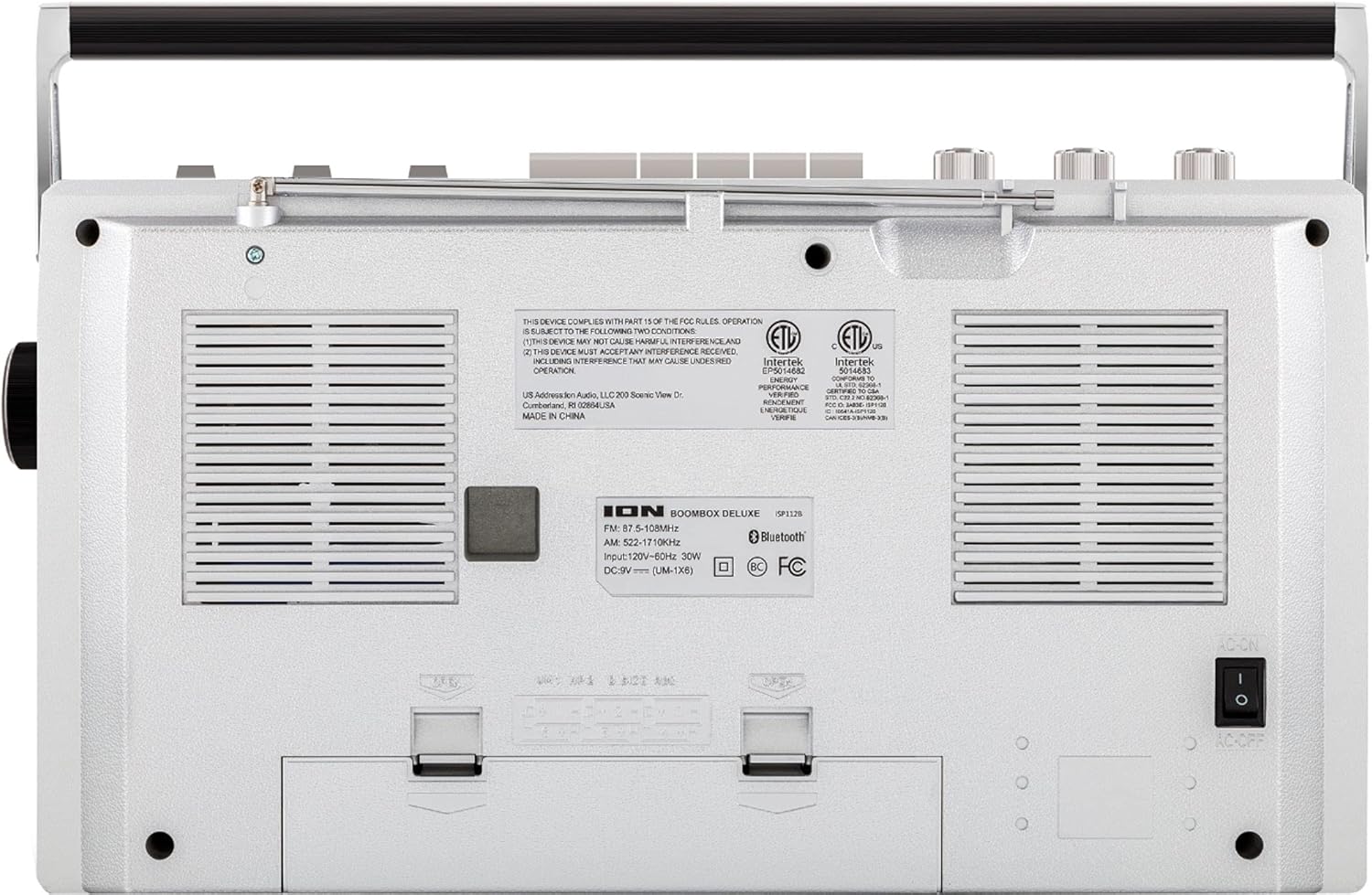
Figure 2: Rear panel of the Boombox Deluxe, highlighting the AC power input and battery compartment location.
3.2 Антеннаны тууралоо
For optimal AM/FM radio reception, extend the telescopic antenna located on the top of the unit. Adjust its position for the clearest signal.
4. Иштөө нускамалары
4.1 Жалпы көзөмөл
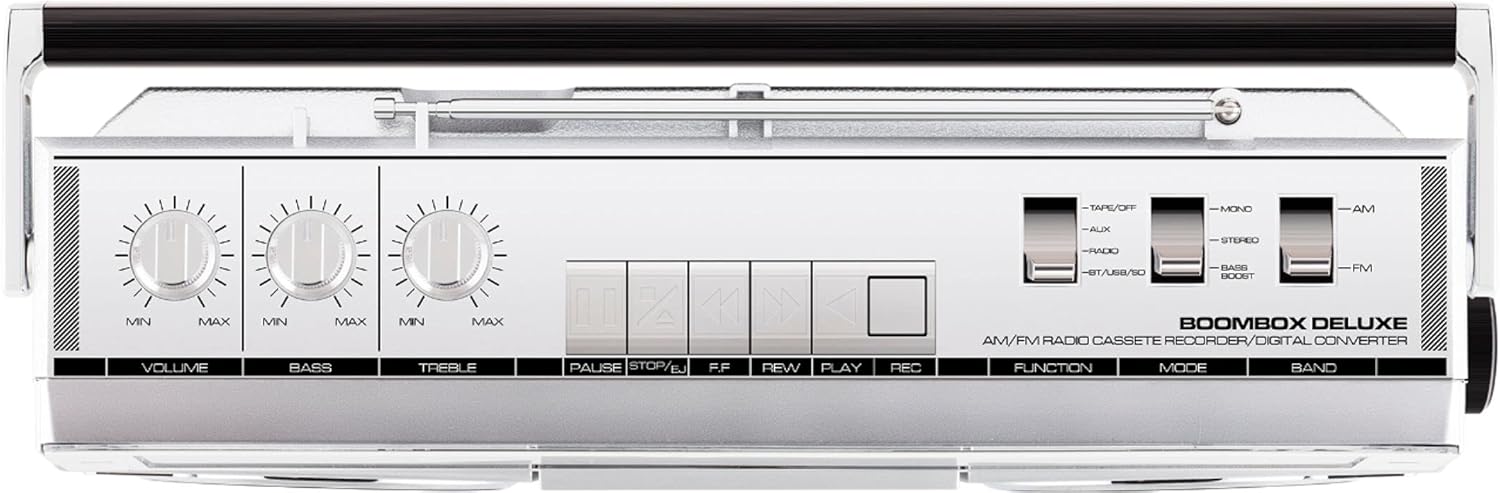
Figure 3: Top panel controls, including Volume, Bass, Treble knobs, and cassette playback buttons.
- Үн баскычы: Жалпы үн чыгаруу деңгээлин тууралайт.
- Басс баскычы: Төмөн жыштыктагы аудио чыгарууну тууралайт.
- Үч ыргытуу баскычы: Жогорку жыштыктагы аудио чыгарууну тууралайт.
- Функция которуу: Selects between Tape/Off, Aux, Radio, and BT/USB/SD modes.
- Режим которуу: Selects between Mono, Stereo, and Bass Boost audio modes.
- Тилкени алмаштыргыч: Selects between AM and FM radio bands.
4.2 Радио менен иштөө
- коюңуз Функцияны которуу to 'Radio'.
- коюңуз Band Switch to 'AM' or 'FM'.
- колдонуу Тюнинг баскычы to select your desired radio station. The frequency will be displayed on the tuner scale.
4.3 Кассета ойноткучтун иштеши
- коюңуз Функцияны которуу to 'Tape/Off'.
- басыңыз Токтотуу/чыгаруу кассеталык бөлүмдү ачуу үчүн баскыч.
- Кассеталык лентаны ачык четин өйдө каратып салыңыз. Бөлүмдү жабыңыз.
- басыңыз Play ойнотууну баштоо үчүн баскыч.
- Колдонуу Rewind (REW) жана Тез алдыга (FF) лентаны багыттоо үчүн баскычтар.
- Басыңыз Тыныгуу to temporarily stop playback. Press again to resume.
- Басыңыз Токтотуу/чыгаруу ойнотууну токтотуу жана лентаны чыгаруу үчүн.
- To record, ensure the Функцияны которуу is set to 'Tape/Off' and press the Record (REC) баскычы менен бир убакта Play баскычы.
4.4 Bluetooth байланышы

Figure 4: Side panel with USB and Micro SD card slots, and playback controls for digital media.
- коюңуз Функцияны которуу to 'BT/USB/SD'. The unit will enter Bluetooth pairing mode, indicated by a flashing LED.
- On your Bluetooth-enabled device (e.g., smartphone, tablet), search for 'ION Boombox Deluxe' in the Bluetooth settings.
- Select 'ION Boombox Deluxe' to pair. Once connected, a confirmation tone will sound, and the LED will stop flashing.
- You can now stream audio from your device to the Boombox Deluxe. Use your device's controls or the boombox's playback buttons (Play/Pause, Next/Previous Track) for media control.
4.5 USB/Micro SD ойнотуу
- коюңуз Функцияны которуу to 'BT/USB/SD'.
- Insert a USB flash drive or Micro SD card (with compatible audio files) into the respective slot on the side of the unit.
- The unit will automatically detect and begin playing audio files.
- Use the playback control buttons (Play/Pause, Next/Previous Track, Delete) on the side panel to manage your music.
4.6 Көмөкчү киргизүү

Figure 5: Side panel with headphone output and auxiliary input jacks.
- коюңуз Функцияны которуу to 'Aux'.
- Тышкы аудио түзмөгүн (мисалы, MP3 ойноткуч, CD ойноткуч) туташтырыңыз AUX IN jack using a 3.5mm audio cable (not included).
- Audio from the connected device will play through the boombox speakers. Control playback from your external device.
5. Өзгөчөлүктөрү
- Integrated Stereo System with Dual Speakers
- Bluetooth зымсыз агымы
- AM/FM Radio Tuner
- Кассета ойноткуч/Диктофон
- USB жана Micro SD карта ойнотуу
- Auxiliary Input for External Devices
- Adjustable Bass and Treble Controls
- Ташуу туткасы менен портативдик дизайн
6. Техникалык шарттар
| Спецификация | Деталь |
|---|---|
| Бренд | ION Audio |
| Модел | Boombox Deluxe |
| Байланыш технологиясы | Bluetooth, USB |
| Динамик түрү | Стерео |
| Power Source | Battery Powered (D-cell), AC Power |
| Түс | Кара, күмүш |
| Элемент Салмагы | 8.93 фунт |
| Пакеттин өлчөмдөрү | 18.1 x 11.1 x 7.6 дюйм |
7. Кыйынчылыктарды
- Кубат жок:
Ensure the AC power cable is securely connected to both the unit and a working power outlet. If using batteries, check that they are inserted correctly and are not depleted. - Радио кабыл алуу начар:
Fully extend the telescopic antenna and adjust its position. Try relocating the unit to an area with better signal reception, away from potential interference sources like other electronic devices. - Cassette Tape Not Playing/Recording:
Ensure the tape is inserted correctly and the cassette compartment is fully closed. Check that the tape is not tangled or damaged. For recording, ensure both Play and Record buttons are pressed simultaneously. - Bluetooth туташпай жатат:
Make sure the Boombox Deluxe is in 'BT/USB/SD' mode and in pairing mode (flashing LED). Ensure Bluetooth is enabled on your external device and it is within range (typically 30 feet). Try unpairing and re-pairing the device. - No Sound from USB/Micro SD:
Verify that the USB drive or Micro SD card is inserted correctly and contains compatible audio files (e.g., MP3). Ensure the volume is turned up on the boombox.
8. Техникалык тейлөө
- Тазалоо: Агрегаттын сыртын тазалоо үчүн жумшак, кургак чүпүрөктү колдонуңуз. Суюк тазалагычтарды же эриткичтерди колдонбоңуз.
- Кассеталык палубага кам көрүү: Periodically clean the tape heads and pinch rollers with a cotton swab lightly dampened with isopropyl alcohol to ensure optimal playback and recording quality.
- Батареяны сактоо: Эгерде түзмөк көпкө чейин колдонулбаса, агып кетүүсүн жана бузулушун алдын алуу үчүн батарейкаларды алып салыңыз.
9. Кепилдик жана колдоо
This product is offered as an Amazon Renewed item. Amazon Renewed products are professionally inspected and tested to work and look like new. If you are not satisfied with your purchase, renewed products are eligible for replacement or refund under the Amazon Renewed Guarantee. For specific details regarding the Amazon Renewed Guarantee, please refer to the Amazon Renewed program terms and conditions on the Amazon webсайт.
For further assistance or technical support, please contact ION Audio customer service or refer to their official webколдоо булактары үчүн сайт.


