StarTech.com 2 Port Dual Monitor HDMI KVM Switch
Model: SV231DHU34K6
1. Киришүү
This instruction manual provides detailed information on the installation, operation, and maintenance of your StarTech.com 2 Port Dual Monitor HDMI KVM Switch. This device allows you to control two computers from a single set of peripherals, including two HDMI monitors, a keyboard, a mouse, and other USB devices, supporting resolutions up to 4K at 60Hz.
2. Коопсуздук маалыматы
Please read and understand all instructions before using this product. Failure to follow these instructions may result in electric shock, fire, or serious injury.
- Электрдик коркунучтар: Do not use damaged or frayed cables. Exposed wires can lead to electric shocks. Ensure all cables are properly connected and secured to prevent accidental disconnection.
- Жылуулуктун топтолушу: Overloaded or tightly bundled cables can overheat and pose a fire hazard. Ensure adequate ventilation and avoid bundling power cables.
- Зыян: Адаптерлерди ар дайым кабелди эмес, сайгычын кармап сууруп алыңыз. Кабельден тартсаңыз, зымдар ачыкка чыгып, электр тогуна урунуп же күйүп калышы мүмкүн.
3. Продукт бүтүп калдыview
The StarTech.com SV231DHU34K6 KVM switch is designed to streamline your workspace by enabling control of two computers with dual 4K HDMI displays and shared USB peripherals. Its robust steel housing ensures durability.
3.1. Негизги өзгөчөлүктөрү
- Supports dual 4K (3840 x 2160) resolution at 60Hz per monitor.
- HDMI 2.0, HDCP 2.2, and HDR10 support.
- Integrated 2-port USB 3.0 Hub (5Gbps) for sharing peripherals.
- Four USB 2.0 HID ports for keyboard and mouse.
- Hotkey and front-panel push-button switching.
- EDID and HDCP signal emulation for fast, seamless switching.
- Supports stereo analog and 7.1 digital audio.
- OS Independent compatibility (Windows, Mac, Linux).
3.2. Алдыңкы панель

1-сүрөт: алдыңкы панелдин макети
- HID USB Port: For connecting a keyboard or mouse.
- 5G USB Port: For connecting high-speed USB 3.0 devices.
- Computer Selection Buttons (1, 2): Press to switch to the corresponding computer.
- ТАНДОО баскычы: Used for various functions, including auto-scan activation.
3.3. Арткы панель
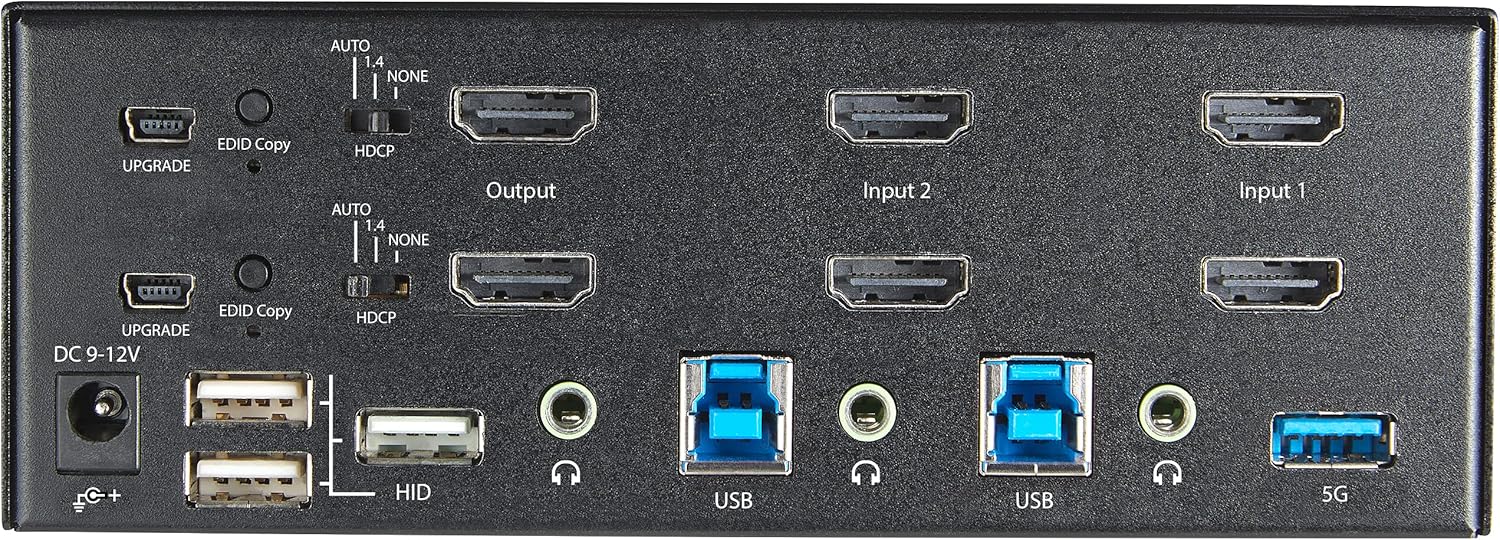
Figure 2: Арткы панелдин жайгашуусу
- DC 9-12V Power Input: Камтылган кубат адаптерин туташтырыңыз.
- UPGRADE Port: Микропрограмма жаңыртуулары үчүн.
- EDID Copy Button/Switch: Manages Extended Display Identification Data.
- HDCP которуу: Manages High-bandwidth Digital Content Protection.
- Output (HDMI): Connect to your monitors.
- Input 1/Input 2 (HDMI): Connect to the HDMI outputs of your computers.
- USB (Тип-B): Connect to the USB 3.0 ports of your computers.
- HID USB Ports (Type-A): For additional keyboard/mouse connections or other low-power USB devices.
- Audio Jacks (3.5mm): For connecting speakers/headphones and microphones.
- 5G USB Port (Type-A): For connecting high-speed USB 3.0 devices.
4. Орнотуу
4.1. Кутуда эмне бар
- 1 x KVM Switch (SV231DHU34K6)
- 1 х Universal Power Adapter (NA / JP, EU, UK, ANZ)
- 4 х Резина бут
- 1 x Ыкчам баштоо боюнча колдонмо
Note: HDMI cables, USB 3.0 Type-A to Type-B cables, and audio cables are not included and must be purchased separately.
4.2. Туташуу нускамалары
Follow these steps to connect your KVM switch:
- Мониторлорду туташтыруу: Connect your two HDMI monitors to the 'Output' HDMI ports on the rear panel of the KVM switch.
- Connect Computers (HDMI): Connect the HDMI outputs from Computer 1 to the 'Input 1' HDMI ports on the KVM switch. Repeat for Computer 2 and 'Input 2'. Ensure both HDMI outputs from each computer are connected for dual monitor support.
- Компьютерлерди туташтыруу (USB): Connect the USB 3.0 Type-B ports on the KVM switch to the USB 3.0 Type-A ports on Computer 1 and Computer 2 using appropriate USB 3.0 cables. These connections enable keyboard, mouse, and USB hub functionality.
- Перифериялык түзүлүштөрдү туташтыруу:
- Connect your keyboard and mouse to the 'HID' USB ports on the front or rear panel.
- Connect other USB devices (e.g., printer, scanner, webcam) to the '5G' USB 3.0 ports on the front or rear panel.
- Аудио туташтыруу (кошумча): If desired, connect your speakers/headphones and microphone to the 3.5mm audio jacks on the rear panel.
- Туташуу кубаты: Connect the included universal power adapter to the 'DC 9-12V' power input on the rear panel, then plug it into a power outlet. The KVM switch will power on automatically.

Figure 3: KVM Switch with Ports for Connection
5. KVM коммутаторун иштетүү
5.1. Switching Between Computers
You can switch between connected computers using either the front-panel push buttons or hotkey commands.
- Front-Panel Buttons: Press the '1' or '2' button on the front panel to directly switch to Computer 1 or Computer 2, respectively.
- Ыкчам баскычтарды алмаштыруу: Use keyboard hotkey combinations to switch computers. The default hotkey sequence is typically Scroll Lock, Scroll Lock, [1 or 2]. Refer to the Quick-Start Guide for a complete list of hotkey commands and customization options. A buzzer sound confirms the switch.
5.2. EDID and HDCP Emulation
The KVM switch includes EDID (Extended Display Identification Data) and HDCP (High-bandwidth Digital Content Protection) signal emulation. This feature ensures that your monitors remain synced and desktop settings are maintained when switching between computers, preventing display resolution changes or window rearrangement.
5.3. USB Hub Functionality
The integrated USB 3.0 hub allows you to share two USB 3.0 peripherals (connected to the 5G ports) and four USB 2.0 HID peripherals (connected to the HID ports) between the connected computers. Devices connected to these ports will function as if directly connected to the currently selected host computer.
5.4. Аудио колдоо
The KVM switch supports both digital audio (via HDMI, 7.1 Channel Audio) and separate 3.5mm stereo analog audio (2 Channel Audio). Ensure your displays and sources support the desired audio format for full compatibility.
6. Техникалык тейлөө
KVM коммутаторуңуздун узак мөөнөттүү иштешин жана оптималдуу иштешин камсыз кылуу үчүн, төмөнкү техникалык тейлөө көрсөтмөлөрүн аткарыңыз:
- Тазалоо: Түзмөктүн сыртын тазалоо үчүн жумшак, кургак чүпүрөктү колдонуңуз. Суюк же аэрозоль тазалагычтарды колдонбоңуз.
- Вентиляция: Ensure the KVM switch is placed in a well-ventilated area. Do not block any ventilation openings.
- Кабелдик башкаруу: Keep cables organized and untangled to prevent damage and ensure proper airflow. Avoid excessive bending or crimping of cables.
- Сактагыч: Узак мөөнөткө колдонулбаганда, аспапты кургак, салкын жерде, тике күндүн нурунан жана өтө температурадан алыс сактаңыз.
7. Кыйынчылыктарды
If you encounter issues with your KVM switch, refer to the following common problems and solutions:
- No Display or Incorrect Resolution:
- Ensure all HDMI cables are securely connected to both the KVM switch and your computers/monitors.
- Verify that your HDMI cables are rated for 4K 60Hz if you are using 4K displays. Longer cables (e.g., over 3m/10ft) may require higher quality or active cables.
- Check the display settings on your computers to ensure they are configured for the correct resolution and refresh rate.
- Try power cycling the KVM switch and monitors.
- Баскычтоп/чычкан жооп бербейт:
- Ensure the USB Type-B cables are securely connected from the KVM switch to your computers.
- Verify that your keyboard and mouse are connected to the designated HID USB ports.
- Алардын иштешин ырастоо үчүн клавиатураны/чычканды түздөн-түз компьютерге туташтырууга аракет кылыңыз.
- Some specialized keyboards/mice with advanced features may require direct connection or specific drivers.
- USB түзмөктөрү аныкталган жок:
- Ensure the USB Type-B cables are connected from the KVM switch to your computers.
- Verify that the USB device is connected to the appropriate 5G USB 3.0 port.
- Some high-power USB devices may require an external power source or a powered USB hub connected to the KVM's 5G port.
- Аудио көйгөйлөр:
- Check all 3.5mm audio cable connections.
- Verify audio output settings on your computers.
- Ensure your monitors or audio devices support the HDMI audio format being sent.
- Slow Switching Time:
- The KVM switch is designed for fast switching. If experiencing delays, ensure EDID and HDCP emulation are functioning correctly.
- Ensure all cables are of good quality and properly seated.
If the problem persists after attempting these solutions, please contact StarTech.com technical support.
8. Техникалык шарттар
| Категория | Спецификация |
|---|---|
| Модель номери | SV231DHU34K6 |
| KVM порттору | 2 |
| Monitors Supported | 2 |
| Видео түрү | HDMI 2.0 |
| Колдоого алынган токтомдор | 3840 x 2160 @ 60 Гц чейин |
| HDCP колдоо | HDCP 2.2 |
| HDR колдоо | HDR10 |
| USB хабы | 2-порттук USB 3.0 (5Gbps) |
| USB HID порттору | 4x USB 2.0 |
| Аудио колдоо | HDMI (7.1 Channel), Analog Stereo (3.5mm) |
| Порт тандоо | Push Button, Hotkeys |
| Материал | Болот |
| Түс | Кара |
| Продукциянын өлчөмдөрү (L x W x Y) | 6.3 x 3.9 x 2.3 дюйм (16.0 x 10.0 x 5.8 см) |
| Продукт Салмагы | 1.8 фунт (0.8 кг) |
| Power Source | AC адаптер (кошулган) |
| Киргизүү көлөмүtage | 100 - 240 AC |
| Энергияны керектөө | 36 Вт |
| Иштөө температурасы | 0℃ден 40℃ге чейин (32℉ден 104℉ге чейин) |
| Сактоо температурасы | -10℃ден 60℃ге чейин (14℉ден 140℉ге чейин) |
| Нымдуулук | 0% - 80% RH (конденсацияланбаган) |
9. Кепилдик жана колдоо
This StarTech.com KVM Switch (Model: SV231DHU34K6) is backed by a 2 жылдык кепилдикStarTech.com ошондой эле төмөнкүлөрдү камсыз кылат өмүр бою акысыз техникалык колдооТехникалык жардам же кепилдик боюнча дооматтар үчүн, расмий StarTech.com сайтына кириңиз. webсайтка же кардарларды колдоо тобуна кайрылыңыз.
Көбүрөөк маалымат алуу үчүн төмөнкүгө кириңиз: www.startech.com


