1. Киришүү
This manual provides essential information for the safe and effective operation of your BenQ GV30 Portable Projector. Please read this manual thoroughly before using the device and retain it for future reference.

Figure 1: BenQ GV30 Portable Projector
2. Кутуда эмне бар
Төмөндө тизмеленген нерселердин баары пакетиңизге камтылганын текшериңиз:
- BenQ GV30 Portable Projector
- Электр кабели
- Алыстан башкаруу
- Колдонуучунун Колдонмосу (бул документ)
- Кепилдик картасы
- Android TV Dongle (QS01)
- Магниттик Негизги
- Ташуу кутусу
3. Продукт бүтүп калдыview
3.1 Негизги өзгөчөлүктөрү
- Дисплей: 720p HD Resolution, 300 ANSI Lumens.
- Аудио: 2.1 Channel Bluetooth Speaker with Extra Bass (4W x 2 midrange tweeters & 8W woofer).
- Акылдуу өзгөчөлүктөр: Integrated Android TV, Chromecast, Airplay.
- Projection Flexibility: Adjustable 135-degree projection angle, Auto Focus, Vertical Keystone.
- Байланыш: HDMI, USB-C DisplayPort, 3.5mm Headphone Jack.
- Көчүрүү мүмкүнчүлүгү: Compact design with a leather loop for easy carrying, built-in battery.
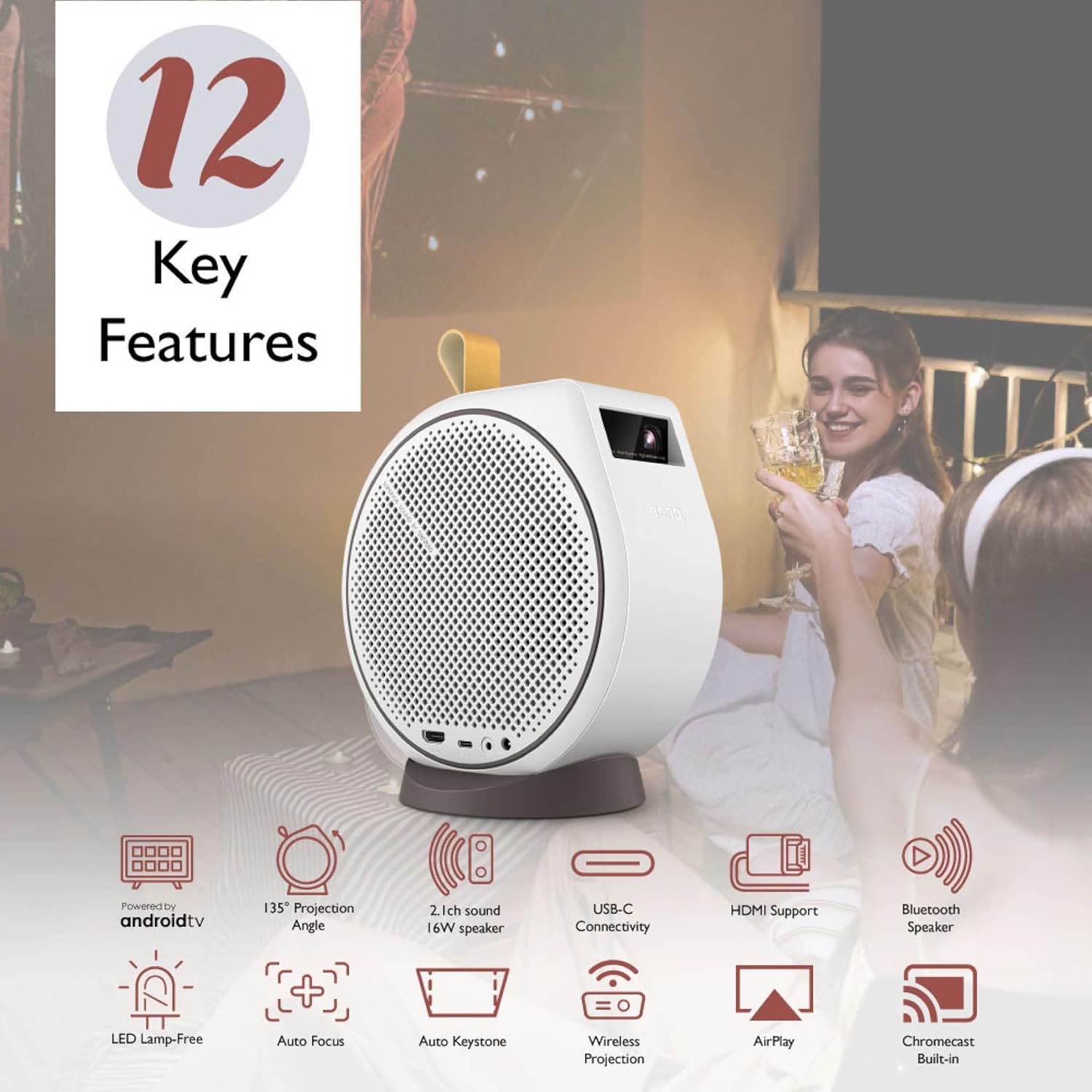
Figure 2: ашыкview of BenQ GV30 Key Features
3.2 Порттор жана башкаруу каражаттары
The BenQ GV30 features various ports for connectivity and control buttons for easy operation.
- HDMI порту: For connecting external devices such as game consoles or Blu-ray players.
- USB-C DisplayPort: Supports data transmission, DisplayPort output (DP Alt Mode), and power delivery (PD inputs only, support 15V/3A).
- 3.5 мм гарнитура уячасы: For connecting external audio devices or headphones.
- Кубат киргизүү: Кубат адаптерин туташтыруу үчүн.
- Жогорку панелдин башкаруу элементтери: Power button, volume up/down, Bluetooth connection button.

Figure 3: Connectivity Ports
4. Орнотуу
4.1 Installing the Android TV Dongle
- Carefully remove the side panel of the projector using the provided tool or a thin, non-abrasive object.
- Insert the BenQ QS01 Android TV dongle into the designated HDMI port inside the compartment.
- Connect the dongle's power cable to the internal USB port.
- Replace the side panel securely.
4.2 Алгачкы күйгүзүү жана тармакка туташуу
- Электр шнурын проекторго жана розеткага туташтырыңыз.
- Аппаратты иштетүү үчүн проектордун же пульттун кубат баскычын басыңыз.
- Follow the on-screen prompts to connect to your Wi-Fi network.
- Log in with your Google account to access Android TV features and download streaming applications.

4-сүрөт: Android TV интерфейси
5. Иштөө нускамалары
5.1 Flexible Projection
The BenQ GV30 offers versatile projection options:
- 135-Degree Projection Angle: The projector can be rotated on its magnetic base to project onto walls, ceilings, or any desired surface.
- Auto Focus & Vertical Keystone: The projector automatically adjusts focus and corrects image distortion to ensure a clear, rectangular picture regardless of the projection angle.

Figure 5: 135-Degree Projection Angle
5.2 Трансляция жана экранды чагылдыруу
Utilize the built-in Chromecast and Airplay features to cast content from your mobile devices or computers.
- Chromecast: Cast videos, photos, and music from compatible Android devices or Chrome browser tabs.
- Эфир ойнотуу: Mirror your screen or stream content from Apple devices.
5.3 Bluetooth колонкасы режими
The GV30 can function as a standalone Bluetooth speaker:
- Press the Bluetooth button on the projector's top panel or remote control.
- Enable Bluetooth on your mobile device and select 'BenQ GV30' from the list of available devices to pair.
- Play audio from your device through the projector's 2.1 channel speaker system.
Video 1: Demonstrates how to set up a Bluetooth connection on the BenQ GV30 projector.
6. Сүрөттүн сапаты
The BenQ GV30 delivers a clear and vibrant viewтажрыйбасы:
- Чечим: Native 720p HD resolution provides sharp images for its class.
- Жарыктык: 300 ANSI Lumens are suitable for dark environments. For optimal viewing, ensure the room is as dark as possible.
- Түс тактыгы: Optimized Picture Modes powered by CinematicColor and 98% Rec. 709 wide color gamut ensure true and vivid colors.
- Сунушталган экран өлчөмү: Optimal image quality is achieved with screen sizes up to 100 inches. Larger sizes may result in pixelation.

Figure 6: Authentic Color Reproduction
7. Аудио өзгөчөлүктөрү
Experience rich and clear audio with the integrated 2.1 channel speaker system:
- Күчтүү үн: Dual 4W midrange tweeters and an 8W woofer provide balanced audio with enhanced bass.
- Clear Vocals: Voices are clear and easy to understand, making it suitable for movies and TV shows.
- Тышкы аудио: Connect external speakers or headphones via Bluetooth or the 3.5mm audio jack for a customized audio experience.

Figure 7: 2.1 Channel Audio System
8. Көчүрүү
The BenQ GV30 is designed for on-the-go entertainment:
- Компакт жана жеңил: Weighing 3.53 pounds with dimensions of 7.3 x 4.7 x 7.7 inches, it is easy to transport.
- Камтылган батарея: Provides approximately 2.5 hours of battery life under power-efficient settings (low brightness, low volume). Expect around 2 hours with medium brightness and average volume. It is recommended to carry the power cord for longer viewсеанстар.
- Ташуу кутусу: A dedicated carrying case is included to protect the projector and its accessories during transport.

Figure 8: Easy-to-Carry Design
Video 2: Showcases the casting features of the BenQ GV30 projector.
Video 3: Highlights the personal theater features of the BenQ GV30 projector.
Video 4: Demonstrates how to project content onto the ceiling using the BenQ GV30 projector.
9. Техникалык шарттар
| Өзгөчөлүк | Деталь |
|---|---|
| Продукциянын өлчөмдөрү | 7.3 x 4.7 x 7.7 дюйм |
| Элемент Салмагы | 3.53 фунт |
| Элемент моделинин номери | GV30 |
| Батареялар | 2 AAA батарейка талап кылынат (кошулган) |
| Display Resolution | 1280 x 720 (720p HD) |
| Байланыш технологиясы | HDMI, USB-C, Bluetooth, Wi-Fi |
| Өзгөчө өзгөчөлүк | Built-In Speaker, Auto Focus, Vertical Keystone |
| Сунушталган Колдонуулар | Bedroom, Business, Education, Gaming, Home Cinema |
10. Кыйынчылыктарды
- Төмөн жарыктык: Ensure the projector is used in a dark environment for optimal viewing. Adjust power mode settings if necessary.
- Unstable Magnetic Base: The magnetic connection of the base is not extremely strong. Exercise caution when rotating the projector on its base to prevent it from slipping off. Avoid picking up the projector by the base.
- Streaming Stick Compatibility: The internal compartment for the Android TV dongle is specifically designed for the BenQ QS01. Other streaming sticks (e.g., Roku, Amazon Fire Stick) may not fit or receive adequate power due to size or power supply port placement.
- Желдетүүчү ызы-чуу: The projector's fan noise is minimal and generally does not hinder the audio experience due to the quality of the built-in speakers.
11. Техникалык тейлөө
- Тазалоо: Use a soft, dry cloth to clean the exterior of the projector. For the lens, use a specialized lens cleaning cloth and solution.
- Сактагыч: When not in use, store the projector in its provided carrying case in a cool, dry place away from direct sunlight.
- Батареяга кам көрүү: To prolong battery life, avoid fully discharging the battery frequently. Charge the projector regularly, even if not in active use.
12. Кепилдик жана колдоо
Your BenQ GV30 Portable Projector comes with a warranty. Please refer to the included Warranty Card for detailed terms and conditions. For technical support, product registration, or service inquiries, please visit the official BenQ webсайтка же кардарларды тейлөөгө кайрылыңыз.


