Introduction
This manual provides essential instructions for the proper use, setup, and maintenance of your Kamon KE Wired Earbuds. Please read this manual thoroughly before using the product to ensure optimal performance and longevity.
Пакеттин мазмуну
Пакетиңизде бардык буюмдар бар экенин текшериңиз:
- 5 x Kamon KE Wired Earbuds (various colors)

A visual representation of the Kamon KE wired earbuds, showcasing the different color options available in the 5-pack. Each earbud features a 3.5mm jack and an integrated remote with microphone.
Продукт бүттүview
The Kamon KE Wired Earbuds are designed for clear audio and convenient communication. They feature an ergonomic in-ear design, a built-in microphone, and an in-line remote control for managing calls and music playback.
Негизги өзгөчөлүктөрү:
- Жогорку сапаттагы үн: Provides clear audio with balanced bass, mid, and treble response.
- In-line пульт жана микрофон: Multi-functional button for call and music control, with an integrated microphone for hands-free communication.
- Эргономикалык дизайн: Secure and comfortable fit for extended wear.
- Кеңири шайкештик: 3.5mm jack compatible with most audio devices.
- Чаташкан эмес кабель: Durable cable designed to resist tangling.
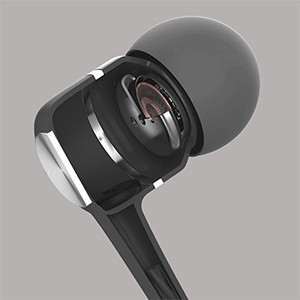
A cutaway diagram revealing the high-powered dynamic speaker system inside the earbud, designed to deliver outstanding audio performance with clear bass, mid, and treble.
Жайгашуу
Түзмөгүңүзгө туташуу:
- Locate the 3.5mm audio jack on your smartphone, tablet, computer, or other compatible audio device.
- Insert the 3.5mm plug of the Kamon KE earbuds firmly into the device's audio jack.
- Ensure the plug is fully inserted for proper audio transmission. If experiencing issues, gently rotate the plug a few times while inserted.

An illustration demonstrating the wide compatibility of the 3.5mm audio jack with various devices, including PCs, Macbooks, iPads, iPhones, Android smartphones, and iPods.
Иштөө нускамалары
Кулакчындарды тагынуу:
- Ар бир кулакчынды тиешелүү кулак каналына акырын киргизиңиз.
- Adjust the earbuds until they feel secure and comfortable. The ergonomic design is intended to provide a stable fit.

Бул сүрөт бир тарапты камсыз кылат view of the earbud in use, illustrating its ergonomic shape designed for a stable and comfortable fit during various activities.
Using the In-line Remote and Microphone:
The multi-functional button on the in-line remote allows for easy control of calls and music playback.
- Чалууларга жооп берүү / аяктоо: Press the button once to answer an incoming call. Press the button once again to end an active call.
- Чалууларды четке кагуу: Press the button two times to reject an incoming call.
- Музыканы ойнотуу/тындыруу: Press the button once to play or pause music playback.
- Кийинки трек: Кийинки музыкалык трекке өтүү үчүн баскычты эки жолу басыңыз.
- Мурунку трек: Мурунку музыкалык трекка кайтуу үчүн баскычты үч жолу басыңыз.

A detailed diagram highlighting the multi-functional button on the in-line remote, explaining how to answer/end calls, play/pause music, and skip tracks. The integrated HD microphone is also indicated.
Техникалык тейлөө
Туура кам көрүү кулакчыныңыздын иштөө мөөнөтүн узартат:
- Avoid pulling the earbud cord directly. Always hold the plug part and the earbud part when disconnecting from devices or removing from ears.
- Keep the earbuds clean and dry. Wipe with a soft, dry cloth as needed.
- Store the earbuds in a safe place to prevent tangling and damage to the cable.
Проблемаларды чечүү
If you encounter issues with your Kamon KE Earbuds, refer to the following common solutions:
- Үн жок же үзгүлтүксүз аудио:
- Ensure the 3.5mm plug is fully inserted into your device's audio jack.
- Gently rotate the earbud plug a few cycles while it is connected to your phone or device. This can often resolve connection issues.
- Түзмөгүңүздүн үнүнүн жөндөөлөрүн текшериңиз.
- Test the earbuds with another device to determine if the issue is with the earbuds or the original device.
- Микрофон иштебейт:
- Ensure the 3.5mm plug is fully inserted.
- Түзмөгүңүздүн микрофон киргизүү жөндөөлөрүн текшериңиз.
- Микрофондун тоскоол болбогонун текшериңиз.
- Алыстан башкаруу жооп бербейт:
- Ensure the 3.5mm plug is fully inserted.
- Some older devices or specific operating systems may have limited compatibility with in-line remote functions.
Техникалык шарттар
Technical specifications for the Kamon KE Wired Earbuds:
| Өзгөчөлүк | Спецификация |
|---|---|
| Модель аты | KE |
| Байланыш технологиясы | Зымдуу |
| Наушник уясы | 3.5 мм Джек |
| Noise Control | Үн изоляциясы |
| Импеданс | 32 Ом ±15% 1КГц |
| Жыштык диапазону | 20 Гц - 20 кГц |
| Power Rating | 3мВт |
| Максималдуу киргизүү күчү | 5мВт |
| Кордун узундугу | 120см |
| Элемент Салмагы | 0.07 килограмм (2.39 унция) |
| Шайкеш түзмөктөр | iPhone devices, Android smartphones, iPod, iPad, MP3 players, music speakers |
| Өзгөчө өзгөчөлүк | Noise Isolation, Remote & Microphone, Tangle Free Cord |
Кепилдик жана колдоо
Kamon products are manufactured with quality and performance in mind. For any product-related inquiries, technical support, or warranty information, please contact Kamon customer service through the retailer where the product was purchased.
Кепилдик дооматтары үчүн сатып алганыңыздын далилин сактап коюңуз.


