1. Киришүү
This manual provides detailed instructions for the Orbic Speed Mobile Hotspot, Model VZORB400LBVZRT. This device allows you to create a personal Wi-Fi network using a 4G LTE cellular connection, enabling up to 10 Wi-Fi enabled devices to connect to the internet simultaneously. It is designed for portability, offering up to 12 hours of usage time and up to 5 days of standby time on a single charge.
Please read this manual thoroughly to ensure proper setup, operation, and maintenance of your device.
2. Продукт бүтүп калдыview
The Orbic Speed Mobile Hotspot is a compact and efficient device for on-the-go internet access. Familiarize yourself with its components:
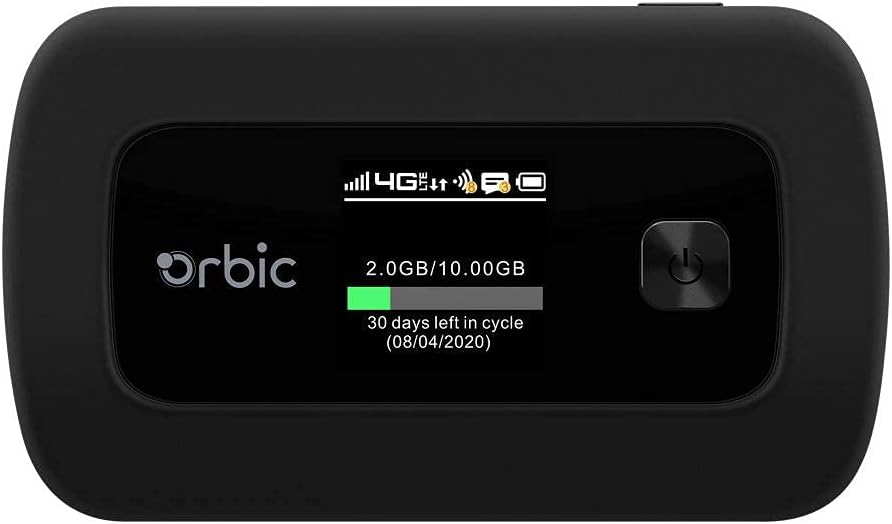
2.1-сүрөт: Фронт view of the Orbic Speed Mobile Hotspot, displaying the screen with network status, data usage, and power button.

2.2-сүрөт: Арткы view of the Orbic Speed Mobile Hotspot, showing the Verizon logo, indicating network compatibility.
Пакеттин мазмуну:
- Orbic Speed Mobile Hotspot (Model VZORB400LBVZRT)
- Литий-иондук батарейка
- Заряддоо кабели (USB)
- Power Adapter (Wall Charger)
- Ыкчам баштоо колдонмосу (эгер камтылган болсо)
3. Орнотуу
Follow these steps to set up your Orbic Speed Mobile Hotspot:
- SIM картаны салыңыз: Open the back cover of the hotspot and carefully insert your activated 4G LTE SIM card into the designated slot. Ensure it is correctly oriented.
- Батарея салыңыз: Place the provided Lithium Ion battery into the battery compartment, ensuring the contacts align. Replace the back cover.
- Аппаратты заряддоо: Connect the charging cable to the hotspot and the power adapter. Plug the adapter into a wall outlet. Allow the device to charge fully before first use. The screen will indicate charging status.
- Күйгүзүү: Press and hold the power button (located on the front panel) until the screen illuminates. The device will boot up and attempt to connect to the 4G LTE network.
- Баштапкы конфигурация: Once powered on, the screen will display network status, Wi-Fi name (SSID), and password. Note these details for connecting your devices.
4. Иштөө нускамалары
4.1 Connecting Devices to Your Hotspot
- Ensure your Orbic Speed Mobile Hotspot is powered on and connected to the 4G LTE network.
- On your Wi-Fi enabled device (e.g., laptop, smartphone, tablet), open the Wi-Fi settings.
- Scan for available Wi-Fi networks. Locate the network name (SSID) displayed on your hotspot's screen.
- Select the hotspot's SSID and enter the Wi-Fi password (also displayed on the hotspot's screen) when prompted.
- Your device should now be connected to the internet via the hotspot. The hotspot supports up to 10 connected devices simultaneously.
4.2 WPS колдонуу (Wi-Fi корголгон орнотуу)
The Orbic Speed Mobile Hotspot supports WPS for easy connection of compatible devices:
- On your Wi-Fi device, initiate the WPS connection process.
- On the Orbic Speed Mobile Hotspot, navigate to the WPS option (refer to the on-screen menu or a dedicated WPS button if available) and activate it.
- The devices will automatically connect without needing to manually enter the password.
4.3 Monitoring Data Usage
The hotspot's screen displays real-time data usage information, including current usage and remaining data in your billing cycle. This helps you manage your data plan effectively.
4.4 Кирүү Web Interface (Advanced Settings)
For advanced settings such as changing Wi-Fi name/password, managing connected devices, or configuring network settings, you can access the hotspot's web interface. Typically, you connect a device to the hotspot's Wi-Fi, then open a web browser and enter a specific IP address (e.g., 192.168.1.1 or 192.168.0.1) or a web address provided in the device's documentation. You will need to log in with administrator credentials, usually found on a sticker inside the battery compartment or in the quick start guide.
5. Техникалык тейлөө
5.1 Батареяга кам көрүү
- Батареянын иштөө мөөнөтүн узартуу үчүн, аппаратты экстремалдык температурага тийгизбеңиз.
- Charge the battery regularly. If the device will not be used for an extended period, charge it to about 50% before storing.
- Түпнуска же бекитилген кубаттоочу аксессуарларды гана колдонуңуз.
5.2 Тазалоо
Түзмөктү жумшак, кургак чүпүрөк менен сүртүңүз. Суюк тазалоочу каражаттарды же абразивдүү материалдарды колдонбоңуз, анткени алар түзмөккө зыян келтириши мүмкүн.
5.3 Программалык камсыздоо жаңыртуулары
Periodically check for software updates for your hotspot. Updates can improve performance, add features, and enhance security. These are typically managed through the device's web интерфейс.
6. Кыйынчылыктарды
If you encounter issues with your Orbic Speed Mobile Hotspot, refer to the following common solutions:
- Тармак туташуусу жок:
- SIM картаңыз туура салынганын жана маалымат планы менен иштетилгенин текшериңиз.
- Check for 4G LTE network coverage in your current location.
- Байланыш чекитин өчүрүп-күйгүзүңүз.
- Түзмөктөр Wi-Fi'га туташа албайт:
- Verify the Wi-Fi name (SSID) and password on the hotspot's screen match what you are entering.
- Ensure the hotspot is powered on and broadcasting its Wi-Fi signal.
- Туташкан түзмөктөрдүн максималдуу санына (10) жеткенин текшериңиз.
- Restart both the hotspot and the device attempting to connect.
- Жай Интернет ылдамдыгы:
- Relocate the hotspot to an area with better cellular signal strength.
- Туташкан түзмөктөрдүн санын азайтыңыз.
- Check your data plan for any speed throttling or data limits.
- Battery Drains Quickly / Not Charging:
- Ensure the charging cable and adapter are securely connected and functioning.
- Avoid using the hotspot in extremely hot or cold environments.
- If the battery life has significantly degraded, it may need replacement.
- Түзмөк жооп бербейт:
- Perform a soft reset by holding the power button until the device turns off, then power it back on.
- If a soft reset fails, locate the reset pinhole (if available) and use a paperclip to perform a factory reset (note: this will erase all custom settings).
7. Техникалык шарттар
| Өзгөчөлүк | Деталь |
|---|---|
| Модель номери | VZORB400LBVZRT |
| Бренд | Orbic (Verizon compatible) |
| Байланыш технологиясы | 4G LTE, Wi-Fi (802.11ac) |
| Жыштык тилкесинин классы | Кош тилкелүү |
| Максималдуу туташкан түзмөктөр | 10ге чейин |
| Колдонуу убактысы | 12 саатка чейин |
| Күтүү убактысы | 5 күнгө чейин |
| Батарея түрү | 1 литий-иондук батарейка |
| Өзгөчө өзгөчөлүк | WPS (Wi-Fi корголгон орнотуу) |
| Антенна түрү | Ички |
| Продукциянын өлчөмдөрү | 2.55 x 3.46 x 1.85 дюйм |
| Элемент Салмагы | 8.8 унция |
8. Кепилдик жана колдоо
For warranty information and technical support, please refer to the documentation provided with your purchase or contact the retailer/manufacturer directly. As this product may be a renewed item, specific warranty terms may vary. Please consult your purchase agreement for details regarding Amazon Renewed Guarantee or other applicable warranties.
For further assistance, you may need your device's serial number, which is typically located on a sticker inside the battery compartment or on the original packaging.


