Introduction
The Dune HD SmartBox 4K Plus is an advanced media player and Smart Android TV box designed for high-quality video and audio playback. It supports Ultra HD 4K video at up to 60 frames per second, High Dynamic Range (HDR) for superior contrast, and 10-bit color coding for a vast color palette. This device integrates the classic Dune HD user interface with the Android operating system, offering a comprehensive media experience. It is equipped with dual-band Wi-Fi, Bluetooth, and various connectivity options for seamless integration into your home entertainment system.
Кутуда эмне бар
- Dune HD SmartBox 4K Plus unit
- Dune HD Slim IR Remote Control
- 2 x AAA батарейкалар (алыштан үчүн)
- Кубат менен камсыздоо (12V 1A)
- A/V Cable (3.5mm to 3RCA)
- HDMI кабели
- Ыкчам орнотуу колдонмосу
Продукт бүттүview

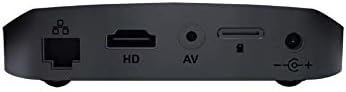


Жайгашуу
1. Аппаратты туташтыруу
- Кубат туташуу: Connect the provided power adapter to the DC 12V input port on the rear of the Dune HD SmartBox 4K Plus, then plug the adapter into a wall outlet.
- HDMI туташуу: Use the included HDMI cable to connect the HDMI output port on the media player to an HDMI input port on your TV or display. Ensure your TV is set to the correct HDMI input source.
- Тармакка туташуу (милдеттүү эмес):
- текст: For a stable connection, connect an Ethernet cable from your router to the Ethernet port on the rear of the device.
- Зымсыз: The device supports dual-band Wi-Fi (2.4 GHz / 5 GHz). You will configure the wireless connection during the initial setup wizard.
- Audio/Video Connection (Optional): If your display does not support HDMI, use the provided A/V cable to connect the A/V output port on the player to the corresponding RCA inputs on your TV.
- USB түзмөктөрү (милдеттүү эмес): Connect external hard drives, USB flash drives, or other USB peripherals to the USB ports on the side of the device.
2. Баштапкы орнотуу устасы
Upon first power-on, the Dune HD SmartBox 4K Plus will guide you through an initial setup wizard. Follow the on-screen prompts to:
- Каалаган тилиңизди тандаңыз.
- Configure network settings (Wi-Fi or Ethernet).
- Adjust display resolution and refresh rate.
- Log in to your Google account (optional, for Android features and app downloads).
- Perform system updates if available.
Ensure the remote control batteries are inserted correctly before starting the setup process.
Иштөө нускамалары
Колдонуучу интерфейсинде навигация
The Dune HD SmartBox 4K Plus features a hybrid user interface combining the classic Dune HD experience with Android OS. Use the included IR remote control or the Dune Control App (available for iOS/Android) to navigate.

- Башкы экран: Provides access to installed applications, media sources, and system settings.
- Медиа булактары: Browse content from connected USB drives, network shares (SMB, NFS, UPnP/DLNA), or the built-in micro SD card slot.
- Тиркемелер: Access pre-installed apps or download new ones from the Google Play Store.
- Орнотуулар: Configure network, display, audio, and other system preferences.
Медиа ойнотуу
The Dune HD SmartBox 4K Plus supports a wide range of video and audio formats:
- Видео кодектери: MPEG2, MPEG4, XVID, WMV9, VC1, H.264, H.265, H.265 10-bit. Supports very high bitrate video up to 100 Mbit/s and higher.
- Video File Форматтары: MKV, MPEG-TS, MPEG-PS, M2TS, VOB, AVI, MOV, MP4, QT, ASF, WMV, BD ISO, BDMV, DVD-ISO, VIDEO_TS.
- 4K Video Formats: H.265 up to 4Kp60 HDR, H.265 10-bit up to 4Kp60 HDR, H.264 up to 4Kp30.
- Аудио форматтары: Supports various audio codecs for high-fidelity sound.
To play media, navigate to your desired source (e.g., USB drive, network share), select the file, and press the Play button on your remote.
Техникалык тейлөө
Тазалоо
To maintain the device's appearance and performance:
- Тазалоодон мурун аппаратты розеткадан сууруп алыңыз.
- Аппараттын сыртын сүртүү үчүн жумшак, кургак чүпүрөктү колдонуңуз.
- Do not use liquid cleaners, aerosols, or abrasive chemicals, as these may damage the surface or internal components.
- Желдетүүчү тешиктерди чаңдан жана таштандылардан тазалаңыз.
Орнотулган программаны жаңыртуу
Periodically check for firmware updates to ensure optimal performance, new features, and bug fixes. Updates can typically be found in the system settings menu under "About" or "System Update." Ensure a stable internet connection during updates and do not power off the device until the update process is complete.
Проблемаларды чечүү
| Көйгөй | Мүмкүн себеп | Чечим |
|---|---|---|
| Күч жок | Электр кабели туташкан эмес; электр розеткасынын маселеси. | Кубат адаптери түзмөккө жана иштеп жаткан розеткага бекем туташтырылганын текшериңиз. |
| Телевизордо сүрөт жок | Incorrect HDMI/AV connection; wrong TV input selected. | Check HDMI/AV cable connections. Select the correct HDMI/AV input on your TV. Try a different HDMI port or cable. |
| Үн жок | TV/receiver volume too low; audio settings incorrect. | Increase volume on TV/receiver. Check audio output settings on the Dune HD SmartBox 4K Plus. |
| Пульт иштебей жатат | Batteries depleted or incorrectly inserted; IR sensor blocked. | Replace batteries. Ensure line of sight between remote and device's IR sensor. |
| Wi-Fi'га туташпай жатат | Туура эмес сырсөз; роутердеги көйгөйлөр; сигналдын тоскоолдуктары. | Verify Wi-Fi password. Restart your router. Move device closer to router or reduce interference. |
| Playback issues (stuttering, freezing) | Network speed insufficient; corrupted media file; external drive issues. | For network content, ensure stable and fast connection. Try playing a different file. Check external drive connection and integrity. |
Техникалык шарттар
- Модель аты: SmartBox 4K Plus
- Модель номери: TV-175N
- Бренд: Dune HD
- Түсү: Кара
- Өлчөмдөрү: 4 x 4 x 1 дюйм
- Элемент Салмагы: 1.12 фунт
- Чечим: HDR менен 60 кадр/секунда жыштыкта 4K (3840 x 2160) чейин
- Байланыш технологиясы: Wireless (Wi-Fi ac 2.4 GHz / 5 GHz), Ethernet, Bluetooth
- Туташтыргычтын түрлөрү: HDMI 2.0a, 2 x USB, A/V, Ethernet, DC Power Input, Micro SD card slot
- Колдоого алынган интернет кызматтары: Google Play, Dune APP, IPTV, YouTube (via Android OS)
- Контроллердин түрү: Алыстан башкаруу, Колдонмо башкаруу
- Батареялар: 2 AAA батарейкалар (алыштан башкаруу үчүн камтылган)
- Видео кодектери: MPEG2, MPEG4, XVID, WMV9, VC1, H.264, H.265, H.265 10-bit
- Video File Форматтары: MKV, MPEG-TS, MPEG-PS, M2TS, VOB, AVI, MOV, MP4, QT, ASF, WMV, BD ISO, BDMV, DVD-ISO, VIDEO_TS
Кепилдик жана колдоо
Кепилдик маалымат
For detailed warranty information regarding your Dune HD SmartBox 4K Plus, please refer to the warranty card included in your product packaging or visit the official Dune HD webсайт. Кепилдиктин шарттары жана шарттары аймакка жараша өзгөрүшү мүмкүн.
Кардарларды колдоо
If you encounter any issues or have questions not covered in this manual, please contact Dune HD customer support. You can typically find support contact information, FAQs, and additional resources on the official Dune HD webсайт:
Visit Dune HD Official Webсайт
For community support and discussions, you may also find helpful information on dedicated A/V forums, such as AVSForum, where Dune HD products are often discussed.


