1. Киришүү
The EZVIZ C3W Pro is a high-performance wired outdoor smart Wi-Fi security camera designed to provide reliable surveillance for your property. Featuring 1080p Full HD video, advanced color night vision, and AI-powered human shape detection, this camera offers comprehensive monitoring day and night. Its IP67 weather-resistant design ensures durability in various outdoor conditions. The camera also supports two-way talk, local storage via MicroSD card, and seamless integration with smart home ecosystems like Amazon Alexa and Google Assistant.

Figure 1: EZVIZ C3W Pro Outdoor Smart Wi-Fi Security Camera.
2. Кутуда эмне бар
Upon unboxing your EZVIZ C3W Pro camera, verify that all the following items are included:
- EZVIZ C3W Pro Camera
- Кубаттуу адаптер
- Монтаждык база
- Монтаждоо бурамалар жана дубал сайгычтар
- Бургулоо шаблону
- Тармак кабели үчүн суу өткөрбөй турган комплект
- Quick Start Guide

Figure 2: Included items in the EZVIZ C3W Pro package.
3. Орнотуу
3.1. Физикалык орнотуу
- Монтаждоо ордун тандаңыз: Ачык аба ырайына ылайыктуу жерди тандаңыз view of the area you wish to monitor. Ensure the camera is within Wi-Fi range and has access to a power outlet. The camera is IP67 rated for dust and water resistance.
- Бургулоочу шаблонду колдонуңуз: Place the provided drill template on the desired mounting surface and mark the screw holes.
- Бургулоо тешиктери: Drill pilot holes at the marked positions. Insert the wall plugs if mounting on masonry or concrete.
- Базаны орнотуу: Берилген бурамалар менен камеранын бекитүүчү негизин бетке бекитиңиз.
- Камераны тиркөө: Attach the camera to the mounting base and adjust its angle for optimal coverage.
Figure 3: EZVIZ C3W Pro camera mounted for outdoor use.
3.2. MicroSD картасын орнотуу (милдеттүү эмес)
For local video storage, you can install a MicroSD card (up to 256GB). Locate the MicroSD card slot on the camera, typically protected by a cover secured with screws. Carefully open the cover, insert the MicroSD card, and then re-secure the cover to maintain the camera's weather resistance.
3.3. Күйгүзүү
Connect the camera to the power adapter and plug it into a suitable outdoor power outlet. The camera will power on and its indicator light will begin to flash blue, indicating it's ready for network configuration.
3.4. EZVIZ App Configuration
- EZVIZ колдонмосун жүктөп алыңыз: Download and install the EZVIZ app from the App Store (iOS) or Google Play Store (Android).
- Каттоо эсебин түзүү: Launch the app and register for a new EZVIZ account if you don't already have one.
- Түзмөк кошуу: Log in to your EZVIZ account. Tap the '+' icon in the upper right corner of the home screen to add a new device. Select 'Cameras'.
- QR кодун сканерлөө: Scan the QR code located on the camera body or on the Quick Start Guide.
- Wi-Fi'га туташуу: Follow the in-app prompts to connect your camera to your 2.4GHz Wi-Fi network. Ensure your phone is connected to the same 2.4GHz Wi-Fi network during this process.
- Толук орнотуу: Once connected, you can name your camera and adjust initial settings.
Video 1: EZVIZ C3W Pro Setup Guide. This video demonstrates the step-by-step setup process for the camera.
4. Камераны иштетүү
4.1. Түз эфир View & Basic Controls
Access the live video feed from your camera through the EZVIZ app. From the live view интерфейси, сиз:
- Take Snapshots: Жандуу түрмөктөн кыймылсыз сүрөттөрдү тартыңыз.
- Видеону жаздыруу: Видеоклиптерди кол менен жаздырыңыз.
- Digital Zoom: Zoom in up to 8x to view майда-чүйдөсүнө чейин.
4.2. Эки тараптуу сүйлөшүү
The C3W Pro features a built-in microphone and speaker, allowing for two-way communication. Tap the 'Talk' button in the app to speak through the camera and hear responses from the monitored area.
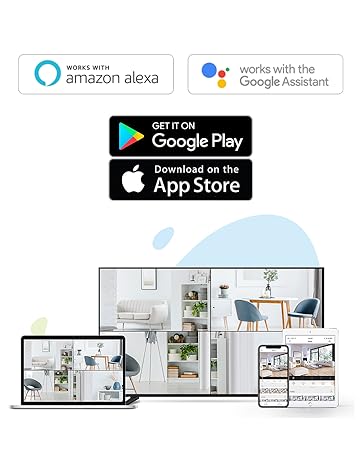
Figure 4: Using the two-way talk feature via the EZVIZ app.
4.3. Түнкү көрүү режимдери
Камера үч түнкү көрүү режимин сунуш кылат:
- IR Mode (Black & White): Standard infrared night vision for clear black and white images in low light.
- Түс режими: Utilizes built-in spotlights to provide full-color night vision, even in complete darkness.
- Акылдуу түнкү көрүнүш: By default, the camera operates in black and white mode. When motion is detected, it automatically switches to color night vision and activates the spotlights.

Figure 5: Night vision modes: Color Night Vision and Black & White Vision.
4.4. Кыймылды аныктоо жана эскертүүлөр
The C3W Pro uses AI-powered human shape detection to minimize false alarms. You can customize detection settings:
- Адамдын формасын аныктоо: Enable this feature to only receive alerts when a human shape is detected.
- Кыймылды аныктоо аймагы: Камералардын ичиндеги белгилүү бир зоналарды аныктаңыз view where motion detection will be active. This helps to ignore irrelevant movements (e.g., trees swaying).
- Кыймылды аныктоо сезимталдыгы: Adjust the sensitivity level to fine-tune how easily motion triggers an alert.
- Активдүү коргонуу: When motion is detected, the camera can trigger a loud siren and flash its spotlights to deter intruders.

Figure 6: AI-Powered Person Detection in action.
4.5. Smart Home интеграциясы
The EZVIZ C3W Pro is compatible with popular smart home platforms:
- Amazon Alexa: Бул үчүн үн буйруктарын колдонуңуз view your camera feed on compatible Alexa devices.
- Google Жардамчысы: Integrate with Google Assistant for voice control and viewing on Google Home devices.

Figure 7: EZVIZ C3W Pro working with Amazon Alexa.
Видео 2: Расмий бүттүview of the EZVIZ C3W Pro's key features, including color night vision, AI detection, and two-way talk.
5. Техникалык тейлөө
- үзгүлтүксүз тазалоо: Мезгил-мезгили менен камеранын линзасын жана корпусун жумшак, гamp Сүрөттүн сапатын так камсыз кылуу үчүн кездеме колдонуңуз. Ачуу химиялык заттардан алыс болуңуз.
- Программалык камсыздоонун жаңыртуулары: Keep your camera's firmware updated through the EZVIZ app to ensure optimal performance, security, and access to new features.
- Байланыштарды текшерүү: Regularly inspect power and network cable connections for any signs of wear or damage, especially in outdoor environments.
6. Кыйынчылыктарды
6.1. No Power / Offline
- Кубат адаптери камерага да, иштеген электр розеткасына да бекем туташып турганын текшериңиз.
- Башка аспапка туташтыруу менен электр розеткасынын иштешин текшериңиз.
- Verify your Wi-Fi network is active and the camera is within range.
6.2. Сүрөттүн сапаты начар
- Камера линзасын кирди же тактарды кетирүү үчүн тазалаңыз.
- Линзанын алдында эч кандай тоскоолдуктар жок экенин текшериңиз.
- Check your Wi-Fi signal strength in the EZVIZ app; a weak signal can affect video quality.
- Adjust the video resolution settings in the app if your network bandwidth is limited.
6.3. Excessive False Alarms
- Enable AI-powered Human Shape Detection in the app settings.
- Adjust the Motion Detection Area to exclude areas with frequent irrelevant motion (e.g., trees, busy roads).
- Lower the Motion Detection Sensitivity in the app.
7. Техникалык шарттар
| Модель номери | EZC3W3H2L28 |
| Видео тартуунун резолюциясы | 1080p |
| Байланыш технологиясы | Wireless (Wi-Fi 2.4GHz with Dual External Antennas) |
| Эл аралык коргоо рейтинги | IP67 (Аба ырайы жана чаң өткөрбөйт) |
| Түнкү көрүү диапазону | 98 Фут |
| Өзгөчөлүктөр | Motion Sensor, Night Vision (Color, Black & White, Smart), AI-Powered Human Detection, Two-Way Talk, Active Defense (Siren & Strobe Light) |
| Сактагыч | MicroSD Slot (up to 256GB), Secure Cloud Storage (Optional) |
| Шайкеш түзмөктөр | iOS, Android, Amazon Alexa, Google Assistant |
| Power Source | Wired (Power Adapter Included) |
| Өлчөмдөрү (L x W x Y) | 9 x 4.1 x 3.7 дюйм |
| Элемент Салмагы | 1.28 фунт |
8. Кепилдик жана колдоо
For warranty information, technical support, or service inquiries, please refer to the official EZVIZ website or contact their customer support directly. Details can typically be found in the Quick Start Guide or on the product packaging.


