Introduction
This manual provides essential information for the safe and effective operation, maintenance, and troubleshooting of your Lenoxx Hacienda Under Desk Bike Pedal Exerciser. Please read this manual thoroughly before first use and retain it for future reference.
The Lenoxx Hacienda Pedal Exerciser is designed to offer a convenient way to engage in low-impact exercise for both arms and legs, suitable for use at home or in an office environment. It features an LCD screen to track your progress and an adjustable tension knob for varied workout intensity.
Коопсуздук маалыматы
- Кандайдыр бир жаңы көнүгүү программасын баштоодон мурун ар дайым саламаттыкты сактоо адиси менен кеңешиңиз.
- Ensure the exerciser is placed on a stable, flat surface during use to prevent tipping.
- Иш учурунда колду жана бутту кыймылдуу бөлүктөрдөн алыс кармаңыз.
- Педаль көнүгүүчүсүнүн үстүндө турбаңыз. Ал отуруп колдонууга гана арналган.
- Do not exceed the recommended usage time or intensity to avoid overexertion.
- Балдар жана үй жаныбарлары жетпеген жерде сактаңыз.
- If you experience pain, dizziness, or discomfort, stop exercising immediately and consult a healthcare professional.
Продукт компоненттери
Familiarize yourself with the main components of your pedal exerciser:
- Main Unit with Base
- Pedals with Adjustable Straps
- LCD дисплей экраны
- Жөнгө салынуучу чыңалуу баскычы
- Transport Handle (on backside)

Сүрөт: алдыңкы view of the Lenoxx Hacienda Pedal Exerciser, showing the main unit, pedals, and the LCD display at the top.

Сүрөт: Арткы view of the pedal exerciser, highlighting the integrated transport handle for easy portability.
Орнотуу жана чогултуу
The Lenoxx Hacienda Pedal Exerciser typically requires minimal assembly. Follow these steps:
- Пакеттен чыгаруу: Бардык компоненттерди таңгактан этияттык менен алып салыңыз. Бардык бөлүктөр бар экенин текшериңиз.
- Педаль тиркемеси: Attach the pedals to the main unit. Note that pedals are often marked 'L' for left and 'R' for right. Ensure they are screwed in tightly. Some models may require specific rotation directions for tightening (e.g., left pedal tightens counter-clockwise).
- Батарея орнотуу: Locate the battery compartment for the LCD display. Insert one AAA battery (not included) with the correct polarity.
- Жайгашкан жери: Place the exerciser on a flat, stable surface. For leg exercises, position it under a desk or in front of a sofa. For arm exercises, place it on a sturdy table.
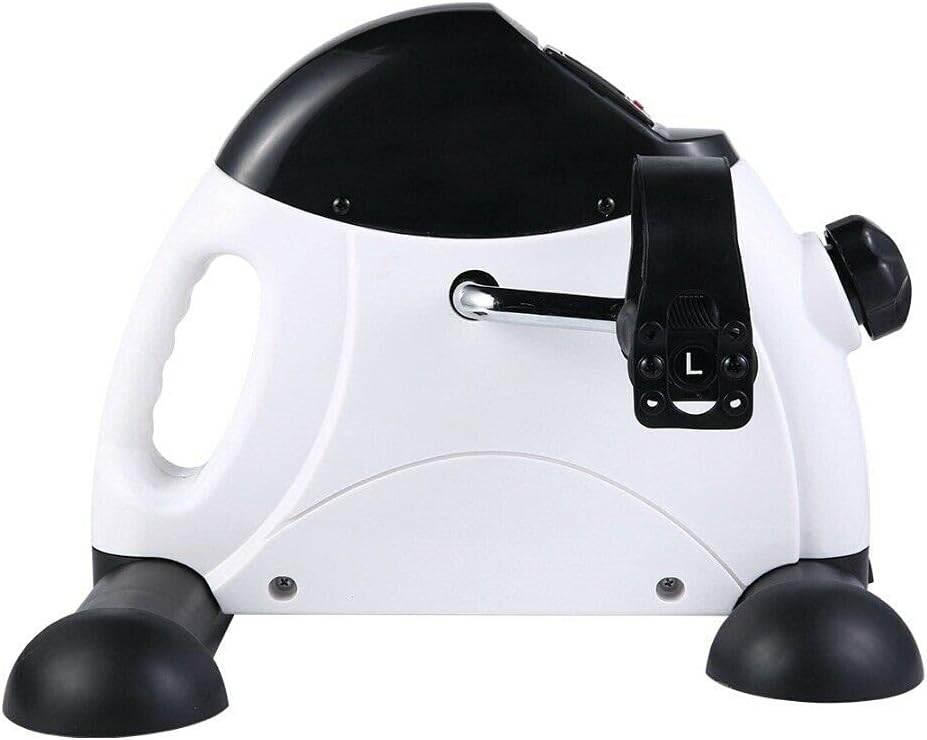
Сүрөт: каптал view of the exerciser, illustrating the pedal attachment point and the 'L' marking on the left pedal.
Иштөө нускамалары
Using the Pedal Exerciser
- Позициялоо: Sit comfortably in a chair. For leg exercises, place your feet into the pedal straps. For arm exercises, place your hands into the pedal straps.
- Чыңалууну жөндөө: Turn the adjustable tension knob located on the front of the unit clockwise to increase resistance and counter-clockwise to decrease resistance. Start with a low resistance and gradually increase as your strength improves.
- Beginning Exercise: Begin pedaling smoothly. The LCD display will automatically activate and start tracking your workout.

Image: A user demonstrating leg exercise with the pedal exerciser while seated on a sofa.

Image: A user demonstrating arm exercise with the pedal exerciser placed on a table.
LCD дисплейди түшүнүү
The LCD monitor tracks various metrics to help you monitor your progress:
- СКАН: Alternates display through all functions.
- TIME: Displays the duration of your current exercise session.
- DIST (дистанция): Болжолдуу басып өткөн аралыкты көрсөтөт.
- COUNT (Cycling Rotations): Displays the number of rotations during the current session.
- БАРДЫГЫ САН: Accumulates the total number of rotations over all sessions.
- КАЛОРИЙ: Estimates the calories burned during the current session.
To reset the display, press and hold the button (if available) or remove and reinsert the battery.

Сүрөт: Жакын план views of the LCD display, illustrating the different metrics it tracks: Scan, Time, Distance, Count, Total Count, and Calories Burned.
Техникалык тейлөө жана кам көрүү
- Тазалоо: Wipe the exerciser with a damp терди жана чаңды кетирүү үчүн ар бир колдонуудан кийин чүпүрөк менен сүртүңүз. Абразивдүү тазалагычтарды же эриткичтерди колдонбоңуз.
- Сактагыч: Көнүгүү аппаратын салкын, кургак жерде, күн нуру түз тийбеген жана өтө жогорку температурадан алыс сактаңыз.
- Батареяны алмаштыруу: Replace the AAA battery in the LCD display when the screen becomes dim or stops functioning.
- Майлоо: Periodically check for any squeaking noises. If present, a small amount of silicone-based lubricant can be applied to moving parts, avoiding the tension mechanism unless specifically instructed.
- Текшерүү: Regularly inspect the pedals, straps, and base for any signs of wear or damage. Do not use the exerciser if any parts are damaged.
Проблемаларды чечүү
| Көйгөй | Мүмкүн себеп | Чечим |
|---|---|---|
| LCD дисплей иштебейт | Батарея өлүп калган же туура эмес орнотулган. | Туура полярдуулукту камсыз кылуу менен AAA батареясын алмаштырыңыз. |
| Иш учурунда ызы-чуу | Кыймылдуу бөлүктөрдө майлоонун жоктугу. | Apply a small amount of silicone-based lubricant to the pedal axles or other friction points. |
| Pedals feel loose or wobbly | Pedals are not securely tightened. | Ensure both pedals are fully tightened onto their respective cranks. Remember that the left pedal often tightens counter-clockwise. |
| Каршылык өзгөрбөйт | Tension knob mechanism issue. | Check if the tension knob is turning freely. If the issue persists, contact customer support. |
Техникалык шарттар
| Өзгөчөлүк | Деталь |
|---|---|
| Модель номери | PE520 |
| Бренд | Lenoxx |
| Өлчөмдөрү (L x W x Y) | 40 см x 31 см x 35 см (болжол менен) |
| Салмагы | 3.2 кг |
| Power Source (LCD) | 1 x AAA Батарея (киргизилген эмес) |
| Дисплей түрү | LCD |
| Каршылык көрсөтүү механизми | Жөнгө салынуучу баскыч |
| Өзгөчөлүктөрү | Portable, Adjustable Tension, Non-Slip Pedal Grips, Transport Handle |

Сүрөт: деталдуу views of key features: LCD screen, adjustable tension knob, anti-slip rubber pads on pedals, and the integrated handle design.
Кепилдик жана колдоо
For warranty information and customer support, please refer to the warranty card included with your product or visit the official Lenoxx webсайт. Сатып алганыңыздын далили катары сатып алуу дүмүрчөгүңүздү сактаңыз.
For further assistance, you may contact Lenoxx customer service through their official channels. Please have your model number (PE520) and purchase details ready.
Note: Warranty terms and conditions may vary by region and retailer.


