1. Киришүү
This manual provides essential information for the safe and efficient operation, setup, and maintenance of your Monport 60W CO2 Laser Engraver. This machine is designed for precise control and engravings on various non-metallic surfaces, including wood, glass, acrylic, and leather. Please read this manual thoroughly before operating the machine.
2. Коопсуздук маалыматы
WARNING: This is a Class 4 Laser product. Laser Radiation is present when open. AVOID EYE AND SKIN EXPOSURE TO DIRECT OR SCATTERED RADIATION. WEAR PROTECTIVE EYEWEAR AND CLOTHING.
Your Monport 60W CO2 Laser Engraver is equipped with comprehensive safety features to ensure user protection:
- Шашылыш токтотуу баскычы: For immediate power shutdown in critical situations.
- Independent Laser Control: A dedicated key controls laser operation.
- Cover Protection: Operation halts automatically when the cover is opened.
- Автоматтык токтотуу функциясы: The machine will stop if water levels are low or temperatures are too high.
- Fireproof Window: Allows safe observation of the engraving process.
- Орнотулган желдетүү: Ensures instant smoke removal from the work area.
Important Operating Conditions:
- The CO2 water temperature must be maintained between 60-70°F (16-21°C) for optimal performance and longevity of the laser tube.
- Ensure proper grounding before operation.
- Do not operate the machine if the water doesn't circulate to avoid damaging the laser tube.
- Always observe the machine during operation and disconnect power when not in use.
3. Продукт бүтүп калдыview
The Monport 60W CO2 Laser Engraver is a robust and versatile machine designed for both DIY and commercial applications. It features a spacious work bed and advanced components for high-precision engraving and cutting.

Figure 3.1: Monport 60W CO2 Laser Engraver. This image shows the overall design of the laser engraver, highlighting its compact yet powerful build.
Негизги компоненттер:

Figure 3.2: Labeled diagram of the Monport 60W CO2 Laser Engraver, indicating the Viewing Window, Laser Head, Honeycomb Work Table, Cautionary Notes, Cover Protection, Front Access Door, Base Feet, and Wheels.
- Лазердик баш: An advanced 4-in-1 industrial-grade laser head combining laser emission, autofocus, air assist, and red light indication. It utilizes high-specification focusing lenses for precision.
- Honeycomb Work Table: Provides a stable and secure environment for workpieces. It is movable to accommodate thicker materials.
- Four-Way Pass-Through: Designed for larger engraving projects, allowing materials to extend beyond the 20"x28" work bed.
- Ruida KT332N Motherboard: Drives the intelligent control panel, offering direct control of auto-focusing, Z-axis movement, and air assistance. Supports power-off resume and accurate work time preview.
- 60W CO2 Glass Laser Tube: Developed in collaboration with Yongli, offering a working life of up to 12,000 hours.
- Syncmotion Technology: Linear guide rails ensure dependable and accurate lasering.
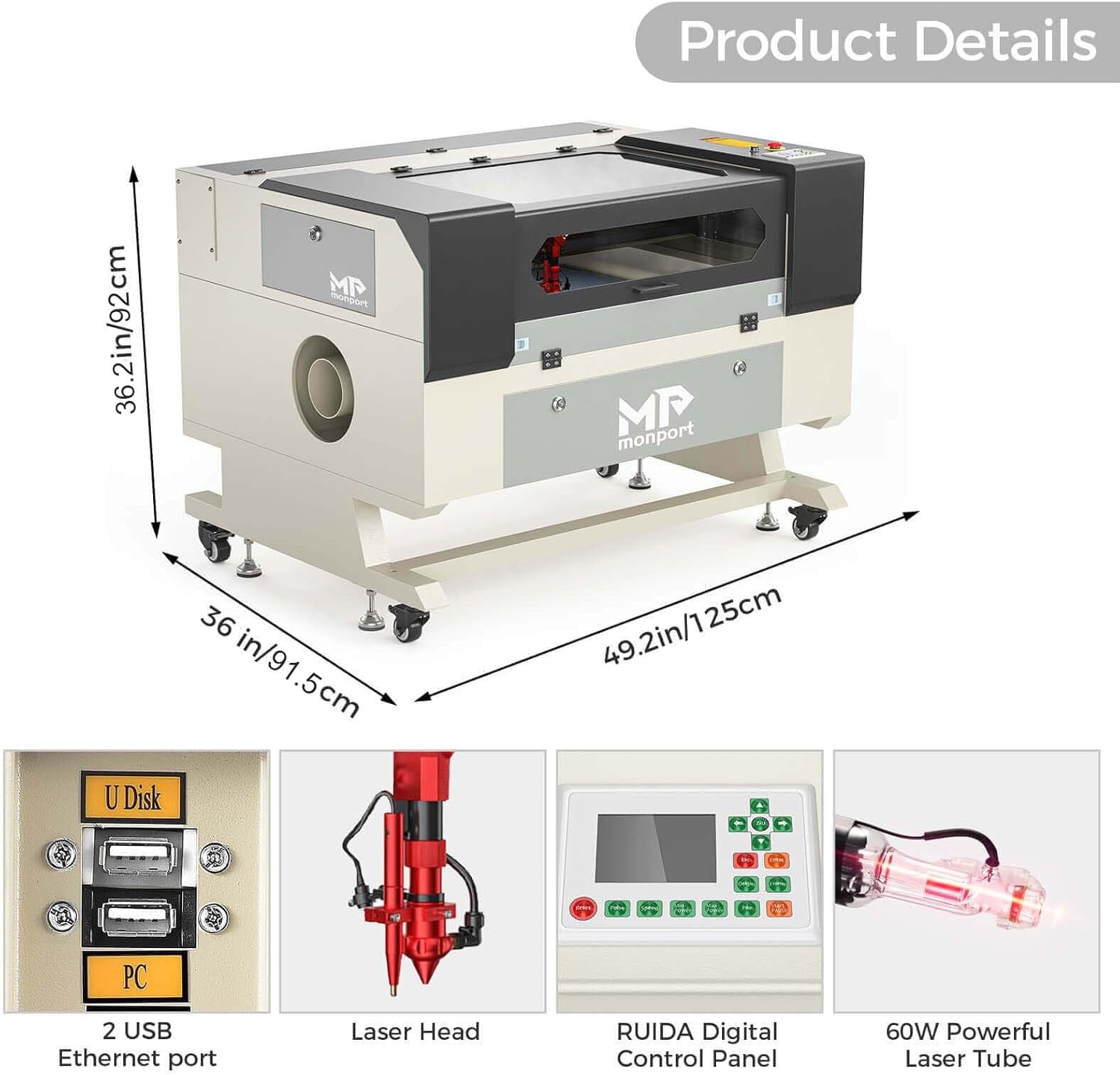
3.3-сүрөт: Детальдуу view of the machine's dimensions (49.2"L x 28"W x 36.2"H) and key internal components like USB ports, Laser Head, RUIDA Digital Control Panel, and 60W Powerful Laser Tube.
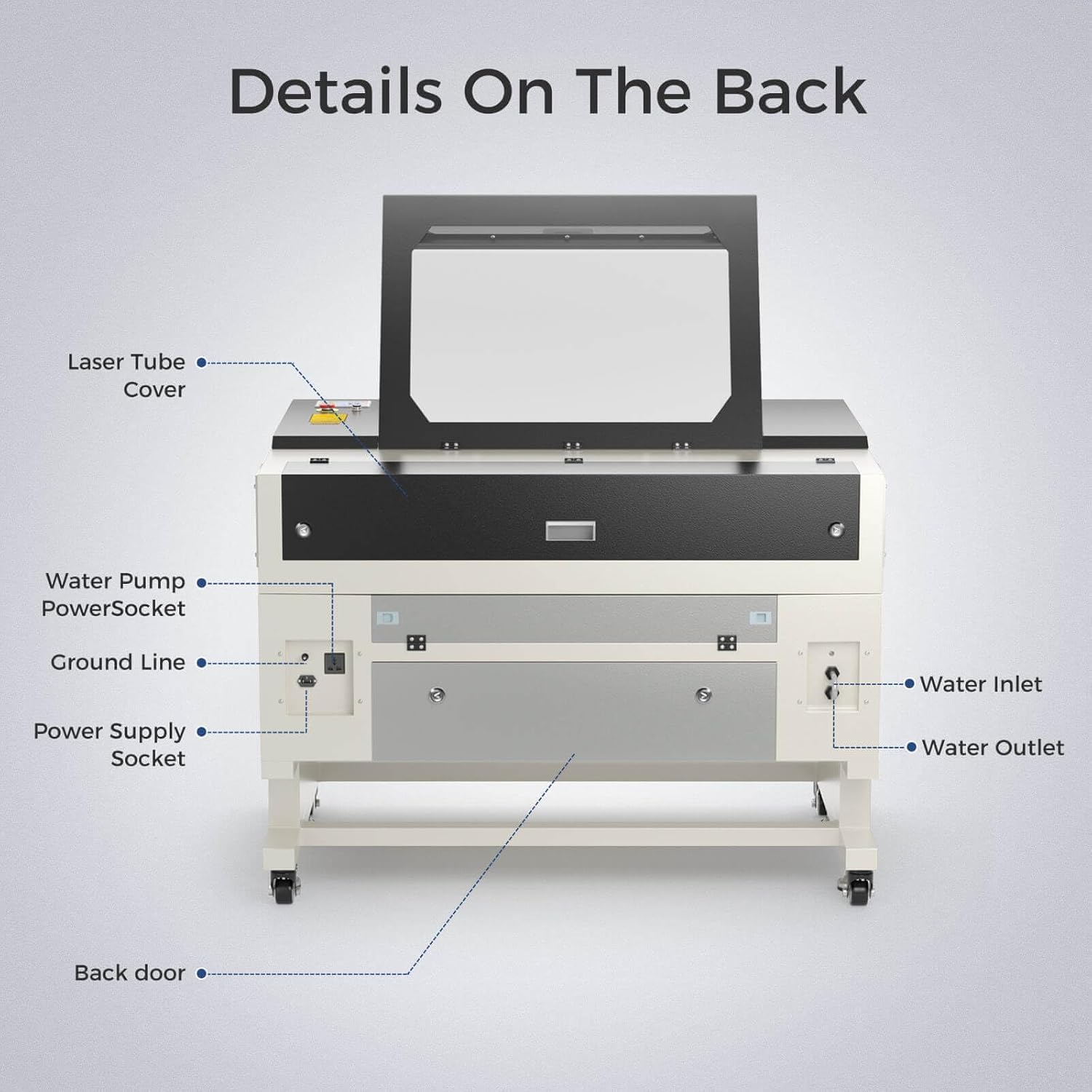
3.4-сүрөт: Арткы view of the laser engraver, showing the Laser Tube Cover, Water Pump Power Socket, Ground Line, Power Supply Socket, Water Inlet, Water Outlet, and Back Door.

Сүрөт 3.5: Жакын пландан views of the Transparent Protection Cover, Movable Wheels, 60W Powerful Laser Tube, Turn On Sensor, and Built-in Air Pump.
Video 3.1: An official Monport video demonstrating the key features and components of the 60W CO2 Laser Engraver, including its connectivity options, internal motherboard, fume extraction, two-way pass-through, Syncmotion Technology, industrial-grade laser head with air-assist and auto-focus, red-beam laser guidance, CO2 glass laser tube, and high-quality mirror optics system.
4. Орнотуу
Before operating your Monport 60W CO2 Laser Engraver, ensure all components are present and properly installed.
Камтылган компоненттер:

Figure 4.1: All accessories included with the Monport 60W CO2 Laser Engraver, such as the Instruction Manual, Silicone Sealant, Keys, Accessory Bag, Hose Clamp, Power Cord, Double-sided Tape, Water Pump, Storage Tank, Ethernet Cable, USB Type-A Cable, Venting Exhaust Duct, USB Drive with Software, and Hex Wrenches.
- Пакеттен чыгаруу: Carefully unpack the machine and all accessories. Retain original packaging for future transport or storage.
- Жайгашкан жери: Гравёрду тез күйүүчү материалдардан алыс, жакшы желдетилген жердеги туруктуу, тегиз бетке коюңуз.
- Суу муздатуу системасы: Connect the provided water pump and hoses to the water inlet and outlet ports on the machine's rear panel. Ensure the water tank is filled with pure distilled water and the pump is submerged. Verify water circulation before powering on the laser.
- Вентиляция системасы: Connect the venting exhaust duct to the machine's exhaust port and direct it outdoors or to a suitable fume extraction system.
- Кубат туташуу: Connect the power cord to a standard 110V AC power outlet. Ensure the machine is properly grounded.
- Программалык камсыздоону орнотуу: Install the provided software (RDWorks or LightBurn) from the USB drive onto your computer.
- Байланыш: Connect the machine to your computer via USB, Ethernet, or use a Flash Drive for direct file өткөрүп берүү.
5. Иштөө нускамалары
Follow these steps for safe and effective operation of your laser engraver.
Программалык шайкештик:
The Monport 60W CO2 Laser Engraver is compatible with Windows and Mac operating systems, supporting various design and control software including:
- RDWorks
- LightBurn
- CorelDRAW
- SOLIDWORKS
- EngraveLab
- Иллюстратор
Башкаруу панели:
The intelligent control panel, driven by the Ruida KT332N motherboard, allows for direct control and monitoring of the engraving process. It features:
- Auto-focusing and Z-axis movement control.
- Air assistance control.
- Dynamic display of processing trajectory and progress.
- Ability to modify layer parameters directly on the panel with auto-saving.
- Power-off resume function.
- Accurate work time preview to the millisecond.
Engraving Process:
- Материалды даярдоо: Place your non-metallic material (e.g., wood, acrylic, leather, glass) on the honeycomb work table within the 20"x28" working area.
- Design & Import: Create or import your design using compatible software.
- Позициялоо: Utilize the red-beam laser guidance to easily pre-trace your project materials and adjust the engraving point of contact for precise alignment.
- Фокусту тууралоо: Use the autofocus feature or manually adjust the Z-axis to set the correct focal distance for your material.
- Параметр орнотуулары: Adjust laser power, speed (up to 800mm/s), and other settings via the software or control panel based on your material and desired outcome.
- Гравюра баштоо: Initiate the engraving process. Monitor the machine through the fireproof window.
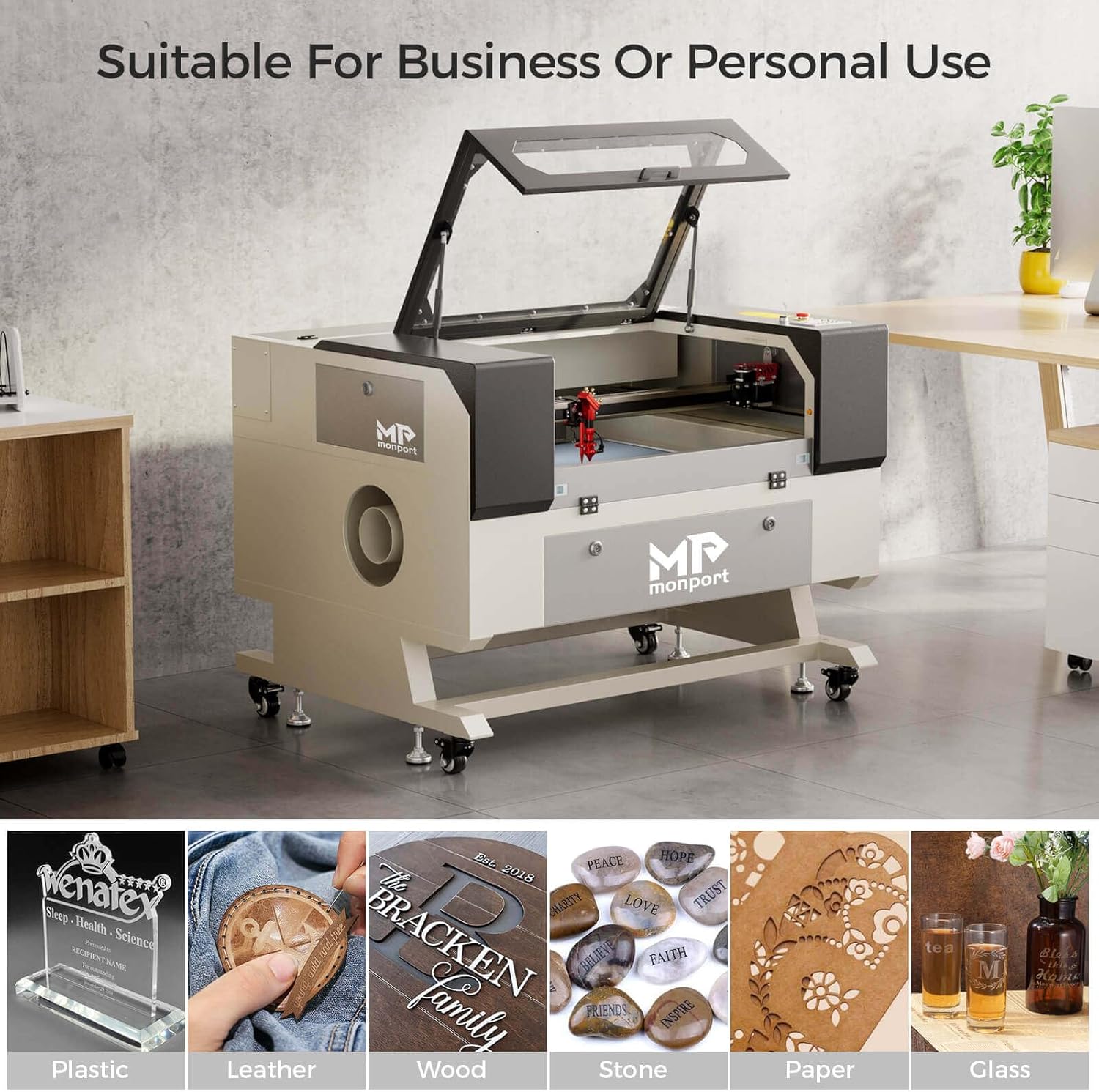
5.1-сүрөт: Мисamples of materials compatible with the Monport 60W CO2 Laser Engraver, including plastic, leather, wood, stone, paper, and glass.

Сүрөт 5.2: Жакын пландан view of the laser head actively engraving a design onto a material, demonstrating the precision of the laser.
6. Техникалык тейлөө
Regular maintenance ensures the longevity and optimal performance of your Monport 60W CO2 Laser Engraver.
- Clean Optics: Regularly clean the laser lens and mirrors to maintain optimal beam quality and prevent damage. The air assist feature helps protect the lens from fumes and debris.
- Суу муздатуу системасы: Periodically check and replace the water in the cooling system. Ensure the water temperature remains within the recommended range (60-70°F / 16-21°C).
- Fume Extraction: Ensure the built-in fume extraction system is clear of obstructions and functioning effectively to continuously expel harmful smoke, sparks, and debris.
- Майлоо: Lubricate linear guide rails and other moving parts as recommended in the full user manual (not provided here).
- Жалпы тазалоо: Keep the work area and machine exterior clean from dust and debris.
7. Кыйынчылыктарды
Бул бөлүмдө лазердик гравёруңуз менен кездешиши мүмкүн болгон жалпы көйгөйлөр каралат.
| Көйгөй | Мүмкүн себеп | Чечим |
|---|---|---|
| Лазер атылбайт | Laser ignition key not turned; emergency stop engaged; water cooling issue; laser tube failure. | Ensure laser ignition key is turned; disengage emergency stop; check water flow and temperature; contact support if laser tube is faulty. |
| Гравюра сапаты начар | Incorrect focus; dirty optics; incorrect power/speed settings; material issues. | Adjust focus; clean lens and mirrors; recalibrate power/speed settings for material; ensure material is flat and suitable. |
| Машина күтүлбөгөн жерден токтойт | Low water level or high water temperature; cover opened during operation; power interruption. | Check water cooling system; ensure cover is closed and latched; verify stable power supply. The machine supports power-off resume. |
| Fumes not clearing | Blocked exhaust duct; fan malfunction. | Check exhaust duct for obstructions; ensure built-in fan is operating. |
8. Техникалык шарттар
| Өзгөчөлүк | Деталь |
|---|---|
| Бренд | Монпорт |
| Модель номери | Monport CO2 Laser Engraver (YX570) |
| Лазердик күч | 60W (Class 4 Laser, 60000 mW output) |
| Жумушчу аймак | 20" x 28" |
| Материалдар | Aluminium, Acrylic, Galvanized Steel (machine construction); Wood, Glass, Acrylic, Leather, Plastic, Stone, Paper, Textile (engraving/cutting) |
| Продукциянын өлчөмдөрү | 49.2"L x 28"W (machine footprint) |
| Иштөө режими | Автоматтык |
| Power Source | AC 110V |
| Max Engraving Speed | 800мм/сек |
| Max Engraving Depth | 0.59'' |
| Laser Tube Life | 12,000 саатка чейин |
| Шайкештик | Windows, Mac (RDWorks, LightBurn, CorelDRAW, SOLIDWORKS, EngraveLab, Illustrator) |
9. Кепилдик жана колдоо
Monport stands behind the quality of its products. Your Monport 60W CO2 Laser Engraver comes with a one-year limited warranty on all Monport laser tubes, ensuring peace of mind regarding this critical component.
For any technical assistance, troubleshooting, or warranty claims, please contact Monport Direct, the authorized seller. You can find their contact information on your purchase receipt or through the official Monport store on Amazon.
Monport Store: Amazon'догу Monport дүкөнүнө баш багыңыз


