1. Бүттүview
The Nokia XR20 is a rugged 5G smartphone designed for durability and performance. This manual provides essential information for its setup, operation, and maintenance.

Сүрөт 1.1: Алдыңкы жана арткы view of the Nokia XR20 5G smartphone.
Негизги өзгөчөлүктөрү:
- Катуу дизайн: MIL-STD-810H compliant, IP68 dust and water resistance, Corning Gorilla Glass Victus.
- Дисплей: 6.67-inch FHD+ (1080x2400) display.
- Камера: 48MP main camera with 13MP ultrawide lens, 8MP front camera.
- Аткаруу: Qualcomm Snapdragon 480 5G processor, 6GB RAM, 128GB internal storage (expandable up to 512GB with MicroSD).
- Байланыш: 5G, Wi-Fi 6, Bluetooth 5.1, NFC, GPS.
- Батарея: 4630 mAh battery with 18W wired and 15W wireless charging support.
- Операция системасы: Android 11 (upgradable to Android 14), with guaranteed OS upgrades and security updates.
2. Баштоо
2.1. Кутудан чыгаруу жана Пакеттин мазмуну
Баштоодон мурун, пакетте бардык элементтер бар экенин текшериңиз:

Image 2.1: Contents of the Nokia XR20 package, including the phone, power adapter, USB-C cable, SIM tray ejector, and screen protector.
- Nokia XR20 Smartphone
- Кубаттуу адаптер
- USB Type-C кабели
- SIM лоток чыгаруучу
- Экран коргоочусу (алдын ала колдонулган же кошулган)
2.2. SIM жана MicroSD карталарын салуу
- SIM/MicroSD карта салгычын телефондун капталынан табыңыз.
- SIM лоток чыгаруучу куралды лотоктун жанындагы кичинекей тешикке киргизип, лоток чыгып кеткенче бекем басыңыз.
- Place your Nano-SIM card(s) and/or MicroSD card into the designated slots on the tray. Ensure the gold contacts face downwards. The Nokia XR20 supports Dual SIM functionality.
- Табаны телефондун ичине кылдаттык менен түртүңүз, ал чыкылдагыча.
2.3. Алгачкы заряддоо жана күйгүзүү
- Connect the USB Type-C cable to the phone's charging port and the power adapter. Plug the adapter into a wall outlet.
- Allow the phone to charge for at least 30 minutes before first use, or until the battery indicator shows sufficient charge.
- To power on, press and hold the Power button (located on the side) until the Nokia logo appears.
2.4. Оператордун шайкештиги
The Nokia XR20 is an unlocked device compatible with all GSM carriers, including AT&T, Boost, Cricket, H2O Wireless, Metro, Net10, Simple Mobile, T-Mobile, and Tracfone. It is not compatible with Verizon. Please confirm 5G network availability with your preferred carrier.

Image 2.2: The Nokia XR20 is compatible with various GSM carriers.
3. Телефонуңузду колдонуу
3.1. Негизги навигация
The Nokia XR20 runs on Android 11 (upgradable). Navigate using on-screen gestures or the navigation bar at the bottom of the display.
- Башкы экран: Ар кандай үй экрандарына кирүү үчүн солго же оңго сүрүңүз.
- Колдонмо тартмасы: Экранды ылдый жагынан өйдө сүрүңүз view бардык орнотулган колдонмолор.
- Эскертмелер жана Ыкчам жөндөөлөр: Билдирмелерди жана тез жөндөөлөрдү которуштуруу үчүн экрандын өйдө жагынан ылдый сүрүңүз.
3.2. Камеранын функциялары
The Nokia XR20 features a dual rear camera system (48MP main, 13MP ultrawide) and an 8MP front camera.

Image 3.1: The Nokia XR20 features a 48MP dual camera system with ZEISS optics.
- Үй экраныңыздан же колдонмо суурмасынан Камера тиркемесин ачыңыз.
- Сүрөткө тартуу үчүн жапкычты басыңыз.
- Оңго же солго сүрүңүз viewfinder to switch between photo, video, and other modes (e.g., Portrait, Night, Panorama).
- Арткы жана алдыңкы камераларды которуштуруу үчүн камераны которуштуруу сүрөтчөсүн таптаңыз.
- Utilize the 13MP ultrawide lens for broader landscape shots or group photos.
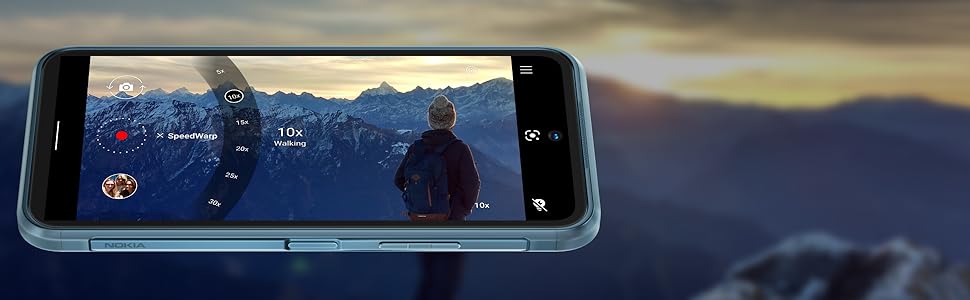
Image 3.2: The camera interface offers various modes and settings for capturing photos and videos.
3.3. 5G байланышы
The Nokia XR20 supports 5G networks, offering faster download and upload speeds where available. Ensure your SIM card and mobile plan support 5G.

Image 3.3: Experience superfast 5G connectivity for quick data transfers.
3.4. Google Жардамчысы
Access Google Assistant by saying "Hey Google" or by long-pressing the dedicated Google Assistant button on the side of the device. Use it for voice commands, information retrieval, and smart home control.

Image 3.4: Google Assistant provides hands-free help and information.
3.5. Манжа изинин сенсору
The fingerprint sensor is integrated into the side power button for convenient and secure unlocking. To set it up, go to Орнотуулар > Коопсуздук > Манжа изи менен кулпудан ачуу жана экрандагы нускамаларды аткарыңыз.
4. Кароо жана тейлөө
4.1. Туруктуулуктун өзгөчөлүктөрү
The Nokia XR20 is built to withstand challenging environments:
- IP68 рейтинги: Provides protection against dust ingress and immersion in water up to 1.5 meters for 60 minutes.
- MIL-STD-810H шайкеш келет: Tested against military standards for drops, temperature extremes, and other environmental factors.
- Corning Gorilla Glass Victus: The display is protected by the toughest Gorilla Glass available, offering enhanced scratch and drop resistance.

Image 4.1: The Nokia XR20 is designed to be water-resistant.
4.2. Аппаратыңызды тазалоо
To clean your Nokia XR20, use a soft, lint-free cloth. For stubborn dirt or smudges, slightly dampen the cloth with water. Avoid using harsh chemicals, abrasive cleaners, or compressed air, as these can damage the device's protective coatings or seals.
4.3. Программалык камсыздоону жаңыртуу
Nokia provides 2 years of OS upgrades and up to 4 years of monthly security updates for the XR20 to ensure your device remains secure and up-to-date with the latest features.

Image 4.2: Regular software updates ensure your phone remains secure and performs optimally.
4.4. Батареяга кам көрүү
The Nokia XR20 is equipped with a 4630 mAh non-removable battery. To maximize battery life:
- Ашыкча температурадан сактаныңыз.
- Use the provided charger or a compatible 18W wired or 15W wireless charger.
- Optimize screen brightness and disable unnecessary features like GPS or Bluetooth when not in use.
5. Кыйынчылыктарды
This section addresses common issues you might encounter with your Nokia XR20.
5.1. Түзмөк күйбөй жатат
- Батарея заряддалганын текшериңиз. Телефонду заряддагычка туташтырыңыз жана аны кайра күйгүзүүдөн мурун бир нече мүнөт күтө туруңуз.
- Мажбурлап өчүрүп күйгүзүү үчүн Кубат баскычын жок дегенде 10-15 секунд басып туруңуз.
5.2. Тармакка туташуу маселелери
- Check if your SIM card is correctly inserted (refer to Section 2.2).
- Verify that your mobile data is enabled in Quick Settings or Орнотуулар > Тармак жана интернет > Мобилдик тармак.
- Ensure your device is compatible with your carrier (refer to Section 2.4).
- Телефонуңузду өчүрүп күйгүзүңүз.
5.3. Заряддоо көйгөйлөрү
- Ensure the charging cable and adapter are securely connected to both the phone and the power outlet.
- Try using a different compatible USB-C cable and power adapter.
- Заряддоо портун сынык же бузулуу бар-жоктугун текшериңиз.
5.4. Экран жооп бербейт
- Күч баскычын 10-15 секунд басып, кармап туруу менен мажбурлап өчүрүп күйгүзүңүз.
- Эгер көйгөй чечилбесе, кардарларды колдоо менен байланышыңыз.
6. Техникалык шарттар

Image 6.1: Physical dimensions and weight of the Nokia XR20.
| Өзгөчөлүк | Спецификация |
|---|---|
| Модель номери | TA-1371 |
| Өлчөмдөр | 171.6 x 81.5 x 10.6 мм (6.76 x 3.21 x 0.42 дюйм) |
| Салмагы | 248 г (8.75 унция) |
| Операция системасы | Android 11 (Android 14кө жаңыртууга болот) |
| Процессор | Qualcomm SM4350 Snapdragon 480 5G (8 nm) Octa-core |
| RAM | 6 ГБ |
| Ички сактагыч | 128 ГБ |
| Кеңейтүүчү сактагыч | MicroSDXC up to 512 GB (uses shared SIM slot) |
| Дисплей | 6.67 inches IPS LCD, 1080 x 2400 pixels (FHD+), 20:9 ratio, Corning Gorilla Glass Victus |
| Арткы камера | 48 MP, f/1.8 (wide) + 13 MP, f/2.4 (ultrawide) with ZEISS optics |
| Алдыңкы камера | 8 МП, f/2.0 (кенен) |
| Батарея | Li-Po 4630 мАч, алынбайт |
| Заряддоо | 18W wired, 15W wireless |
| Байланыш | Wi-Fi 802.11 a/b/g/n/ac/6, Bluetooth 5.1, NFC, GPS (L1+L5), USB Type-C 3.0 |
| Сенсорлор | Side-mounted Fingerprint, Accelerometer, Gyro, Proximity, Compass, Barometer |
| Туруктуу | IP68 dust/water resistant, MIL-STD-810H compliant, Corning Gorilla Glass Victus |
7. Кепилдик жана колдоо
7.1. Өндүрүүчүнүн Кепилдиги
The Nokia XR20 comes with a manufacturer's warranty. Please refer to the warranty card included in your product packaging or visit the official Nokia webкамтуу мөөнөтү жана тейлөө жол-жоболору сыяктуу кеңири шарттар жана эрежелер менен сайттан таанышсаңыз болот.
7.2. Кардарларды колдоо кызматы
Кошумча жардам, техникалык колдоо же кызмат суроо үчүн Nokia расмий колдоо бөлүмүнө кайрылыңыз website or contact their customer service helpline. Contact information can typically be found on the Nokia webсайтында же продукт документациясында.


