Introduction
This manual provides detailed instructions for the installation, operation, and maintenance of your GOAOFOEOI 1080P Wired Outdoor Security Camera. Please read this manual thoroughly before using the product to ensure proper functionality and safety. This camera is designed for outdoor surveillance, offering 1080P Full HD video, motion detection, two-way audio, and night vision capabilities.
Кутуда эмне бар
Пакетти ачкандан кийин, төмөндө көрсөтүлгөн нерселердин бардыгы бар экенин жана жакшы абалда экендигин текшериңиз:
- Камера (x2)
- Орнотуу комплекти (x2)
- Кубат менен камсыздоо (x2)
- Антенна (x2)
- Пайдалануу боюнча колдонмо (x1)

Figure 1: Package Contents - Two GOAOFOEOI security cameras and their respective power adapters.
Продукт бүттүview
The GOAOFOEOI 1080P Wired Outdoor Security Camera features a durable full metal casing, ensuring weather resistance and efficient heat dissipation. It is equipped with advanced infrared LED lights for clear night vision and a 120° wide-angle lens for extensive coverage.

Figure 2: Weather Resistance - The camera's full metal housing provides IP65 waterproof rating, suitable for temperatures from -4°F to 140°F (-20°C to 60°C).
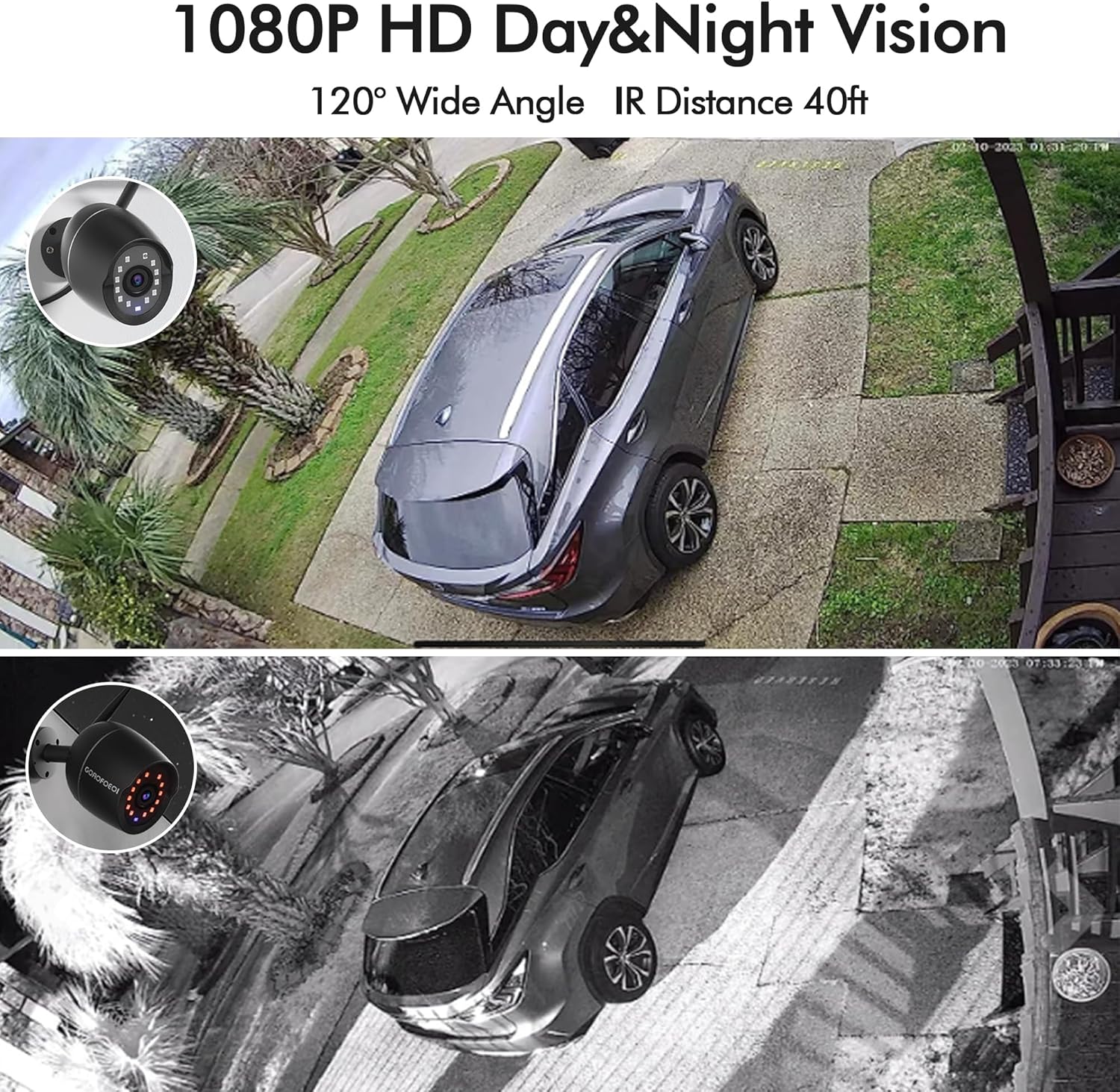
Figure 3: 1080P HD Day & Night Vision - The camera provides clear 1080P video with a 120° wide angle and up to 40ft IR night vision.
Жайгашуу
1. Колдонмону орнотуу
Download the "meShare" app from your device's app store (Google Play for Android or Apple App Store for iOS). Register for a new account or log in if you already have one.
2. Күйгүзүү
Connect the camera to the provided power supply and plug it into a power outlet. Ensure the camera is placed close to your Wi-Fi router during the initial setup process.
3. Wi-Fi туташуусу (2.4 ГГц гана)
The camera supports 2.4GHz Wi-Fi networks only. Ensure your smartphone is connected to a 2.4GHz Wi-Fi network before proceeding. 5.0GHz networks are not supported.
4. QR кодун орнотуу
Follow the in-app instructions to add your device. You will be prompted to scan a QR code from the quick guide with your phone. Then, the app will generate a QR code on your phone's screen. Hold your camera's lens approximately 8 inches (20cm) in front of your phone's screen to scan this QR code. You will hear a voice prompt indicating successful connection.
Video 1: QR Code Setup Guideline - This video demonstrates the quick setup process using the meShare app and QR code scanning.
5. Device Naming and Password
After successful connection, you will be prompted to name your device and set an exclusive password for it within the meShare app. This enhances your camera's security.
6. Физикалык орнотуу
Choose a suitable outdoor location for installation, ensuring a strong Wi-Fi signal. Use the provided mounting kit to securely attach the camera. The camera's robust metal casing and IP65 rating ensure durability against various weather conditions.
Video 2: Security Camera Outdoor Installation Tutorial - This video guides you through the physical installation of the security camera.
Камераны иштетүү
1. Түз эфир View жана Жаздыруу
Access the live feed of your camera through the meShare app. You can view real-time video and initiate manual recordings directly from the app interface.
2. Motion Detection & Real-time Alerts
The camera features smart motion detection. You can customize monitoring areas to reduce false alarms. Upon detection, the camera sends real-time alerts and immediate notifications to your smartphone, automatically saving snapshots and 10-second video clips to your chosen storage option.

Figure 4: Motion Detection - The camera detects motion within a 120° field of view and sends instant alerts to your phone.
3. Эки тараптуу аудио
Engage in clear, real-time communication using the built-in noise-cancellation speaker and microphone. This allows you to interact with visitors or deter intruders directly through the app.

Figure 5: Two-Way Audio - Communicate clearly with people near your camera using the integrated microphone and speaker.
4. Түнкү көрүнүш
Equipped with 12 advanced infrared LED lights, the camera provides high-quality, clear images in darkness up to 40 feet. The Smart IR feature automatically switches between day and night vision modes for optimal clarity.
5. Storage Options (SD Card/Cloud Service)
The camera supports local storage via a micro SD card (up to 128GB, not included). Additionally, a 30-day free cloud service trial is available upon initial connection, offering secure financial encryption technology to protect your data and privacy.

Figure 6: Storage Options - Supports up to 128GB SD card and offers 30 days of free cloud storage.
6. Remote Accessibility & Family Sharing
Stay connected to your home from anywhere with remote access via the meShare app. Multiple accounts can simultaneously view the video feed, allowing family members to share access and monitor the property.

Figure 7: Family Sharing - Up to 3 devices can view камера бир убакта көрсөтүлөт.
7. Alexa шайкештиги
The camera is perfectly compatible with Amazon Alexa. You can ask Alexa to display the live feed of your camera directly on the screen of your Echo Show or other compatible devices.

Figure 8: Alexa Compatibility - View your camera's live feed on Alexa-enabled devices.
Техникалык тейлөө
The GOAOFOEOI security camera is designed for minimal maintenance due to its durable construction. Regularly check the camera's lens for any dirt or obstructions and clean gently with a soft cloth. Ensure the power connection remains secure and free from damage. The IP65 weather-resistant rating means it can withstand various outdoor conditions, but extreme weather events should be monitored.

Figure 9: Weather-Resistant Design - The camera's metal outer casing ensures normal operation even in harsh weather.
Проблемаларды чечүү
| Көйгөй | Чечим |
|---|---|
| Камера Wi-Fi'га туташпай жатат: |
|
| Видеонун сапаты начар: |
|
| Кыймыл эскертүүлөрү жок: |
|
| Эки тараптуу аудио көйгөйлөрү: |
|
Техникалык шарттар
| Өзгөчөлүк | Деталь |
|---|---|
| Модель аты | GO-WIFICAM01 |
| Сүрөттүн чечилиши | 1080p (Max 1920 x 1080) |
| Камера бурч | 120 градус |
| Инфракызыл LED | 12 LEDs, Night Vision up to 40ft |
| Сактагыч медиа | Micro SD карта (128 ГБ чейин), булут сактагычы |
| Weatherproof Level | IP65 |
| Power Source | Зымдуу электр (15 ватт) |
| Connectivity Protocol | Wi-Fi (2.4 ГГц гана) |
| Иштөө температурасы | -4°F – 140°F (-20°C – 60°C) |
| Материал | Толук металл корпус |
| Өзгөчөлүктөр | 2-Way Audio, Motion Sensor, HD Resolution, Weather Resistant, Easy Installation |
| Шайкеш түзмөктөр | Alexa |
| UPC | 633690230336 |
Кепилдик жана колдоо
For any product inquiries, technical support, or warranty claims, please contact GOAOFOEOI customer service. Refer to the contact information provided in your product packaging or on the official GOAOFOEOI webсайт.
Электрондук почта: goaofoeoiservices@163.com
Please note that support hours are typically Monday to Friday, 10 AM to 7 PM CST. For scheduled callbacks, a 24-hour notice may be required.


