Introduction
Welcome to the user manual for your ZVOX SB500 Soundbar. This high-performance soundbar is designed to deliver an immersive audio experience for your television, featuring advanced AccuVoice dialogue boost technology and powerful built-in subwoofers. The SB500 is engineered to enhance clarity and provide rich, room-filling sound, making every movie, show, and sporting event come to life. Please read this manual thoroughly to ensure proper setup, operation, and maintenance of your device.

Сүрөт 1: Алдыңкы view of the ZVOX SB500 Soundbar. This sleek black soundbar features a minimalist design with a subtle ZVOX logo at the bottom center.
Жайгашуу
Жайгаштыруу параметрлери
The ZVOX SB500 Soundbar offers versatile placement options to suit your home entertainment setup. It can be wall-mounted, placed upright, or laid flat on furniture. This flexibility ensures optimal sound delivery and seamless integration with your room's aesthetics.

Figure 2: The ZVOX SB500 Soundbar positioned on a TV stand beneath a television, demonstrating a common horizontal placement.

Figure 3: A visual representation of sound waves emanating from the ZVOX SB500 Soundbar, illustrating its immersive audio capabilities when placed under a TV.

Figure 4: The ZVOX SB500 Soundbar with its dimensions (49.9"W x 3.3"D x 5.7"H) and key features highlighted, including dual built-in subwoofers and 6 modes of AccuVoice.
Саундбарыңызды туташтыруу
The SB500 Soundbar offers two primary ways to connect to your television or other audio sources:
- Optical Digital Input (TOSLINK): For high-quality digital audio connection.
- Analog Input (3.5mm Headphone Jack): For connecting devices with an analog audio output.
Эскертүү: This product does not include an HDMI connection. Please check your TV for compatibility with optical or analog audio outputs.
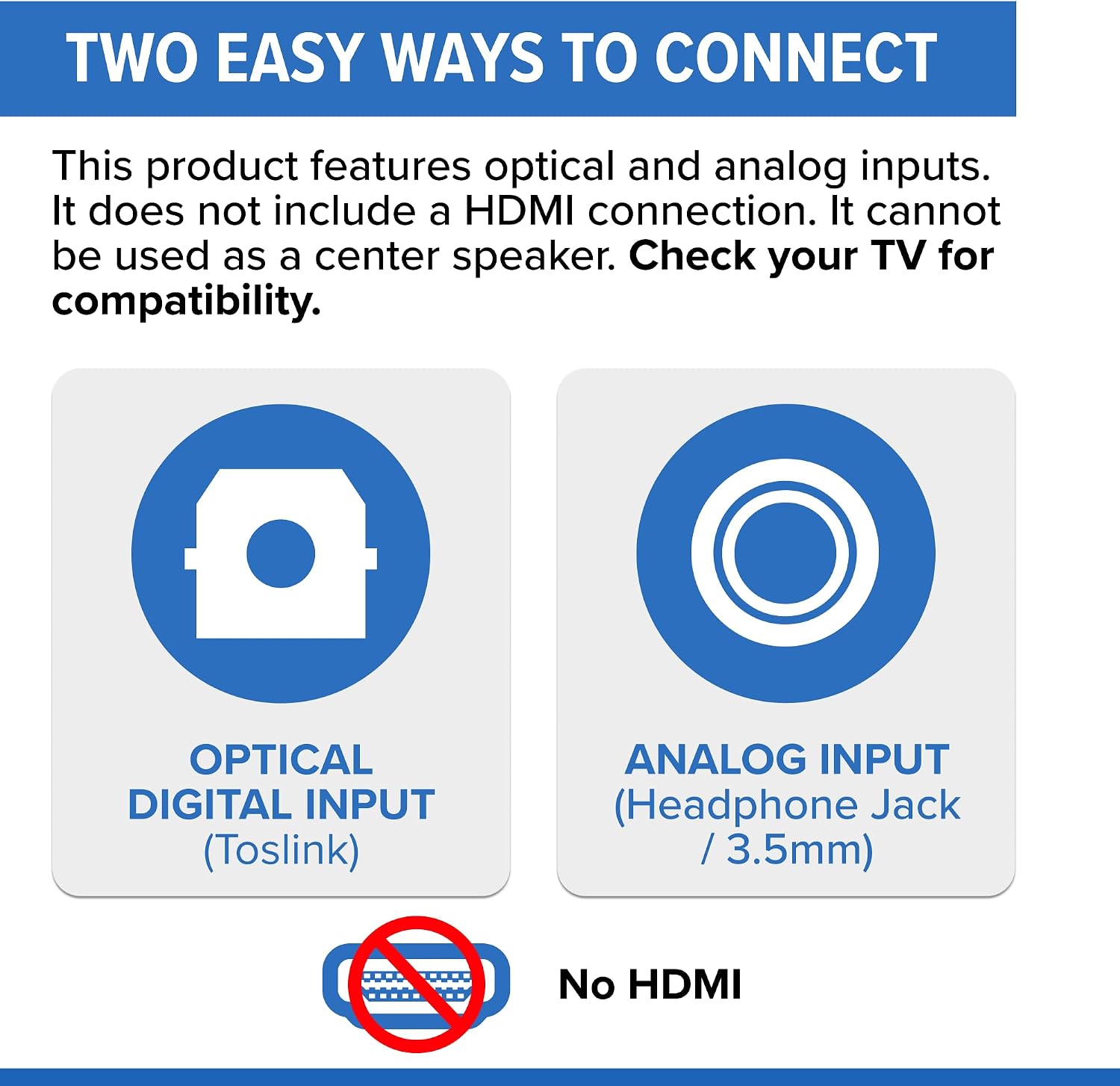
Figure 5: Diagram illustrating the optical digital input (TOSLINK) and analog input (3.5mm) options on the ZVOX SB500 Soundbar, with a clear indication that HDMI is not supported.
Баштапкы күйгүзүү
Once connected, plug the soundbar into a power outlet. The soundbar will typically power on automatically or can be turned on using the included remote control. Follow the on-screen prompts on your TV (if any) to select the correct audio output.
Иштөө нускамалары
Негизги башкаруу элементтери
The ZVOX SB500 Soundbar can be controlled using the included remote control. Key functions include:
- Күч: Саундбарды күйгүзөт же өчүрөт.
- Үнүн жогорулатуу/төмөндөтүү: Жалпы үн деңгээлин тууралайт.
- Үнсүз: Аудио чыгыштын үнүн басат.
- Киргизүүнү тандоо: Switches between Optical and Analog inputs.

6-сүрөт: Каптал view of the ZVOX SB500 Soundbar, showing the integrated control buttons for power, volume, and input selection.
AccuVoice Dialogue Boost
Experience every word with perfect clarity using ZVOX's patented AccuVoice hearing aid technology. This feature lifts voices out of background noise, making dialogue clear and easy to understand, even at low volumes. The SB500 offers six levels of voice boost, allowing you to customize your listening experience.

Figure 7: The ZVOX SB500 Soundbar display showing "AC S" (AccuVoice Setting), emphasizing the ability to turn off subtitles and turn on AccuVoice for enhanced dialogue clarity.

Figure 8: The AccuVoice logo, representing the patented technology for clear dialogue.
PhaseCue Virtual Surround Sound
The SB500 features PhaseCue virtual surround sound technology, which creates a rich and immersive 3D sound experience from a single soundbar. This technology broadens the soundstage, making it feel like sound is coming from all around you.

Figure 9: A graphic illustrating how the ZVOX SB500 Soundbar creates room-filling 3D sound, with arrows indicating sound dispersion throughout a living space.

Figure 10: The ZVOX SB500 Soundbar integrated into a home entertainment setup, demonstrating its ability to deliver immersive audio for dynamic content like action scenes.
Чыгуу деңгээли
The SB500's output leveling feature automatically tames sudden volume spikes, such as those from loud commercials. This provides a consistent audio experience, eliminating the need to constantly adjust the volume.

Figure 11: An image depicting a woman covering her ears, symbolizing the discomfort caused by sudden loud noises, which the soundbar's output leveling feature aims to prevent.
Техникалык тейлөө
Тазалоо
To maintain the appearance and performance of your ZVOX SB500 Soundbar, regularly wipe the exterior with a soft, dry cloth. Avoid using abrasive cleaners, waxes, or solvents as they may damage the finish. Ensure the soundbar is unplugged before cleaning.
Сактагыч
If storing the soundbar for an extended period, disconnect it from power and audio sources. Store it in a cool, dry place, ideally in its original packaging to protect it from dust and physical damage.
Проблемаларды чечүү
If you encounter issues with your ZVOX SB500 Soundbar, please refer to the following common problems and solutions:
| Көйгөй | Мүмкүн себеп | Чечим |
|---|---|---|
| Саундбардан үн чыкпайт. |
|
|
| Бурмаланган же начар үн сапаты. |
|
|
| Пульт иштебей жатат. |
|
|
If the problem persists after trying these solutions, please contact ZVOX customer support.
Техникалык шарттар
| Өзгөчөлүк | Деталь |
|---|---|
| Модель аты | SB500 |
| Бренд | ZVOX |
| Продукциянын өлчөмдөрү | 3.3"D x 43.9"W x 5.7"H |
| Элемент Салмагы | 12.6 фунт |
| Динамик түрү | Surround Sound, Subwoofer, 3D, Woofer, Soundbar |
| Динамиктин максималдуу чыгаруу күчү | 140 Ватт |
| Сабвуфердин диаметри | 4 Inches (Dual Built-in) |
| Байланыш технологиясы | Wi-Fi (for multi-zone integration), Wired (Optical, Analog) |
| Өзгөчөлүктөр | AccuVoice, Disappearing Display, Output Leveling, PhaseCue |
| Шайкеш түзмөктөр | Телевидение |
| Камтылган компоненттер | Алыстан |
| Power Source | DC |
| Controller Type | Алыстан башкаруу |
| Number of Power Levels (AccuVoice) | 6 |
| UPC | 882360050020 |
Кепилдик жана колдоо
Кепилдик маалымат
The ZVOX SB500 Soundbar comes with a Чектелген Кепилдик. For specific details regarding the terms and conditions of your warranty, including coverage period and what is covered, please refer to the warranty card included with your product or visit the official ZVOX webсайт.
Кардарларды колдоо
For further assistance, technical support, or inquiries regarding your ZVOX SB500 Soundbar, please visit the official ZVOX webсайтка же кардарларды тейлөө бөлүмүнө кайрылыңыз.


