Introduction
The Logitech POP Mouse is a compact, wireless mouse designed for enhanced productivity and personal expression. Featuring SilentTouch Technology for quiet clicks, a customizable top button for emojis or shortcuts, and a SmartWheel that shifts between precision and speed scrolling, it offers a versatile user experience. This mouse supports multi-device connectivity via Bluetooth, allowing seamless switching between up to three devices. It is built with durability in mind, offering up to 24 months of battery life and auto-sleep power-saving features.
Кутуда эмне бар
- Logitech POP чычканы
- 1 x AA батарейкасы (алдын ала орнотулган)
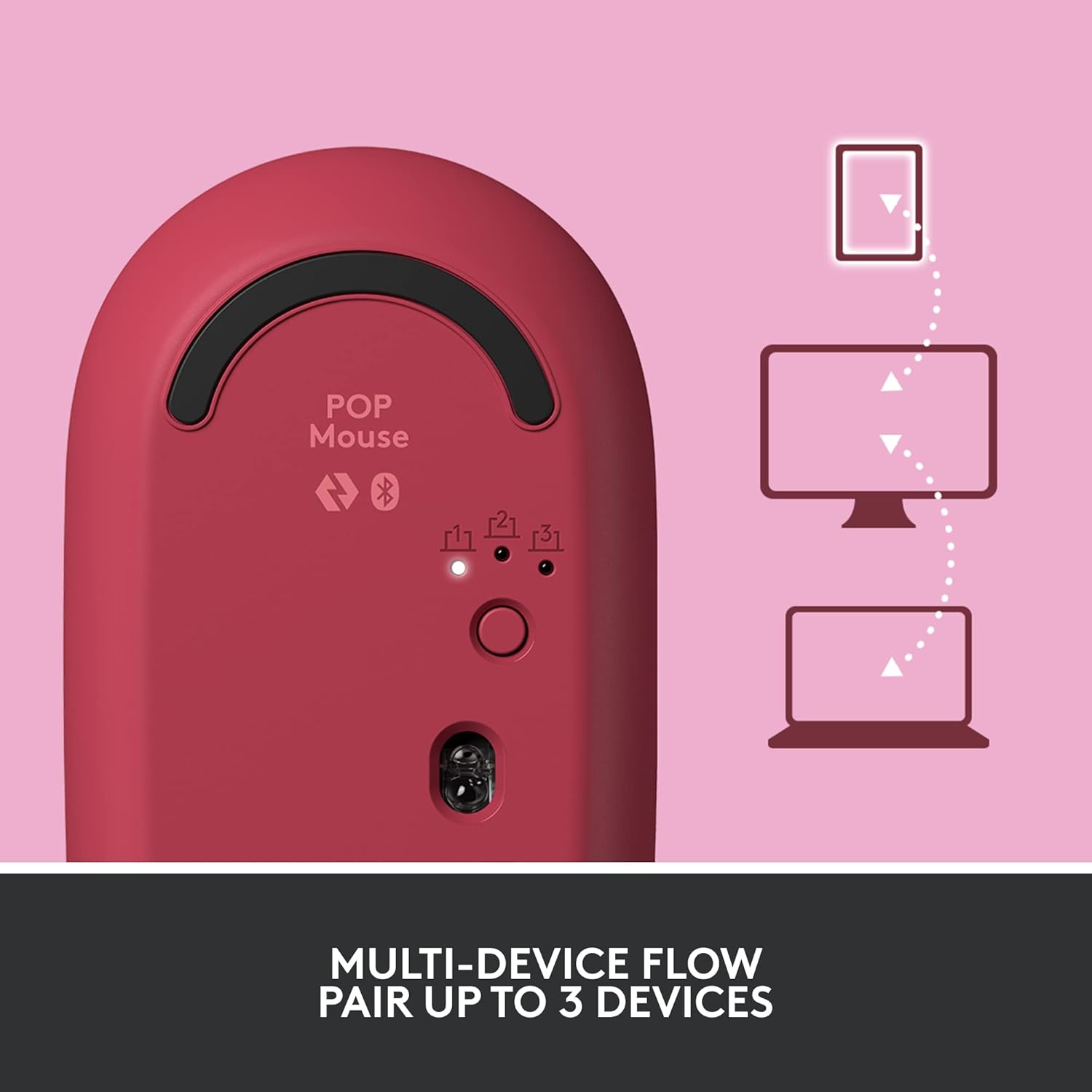
Image: The Logitech POP Mouse and an included AA battery, as typically found in the product packaging.
Жайгашуу
1. Батареяны орнотуу
- Чычкандын астыңкы жагындагы батарея бөлүкчөсүн табыңыз.
- Чычкандын үстүнкү капкагын алып салуу үчүн аны акырын артка жылдырыңыз.
- Туура полярдуулукту (+/-) текшерип, комплекттеги AA батареясын салыңыз.
- Үстүнкү капкакты тегиздеп, ордуна чыкылдаган үн чыкканча алдыга жылдыруу менен кайра ордуна коюңуз.
2. Күйгүзүү
- Flip the mouse over. Locate the On/Off switch on the bottom of the mouse.
- Slide the switch to the 'On' position (usually indicated by green color).
3. Device Pairing (Bluetooth)
- On the bottom of the mouse, press and hold the Easy-Switch button (labeled with 1, 2, or 3) for 3 seconds until the LED light starts blinking rapidly. This indicates pairing mode.
- On your computer, tablet, or phone, open your Bluetooth settings.
- Select "Logitech POP Mouse" from the list of available devices.
- Follow any on-screen prompts to complete the pairing process. The LED light on the mouse will turn solid for 5 seconds when connected.
4. Көп түзмөктү которуу
- The POP Mouse can be paired with up to three devices. To switch between paired devices, simply press the Easy-Switch button on the bottom of the mouse. The corresponding LED (1, 2, or 3) will light up to indicate the active device.
Image: The Logitech POP Mouse can seamlessly connect and switch between up to three different devices, such as a tablet, desktop computer, and laptop.
Чычканды иштетүү
1. Негизги функциялар
- Сол чыкылдатуу: Негизги тандоо жана өз ара аракеттенүү.
- Оң чыкылдатуу: Контексттик менюларга жетет.
- Жылдыруу дөңгөлөгү: Документтерди тигинен жылдырат жана web барактар.
2. Акылдуу Дөңгөлөк технологиясы
- The SmartWheel automatically shifts between high-precision scrolling for detailed work and super-fast scrolling for quickly navigating long documents or web барактар.

Image: The SmartWheel on the Logitech POP Mouse dynamically adjusts its scrolling mode for precision or speed.
3. SilentTouch технологиясы
- Enjoy a quiet working environment with SilentTouch Technology, which significantly reduces click noise without compromising tactile feedback.

Image: SilentTouch Technology ensures a quiet and comfortable user experience.
Ыңгайлаштыруу
1. Customizable Top Button
- The top button, located below the scroll wheel, is customizable. By default, it opens an emoji menu for quick access to your favorite emojis.

Image: The customizable top button allows for quick access to an emoji menu on your screen.
2. Logi Options+ App
- жүктөп алыңыз Logi Options+ App (Windows and macOS only) to personalize your POP Mouse.
- You can reassign the top button to perform various shortcuts, such as Snip Screen, Mic Mute, Voice-to-Text, or any other function you desire.
- The app also allows you to adjust pointer speed, scroll speed, and enable Flow for cross-computer control.
Техникалык тейлөө
- Тазалоо: жумшак колдонуу, damp cloth to clean the exterior of the mouse. Avoid harsh chemicals or abrasive materials.
- Батареяны алмаштыруу: Replace the AA battery when the low battery indicator light appears.
- Сактагыч: When not in use for extended periods, turn off the mouse using the On/Off switch to conserve battery life.
Проблемаларды чечүү
- Чычкан туташпай жатат: Ensure the mouse is powered on and within range of your device. Check your device's Bluetooth settings to confirm it's enabled and the mouse is paired. Try re-pairing the mouse.
- Артта калуу же туура эмес кыймыл: Replace the battery if it's low. Ensure there are no obstructions between the mouse and your device. Avoid using the mouse on highly reflective or uneven surfaces.
- Custom button not working: Verify that the Logi Options+ App is installed and running on your computer. Check the button assignments within the app.
Техникалык шарттар
| Бренд | Logitech |
| Модель номери | 910-006545 |
| Байланыш технологиясы | Bluetooth 5.1 |
| Зымсыз диапазон | 32.81 фут (10 м) |
| Sensor Technology | Logitech жогорку тактыктагы оптикалык көзөмөлдөө |
| баскычтардын саны | 4 (Left/Right click, Scroll wheel click, Top button) |
| Ыңгайлаштырылуучу баскыч | Yes (Top button, via Logi Options+ App) |
| Батарея түрү | 1 x AA батарейка |
| Батареянын иштөө мөөнөтү | 24 айга чейин (колдонууга жараша өзгөрүшү мүмкүн) |
| Операциялык системанын шайкештиги | Windows 10 же андан кийинки версиясы, macOS 10.15 же андан кийинки версиясы, iPadOS, Chrome OS, Android |
| Элемент Салмагы | 2.89 унция |
| Продукциянын өлчөмдөрү (LxWxH) | 4.3 x 2.6 x 1.7 дюйм |
| Материал | Plastic parts include certified post-consumer recycled plastic (Heartbreaker Rose: 29%) |
Кепилдик жана колдоо
Кепилдик жөнүндө маалымат жана техникалык колдоо алуу үчүн, расмий Logitech колдоо кызматына кайрылыңыз website or refer to the warranty card included with your product. You can find detailed FAQs, troubleshooting guides, and contact options for customer service.
- Онлайн колдоо: Visit support.logi.com
- Продукцияны каттоо: Жаңыртууларды жана колдоо алуу үчүн продуктуңузду каттаңыз.


