MARKLIFE этикетка жасоочу машинанын колдонуучу колдонмосу
Модель: P50 | Бренд: MARKLIFE
Продукт бүттүview
MARKLIFE P50 Label Maker – үйлөрдө, кеңселерде жана чакан бизнестерде ар кандай этикеткалоо муктаждыктары үчүн иштелип чыккан мини-көчмө Bluetooth термикалык этикетка принтери. Ал термикалык басып чыгаруу технологиясын колдонот, сыя же тонердин кереги жок кылат жана кара жана ак басып чыгарууну колдойт.
Негизги өзгөчөлүктөр төмөнкүлөрдү камтыйт:
- Кеңири колдонуу: 0.59 дюймдан 2.24 дюймга чейинки этикеткалардын туурасын колдойт, дарекке, кийимге, баага, кабельге, зер буюмдарына жана ингредиенттердин этикеткаларына ылайыктуу.
- Зымсыз жана портативдик: 33 фут аралыктагы смартфондордон (Android жана iOS) ыңгайлуу, жылмакай жана тез басып чыгаруу үчүн Bluetooth 4.0 туташуусу бар жеңил дизайн.
- Акылдуу басып чыгаруунун өзгөчөлүктөрү: Үн жана сүрөттөрдү таануу, сканерлөөдөн штрих-коддорду түзүү, PDF файлдарын топтом менен басып чыгаруу жана сүрөттөрдү этикеткаларга басып чыгаруу мүмкүнчүлүгүн сунуштайт. Windows компьютери үчүн USB туташуусу жана онлайн программалык камсыздоо жеткиликтүү.
- Туруктуу энбелгилер: Этикеткалар айрылбай турган, суу өткөрбөй турган жана май өткөрбөй тургандай кылып иштелип чыккан, бул алардын узак мөөнөттүү кызмат кылуусун камсыз кылат.
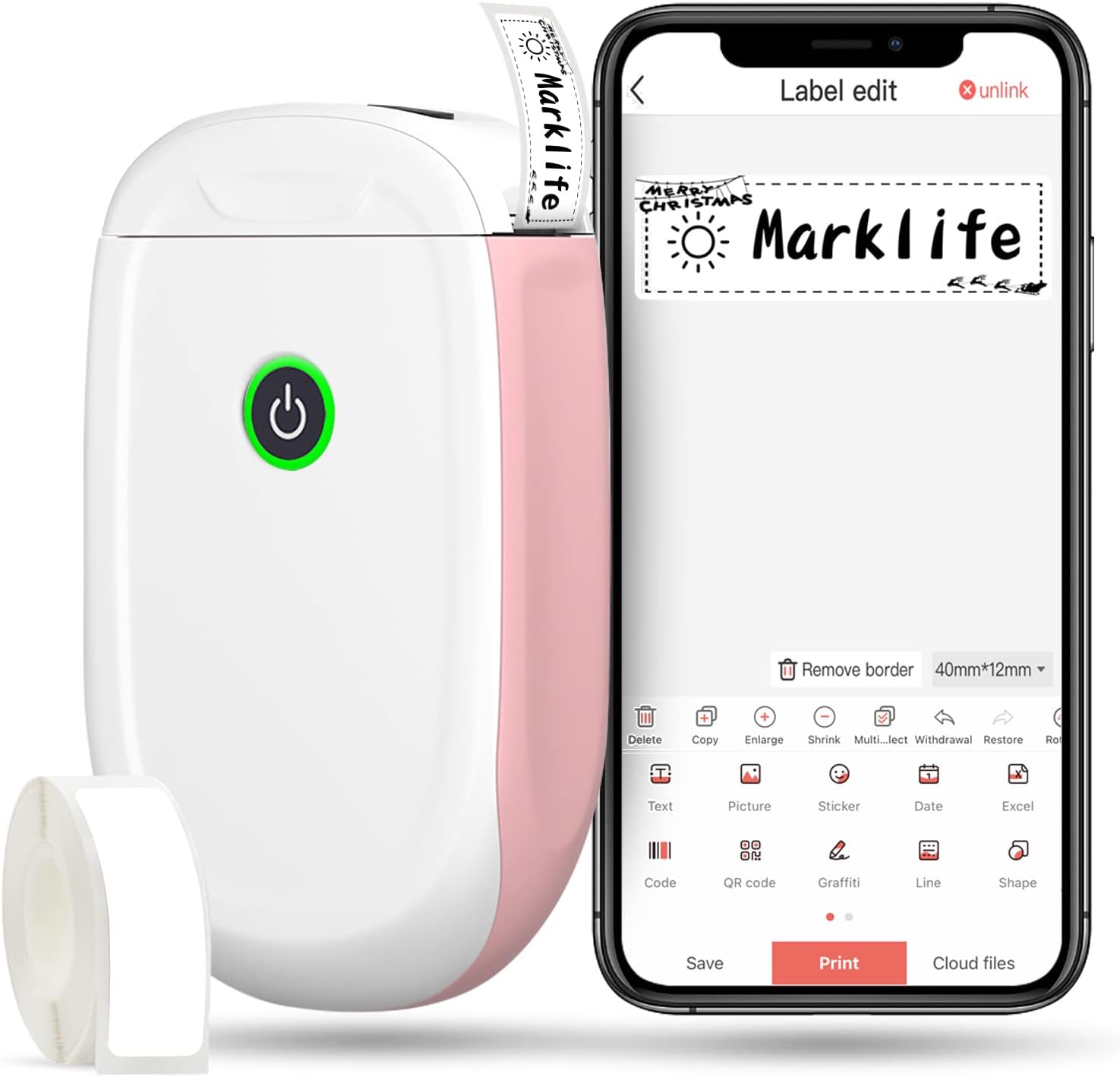
1-сүрөт: MARKLIFE P50 этикетка түзүүчү жана ага тиешелүү колдонмо.
Орнотуу колдонмосу
MARKLIFE P50 этикетка жасоочу түзмөгүңүздү орнотуу үчүн төмөнкү кадамдарды аткарыңыз:
- Этикетка кагазын жүктөңүз: Капкакты ачып, этикетка түрмөгүн басып чыгаруучу тарабын өйдө каратып салыңыз. Капкакты бекем жабыңыз.
- Колдонмону жүктөп алыңыз: Издөө Смартфонуңуздун колдонмолор дүкөнүнө (Android жана iOS үчүн жеткиликтүү) "Marklife" жүктөп алып, орнотуңуз.
- Bluetooth күйгүзүү: Смартфонуңузда Bluetooth'ду иштетиңиз.
- Түзмөккө туташуу: Marklife колдонмосун ачып, этикетканы күйгүзүп, түзмөккө Bluetooth аркылуу туташыңыз. Түзмөктүн аталышы адатта "P11" же "P50" менен башталат.

2-сүрөт: Marklife P50 үчүн тез орнотуу боюнча көрсөтмө.
1-видео: Marklife P11 (P50 сыяктуу) этикетка жасоочу түзүлүштү орнотуу жана негизги колдонуу, анын ичинде кагазды жүктөө, Bluetooth аркылуу туташуу жана этикетканы басып чыгаруу көрсөтүлөт.
Иштөө нускамалары
Туташкандан кийин, сиз этикеткаларды түзүп жана басып чыгара баштасаңыз болот:
- Шаблонду тандаңыз: Marklife колдонмосунда алдын ала иштелип чыккан ар кандай шаблондордон тандаңыз же жаңы бош энбелги баштаңыз.
- Этикетканын мазмунун түзөтүү: Текст киргизүү үчүн этикетка аймагын эки жолу чыкылдатыңыз. Шрифтти, өлчөмүн, тегиздөөнү ыңгайлаштырып, сүрөттөр, сүрөтчөлөр, даталар же штрих-коддор сыяктуу элементтерди кошо аласыз.
- Preview жана басып чыгаруу: Басууга чейин, алдын алаview этикеткаңыздын каалагандай көрүнүшүн камсыз кылуу үчүн аны басыңыз. Андан кийин, дизайнды этикетка жасоочуга жөнөтүү үчүн "Басып чыгаруу" баскычын басыңыз.
- Өркүндөтүлгөн өзгөчөлүктөр:
- Штрих-код/QR коду: Колдонмодон түз штрих-коддорду же QR коддорун түзүңүз. Мисалыampштрих-код: 46745875478655
- Сүрөттү таануу (OCR): Сүрөттөрдөгү текстти түзөтүлүүчү этикетка мазмунуна айландыруу үчүн телефонуңуздун камерасын колдонмодогу OCR сканери катары колдонуңуз.
- Пакеттик басып чыгаруу: Натыйжалуулук үчүн PDF файлынан же тизмеден бир нече этикеткаларды басып чыгарыңыз.
- Ыңгайлаштыруу: 600дөн ашык шаблон айкалышына, 9 тилге, 600дөн ашык символго, 27ден ашык фреймге жана 15тен ашык шрифтке мүмкүнчүлүк алыңыз.

3-сүрөт: Ар кандай дизайн элементтери менен өзүңүздүн этикеткаларыңызды ыңгайлаштырыңыз.

4-сүрөт: Колдонмодо көптөгөн дизайн элементтери бар.
Техникалык тейлөө
MARKLIFE P50 этикетка жасоочуңуздун узак мөөнөттүү кызматын жана оптималдуу иштешин камсыз кылуу үчүн, төмөнкү техникалык тейлөө көрсөтмөлөрүн аткарыңыз:
- Тазалоо: Түзмөктүн сыртын жумшак, кургак чүпүрөк менен үзгүлтүксүз сүртүп туруңуз. Басып чыгаруучу баш үчүн кебезди бир аз колдонуңуз.ampаппаратты спирт менен сүртүп, өчүрүп, электр тармагынан ажыратып коюңуз. Колдонуудан мурун толугу менен кургаганча күтүңүз.
- Сактагыч: Этикетка жасоочу каражатты салкын, кургак жерде, күндүн түз нурунан жана өтө жогорку температурадан алыс сактаңыз.
- Энбелгилердин түрмөгүнө кам көрүү: Колдонулбаган этикетка түрмөктөрүн чаңдан жана нымдуулуктан коргоо үчүн аларды баштапкы таңгагында сактаңыз.
- Батареяга кам көрүү: Батареянын иштөө мөөнөтүн оптималдаштыруу үчүн, көп колдонулбаса дагы, түзмөктү үзгүлтүксүз кубаттап туруңуз. Батареянын узак убакыт бою толугу менен түгөнүп калышына жол бербеңиз.

5-сүрөт: Термикалык басып чыгаруу технологиясы сыяны талап кылбайт, бул техникалык тейлөөнү жеңилдетет.

6-сүрөт: Этикеткалар бышыктыгы жана сууга жана майга туруктуулугу үчүн иштелип чыккан.
Проблемаларды чечүү
Эгерде сиз MARKLIFE P50 этикетка жасоочу түзмөгүңүздө көйгөйлөргө туш болсоңуз, төмөнкү чечимдерди колдонуп көрүңүз:
| Көйгөй | Мүмкүн себеп | Чечим |
|---|---|---|
| Түзмөк күйбөйт. | Батарея аз. | Берилген USB кабели аркылуу аппаратты заряддаңыз. |
| Bluetooth аркылуу туташуу мүмкүн эмес. | Телефондо/түзмөктө Bluetooth өчүк же түзмөк байланыш аймагынан тышкары. | Телефонуңузда Bluetooth иштетилгенин жана этикетка жасоочу 33 фут аралыкта экенин текшериңиз. Эки түзмөктү тең өчүрүп-күйгүзүңүз. |
| Басып чыгаруу сапаты начар же этикеткалар бош. | Этикетка кагазы туура эмес жүктөлүп жатат, басып чыгаруу башынын кирдегени же батареянын заряды аз. | Этикетка кагазын туура кайра жүктөңүз. Басып чыгаруучу башты тазалаңыз. Түзмөктү кубаттаңыз. |
| Колдонмо бузулат же катып калат. | Программалык камсыздоонун иштебей калышы же колдонмонун эскирген версиясы. | Колдонмону өчүрүп-күйгүзүңүз. Колдонмо дүкөнүңүздөн колдонмо жаңыртууларын текшериңиз. Зарыл болсо, колдонмону кайра орнотуңуз. |
| Этикеткалар туура эмес берилип жатат. | Кагаз тыгылып калды же кагаздын түрү туура эмес. | Капкагын ачып, тыгылып калган кагазды тазалаңыз. Шайкеш келген Marklife этикетка түрмөктөрүн колдонуп жатканыңызды текшериңиз. |
Техникалык шарттар
| Өзгөчөлүк | Деталь |
|---|---|
| Модель аты | P50 |
| Бренд | MARKLIFE |
| Басма технологиясы | Термикалык |
| Байланыш технологиясы | Bluetooth |
| Принтердин чыгышы | Монохром (Кара сыя) |
| Макс басып чыгаруу ылдамдыгы (монохромдуу) | 30 промилле |
| Максималдуу медиа өлчөмү | 3 x 5 дюйм |
| Энбелгилердин кеңдиги | 0.59 дюймдан 2.24 дюймга чейин |
| Элемент Салмагы | 9.6 унция (272 грамм) |
| Продукциянын өлчөмдөрү | 3.14 x 5.5 x 1.18 дюйм (болжол менен 7.5 x 13.6 x 2.8 см) |
| Шайкеш түзмөктөр | Android жана iOS мобилдик түзмөктөрү, Windows PC (USB аркылуу) |
| Камтылган компоненттер | Этикетка жасоочу, этикетка скотчу |
Тиркемелер
MARKLIFE P50 этикетка жасоочу каражат ар тараптуу жана ар кандай кырдаалдарда колдонулушу мүмкүн:
- Үйдү уюштуруу: Татымал банкаларын, сактоочу идиштерди, ымыркай буюмдарын жана жеке буюмдарды этикеткалоо.
- Office колдонуу: Уюштуруу files, кабелдерди белгилөө, кеңсе шаймандарын этикеткалоо жана аталыш түзүү tags. Мисampштрих-код: 6953124066961
- Чакан бизнес: Бааны түзүү tags, чекене соода, кийим-кече жана зер буюмдары үчүн товарлардын этикеткалары, штрих-код этикеткалары жана жеткирүү этикеткалары.
- Жеке колдонуу: Белектерге этикетка чаптоо, жекече стикерлерди жасоо жана тамак-аштын жарактуулук мөөнөтүн белгилөө.
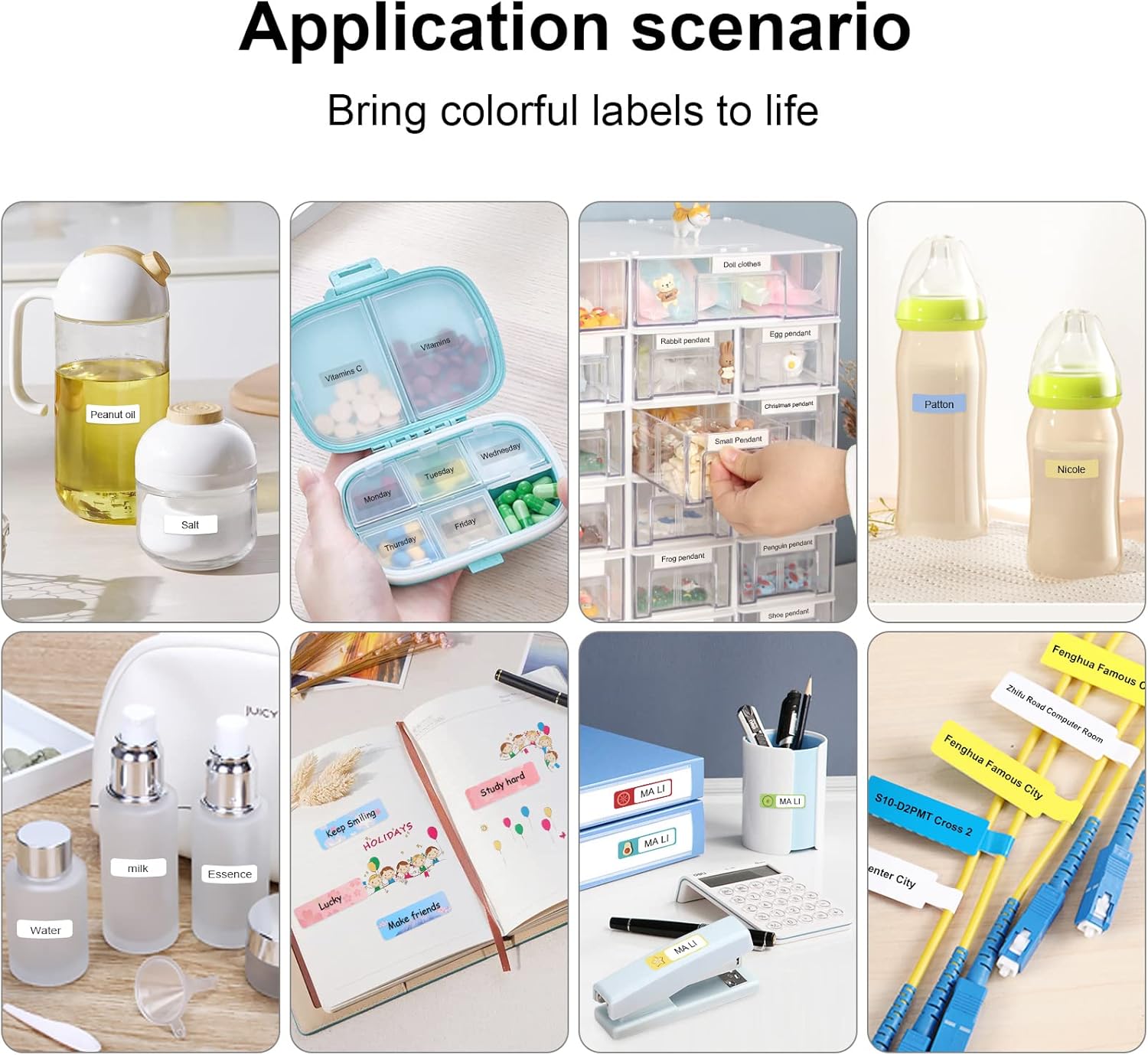
7-сүрөт: Үй шартында жана жеке колдонуу үчүн ар кандай тиркеме сценарийлери.
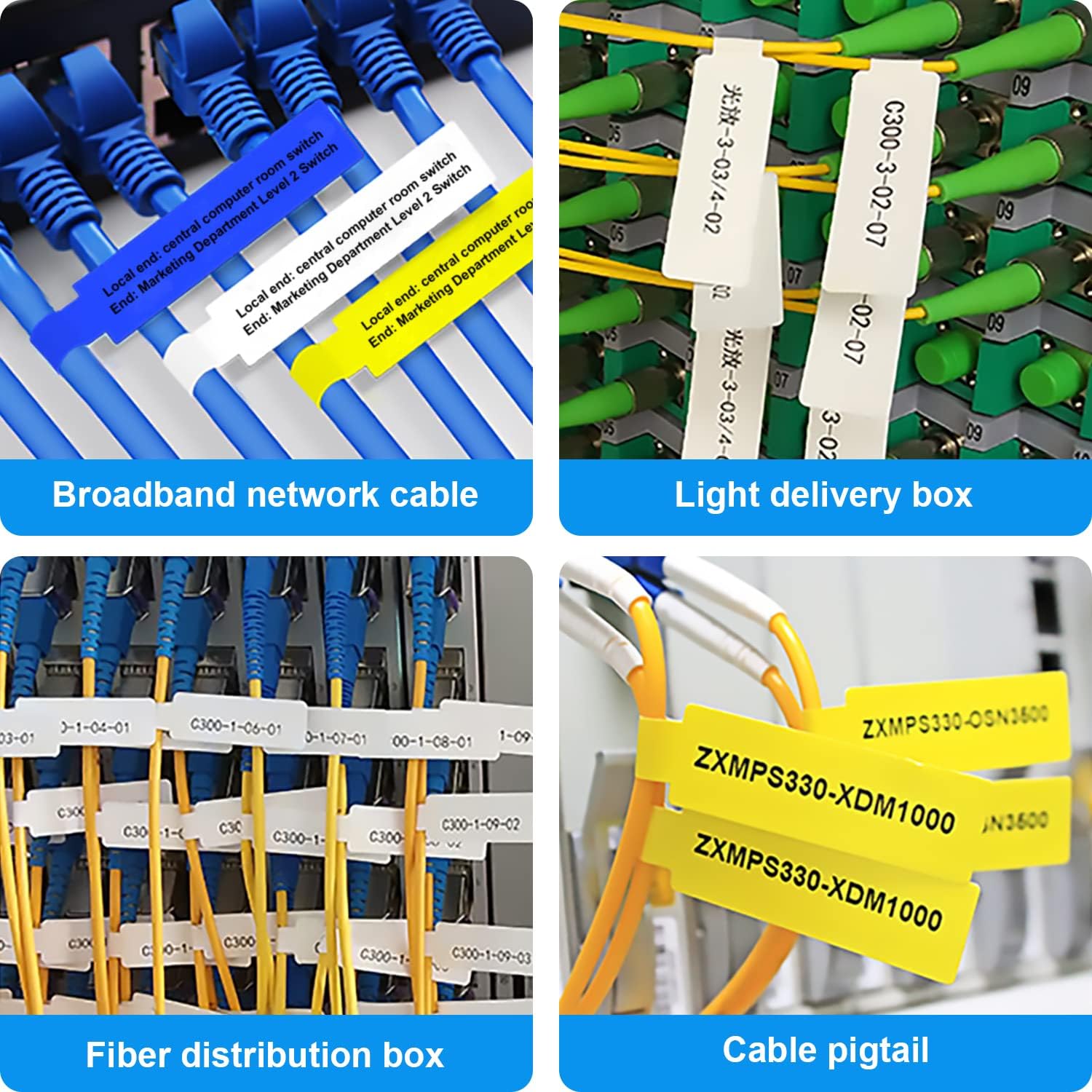
8-сүрөт: Ар кандай типтеги кабелдер жана зымдар үчүн маркировкалоо чечимдери.

9-сүрөт: Кеңсе уюштуруунун практикалык колдонулуштары.

10-сүрөт: Белектерди этикеткалоону чыгармачыл түрдө колдонуу.
Кепилдик жана колдоо
MARKLIFE өнүмдөрү ишенимдүүлүк жана иштөө үчүн иштелип чыккан. Кепилдик боюнча так маалымат жана колдоо алуу үчүн, өнүмүңүзгө тиркелген кепилдик картасын караңыз же MARKLIFEтин расмий веб-сайтына кириңиз. webсайт. Көп берилүүчү суроолор боюнча, ушул колдонмонун бузулууларды оңдоо бөлүмүнө же Marklife колдонмосундагы Көп берилүүчү суроолор бөлүмүнө кайрылыңыз.
Көбүрөөк маалымат алуу жана өнүмдөрдү жаңыртуу үчүн Amazon'догу расмий MARKLIFE дүкөнүнө да барсаңыз болот: MARKLIFE дүкөнү.


