1. Киришүү
The Hama MW-650 is a versatile 6-button optical wireless mouse designed for multi-device use. It offers flexible connectivity options via a 2.4 GHz USB-A receiver and Bluetooth, allowing seamless switching between up to three devices. The optical sensor provides precise cursor control, and adjustable DPI settings cater to various user preferences. This manual provides detailed instructions for setup, operation, maintenance, and troubleshooting to ensure optimal performance of your device.
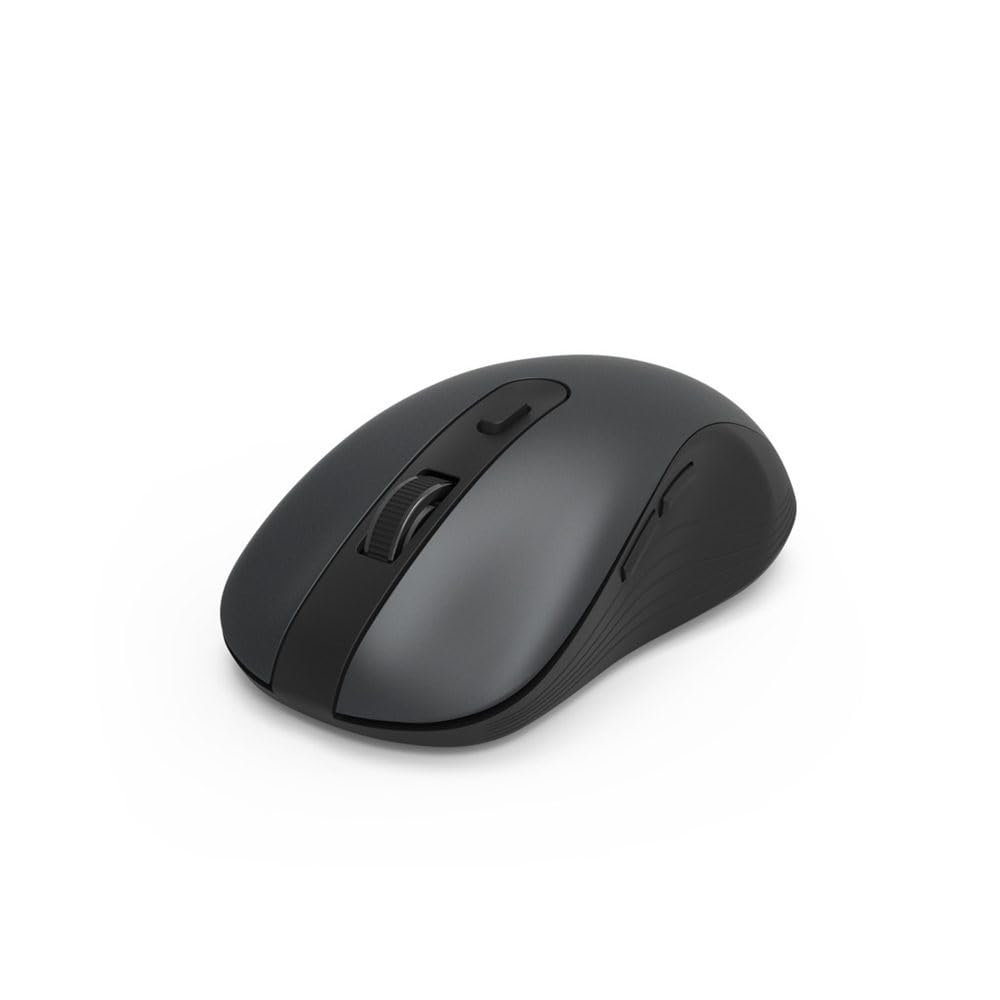
Image 1.1: Hama MW-650 Wireless Mouse (Top View)
2. Пакеттин мазмуну
Сураныч, пакетте төмөнкү нерселерди текшериңиз:
- 1 x Hama MW-650 6-Button Optical Wireless Mouse
- 1 x USB-A кабыл алгыч
- 2 x AA Mignon Batteries
- 1 х Инструкция (бул документ)

Image 2.1: Hama MW-650 Product Packaging
3. Орнотуу
3.1. Батареяны орнотуу
- Чычкандын астыңкы жагындагы батарея бөлүкчөсүн табыңыз.
- Батарея уясынын капкагын ачыңыз.
- Insert the two AA Mignon batteries, ensuring correct polarity (+/-).
- Батарея уясынын капкагын бекем жабыңыз.
3.2. Күйгүзүү/өчүрүү
On the underside of the mouse, slide the ON/OFF switch to the 'ON' position to power on the mouse. Slide it to 'OFF' when not in use to conserve battery life.

Image 3.1: Underside of Hama MW-650 Mouse with ON/OFF Switch and Receiver
3.3. Байланыш параметрлери
The Hama MW-650 mouse supports two wireless connection methods: 2.4 GHz via USB-A receiver and Bluetooth.
3.3.1. 2.4 GHz USB-A Receiver Connection
- Remove the USB-A receiver from its storage slot on the underside of the mouse.
- Plug the USB-A receiver into an available USB-A port on your computer or laptop.
- Операциялык система керектүү драйверлерди автоматтык түрдө таап, орнотушу керек.
- The mouse will connect automatically. The LED indicator for BT1/BT2 will not be lit when using the USB receiver.
3.3.2. Bluetooth туташуусу
The mouse can connect to two separate Bluetooth devices (BT1 and BT2).
- Чычкан күйгүзүлгөнүн текшериңиз.
- Press the 'BT1' or 'BT2' button on the underside of the mouse to select the desired Bluetooth channel. The corresponding LED will flash slowly.
- To enter pairing mode, press and hold the selected 'BT1' or 'BT2' button for approximately 3 seconds until the LED flashes rapidly.
- Түзмөгүңүздө (компьютер, ноутбук, планшет, смартфон) Bluetooth иштетиңиз жана жаңы түзмөктөрдү издеңиз.
- Select "Hama MW-650" from the list of available devices to pair.
- Once successfully paired, the LED will stop flashing and remain steadily lit for a few seconds before turning off.
4. Иштөө нускамалары
4.1. Чычкандын негизги функциялары
The Hama MW-650 features 6 buttons and a scroll wheel:
- Сол чыкылдатуу баскычы: Primary function, typically for selecting items or opening links.
- Оң баскычты чыкылдатуу: Көбүнчө контексттик менюлар үчүн кошумча функция.
- Жылдыруу дөңгөлөгү: For scrolling up and down documents or web барактар. Ошондой эле, ортоңку чыкылдатуу функциясы үчүн басууга болот.
- DPI баскычы: Located behind the scroll wheel, used to adjust cursor sensitivity.
- Алдыга/Артка баскычтары: Located on the side of the mouse, typically used for navigating web барактар же папкалар.
4.2. Түзмөктөрдүн ортосунда которулуу
The MW-650 mouse allows you to switch between three connected devices (one via USB receiver, two via Bluetooth).
- To switch to a Bluetooth-connected device, press the 'BT1' or 'BT2' button on the underside of the mouse. The corresponding LED will light up briefly.
- To switch to the device connected via the USB receiver, press the 'USB' button (or the button without a BT label) on the underside of the mouse.

Image 4.1: Multi-Device Connectivity Example

Image 4.2: Multi-Device Setup with Monitor
4.3. DPI Sensitivity Adjustment
The mouse offers adjustable DPI (Dots Per Inch) settings to control cursor speed and sensitivity. Press the DPI button located behind the scroll wheel to cycle through the available sensitivities:
- 800 DPI
- 1200 DPI (демейки)
- 1600 DPI
- 2000 DPI
- 2400 DPI
Each press of the DPI button will change the sensitivity, allowing you to find the setting that best suits your task or preference.
5. Электр энергиясын башкаруу
The Hama MW-650 mouse is designed with intelligent power management features to conserve battery life:
- Автоматтык күтүү режими: The mouse will automatically enter a standby mode after a period of inactivity. To wake it up, simply move the mouse or click any button.
- Күйгүзүү/өчүрүү: For extended periods of non-use, slide the ON/OFF switch on the underside of the mouse to the 'OFF' position to completely power down the device and maximize battery life.
6. Кароо жана тейлөө
6.1. Тазалоо
Чычканыңыздын иштешин жана көрүнүшүн сактоо үчүн:
- Тазалоодон мурун, чычканды өчүрүп коюңуз.
- Чычкандын бетин сүртүү үчүн жумшак, кургак, түксүз чүпүрөктү колдонуңуз.
- өжөр кир үчүн, бир аз гampчүпүрөктү суу же жумшак тазалоо эритмеси менен жууп салыңыз. Катуу химиялык заттардан же абразивдүү материалдардан алыс болуңуз.
- Clean the optical sensor area on the underside of the mouse periodically with a cotton swab to ensure accurate tracking.
6.2. Батареяны алмаштыруу
When the mouse's performance degrades or it stops responding, it may be time to replace the batteries.
- Power off the mouse using the ON/OFF switch.
- Төмөнкү жагындагы батарея бөлүмүн ачыңыз.
- Remove the old AA batteries and dispose of them according to local regulations.
- Insert new AA Mignon batteries, observing correct polarity.
- Батарея отсегин жабыңыз.
7. Кыйынчылыктарды
If you encounter issues with your Hama MW-650 mouse, please refer to the following common solutions:
| Көйгөй | Мүмкүн чечим |
|---|---|
| Чычкан жооп бербейт. |
|
| Курсордун кыймылы туура эмес же жай. |
|
| Түзмөктөр ортосунда которуштуруу мүмкүн эмес. |
|
| Bluetooth жупташуусу болбой жатат. |
|
8. Техникалык шарттар
| Модель номери | 00182617 (MW-650) |
| Байланыш технологиясы | 2.4GHz RF (USB-A Receiver), Bluetooth 5.0 |
| Кыймылды аныктоо технологиясы | Оптикалык |
| DPI сезгичтиги | 800 / 1200 / 1600 / 2000 / 2400 DPI (adjustable) |
| баскычтардын саны | 6 (анын ичинде жылдыруу дөңгөлөгү) |
| Форма фактору | Оң кол |
| Power Source | 2 x AA Mignon Batteries (included) |
| Батареянын иштөө мөөнөтү | 288 күнгө чейин (колдонууга жараша) |
| Шайкеш операциялык системалар | Windows 11/10/8/7, Android 4.3 or higher, macOS 10.10 or higher, iOS 13 or higher |
| Продукциянын өлчөмдөрү (L x W x Y) | 11.3 x 6.3 x 4 см (4.41 x 2.48 x 1.57 дюйм) |
| Элемент Салмагы | 3.62 унция |
| Түс | Кара |
9. Кепилдик жана колдоо
Кепилдик маалыматы жана техникалык колдоо үчүн расмий Хамага кайрылыңыз webсайтка же түздөн-түз кардарларды тейлөөгө кайрылыңыз. Ар кандай кепилдик дооматтары үчүн сатып алганыңыздын далилин сактаңыз.
- Өндүрүүчү: Hama GmbH & Co KG
- Webсайт: www.hama.com