Introduction
This manual provides detailed instructions for the installation, operation, maintenance, and troubleshooting of your SHZSR Car Radio Multi-Touch Screen for Infiniti JX35 / QX60. Please read this manual thoroughly before using the product to ensure proper functionality and safety.
The SHZSR Car Radio is designed to enhance your in-car entertainment and navigation experience, featuring a large 12.1-inch vertical HD display, Android operating system, and support for various connectivity options including CarPlay and Android Auto.
Орнотуу жана орнотуу
The SHZSR Car Radio is designed for specific Infiniti JX35 / QX60 models (2016-2021). Professional installation is recommended. Ensure the screen size does not obstruct existing buttons or vent holes in your vehicle's dashboard.
Шайкештикти текшерүү
Before installation, verify that your vehicle's center console matches the design shown in the image below, particularly regarding the stitching at the top of the dashboard.
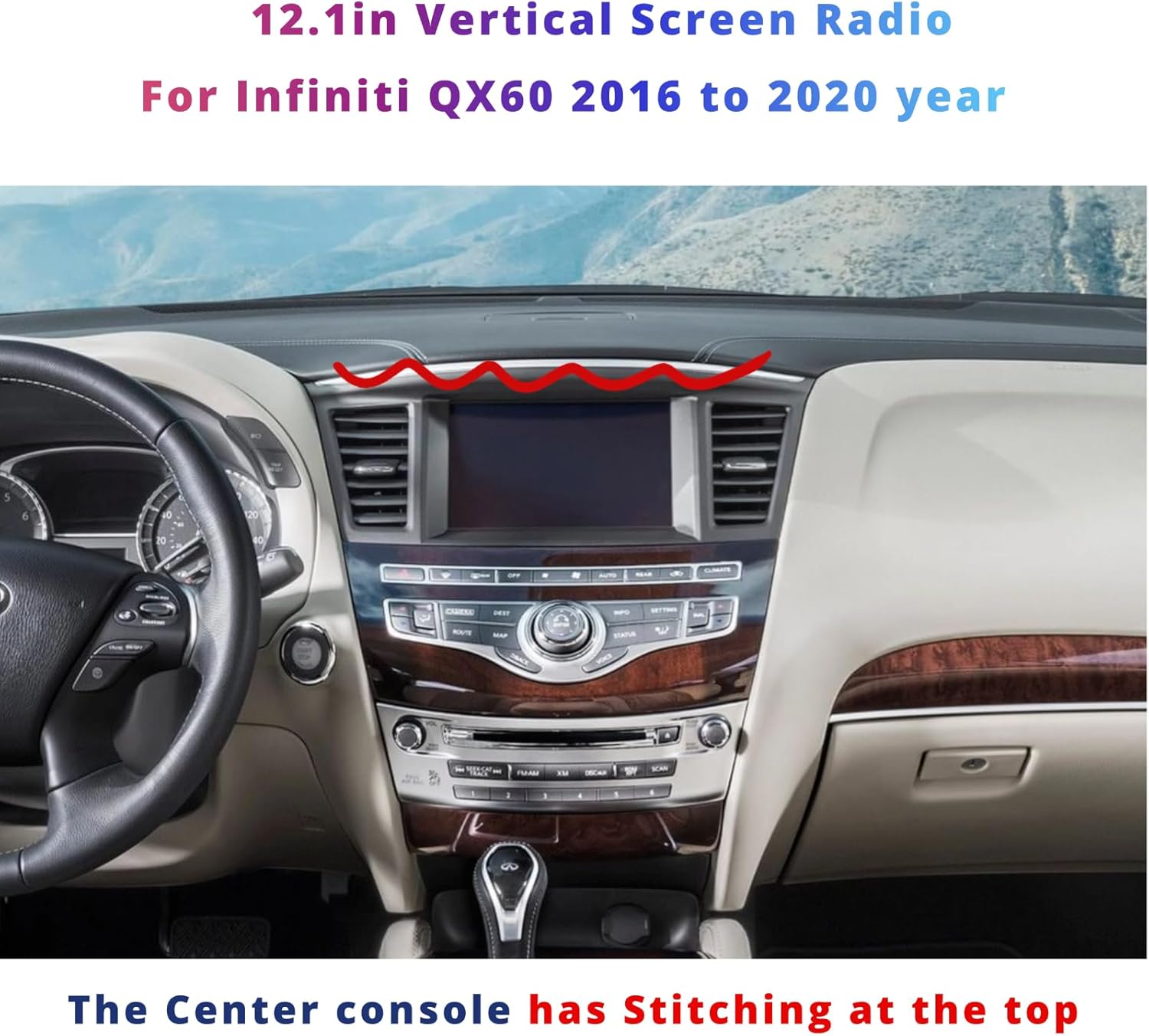
Figure 1: SHZSR Car Radio installed in an Infiniti QX60 dashboard. Note the dashboard stitching for compatibility verification.
Орнотуу кадамдары (Жалпы)
- Даярдоо: Ensure the vehicle's power is off and the battery is disconnected before beginning installation.
- Removal of Original Unit: Carefully remove the existing car radio and dashboard components as per your vehicle's service manual.
- Зымдар: Connect the provided cables to the SHZSR unit and the vehicle's wiring harness. The unit supports plug-and-play functionality; however, refer to the included installation instructions for specific wiring diagrams.
- Интеграция: The unit retains factory backup camera, USB, steering wheel controls, and AUX input. Ensure all these connections are properly made.
- Монтаждоо: Securely mount the SHZSR unit into the dashboard.
- Сыноо: Reconnect the battery and power on the vehicle to test all functions before fully reassembling the dashboard.
For detailed wiring and mounting instructions, please refer to the separate installation guide included in your package.
Иштөө нускамалары
The SHZSR Car Radio features a 12.1-inch multi-touch HD display running on an Android operating system, providing a user-friendly interface for various functions.
Негизги навигация
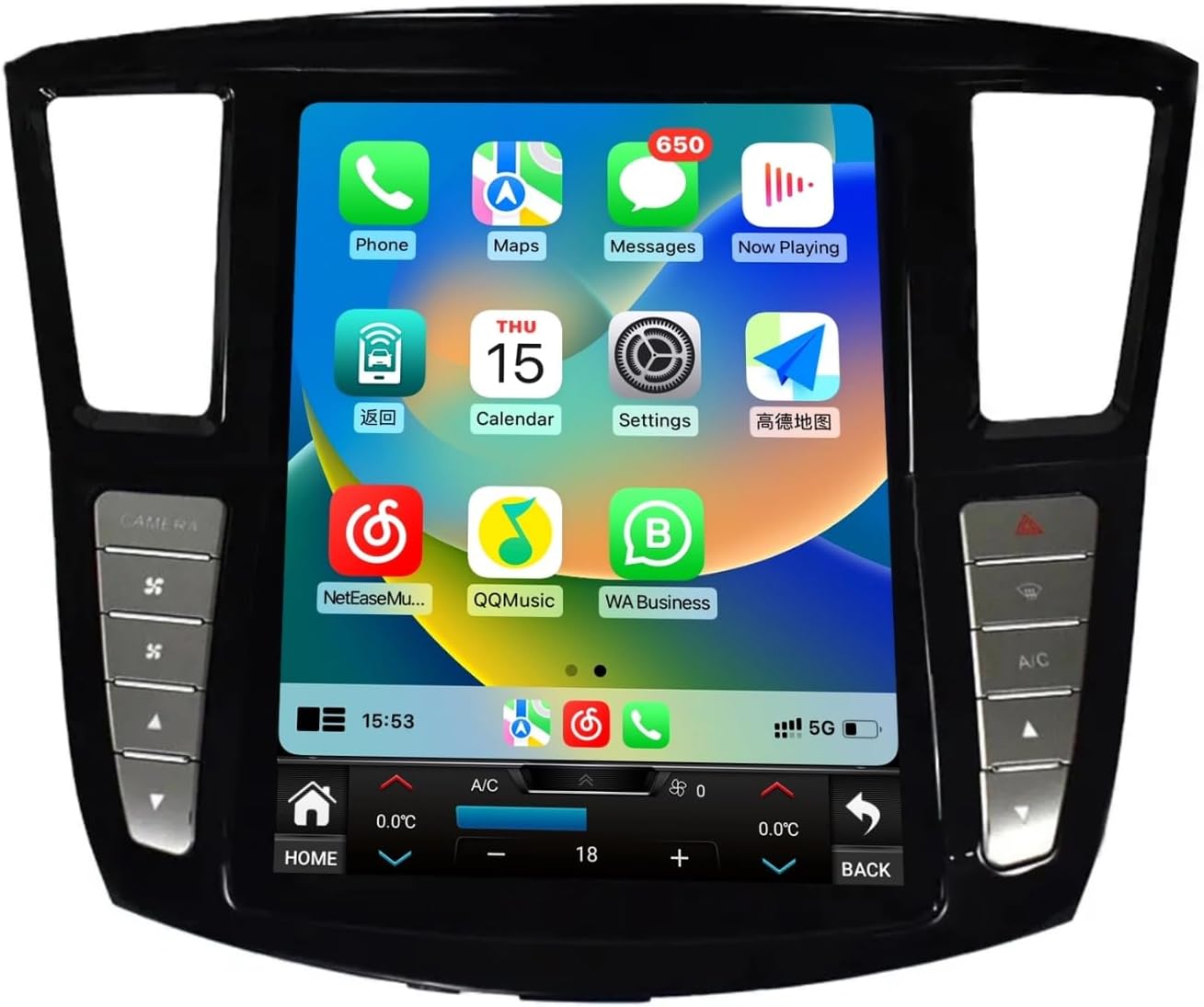
Figure 2: Main user interface with various application icons.
- Сенсордук экран: Экранга тийүү менен менюлар жана тиркемелер аркылуу өтүңүз.
- Үй баскычы: Located at the bottom left of the screen, returns you to the main home screen.
- Артка баскычы: Located at the bottom right of the screen, returns to the previous screen.
- Үндү көзөмөлдөө: Use the physical buttons on the side bezel or the on-screen controls.
Байланыш өзгөчөлүктөрү
The unit supports various connectivity options for enhanced functionality.
- Bluetooth: For hands-free calling and audio streaming. Pair your mobile device via the Bluetooth settings menu.
- Wi-Fi: Интернетке кирүү, колдонмолорду жүктөп алуу жана онлайн кызматтар үчүн Wi-Fi хотспотуна туташыңыз.
- 4G тармагы: If equipped, insert a 4G SIM card for direct internet access.
- USB: Медиа ойнотуу же маалыматтарды өткөрүү үчүн USB түзмөктөрүн туташтырыңыз.
CarPlay жана Android Auto
The unit features built-in Wireless CarPlay and wired/wireless Android Auto for seamless smartphone integration.
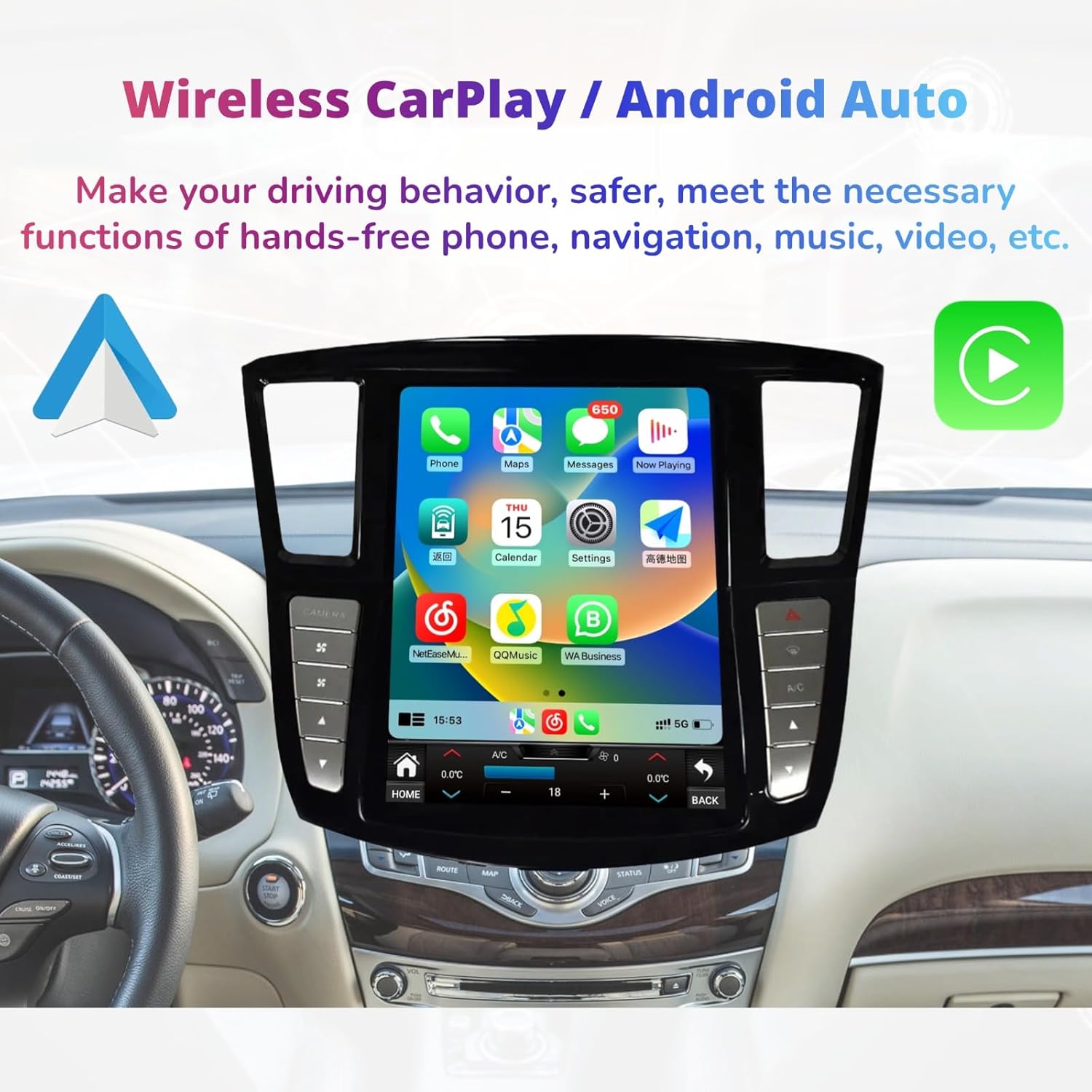
Figure 3: Wireless CarPlay interface for smartphone integration.
- CarPlay: Connect your iPhone wirelessly or via USB to access navigation, messages, calls, and music directly on the car's display.
- Android Auto: Connect your Android phone wirelessly or via USB to use Google Maps, send messages, make calls, and play music.
- Жандандыруу: Access CarPlay or Android Auto through their respective icons on the main screen or by connecting your device.
Climate Control and Vehicle Settings
The unit integrates with your vehicle's climate control system and other settings, accessible via the touch screen.

Figure 4: Integrated climate control interface and physical control buttons.
- Климатты көзөмөлдөө: Adjust temperature, fan speed, and air distribution directly from the touch screen.
- Физикалык баскычтар: Dedicated physical buttons on the bezel provide quick access to functions like camera view, A/C, and warning lights.
- Руль башкаруусу: The unit supports existing steering wheel controls for audio, calls, and other functions.
App Store and Multimedia
Access a wide range of applications and multimedia features.

Figure 5: App Store interface with various downloadable applications.
- App Store: Download and install Android applications from the Play Store or "Unknown sources" (exercise caution with unknown sources).
- Мультимедиа ойнотуу: Play MP3/MP4 files from USB, stream music via Bluetooth, or use installed streaming apps.
- GPS навигациясы: Utilize built-in GPS with pre-installed maps or download preferred navigation apps like Google Maps.
Техникалык тейлөө
Regular maintenance ensures the longevity and optimal performance of your SHZSR Car Radio.
- Экранды тазалоо: Бир аз жумшак, түксүз кездемени колдонуңуз dampened with water or a screen cleaner specifically designed for electronic displays. Avoid harsh chemicals or abrasive materials.
- Программалык камсыздоо жаңыртуулары: Periodically check for software updates through the system settings to ensure you have the latest features and security patches.
- Системаны баштапкы абалга келтирүү: If the system becomes unresponsive, a soft reset can often resolve the issue. Refer to the system settings for reset options.
- Ашыкча температурадан сактаныңыз: Түзмөктү узак убакыт бою өтө ысык же муздак жерге койбоңуз, анткени бул анын иштешине жана иштөө мөөнөтүнө таасир этиши мүмкүн.
Проблемаларды чечүү
This section addresses common issues you might encounter with your SHZSR Car Radio.
| Көйгөй | Мүмкүн себеп | Чечим |
|---|---|---|
| Түзмөк күйбөйт. | Бошоң электр туташуу, күйгөн сактагыч, унаанын аккумуляторунун көйгөйү. | Электр кабелдерин жана туташууларын текшериңиз. Унаанын сактагычтарын текшериңиз. Унаанын аккумулятору заряддалганын текшериңиз. |
| Сенсордук экран жооп бербейт. | Software glitch, screen calibration issue. | Perform a soft reset of the unit. If issue persists, check for software updates. |
| Аудио чыгышы жок. | Volume too low, incorrect audio source selected, loose speaker connections. | Increase volume. Verify correct audio source (e.g., Radio, Bluetooth, USB). Check speaker wiring. |
| GPS сигналы жоголду же так эмес. | Poor satellite reception, outdated map data, antenna issue. | Ensure the vehicle is in an open area. Update GPS maps. Check GPS antenna connection. |
| CarPlay/Android Auto туташпай жатат. | Туура эмес USB кабели, телефон жөндөөлөрү, программалык камсыздоонун дал келбестиги. | Use a high-quality USB cable. Ensure CarPlay/Android Auto is enabled on your phone. Update phone OS and unit software. |
Эгер бул жерде көрсөтүлбөгөн маселелерге туш болсоңуз же сунушталган чечимдер көйгөйдү чечпесе, кардарларды колдоо кызматына кайрылыңыз.
Техникалык шарттар
Key technical specifications of the SHZSR Car Radio Multi-Touch Screen.

Figure 6: ашыкview негизги мүнөздөмөлөр жана спецификациялар жөнүндө.
| Өзгөчөлүк | Деталь |
|---|---|
| Модель аты | Infiniti QX60 |
| Шайкеш унаалар | Infiniti JX35 / QX60 (2016 - 2021) |
| Screen Size | 12.1 дюйм |
| Display Resolution | 1280 x 480 пиксел (HD) |
| Операция системасы | Android 9 (Quick start) / Android 12 (as per image) - Note: Product description states Android 9, image states Android 12. Please verify with product packaging. |
| CPU Frequency Platform | PX6: 6 cores |
| RAM | 6GB (as per image) |
| ROM (сактоо) | 128 ГБ |
| Байланыш | Bluetooth, Wi-Fi, 4G, USB |
| Өзгөчөлүктөр | Multi-Touch Screen, Built-in GPS, Wireless CarPlay, Android Auto, DSP Support, Steering Wheel Control Support, Factory Backup Camera Retention, AUX Input, Touchscreen Climate Control. |
| Элемент Салмагы | 3.9 килограмм |
| Өндүрүүчү бөлүгүнүн номери | 367-153-998 |
Кепилдик маалымат
The SHZSR Car Radio Multi-Touch Screen comes with a 1 жылдык кепилдик сатып алынган күндөн тартып. Бул кепилдик өндүрүштүк кемчиликтерди жана нормалдуу колдонуудагы бузулууларды камтыйт.
The warranty does not cover damage caused by improper installation, misuse, accidents, unauthorized repairs, or normal wear and tear. Please retain your proof of purchase for warranty claims.
Кардарларды колдоо
For technical assistance, troubleshooting beyond this manual, or warranty claims, please contact SHZSR customer support.
- Электрондук почта колдоо: You can reach our professional technical support team via Amazon email. Please provide your order number and a detailed description of the issue for prompt assistance.
- Онлайн ресурстар: Visit the SHZSR official website (if available) for additional FAQs, software updates, and support documentation.
We are committed to providing the best products and excellent customer service.


