PLZ MP-902 кош динамиктүү унаа стереосу үчүн колдонуучунун колдонмосу
Model: MP-902 | Brand: PLZ
Introduction
This user manual provides comprehensive instructions for the installation, operation, and maintenance of your PLZ MP-902 Double Din Car Stereo. Please read this manual thoroughly before using the product to ensure proper functionality and safety. The MP-902 is designed to enhance your in-car audio and entertainment experience with its advanced features and user-friendly interface.
Продукт өзгөчөлүктөрү
Bluetooth 5.1 & Dual Mic: Enjoy hands-free calling and audio streaming with advanced Bluetooth 5.1. Features a built-in microphone and external microphone interface for clear communication.
Күзгү шилтемесинин функциясы: Supports screen mirroring for both ISO (iPhone) and Android phones via USB, allowing you to display navigation, videos, and other apps on the 7-inch touchscreen.
Арткы/Алдыңкы View Камераны колдоо: Designed for safety, the MP-902 automatically displays the rear camera image when reversing. An HD rear camera with night vision and a 170° ultra-wide viewing angle is included.
7 Inch Full HD Capacitive Touchscreen: Features a highly sensitive and accurate 7-inch capacitive touch screen supporting 1080P video playback for an immersive viewтажрыйбасы.
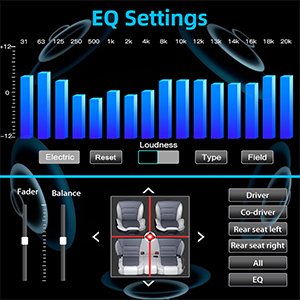
16-Band EQ DSP: Customize your audio experience with the built-in 16-band equalizer and Digital Signal Processor (DSP) to match various music styles.
USB Fast Charging & Data Read: Conveniently charge your devices and read data via the USB port.
FM/AM радиосу: Access your favorite radio stations with FM/AM tuner.
Руль башкаруусу: Compatible with steering wheel controls for safe and convenient operation while driving.
Пакеттин мазмуну
Төмөндө тизмеленген нерселердин баары пакетиңизде бар экенин текшериңиз:
PLZ MP-902 Double Din Car Stereo Unit
Алыстан башкаруу
Арткы View Камера
Камера кабели
Frame
Brackets (Mounting Hardware)
Бурамалар
Электр зымдары
User Manual
Image: Complete package contents for the PLZ MP-902 car stereo.
Орнотуу жана орнотуу
Before beginning installation, ensure your vehicle's dashboard opening is compatible with the standard double din size (173mm x 98mm). If not, a suitable dash kit or modification may be required. Professional installation is recommended.
1. Зымдарды туташтыруу
Connect the included wiring harness to your vehicle's existing wiring. Refer to the detailed wiring diagram provided in the user manual and on the product image for correct connections. Additional wire harness adapters or antenna adapters may be needed for specific car models.
Image: Standard size and wiring diagram for the MP-902 car stereo.
2. Камераны орнотуу
The MP-902 supports both front and rear view cameras. The included HD rear camera should be mounted at the rear of your vehicle. Connect the camera's video output to the 'R-CAM' input on the stereo and its power to your vehicle's reverse light circuit for automatic activation when shifting into reverse.
Image: Front and rear camera input setup, highlighting the included rear camera with night vision and wide viewбурч.
3. Физикалык орнотуу
Secure the stereo unit into the dashboard opening using the provided brackets and screws. Attach the frame for a clean, integrated look. Ensure all cables are properly routed and secured to prevent interference or damage.
Video: A demonstration of the PLZ MP-902 car stereo's functions, including a brief overview of its physical features and connections.
Иштөө нускамалары
The PLZ MP-902 features an intuitive touchscreen interface for easy navigation and control. Below are instructions for key functions.
1. Негизги навигация
From the main menu, tap on the desired icon to access functions such as Radio, Bluetooth, Phone Link, USB, Card, AV In, F-CAM (Front Camera), and Setup.
Image: Main menu interface of the MP-902.
2. Bluetooth байланышы
To connect your phone via Bluetooth 5.1, go to the 'BT' menu. Enable Bluetooth on your phone and search for 'MP-902'. Pair the devices. Once connected, you can make hands-free calls, access your phonebook, and stream audio. The dual microphone system ensures clear call quality.
Image: Bluetooth 5.1 interface for hands-free calling and music streaming.
3. Mirror Link (Phone Connectivity)
Select 'Phone Link' from the main menu. Connect your ISO or Android smartphone via a USB cable. Follow the on-screen prompts to enable screen mirroring. This allows you to display your phone's screen, including navigation apps and video content, directly on the stereo's display.
Image: Phone Mirror Link feature displaying a mirrored smartphone screen.
4. Audio Settings (16-Band EQ)
Access the 16-Band EQ settings from the 'EQ' icon. Adjust individual frequency bands to customize your audio output. You can also control fader and balance settings to optimize sound distribution within your vehicle.
Image: Detailed 16-Band EQ settings for audio customization.
5. Радио операциясы
Select 'Radio' from the main menu. You can manually tune to stations or use the auto-scan feature to find available FM/AM frequencies. Save your favorite stations as presets for quick access.
Image: FM/AM Radio interface.
6. Рулду башкаруу (SWC)
If your vehicle supports steering wheel controls, you can configure them in the 'Setup' menu under 'Steering Wheel Setup'. This allows you to control volume, track changes, and other functions directly from your steering wheel.
To ensure the longevity and optimal performance of your PLZ MP-902 car stereo, follow these maintenance guidelines:
Экранды тазалоо: Сенсордук экранды акырын сүртүү үчүн жумшак, түксүз чүпүрөктү колдонуңуз. өжөр тактар үчүн, бир аз гampчүпүрөккө суу же экранды тазалоочу каражат. Абразивдүү материалдардан же катуу химиялык заттардан алыс болуңуз.
Жалпы тазалоо: Агрегатты чаңдан жана таштандыдан алыс кармаңыз. Баскычтарды жана желдеткичтерди тазалоо үчүн жумшак щетка же кысылган абаны колдонуңуз.
Программалык камсыздоо жаңыртуулары: Мезгил-мезгили менен өндүрүүчүнүн текшерүү website or contact customer support for any available software updates. Updates can improve performance, add features, or fix bugs. Follow update instructions carefully.
Ашыкча температурадан сактаныңыз: Do not expose the unit to extreme heat or cold for prolonged periods, as this can affect electronic components.
Проблемаларды чечүү
If you encounter issues with your PLZ MP-902, refer to the following common troubleshooting steps:
Көйгөй
Мүмкүн себеп
Чечим
Күч жок
Loose wiring, blown fuse, vehicle power issue.
Check power and ground connections. Inspect vehicle's fuse box and the stereo's inline fuse. Ensure ignition is on.
Үн жок
Динамиктин зымдары туура эмес, үнү өтө төмөн, үнсүз режим иштетилген, аудио булагы туура эмес.
Verify speaker connections. Increase volume. Check if mute is active. Select the correct audio source (e.g., Radio, BT, USB).
Bluetooth туташпай жатат
Bluetooth not enabled on phone/stereo, device not in pairing mode, interference.
Ensure Bluetooth is on for both devices. Put stereo in pairing mode. Delete previous pairings on phone and retry. Move closer to the unit.
Mirror Link иштебей жатат
Incorrect USB cable, phone settings, app compatibility.
Use a high-quality USB cable. Ensure phone's USB debugging or mirroring settings are enabled. Some apps may restrict mirroring due to copyright.
Арткы камеранын сүрөтү көрүнбөйт
Incorrect camera wiring, reverse trigger wire not connected, faulty camera.
Check camera video input and power connections. Ensure the reverse trigger wire is correctly connected to the vehicle's reverse light.
If these steps do not resolve the issue, please contact PLZ customer support for further assistance.
Техникалык шарттар
Өзгөчөлүк
Деталь
Модель номери
МП-902
Screen Size
7 дюйм
Экран түрү
Full HD Capacitive Touchscreen
Bluetooth версиясы
5.1
Аудио эквалайзер
16-Band EQ DSP
Байланыш
Bluetooth, көмөкчү, USB
Supported Video Playback
1080P
Продукциянын өлчөмдөрү
3.26"D x 7"W x 3.93"H (8.28 x 17.78 x 9.98 см)
Элемент Салмагы
2.51 фунт (1.14 кг)
Камера кошулган
HD Rear Camera with Night Vision (170° ultra-wide viewбурч)
Кепилдик жана колдоо
PLZ is committed to providing high-quality products and excellent customer service. For any warranty claims, technical support, or inquiries regarding your MP-902 car stereo, please contact PLZ customer support directly. Refer to the contact information provided with your product packaging or visit the official PLZ webжардам үчүн сайт.
Many common issues can be resolved by referring to the troubleshooting section of this manual or by checking for the latest software updates from PLZ.
PLZ Portable Car Play Screen Колдонуучунун колдонмосу: Орнотуу жана туташуу колдонмосу Apple CarPlay, Android Auto, AirPlay жана Android Cast үчүн орнотуу жана туташуу жол-жоболорун деталдуу камтыган PLZ Portable Car Play Screen үчүн комплекстүү колдонуучу колдонмосу. Смартфонду кемчиликсиз интеграциялоо менен айдоо тажрыйбаңызды өркүндөтүңүз.
NAGAOKA MP Series Stereo Cartridge Operation Manual NAGAOKA MP Series стерео картридждери үчүн комплекстүү эксплуатациялоо боюнча колдонмо, деталдарды орнотуу, калемди алмаштыруу, спецификациялар, колдонууда сактык чаралары жана MP-500, MP-300, MP-200, MP-150 жана MP-110 моделдери үчүн кепилдик маалыматы.
P.L.Z MP-900 Mirror-Link Instruction Manual Instruction manual for the P.L.Z MP-900 Mirror-Link system, detailing Phonelink setup for Android and iPhone, Bluetooth pairing, app installation, and troubleshooting steps.