1. Киришүү
Сатып алганыңыз үчүн рахматasing the KEPLUG Sunrise Alarm Clock. This device is designed to enhance your waking and sleeping experience with its unique features, including sunrise and sunset simulations, dual alarms, FM radio, and various natural sounds. Please read this manual carefully to ensure proper use and optimal performance.
Пакеттин мазмуну:
- 1 x KEPLUG Sunrise Alarm Clock
- 1 x Micro USB кабели
- 1 x Дубал адаптери
- 1 x User Manual
2. Продукт бүтүп калдыview
Familiarize yourself with the main components and controls of your KEPLUG Sunrise Alarm Clock.

Сүрөт 2.1: Фронт view of the KEPLUG Sunrise Alarm Clock, showing the digital time display and the illuminated light panel. The clock face is round with a white base.
Башкаруу баскычтары жана порттор:
Refer to the diagram below for button identification (exact button layout may vary slightly by model, but functions are consistent).
- Убакытты орнотуу баскычы: Убакытты орнотуу режимине кирүү үчүн колдонулат.
- Ойготкуч 1 баскычы: Used to set and activate Alarm 1.
- Ойготкуч 2 баскычы: Used to set and activate Alarm 2.
- FM Radio Button: Activates and controls FM radio functions.
- Жарык баскычы: Controls the light brightness and color modes.
- Үн +/- баскычтары: Үндүн үнүн тууралайт.
- Өйдө/ылдый баскычтары: Менюларды багыттоо жана маанилерди тууралоо.
- Snooze/Sleep Aid Button: Activates snooze during an alarm or sleep aid function.
- USB кубаттоо порту: Тышкы түзмөктөрдү кубаттоо үчүн.
- Микро USB кубат киргизүү: Кубат адаптерине туташат.
3. Орнотуу
3.1 Кубат туташтыруу
- Connect the micro USB cable to the power input port on the back of the alarm clock.
- Дубал адаптерин стандарттуу электр розеткасына сайыңыз.
- Дисплей күйүп, түзмөктүн күйүп турганын көрсөтөт.
The clock includes a built-in backup battery to retain settings during power outagбайланыштардын үзүлүшү же байланыш үзүлүшү.
3.2 Убакытты коюу
- басыңыз Убакытты орнотуу баскычы (often represented by a clock icon). The hour display will start flashing.
- колдонуу Өйдө / ылдый баскычтар саатты тууралоо үчүн.
- басыңыз Убакытты орнотуу баскычы again to confirm the hour and move to minute setting. The minute display will flash.
- колдонуу Өйдө / ылдый баскычтар мүнөтүн тууралоо үчүн.
- басыңыз Убакытты орнотуу баскычы a third time to confirm the minutes.
- 12 сааттык жана 24 сааттык форматтын ортосунда которулуу үчүн, басыңыз Өйдө / ылдый баскычтар while the time is flashing during setup, or refer to the specific instructions in your manual for a dedicated time format button.
3.3 Time Display Brightness
The time display offers three brightness settings: High, Low, and Off. This can typically be adjusted by repeatedly pressing a dedicated display brightness button or by holding the Time Setting button. Refer to your specific model's instructions for exact control.
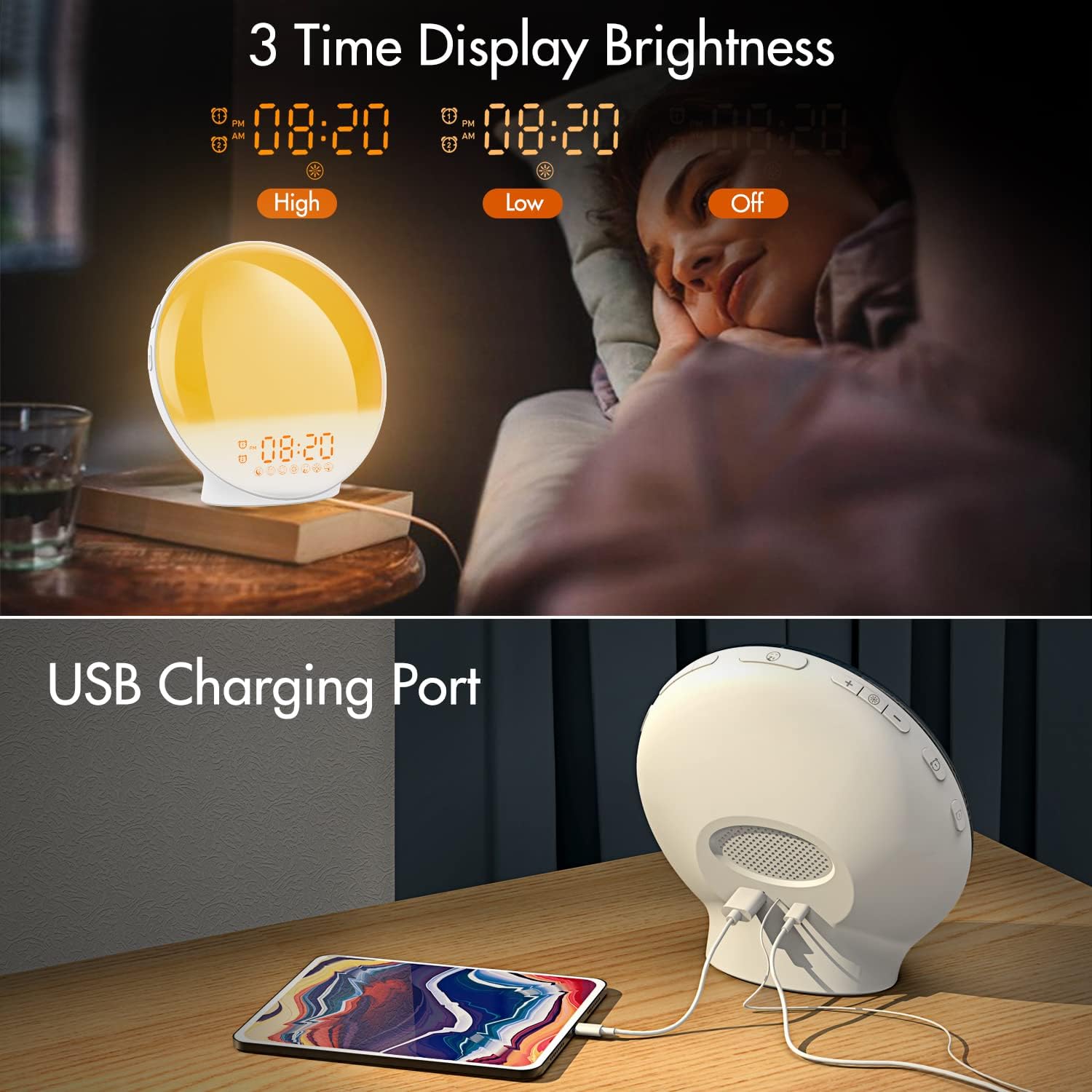
Сүрөт 3.1: Illustration of the three time display brightness options: High, Low, and Off, allowing users to customize visibility for different times of day or night.
4. Иштөө нускамалары
4.1 Ойготкучтарды орнотуу (ойготкуч 1 & Ойготкуч 2)
The clock features two independent alarms, allowing for separate wake-up times (e.g., weekday and weekend).

Сүрөт 4.1: Depiction of the dual alarm functionality, allowing users to set different alarms for weekdays and weekends, along with the snooze feature.
- басыңыз Ойготкуч 1 баскычы (же Ойготкуч 2 баскычы) to activate and enter alarm setting mode. The alarm time will flash.
- колдонуу Өйдө / ылдый баскычтар каалаган ойготкуч саатын коюуга.
- басыңыз Ойготкуч баскычы again to confirm the hour and set the minutes.
- колдонуу Өйдө / ылдый баскычтар каалаган ойготкуч мүнөттөрүн коюу үчүн.
- басыңыз Ойготкуч баскычы again to select the wake-up sound. Use Өйдө / ылдый баскычтар to cycle through 7 nature sounds or FM radio.
- басыңыз Ойготкуч баскычы again to set the volume level (1-16) for the alarm sound. Use Өйдө / ылдый баскычтар тууралоо.
- басыңыз Ойготкуч баскычы one last time to confirm all settings and activate the alarm. An alarm icon will appear on the display.
4.2 Тындыруу функциясы
When an alarm sounds, tap the Чакыруу баскычы (often the large button on top or front) to pause the alarm for 9 minutes. This can be repeated up to 5 times.
4.3 Күн чыгышын симуляциялоо
The sunrise simulation gradually brightens the light before your alarm time, mimicking a natural sunrise.

Сүрөт 4.2: Visual representation of the sunrise simulation feature, where the light intensifies gradually over a set period before the alarm, designed for a gentle wake-up.
- When setting an alarm, after selecting the sound and volume, you will typically be prompted to set the sunrise duration.
- колдонуу Өйдө / ылдый баскычтар to choose a duration between 10 to 60 minutes. The light will gradually increase from 0% to the set brightness level (0-20) during this period.
- The light color will transition from deep red to bright yellow, simulating a natural sunrise.
4.4 Sunset Simulation / Sleep Aid
The sunset simulation gradually dims the light and can play soothing sounds to help you fall asleep.

Сүрөт 4.3: Illustration of the sunset simulation, where the light gradually dims over a period of 10 to 120 minutes, accompanied by optional sleep sounds like rain, forest, river, or FM radio.
- басыңыз Snooze/Sleep Aid Button (or a dedicated Sleep Aid button) to activate the sleep aid function.
- колдонуу Өйдө / ылдый баскычтар to select a duration for the dimming process (10-120 minutes).
- You can also select a natural sound (Rain, Forest, River) or FM radio to play during this period.
- The light will gradually dim from 100% to 0% over the selected duration, and the sound will fade out.
4.5 FM радиосу
The built-in FM radio allows you to listen to your favorite stations or use them as an alarm sound.

Сүрөт 4.4: Бүттүview of the 7 available alarm sounds and the FM radio option, providing diverse choices for waking up.
- басыңыз FM радиосунун баскычы радиону күйгүзүү/өчүрүү.
- кармаңыз FM радиосунун баскычы to automatically scan and save available stations.
- колдонуу Өйдө / ылдый баскычтар to manually tune to a specific frequency or cycle through saved stations.
- Үнүн колдонуп, үнүн жөндөңүз Көлөм +/- Баскычтар.
4.6 Night Light / Color Light
The clock can function as a night light with various color options and adjustable brightness.

Сүрөт 4.5: Display of the 7 color atmosphere light options and 20 brightness levels, highlighting the clock's versatility as a mood light or reading lamp.
- басыңыз Жарык баскычы жарыкты күйгүзүү.
- басыңыз Жарык баскычы repeatedly to cycle through 7 static colors (e.g., Red, Green, Blue, Yellow, Indigo, Purple, White) or an automatic color-changing mode.
- колдонуу Өйдө / ылдый баскычтар to adjust the brightness level (0-20) of the selected color or white light.
- кармаңыз Жарык баскычы жарыкты өчүрүү.
4.7 USB кубаттоо порту
A 5V/2.4A USB port is located on the back of the device, allowing you to charge your smartphone or other small electronic devices.
Сүрөт 4.6: Арткы view of the alarm clock showing the USB charging port in use, connected to a tablet for charging.
5. Техникалык тейлөө
- Тазалоо: Аппаратты жумшак, кургак чүпүрөк менен сүртүңүз. Абразивдүү тазалагычтарды же эриткичтерди колдонбоңуз.
- Сактагыч: Аппаратты узак убакыт бою колдонбогондо салкын, кургак жерде сактаңыз.
- Күч: Always use the provided power adapter to prevent damage.
6. Кыйынчылыктарды
| Көйгөй | Мүмкүн себеп | Чечим |
|---|---|---|
| Саат күйбөй жатат. | Кубат адаптери туташкан эмес же туура эмес. | Ensure the power adapter is securely connected to both the clock and a working power outlet. Try a different outlet. |
| Ойготкуч угулбайт. | Ойготкуч иштетилген эмес же үнү өтө төмөн. | Check if the alarm icon is displayed. Re-set the alarm and ensure the volume is set to an audible level. |
| Күн чыгышын симуляциялоо иштебей жатат. | Sunrise duration not set during alarm setup. | Ensure you have set a sunrise duration (10-60 minutes) when configuring the alarm. |
| FM радиосу статикалык же начар кабыл алуу. | Сигналдын же антеннанын начар абалы. | Extend the antenna wire fully. Reposition the clock to improve reception. Perform an auto-scan for stations. |
| USB кубаттоо иштебей жатат. | Түзмөк шайкеш келбейт же кабель бузулган. | Ensure the device you are charging is compatible with 5V/2.4A USB charging. Try a different USB cable. |
7. Техникалык шарттар
- Бренд: KEPLUG
- Модел: B09FRY71NH
- Продукциянын өлчөмдөрү: 16 x 16 x 6.1 см
- Элемент Салмагы: 481 г
- Тtage: 5 вольт
- Кубат булагы: Battery Powered (with AC adapter)
- Дисплей түрү: Санарип
- Өзгөчөлүктөр: Charging Port, Dimmable Light, Sunrise/Sunset Simulation, Dual Alarm, FM Radio, Nature Sounds
- Биринчи жеткиликтүү болгон күнү: 12-ноябрь, 2021-жыл
8. Кепилдик жана колдоо
For warranty information or technical support, please refer to the contact details provided with your purchase documentation or visit the official KEPLUG webсайт. Сатып алганыңыздын далили катары сатып алуу дүмүрчөгүңүздү сактаңыз.