Introduction
This manual provides detailed instructions for the setup, operation, and maintenance of your beFree Sound 2.1 Channel Bluetooth Surround Sound Speaker System. Designed for a sophisticated look and smooth sound, this system offers versatile listening options including Bluetooth, USB, SD, and FM radio capabilities. Please read this manual thoroughly before using the product to ensure proper function and longevity.

Image: The beFree Sound 2.1 Channel Bluetooth Surround Sound Speaker System, featuring a central subwoofer with blue LED lighting, two satellite speakers, and a remote control. Icons for Bluetooth, SD, USB, and FM radio are displayed below.
Кутуда эмне бар
- One 5.25" Amplifier (Subwoofer)
- Two 3" Satellite Speakers
- Алыстан башкаруу
- 1 Audio Cable (RCA to 3.5mm)
- 1 FM антенна
Жайгашуу
1. Физикалык байланыш
- Place the Subwoofer: Position the subwoofer on a stable, flat surface, ideally near your audio source.
- Спутник динамиктерин туташтыруу: Connect the two satellite speakers to the corresponding output ports on the back of the subwoofer. Ensure a secure connection for optimal sound.
- Кубат туташуу: Plug the power cord from the subwoofer into a standard electrical outlet.
2. Аудио киргизүү байланыштары
The system supports multiple audio input methods:
- RCA киргизүү: Use the included audio cable (RCA to 3.5mm) to connect devices with RCA output (e.g., DVD player, TV) or 3.5mm output (e.g., smartphone, PC). Connect the red and white RCA plugs to the 'INPUT' ports on the subwoofer.
- USB Drive: Insert a USB flash drive into the USB port on the front panel of the subwoofer. The system will automatically detect and play compatible audio files.
- SD карта: Insert an SD card into the SD card slot on the front panel of the subwoofer. The system will automatically detect and play compatible audio files.
- FM антеннасы: Connect the FM antenna to the designated port on the back of the subwoofer for improved radio reception. Extend the antenna for best results.
3. Bluetooth Жупташтыруу
- Bluetooth режимин жандыруу: Press the 'SOURCE' button on the front panel or remote control until 'BT' appears on the display. The system will enter pairing mode, indicated by a flashing Bluetooth icon or indicator light.
- Түзмөгүңүздө Bluetooth иштетүү: On your smartphone, tablet, or other Bluetooth-enabled device, go to the Bluetooth settings and turn on Bluetooth.
- Select Speaker System: Издөө available devices and select "beFree Sound" or a similar name from the list.
- Жупташтыруу ырастоо: Once connected, the system will indicate successful pairing (e.g., a solid Bluetooth icon or a confirmation sound). You can now play audio from your device through the speaker system.
Иштөө нускамалары
1. Күйгүзүү/өчүрүү
Press the 'ST-BY/M' (Standby/Mode) button on the front panel or the power button on the remote control to turn the system on or off.
2. Selecting Input Mode
Press the 'SOURCE' button on the front panel or remote control repeatedly to cycle through available input modes: Bluetooth (BT), USB, SD, FM Radio, and AUX (Audio Input).
3. Үндү башкаруу
Adjust the master volume using the large rotary knob on the front panel of the subwoofer or the 'VOL+' and 'VOL-' buttons on the remote control.
4. FM радиосунун иштеши
- Авто сканерлөө: In FM mode, press and hold the 'PLAY/PAUSE' button on the remote or front panel to automatically scan and save available radio stations.
- Кол менен жөндөө: Use the 'PREV' and 'NEXT' buttons to manually tune to specific frequencies or navigate through saved stations.
5. USB/SD картаны ойнотуу
When a USB drive or SD card is inserted, the system will automatically switch to the respective mode and begin playback. Use the 'PLAY/PAUSE', 'PREV', and 'NEXT' buttons on the front panel or remote control to manage playback.
6. Алыстан башкаруу функциялары
The full-function remote control allows for convenient operation of all system features, including power, mode selection, volume, track control, FM tuning, and bass boost.
Өзгөчөлүктөрү
- 2.1 Channel Surround Sound Configuration
- Bluetooth Wireless Connectivity (Range: 10 Meters)
- USB and SD Card Inputs for direct media playback
- Integrated FM Radio
- Audio Input and Output options
- Enhanced Bass Boost Ported Design
- Illuminated Display with Front Panel Controls
- Толук функциялуу алыстан башкаруу
- Жыштык жообу: 40Hz-20KHz
- Signal-to-Noise Ratio (S/N Ratio): >75dB
- Бөлүнүү: >50дБ
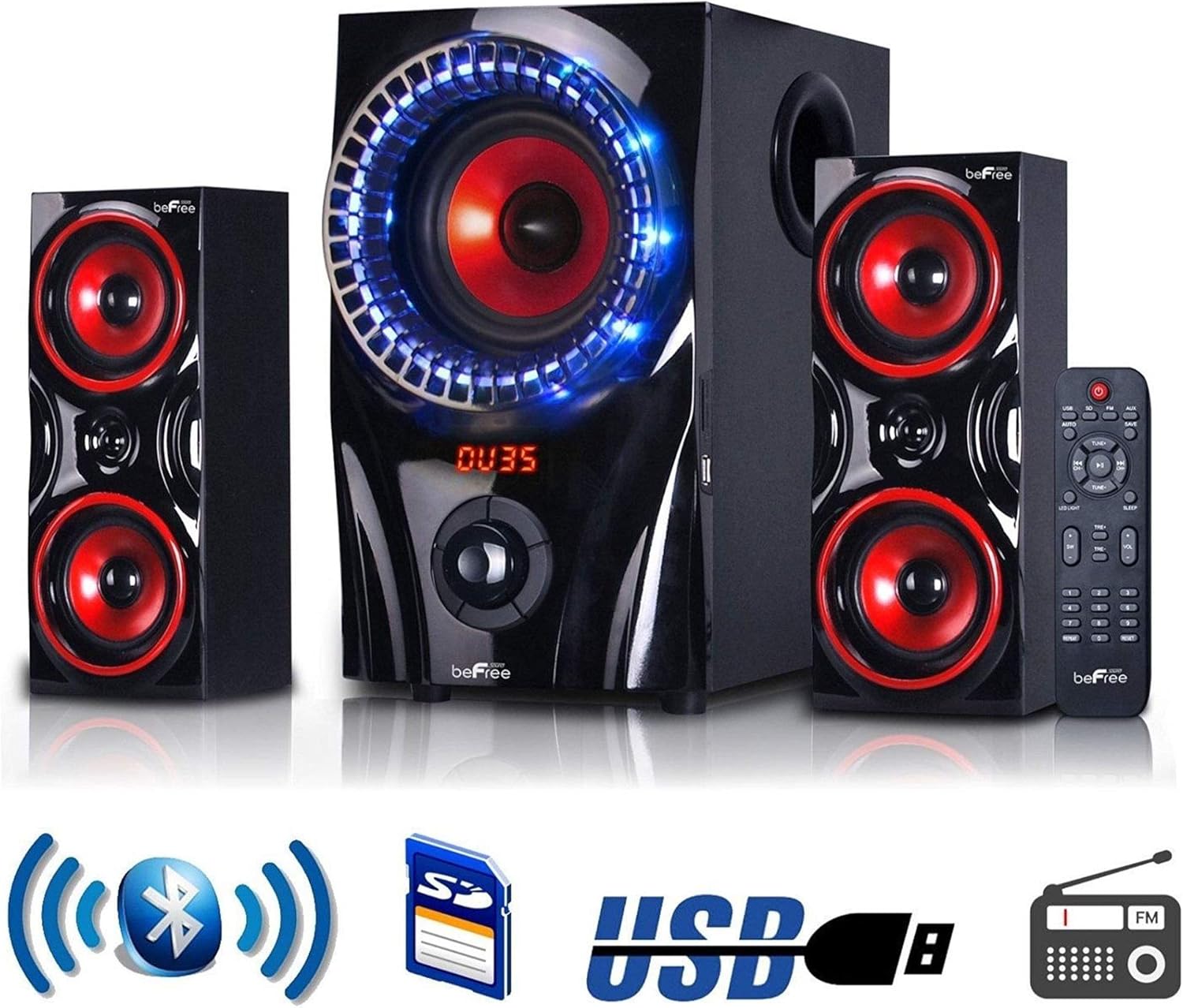
Image: The beFree Sound 2.1 Channel Bluetooth Surround Sound Speaker System, highlighting its connectivity options including Bluetooth, SD card, USB, and FM radio.
Техникалык шарттар
| Модель аты | BFS-2.1 көлөмдүү үн динамик системасы |
| Бренд | beFree Sound |
| Динамик түрү | Surround Sound |
| Көлөмдүү үн каналынын конфигурациясы | 2.1 |
| Байланыш технологиясы | Bluetooth, USB |
| Зымсыз байланыш технологиясы | Bluetooth |
| Bluetooth диапазону | 10 метр |
| Сабвуфердин диаметри | 5.25 дюйм |
| Speaker Size (Satellite) | 3 дюйм |
| Динамиктин максималдуу чыгаруу күчү | 60 Ватт |
| Frequency Response | 40Гц-20КГц |
| Ызы-чуунун катышы | >75дБ |
| Бөлүнүү | >50дБ |
| Power Source | Электр зымдары |
| Башкаруу ыкмасы | Алыстан |
| Продукциянын өлчөмдөрү | 13.22"D x 13.22"W x 13"H |
| Элемент Салмагы | 18.46 фунт (8.39 килограмм) |
| UPC | 840191201196 |
Техникалык тейлөө
- Тазалоо: Use a soft, dry cloth to clean the exterior surfaces of the speakers and subwoofer. Do not use liquid cleaners or abrasive materials.
- Вентиляция: Ensure that the subwoofer and speakers have adequate ventilation. Do not block any ventilation openings.
- Жайгашкан жери: Системаны күндүн нуру түз тийген жерге, жылуулук булактарынын жанына же нымдуулугу жогору же чаңдуу жерлерге койбоңуз.
- Өчүрүү: Always turn off and unplug the system before cleaning or if it will be unused for an extended period.
Проблемаларды чечүү
- Кубат жок: Check if the power cord is securely plugged into both the subwoofer and the electrical outlet. Ensure the outlet is functional.
- Үн жок:
- Verify the system is powered on and the volume is turned up.
- Ensure the correct input mode (Bluetooth, USB, SD, FM, AUX) is selected.
- Бардык аудио кабелдерди коопсуз туташуу үчүн текшериңиз.
- If using Bluetooth, ensure your device is paired and connected.
- Bluetooth туташпай жатат:
- Make sure the speaker system is in Bluetooth pairing mode.
- Түзмөгүңүздүн Bluetooth функциясы күйгүзүлгөнүн жана анын иштөө аралыгы 10 метр экенин текшериңиз.
- Түзмөктү жупташып, кайра жупташып көрүңүз.
- Динамик системасын жана Bluetooth түзмөгүңүздү өчүрүп-күйгүзүңүз.
- FM кабыл алуу начар: Extend and adjust the position of the FM antenna. Try moving the system to a different location.
- USB/SD Card Not Playing: Ensure the USB drive or SD card is inserted correctly and contains compatible audio files (e.g., MP3). Try a different USB drive or SD card.
Кепилдик жана колдоо
This beFree Sound speaker system comes with a Limited Warranty. Please refer to the warranty card included with your product for specific terms and conditions. For technical support or warranty claims, please contact beFree Sound customer service through their official webпродукт сатылып алынган сайт же сатуучу.


