Introduction
This manual provides essential information for the installation, operation, and maintenance of your Intel® Core™ i7-12700KF Desktop Processor. Designed for high performance, this processor is built with Intel's performance hybrid architecture, offering exceptional capabilities for gaming, content creation, and demanding applications.

Figure 1: Intel Core i7-12700KF Processor Retail Packaging. This image shows the blue and white retail box for the Intel Core i7 processor, indicating it is a 12th Gen unlocked model.
Продукт бүттүview
The Intel® Core™ i7-12700KF is a 12th Generation Intel Core processor featuring 12 cores (8 Performance-cores and 4 Efficient-cores) and a maximum turbo frequency of up to 5.0 GHz. It is designed for the LGA1700 socket and is compatible with Intel 600 and 700 series chipset-based motherboards. This 'KF' variant requires a discrete graphics card as it does not include integrated graphics.
- Гибриддик архитектуранын натыйжалуулугу: Combines Performance-cores and Efficient-cores to optimize performance for gaming, productivity, and content creation.
- Кулпусу ачылган мультипликатор: Жогорку өндүрүмдүүлүккө жетүү үчүн оверлокингге мүмкүндүк берет (шайкеш келген энелик платаны жана муздатууну талап кылат).
- LGA1700 розеткасы: Designed for the latest Intel motherboards.
- Дискреттик графика талап кылынат: This processor does not have integrated graphics.
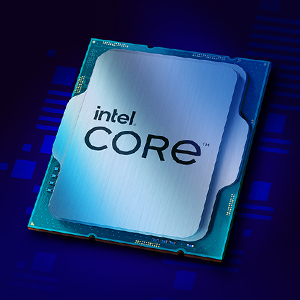
Figure 2: Close-up of the Intel Core i7 Processor Chip. This image displays the metallic surface of the Intel Core processor, highlighting its intricate design.
Орнотуу жана орнотуу
Proper installation is crucial for optimal performance and longevity of your processor. Always handle the processor by its edges to avoid touching the gold contacts or the top surface.
Баштоодон мурун:
- Ensure your motherboard has an LGA1700 socket and is compatible with 12th Gen Intel Core processors (600 or 700 series chipset).
- Acquire a compatible CPU cooler (not included with KF series processors).
- Gather necessary tools: Phillips head screwdriver, thermal paste (if not pre-applied to cooler).
- Work in a static-free environment. Use an anti-static wrist strap.
Орнотуу кадамдары:
- Motherboard даярдоо: Open the CPU socket retention lever on your motherboard.
- Процессорду орнотуу: Carefully align the triangular marker on the processor with the corresponding marker on the socket. Gently place the processor into the socket without forcing it.
- Коопсуз процессор: Процессорду ордуна бекитүү үчүн кармоо рычагын жабыңыз.
- Термикалык пастаны колдонуу: Apply a small amount of thermal paste to the center of the processor's integrated heat spreader (IHS) if your cooler does not have it pre-applied.
- CPU Cooler орнотуу: Mount your chosen CPU cooler according to its manufacturer's instructions, ensuring even pressure distribution.
- Муздаткыч желдеткичти туташтырыңыз: CPU муздаткычынын желдеткич кабелин энелик платадагы көрсөтүлгөн CPU_FAN колонкасына туташтырыңыз.
For detailed visual instructions, refer to your motherboard's user manual or Intel's official installation guides available on their support webсайт.
Иштетүү жөнүндө ойлор
Once installed, the Intel Core i7-12700KF processor will operate automatically with your system's operating system. Key operating considerations include:
- BIOS/UEFI Орнотуулары: Ensure your motherboard's BIOS/UEFI is updated to the latest version for optimal compatibility and performance. Verify that XMP (Extreme Memory Profile) is enabled for your RAM if applicable.
- Драйверди орнотуу: Энелик платаңыздын өндүрүүчүсүнөн эң акыркы чипсет драйверлерин орнотуңуз website or Intel's official support page.
- Муздатуу: Monitor CPU temperatures, especially during heavy loads (gaming, video editing). Adequate cooling is essential to prevent thermal throttling and ensure stable performance.
- Оверлокинг (милдеттүү эмес): The 'KF' designation indicates an unlocked multiplier, allowing for overclocking. This should only be attempted by experienced users with robust cooling solutions. Refer to Intel's official guidelines and third-party resources for safe overclocking practices.

3-сүрөт: Мисample of a high-performance desktop setup utilizing an Intel Core processor. This image illustrates a multi-monitor workstation configured for gaming, streaming, and content creation, demonstrating the processor's capability to handle demanding tasks.
Техникалык тейлөө
Processors generally require minimal maintenance. However, periodic checks can help ensure long-term stability and performance.
- Чаңды тазалоо: Regularly clean dust from your CPU cooler and case fans to maintain optimal airflow and cooling efficiency. Use compressed air for best results.
- Термикалык пастаны кайра колдонуу: If you notice consistently high temperatures, consider reapplying thermal paste every few years or if you remove and reinstall your CPU cooler.
- Программалык камсыздоо жаңыртуулары: Keep your operating system, motherboard BIOS/UEFI, and chipset drivers updated to benefit from performance improvements and security patches.
Проблемаларды чечүү
Эгерде сиз процессоруңузда көйгөйлөргө туш болсоңуз, анда төмөнкү көйгөйлөрдү чечүү кадамдарын карап көрүңүз:
- Дисплей/жүктөө маселелери жок:
- Ensure your discrete graphics card is properly seated and powered.
- Бардык кубат кабелдеринин (24-пиндүү ATX, 8-пиндүү CPU) энелик платага бекем туташтырылганын текшериңиз.
- RAM модулдарын кайра орнотуңуз.
- CMOSту тунук кылыңыз (энелик платанын колдонмосун караңыз).
- Системанын туруксуздугу/бузуулар:
- Check CPU temperatures using monitoring software. High temperatures can cause instability.
- RAM көйгөйлөрүн текшерүү үчүн эс диагностикалык куралдарын иштетиңиз.
- Энергия менен камсыздоо блогуңузда (PSU) жетиштүү ват бар экенин текшериңизtagбардык компоненттер үчүн e.
- If overclocked, revert to default settings to rule out instability from overclocks.
- Начар аткаруу:
- Verify CPU is running at expected clock speeds (check with CPU-Z or similar tools).
- Ensure background applications are not consuming excessive resources.
- Check for thermal throttling (CPU reducing speed due to high temperatures).
For further assistance, consult Intel's official support resources or your motherboard manufacturer's support.
Техникалык шарттар
| Өзгөчөлүк | Деталь |
|---|---|
| Процессордун модели | Intel Core i7-12700KF |
| Жалпы өзөктөр | 12 (8 Performance-cores + 4 Efficient-cores) |
| Total Threads | 20 |
| Max Turbo Frequency | 5.0 ГГц чейин |
| Процессордун базалык жыштыгы | 3.6 ГГц |
| Кэш | 25 МБ Intel® Smart кэш |
| L2 кэш | 12 MB |
| TDP | 125 Вт |
| Сокет колдоого алынат | LGA1700 |
| Чипсеттин шайкештиги | Intel 600 сериясы, Intel 700 сериясы |
| Интегралдык графика | Жок (Дискреттик графика талап кылынат) |
| Memory Support | DDR5 up to 4800 MT/s, DDR4 up to 3200 MT/s |
| PCI Express кайра кароо | 5.0 жана 4.0 |
| Продукциянын өлчөмдөрү | 4.57 x 1.73 x 3.98 дюйм |
| Элемент Салмагы | 1.76 унция |
Кепилдик жана колдоо
Intel processors typically come with a limited warranty. For specific warranty terms and conditions, please refer to the official Intel website or the documentation included with your processor. Warranty coverage usually applies to defects in materials and workmanship under normal use.
Техникалык колдоо:
For technical assistance, driver downloads, and compatibility information, visit the official Intel Support webсайт:
You can also find compatible motherboards and other related information using the Intel Product Compatibility Tool: Intel продуктысынын шайкештик куралы


