1. Киришүү
The Milestone MPT-II is a compact and portable 58mm thermal printer designed for various business applications, including retail, restaurants, and mobile logistics. It offers high-speed, clear printing and features Bluetooth connectivity for seamless integration with Android and iOS devices. Its lightweight design and long-lasting battery make it ideal for on-the-go printing needs.

2. Негизги өзгөчөлүктөрү
- Bluetooth басып чыгаруу: Supports Android and iOS devices for wireless printing.
- Көчүрүү мүмкүнчүлүгү: Light and compact design allows for printing anywhere, anytime.
- Low Operating Cost: Direct thermal printing eliminates the need for ink ribbons or cartridges, requiring only thermal paper.
- Батареянын узак иштөө мөөнөтү: Built-in 7.4V/2500mAh rechargeable lithium battery provides up to 4 hours of continuous printing.
- Versatile Interface: Equipped with both USB and Bluetooth connectivity.
- ESC/POS шайкеш келет: Supports standard ESC/POS print commands for broad software compatibility.

3. Баштапкы орнотуу
3.1 Кутудан чыгаруу жана Мазмуну
Carefully unpack the printer and verify all components are present:
- 1 x Milestone MPT-II Thermal Printer
- 1 x USB кабели
- 1 x USB Adaptor
- 1 х кагаз түрмөк
- 1 х Колдонуучунун колдонмосу (бул документ)
3.2 Принтерди заряддоо
- Connect the USB cable to the printer's charging port.
- Plug the USB adaptor into a standard power outlet.
- The charging indicator light will illuminate. Charge the printer fully before first use (approximately 2.5-3 hours for continuous printing).
3.3 Термикалык кагазды жүктөө
- Кагаз бөлүмүнүн капкагын акырын басып ачыңыз.
- Insert the thermal paper roll with the printing side facing outwards (as shown in Figure 2). Ensure the roll is seated correctly.
- Pull a small length of paper out beyond the cutting edge.
- Кагаз бөлүкчөсүнүн капкагын чыкылдагыча бекем жабыңыз.
4. Иштөө нускамалары
4.1 Күйгүзүү/өчүрүү
- Күйгүзүү үчүн: Күйгүзүү баскычын индикатор жарыгы күйгөнгө чейин басып туруңуз.
- Өчүрүү үчүн: Индикатор жарыгы өчкөнгө чейин кубат баскычын басып, кармап туруңуз.
4.2 Bluetooth байланышы
The MPT-II printer supports Bluetooth connectivity for mobile devices.
- Принтер күйгүзүлүп турганын жана мобилдик түзмөгүңүзгө жетүү мүмкүнчүлүгүнүн аралыгында экенин текшериңиз.
- On your mobile device (Android/iOS), go to Bluetooth settings and turn Bluetooth on.
- Издөө available devices. The printer will appear as "MPT-II".
- Select "MPT-II" to pair. If prompted for a password, enter 1234 or 0000.
- Жупташтырылгандан кийин, принтер шайкеш келген тиркемелер менен колдонууга даяр болот.
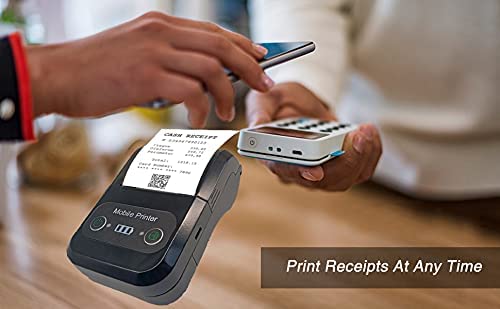
4.3 Тиркемелер менен колдонуу
For mobile printing, you will need a compatible application. Milestone recommends downloading RAWBT Printer App or MYXPrint App from the Google Play Store. For iOS, search for compatible thermal printer apps in the App Store.
- Тандалган басып чыгаруу тиркемесин ачыңыз.
- Navigate to the printer settings within the app.
- Select the "MPT-II" printer from the list of available Bluetooth devices.
- You can now send print commands from the application.
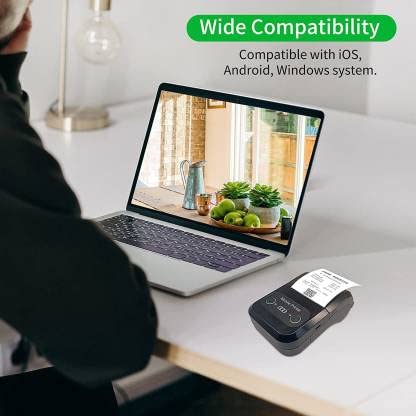

4.4 USB Connection (for PC)
The printer can also be connected to a PC via USB. You may need to install a printer driver, which is typically available from the manufacturer's website or included on a CD with the product (if applicable).
5. Техникалык тейлөө
5.1 Принтерди тазалоо
To ensure optimal performance and print quality, regularly clean the printer:
- Басма башчысы: Кебезди жеңил колдонуңуз dampened with isopropyl alcohol to gently wipe the thermal print head. Allow it to dry completely before use.
- Кагаз жолу: Use a soft, dry cloth or a small brush to remove any paper dust or debris from the paper path.
- Сырткы: Принтердин сыртын жумшак менен сүртүңүз, damp кездеме. Катуу химиялык заттарды же абразивдүү тазалагычтарды колдонуудан алыс болуңуз.
5.2 Батареяга кам көрүү
- Биринчи жолу колдонуудан мурун батарейканы толук кубаттаңыз.
- Батареяны бат-баттан толук түгөтүп коюудан алыс болуңуз.
- If storing the printer for an extended period, charge it to about 50% and recharge every few months to prevent battery degradation.
6. Кыйынчылыктарды
| Көйгөй | Мүмкүн себеп | Чечим |
|---|---|---|
| Принтер күйбөй жатат. | Батарея аз же түгөнүп калган. | Charge the printer using the provided USB cable and adaptor. |
| Bluetooth аркылуу туташуу мүмкүн эмес. | Bluetooth is off on device; incorrect pairing password; printer not discoverable. | Ensure Bluetooth is enabled on your device. Re-attempt pairing with password 1234 or 0000. Restart both printer and device. |
| No print output or blank paper. | Кагаз туура эмес жүктөлгөн; кагаз түгөнүп калган; басып чыгаруу башы кир. | Check paper orientation (printing side out). Replace paper roll if empty. Clean the thermal print head (refer to Maintenance section). |
| Басып чыгаруунун сапаты начар (өчүп кеткен, сызыктар). | Print head dirty; low battery; poor quality thermal paper. | Clean the print head. Charge the printer fully. Use high-quality thermal paper. |
| Printer beeps continuously. | Paper alarm (out of paper or paper jam); low battery reminder. | Check and replace paper roll or clear jam. Charge the printer. |
7. Техникалык шарттар
| Өзгөчөлүк | Спецификация |
|---|---|
| Басып чыгаруу ыкмасы | Термикалык линия басып чыгаруу |
| Printing Width | Paper width 58mm, effective width 58mm |
| Басып чыгаруу тыгыздыгы | 576 чекит/сызык |
| Резолюция | 8 dots/mm, 203 DPI |
| Басып чыгаруу ылдамдыгы | 70mm/s (Max Print speed Monochrome: 50 ppm) |
| Printer Core Life | 50KM (25% print density or less than 100 million pulses) |
| Printable Content | English, numbers, symbols, characters, pictures, 1D/2D barcode, multi-languages |
| Маалымат байланыш интерфейси | USB / Bluetooth |
| Электр камсыздоо | Machine charging 9V-1.5A |
| Батарея | Built-in rechargeable 2600mAh lithium-ion battery (7.4V/2500mAh) |
| Үзгүлтүксүз басып чыгаруу убактысы | 2.5-3 саат |
| Instruction Set | ESC / POS шайкеш келет |
| Кагаз кесүү | Manually tear |
| Операциялык системанын шайкештиги | Android, iOS, Windows |
| Продукциянын өлчөмдөрү | 15D x 12W x 6H Сантиметр |
| Элемент Салмагы | 310 грамм |
| Камтылган компоненттер | 1 x Thermal Printer, 1 x USB Cable, 1 x USB Adaptor, 1 x Paper Roll, 1 x User Manual |
8. Кепилдик жана колдоо
This product comes with a 10-day warranty as per the purchase terms. For any technical assistance, troubleshooting beyond this manual, or warranty claims, please contact your retailer or the manufacturer's customer support. Refer to your purchase documentation for specific contact details.
Өндүрүүчү: Мезгил
Импорттоочу: SB RETAILS, SECTOR 28, PRADHIKARAN, PUNE-44, +918888881631


