1. Коопсуздук маалыматы
Чогултуудан жана колдонуудан мурун бардык көрсөтмөлөрдү кунт коюп окуп чыгыңыз. Бул көрсөтмөлөрдү аткарбоо жаракат алууга же продуктунун бузулушуна алып келиши мүмкүн. Бул колдонмону келечекте колдонуу үчүн сактап коюңуз.
- This desk requires assembly. Ensure all components are correctly installed before use.
- The maximum weight capacity for this desk is 220 pounds (100 kg). Do not exceed this limit.
- When adjusting the desk height, ensure there are no obstructions above or below the desk that could interfere with its movement.
- Иш учурунда балдарды жана үй жаныбарларын столдон алыс кармаңыз.
- Do not attempt to manually force the desk up or down. Use only the electric control panel.
- Ensure the power cord is properly connected and routed to prevent tripping hazards or damage.
- Оптималдуу туруктуулук үчүн, столдун тегиз жерге коюлганын текшериңиз.
Important Note: When using the LED control panel to adjust height, the three height keys must be pressed and held continuously until the desired height is reached.
2. Пакеттин мазмуну
Монтаждоону баштоодон мурун бардык компоненттер бар экендигин текшериңиз. Эгерде кандайдыр бир бөлүктөрү жок же бузулуп калса, кардарларды колдоо менен байланышыңыз.
- Desktop (71"x32" Black Top)
- Үстөлдүн алкагы (Кара алкак)
- 4 Буттар
- Башкаруу панели
- Кубаттуу адаптер жана кабель
- Монтаждоочу жабдык (буроолор, болттар ж.б.)
- Instruction Manual
3. Монтаждоо боюнча нускамалар
Assembly typically requires two people. Please follow these steps carefully. A power drill may be helpful for some steps, but is not strictly required.
- Компоненттерди таңгактан чыгаруу: Таңгактан кылдаттык менен бардык бөлүктөрүн алып салыңыз жана чийилип калбаш үчүн таза, жумшак бетке жаткызыңыз.
- Буттарды рамкага бекитүү: Securely attach the four legs to the desk frame using the provided hardware. Ensure all connections are tight.
- Install Desktop: Place the desktop upside down on a soft surface. Carefully align the assembled frame with the pre-drilled holes on the underside of the desktop. Secure the frame to the desktop using the appropriate screws.
- Тоо башкаруу панели: Attach the LED control panel to the underside of the desktop, typically on the front edge, using the provided screws.
- Кабелдерди туташтыруу: Connect the motor cables from the legs to the control box. Connect the control panel cable to the control box. Finally, connect the power adapter to the control box and plug it into a power outlet. Ensure all cables are neatly managed to avoid interference with desk movement.
- Баштапкы орнотуу: Once assembled, carefully flip the desk upright. Perform an initial height calibration by pressing and holding the 'Down' button until the desk reaches its lowest point, then release. The desk is now ready for operation.

Figure 3.1: Fully assembled FLEXISPOT 4 Leg Standing Desk.
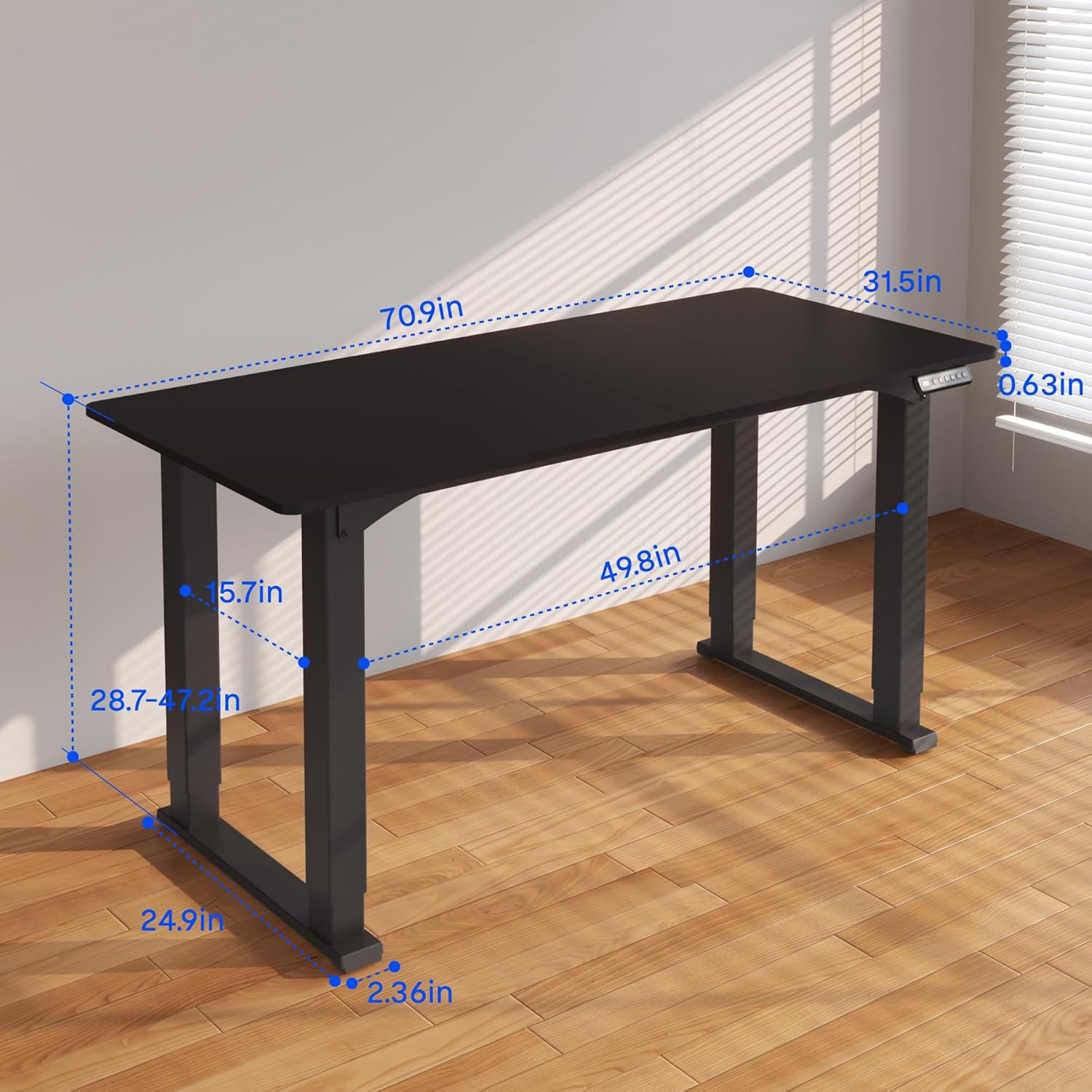
Figure 3.2: Detailed dimensions of the desk, including height range and desktop size.
4. Иштөө нускамалары
The FLEXISPOT 4 Leg Standing Desk features an intuitive LED control panel for easy height adjustments and memory settings.
4.1. Control Panel Overview

Figure 4.1: Digital Keypad with memory functions and up/down controls.
- Өйдө/Төмөн жебелери (▲ / ▼): Press and hold to adjust the desk height upwards or downwards. The current height is displayed on the LED screen.
- Memory Buttons (1, 2, 3): These buttons allow you to save and recall preferred height settings.
- Эстутумду орнотуу баскычы (M): Used to program a height into a memory slot.
4.2. Бийиктикти тууралоо
To adjust the desk height, press and hold the ▲ (Up) or ▼ (Down) arrow button until the desk reaches your desired position. The desk will move smoothly between 28.7 inches and 47.2 inches.
4.3. Saving Memory Presets
You can save up to three preferred height settings for quick recall:
- Өйдө/Төмөн жебелери аркылуу үстөлдү каалаган бийиктикке тууралаңыз.
- 'M' баскычын басыңыз. LED дисплейде 'S-' көрсөтүлөт.
- Within 3 seconds, press one of the memory buttons (1, 2, or 3). The LED display will show 'S-1', 'S-2', or 'S-3' to confirm the setting has been saved.
4.4. Эстутумдун алдын ала орнотууларын кайра чакырып алуу
To move the desk to a saved height, press and кармоо the corresponding memory button (1, 2, or 3) until the desk reaches the programmed height.
4.5. Кагылышууга каршы система
The desk is equipped with an anti-collision system to prevent damage. If the desk encounters an obstruction during movement, it will stop and reverse slightly. Remove the obstruction before resuming operation.

Figure 4.2: Anti-collision system in action, preventing damage from obstructions.
5. Техникалык тейлөө
Regular maintenance ensures the longevity and smooth operation of your standing desk.
- Тазалоо: Иш тактасын жана алкакты жумшак менен сүртүңүз, гamp кездеме. Катуу химиялык заттардан же абразивдүү тазалагычтардан алыс болуңуз.
- Кабелдик башкаруу: Кабелдердин чаташкан жерлерин алдын алуу жана алардын столдун кыймылына тоскоол болбошу үчүн мезгил-мезгили менен текшерип, иретке келтирип туруңуз.
- Бекер текшерүү: Бардык бурамаларды жана болттордун бекем турганын текшерүү үчүн мезгил-мезгили менен текшерип туруңуз. Зарыл болсо, кайра бекемдеңиз.
- Мотор багуу: The electric motors are maintenance-free. Do not attempt to lubricate or disassemble them.
6. Кыйынчылыктарды
Үстөлүңүздө көйгөйлөргө туш болсоңуз, төмөнкү жалпы көйгөйлөрдү жана чечимдерди караңыз:
- Үстөл кыймылдабайт:
- Кубат шнуру столдун үстүнө да, розеткага да бекем сайылганын текшериңиз.
- Бардык мотор кабелдеринин башкаруу кутучасына туура туташтырылганын текшериңиз.
- Perform a reset: Press and hold the 'Down' button until the desk reaches its lowest point and slightly retracts, then release.
- Тегиз эмес кыймыл же солкулдатуу:
- Столдун тегиз жерде турганын текшериңиз. Зарыл болсо, тегиздөөчү буттарды тууралаңыз.
- Check that all assembly screws and bolts are tightened securely.
- Verify that the weight on the desk does not exceed the maximum capacity of 220 lbs and is evenly distributed.
- Дисплейдеги ката коддору:
- If an error code appears, try performing a reset as described above.
- If the error persists, disconnect power for 10 minutes, then reconnect and try again.
- Өндүрүүчүдөн кеңеш алыңыз website or contact customer support with the specific error code.
- Эстутум алдын ала орнотуулары иштебейт:
- Ensure you are pressing and кармоо the memory button until the desk reaches the saved height.
- Re-program the memory presets if they are not recalling correctly.
Эгерде бул кадамдар маселени чечпесе, кошумча жардам алуу үчүн FLEXISPOT кардарларды колдоо бөлүмүнө кайрылыңыз.
7. Техникалык шарттар
| Өзгөчөлүк | Спецификация |
|---|---|
| Бренд | FLEXISPOT |
| Модель номери | QS2B-1880-AU |
| Иш тактасынын көлөмү | 71"D x 32"W (approx. 180.3cm x 81.3cm) |
| Жөнгө салынуучу бийиктик диапазону | 28.7" to 47.2" (approx. 72.9cm to 119.9cm) |
| Максималдуу Салмак сыйымдуулугу | 220 фунт (100 кг) |
| Frame Material | Металл |
| Top Material | Жыгач |
| Түс | Кара рамка жана кара топ |
| Башкаруу түрү | LED Digital Keypad with Memory Presets |
| Өзгөчөлүктөр | 4-Leg Design, Anti-Collision System, Corded Operation |
| Ассамблея талап кылынат | Ооба |
8. Кепилдик жана колдоо
FLEXISPOT сиздин тынчтыгыңыз үчүн ар тараптуу кепилдикти камсыз кылат:
- 5 жылдык кепилдик: Covers the desk frame and motor components.
- 2 жылдык кепилдик: Covers the control panel and other electronic parts.
For warranty claims, technical support, or any questions regarding your FLEXISPOT product, please visit the official FLEXISPOT website or contact their customer service department. Please have your model number (QS2B-1880-AU) and proof of purchase available when contacting support.


