1. Продукт бүтүп калдыview
The URMET 1068 anti-intrusion system is an ideal solution for implementing medium and small-sized anti-intrusion installations. It features a minimalist design combined with advanced technology, making it easily scalable to meet the needs of residential markets. This system can be managed both locally and remotely using mobile devices such as smartphones and tablets. It is a flexible system that communicates with wireless devices and supports IP (Ethernet and Wi-Fi), GSM, and PSTN communication vectors. It includes a dedicated user application (URMET SECURE APP) and an installer application (1068set APP) for system configuration and management.
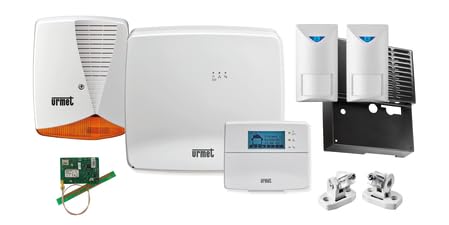
1-сүрөт: Components of the URMET 1068/906 Home Professional Anti-Intrusion Kit. This image displays the main control unit, LCD keypad, IP/Wi-Fi interface, dual-technology sensors, GSM communicator, self-powered outdoor siren, and siren protection grille.
2. Компоненттер камтылган
The URMET 1068/906 kit typically includes the following components:
- 1 x Management Control Unit (Code 1068/005)
- 1 x LCD Keypad (Code 1068/021)
- 1 x IP/Wi-Fi Interface (Code 1068/013)
- 3 x Dual Technology Sensors (Code 1033/132)
- 1 x GSM Telephone Communicator with integrated voice synthesis (Code 1068/458)
- 1 x Self-powered Outdoor Siren (Code 1033/414)
- 1 x Protection Grille for the Siren (Code 1033/417)
3. Орнотуу колдонмосу
The URMET 1068 system is designed for hybrid installation, suitable for both professional setup and advanced DIY users. Proper installation is crucial for optimal performance and security.
3.1 Initial System Placement
- Башкаруу бирдиги: Install the main control unit (1068/005) in a secure, central location within the premises, away from direct sunlight and moisture. Ensure it has access to power and communication lines.
- Баскычтоп: Place the LCD keypad (1068/021) near an entry/exit point for easy arming and disarming.
- Сенсорлор: Strategically position the dual-technology sensors (1033/132) to cover vulnerable areas such as entry points, hallways, and rooms. Consider line of sight and potential obstructions.
- Сирена: Mount the self-powered outdoor siren (1033/414) in a visible, elevated location to maximize sound propagation and deter intruders. Ensure the protection grille (1033/417) is securely attached.
3.2 Кубат жана байланыш
- Электр камсыздоо: Connect the control unit to a stable power source. Ensure backup battery installation for uninterrupted operation during power outages.
- IP/Wi-Fi Interface: Connect the 1068/013 interface to your local network via Ethernet or configure it for Wi-Fi connectivity. This enables remote management and notifications.
- GSM Communicator: Insert a valid SIM card into the GSM telephone communicator (1068/458) to enable SMS and voice call notifications. Ensure good GSM signal strength.
- PSTN Connection: If utilizing PSTN, connect the system to a landline telephone jack.
3.3 System Configuration (Installer APP)
For initial setup and advanced configuration, the installer (or advanced user) should use the URMET 1068set APP. This application allows for:
- Device pairing and zone assignment.
- Setting up communication parameters (IP, Wi-Fi, GSM, PSTN).
- Configuring user codes and access levels.
- Customizing alarm responses and notification settings.
- Performing system diagnostics and firmware updates.
Refer to the detailed installer manual for specific steps on using the 1068set APP.
4. Иштөө нускамалары
The URMET 1068 system offers flexible control options, primarily through the dedicated user application and the LCD keypad.
4.1 URMET SECURE APP (User APP)
жүктөп алып, орнотуңуз URMET SECURE APP on your smartphone or tablet. This app provides comprehensive control over your anti-intrusion system:
- Куралдантуу/Карсыздандыруу: Easily arm or disarm the system remotely, or set specific zones to be armed/disarmed.
- Статус мониторинги: View the current status of your system, including armed/disarmed state, sensor activity, and power status.
- Эскертмелер: Receive push notifications, voice messages, emails, and SMS alerts in case of an alarm event or system status change.
- Окуялар журналы: Access a history of system events, including arming/disarming times, alarm triggers, and sensor activations.
- Түзмөктү башкаруу: Manage connected devices, view their status, and perform basic configurations.
4.2 LCD Keypad Operation
The LCD keypad (1068/021) provides local control and visual feedback:
- Куралдандыруу: Enter your user code and press the arm button to fully arm the system.
- Куралсыздандыруу: Enter your user code and press the disarm button to disarm the system.
- Partial Arming: Use specific codes or button combinations for partial arming (e.g., night mode, perimeter only).
- Статус дисплей: The LCD screen displays system status, zone information, and event messages.
- Паника баскычы: The keypad may include a dedicated panic button for immediate alarm activation in emergencies.
4.3 Alarm Alerts
Upon detection of an intrusion, the system triggers audio and motion alerts. The outdoor siren will activate, and notifications will be sent via the configured communication channels (push, voice, email, SMS) to designated contacts.
5. Техникалык тейлөө
Regular maintenance ensures the longevity and reliability of your URMET anti-intrusion system.
- Батареяны текшерүү: Periodically check the backup batteries in the control unit and any wireless sensors. Replace batteries as recommended by the manufacturer or when low battery alerts are received.
- Сенсор тазалоо: Gently clean the lenses of motion sensors and other detectors with a soft, dry cloth to prevent false alarms caused by dust or debris.
- Системалык тест: Perform a full system test at least once a month. Arm the system and trigger each sensor individually to ensure they are functioning correctly and that alarms are being transmitted.
- Программалык камсыздоо жаңыртуулары: Keep the URMET SECURE APP and the system firmware updated to the latest versions to benefit from new features, security enhancements, and bug fixes.
- Физикалык текшерүү: Inspect all wiring and connections for any signs of wear or damage. Ensure all components are securely mounted.
- Сирена текшерүү: Verify the outdoor siren's functionality during a system test. Ensure it is free from obstructions and its sound output is clear.
6. Кыйынчылыктарды
This section provides solutions to common issues you might encounter with your URMET 1068 system.
| Көйгөй | Мүмкүн себеп | Чечим |
|---|---|---|
| System not arming | A zone is open (e.g., door/window ajar), low battery in a sensor, system fault. | Check all doors and windows. Verify sensor status on the keypad or app. Check battery levels. Consult the event log for specific fault messages. |
| Жалган коңгуроо | Improper sensor placement, pets, drafts, dust on sensors, faulty sensor. | Ensure sensors are mounted correctly and not affected by environmental factors. Clean sensor lenses. If persistent, contact a professional installer. |
| No remote access via APP | Internet connectivity issues, incorrect IP/Wi-Fi interface configuration, server issues. | Check your home internet connection. Verify the IP/Wi-Fi interface (1068/013) is powered and connected. Restart your router and the interface. Ensure the app is updated. |
| No GSM notifications | No SIM card, expired SIM, poor GSM signal, incorrect communicator configuration. | Ensure a valid, active SIM card is inserted. Check GSM signal strength. Verify recipient numbers are correctly configured in the 1068/458 communicator settings via the installer app. |
| Баскычтоп жооп бербейт | Power issue, loose connection, keypad fault. | Check power to the control unit. Ensure the keypad cable is securely connected. If the issue persists, contact technical support. |
For issues not covered here, or for complex technical problems, it is recommended to contact URMET technical support or a certified installer.
7. Техникалык шарттар
| Өзгөчөлүк | Деталь |
|---|---|
| Бренд | Урмет |
| Модель номери | 1068 |
| Power Source | Батарея менен иштейт |
| Шайкеш түзмөктөр | Смартфон, Планшет |
| Байланыш технологиясы | Wired and Wireless (IP, Wi-Fi, GSM, PSTN) |
| Орнотуу түрү | Hybrid (Professional and DIY) |
| Эскертүү түрү | Аудио жана кыймыл |
| Башкаруу ыкмасы | Application (URMET SECURE APP, 1068set APP) |
| Сунушталган продукт колдонуу | Интрузиядан коргоо |
| Sensor Technology | Dual Technology |
| Dimensions (Base x Height x Depth) | 323 мм x 280 мм x 435 мм |
| Пакеттин саны | 1 комплект |
8. Кепилдик жана колдоо
Information regarding spare parts availability is not directly provided. For specific warranty terms and conditions, please refer to the documentation included with your purchase or contact your point of sale.
8.1 Техникалык колдоо
For technical assistance, installation guidance, or troubleshooting beyond the scope of this manual, please contact URMET customer support or a certified URMET installer.
You can typically find contact information on the official URMET webсайт же продукт сатуучу аркылуу.


