1. Продукт бүтүп калдыview
The Anderic OEM NSRCFNA21 Smart Remote is an original equipment manufacturer (OEM) replacement remote control specifically designed for various Insignia TV models. This remote provides seamless functionality and user-friendly operation, ensuring reliable control over your television.
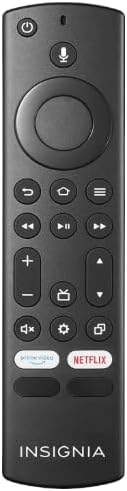
Сүрөт 1.1: The Anderic OEM NSRCFNA21 Smart Remote. This image displays the front view of the black remote control, featuring various buttons for power, voice control, navigation, volume, channel, and dedicated streaming service buttons.
Негизги өзгөчөлүктөр төмөнкүлөрдү камтыйт:
- Original Quality: An authentic OEM product, ensuring performance and reliability comparable to the remote originally supplied with your TV.
- Колдонуучуга ыңгайлуу дизайн: Intuitive buttons and controls for easy navigation, volume adjustment, channel changes, and access to various TV functions.
- Ишенимдүү аткаруу: Provides a stable and responsive connection for accurate command execution.
2. Орнотуу жана жупташтыруу боюнча нускамалар
To ensure proper functionality, the remote control must be paired with your Insignia TV. Follow these steps carefully:
- Сыналгыны баштапкы абалга келтирүү: Unplug your Insignia TV from its power source. Wait for approximately 30 seconds.
- Power On TV: Plug the TV back into the power source and turn it on. Allow the TV to fully boot up.
- Жупташтыруу: Once the TV has completely booted up and is displaying content, press and hold the Үй button on the Anderic NSRCFNA21 remote control for up to 30 seconds.
- Remote Update (if prompted): Your TV may display a message indicating that the remote needs an update. If prompted, allow the TV to proceed with the update. This process may take 1 to 3 minutes to complete.
- Текшерүү: After the update (if any) and pairing process, test the remote's functions (e.g., volume, channel, navigation) to confirm successful pairing.
If the remote does not pair after following these steps, repeat the process or refer to the troubleshooting section.
3. Пультту иштетүү
The Anderic NSRCFNA21 remote control features an intuitive layout for easy operation of your Insignia TV. Below are the general functions of the primary buttons:
- Кубат баскычы: Телевизорду күйгүзөт же өчүрөт.
- Үн менен башкаруу баскычы: Activates voice commands for searching content or controlling the TV.
- Navigation Pad (Directional Buttons and Select): Менюларда жылдыруу жана элементтерди тандоо үчүн колдонулат.
- Үй баскычы: Returns to the TV's main home screen.
- Артка баскычы: Мурунку экранга же менюга кайтат.
- Menu/Options Button: Accesses additional menu options or settings.
- Үнүн жогорулатуу/төмөндөтүү: Телевизордун аудио үнүн тууралайт.
- Канал өйдө/төмөн: Телеканалдарды өзгөртөт.
- Үнсүз баскычы: Телевизордун үнүн өчүрөт же кайра күйгүзөт.
- Орнотуулар баскычы: Телевизордун жөндөөлөр менюсун ачат.
- Киргизүү/Булак баскычы: Changes the TV's input source (e.g., HDMI 1, HDMI 2).
- Dedicated Streaming Service Buttons: Provides quick access to popular streaming applications (e.g., Amazon Prime Video, Netflix).
4. Шайкештик
The Anderic OEM NSRCFNA21 Smart Remote is compatible with the following Insignia TV models:
- NS24DF310NA21
- NS39DF310NA21
- NS50DF710NA21
- NS55DF710NA21
This remote also replaces the following models:
- NSRCFNA19 Rev B Fire
- NSRCFNA19revB
- NSRCFNA21 Fire
- NSRCFNA21 Rev E
- NSRCFNA21-Rev-E
Ensure your TV model is listed above for optimal performance.
5. Техникалык тейлөө
Proper maintenance can extend the life and functionality of your remote control.
- Батареяны алмаштыруу: The remote requires two AAA batteries. Replace batteries when the remote's responsiveness decreases or it stops functioning. Ensure correct polarity when inserting new batteries.
- Тазалоо: Use a soft, dry cloth to clean the remote's surface. Avoid using liquid cleaners or abrasive materials, as these can damage the remote.
- Сактагыч: Пультту кургак жерде, өтө жогорку температурадан жана түз күн нурунан алыс сактаңыз.
6. Кыйынчылыктарды
If you encounter issues with your Anderic NSRCFNA21 Smart Remote, try the following troubleshooting steps:
- Алыстан жооп бербейт:
- Check the batteries. Replace them with fresh AAA batteries, ensuring correct polarity.
- Пульт менен сыналгынын сенсорунун ортосунда эч кандай тоскоолдук жок экенин текшериңиз.
- 2-бөлүмдө сүрөттөлгөндөй жупташтыруу процессин кайра аракет кылыңыз.
- Үзгүлтүктүү функция:
- This could indicate low battery power. Replace the batteries.
- Ensure you are within the effective range of the TV's sensor.
- Pairing Fails:
- Confirm your TV model is listed in the compatibility section (Section 4).
- Ensure the TV is fully booted up before attempting to hold the Home button.
- Try unplugging the TV for a longer period (e.g., 1-2 minutes) before plugging it back in and re-attempting pairing.
If problems persist after attempting these steps, contact customer support for further assistance.
7. Техникалык шарттар
| Бренд | Андерик |
| Модель номери | NSRCFNA21 Rev B |
| Шайкеш түзмөктөр | Insignia Televisions |
| Power Source | 2 AAA батарейка (талап кылынат) |
| Элемент Салмагы | 1.76 унция |
| Пакеттин өлчөмдөрү | 6.3 x 2.95 x 0.67 дюйм |
| Түс | Кара |
| Өндүрүүчү | Дэндин электроника жана башкалар компаниясы |
8. Кепилдик жана колдоо
For warranty information or technical support, please contact the manufacturer, Anderic (Dan's Electronics Etc., Inc.). Refer to the product packaging or the official Anderic webбайланыш маалыматтары жана кепилдик шарттары үчүн сайтты караңыз.
кире аласыз Amazon'догу Андерик дүкөнү көбүрөөк маалымат алуу үчүн.


