1. Продукт бүтүп калдыview
The Philips T4506 True Wireless Headphones offer an immersive audio experience with Active Noise Canceling (ANC) technology. Designed for comfort and durability, these headphones feature intuitive touch controls, an Awareness Mode, and an IPX4 water-resistant rating. Enjoy extended listening with up to 24 hours of playtime, supported by a portable USB-C charging case.

Image: Philips T4506 True Wireless Headphones in teal, shown inside their open charging case. The earbuds are nestled in their respective slots, and the case lid is open, revealing product information on the inside.
2. Орнотуу жана биринчи колдонуу
2.1. Кутуда эмне бар
- Philips T4506 True Wireless Headphones (Left and Right earbuds)
- Портативдик кубаттоочу куту
- USB-C заряддоо кабели
- Eartips (3 sizes: Small, Medium, Large)
- Ыкчам баштоо колдонмосу (бул колдонмодо камтылган эмес)

Image: A black USB-C charging cable is coiled next to three pairs of teal silicone eartips of varying sizes, representing the included accessories.
2.2. Баштапкы заряддоо
- Кулакчындардын экөөнү тең зарядкага салыңыз.
- Connect the USB-C charging cable to the port on the charging case and the other end to a USB power source.
- Allow the earbuds and case to fully charge before first use. Charging indicators on the case will provide status. A 15-minute charge provides approximately 1 hour of playback.
2.3. Bluetooth түзмөгү менен жупташуу
- Кулакчындардын заряддалганын жана кубаттоочу кутуга салынганын текшериңиз.
- Заряддоо кутучасын ачыңыз. Кулакчындар жупташтыруу режимине автоматтык түрдө кирет.
- On your Bluetooth device (smartphone, tablet, laptop), go to Bluetooth settings and enable Bluetooth.
- Select "Philips T4506" from the list of available devices.
- Туташкандан кийин үн билдирүүсү ийгиликтүү жупташтырууну ырастайт.
Эскертүү: The headphones are ready to pair the moment you open the charging case after initial setup.
2.4. Кулакчындарды орнотуу
- Select the appropriate size of silicone ear-tips for a secure and comfortable fit. A snug fit is crucial for optimal sound quality and Active Noise Canceling performance.
- Ар бир кулакчынды кулак каналыңызга акырын киргизиңиз.
- Twist slightly to ensure a secure and comfortable seal.
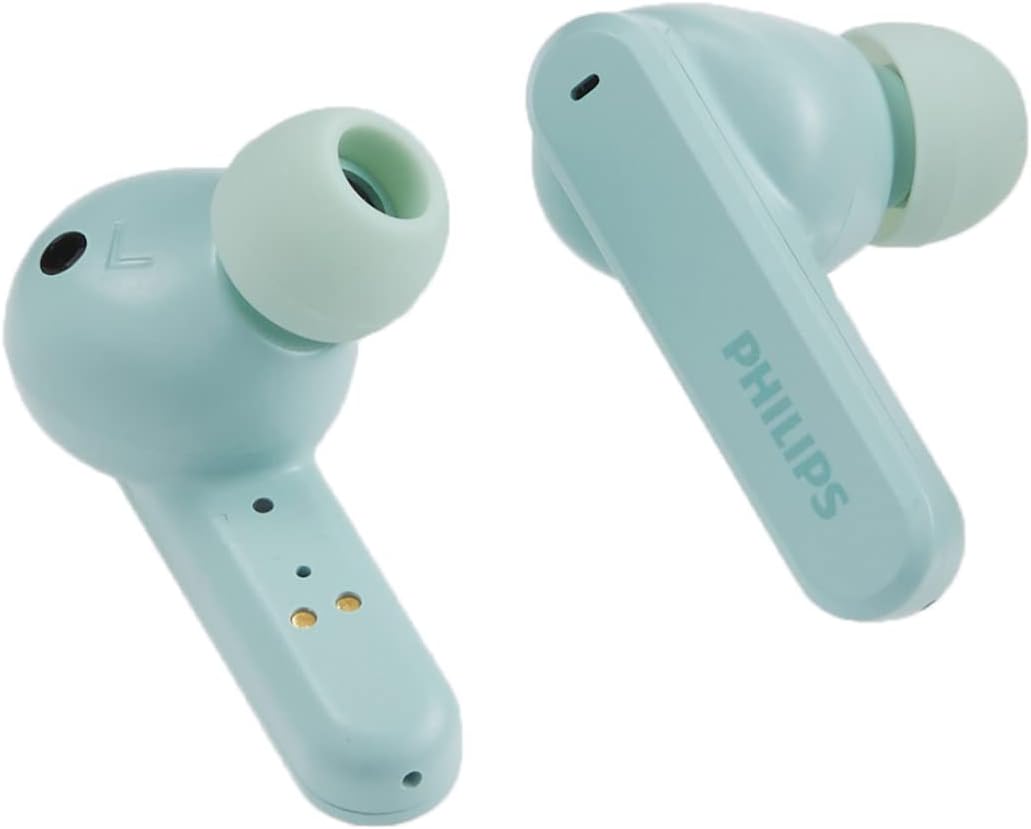
Сүрөт: жакын план view of a single teal Philips T4506 earbud, emphasizing the soft silicone ear tip designed for a comfortable and secure fit.
3. Иштөө нускамалары
3.1. Башкаруу элементтерине тийүү
The Philips T4506 headphones feature intuitive touch controls on each earbud for managing audio playback, calls, and voice assistant activation.
| Функция | Акция |
|---|---|
| Музыканы ойнотуу/тындыруу | Кулакчындарды бир жолу таптаңыз |
| Кийинки трек | Оң кулакчынды эки жолу таптаңыз |
| Мурунку трек | Сол кулакчынды эки жолу таптаңыз |
| Чалууга жооп берүү/аяктоо | Кулакчындарды бир жолу таптаңыз |
| Чакырууну четке кагуу | Кулакчындардын бирин басып, кармап туруңуз |
| Үн жардамчысын жандырыңыз | Кулакчындарды үч жолу таптаңыз |
3.2. Active Noise Canceling (ANC) and Awareness Mode
- Активдүү ызы-чууну жокко чыгаруу (ANC): Internal microphones filter out unwanted ambient sound, providing a focused listening experience.
- Маалымдоо режими: Allows you to hear your surroundings without removing the earbuds, useful for safety or conversations.
- Которуу режимдери: Refer to the quick start guide or product packaging for specific touch control gestures to switch between ANC, Awareness Mode, and standard listening.

Image: The front of the Philips T4506 headphones box, visually emphasizing the Active Noise Canceling and Touch Control functionalities.
3.3. Mono Mode and Auto-Pause
- Моно режими: Use a single earbud for calls or music while the other charges. The microphone is automatically assigned to the earbud in use.
- Автоматтык тындыруу: Music playback will automatically pause when you remove either earbud from your ear and resume when re-inserted.

Image: Both teal Philips T4506 earbuds are shown outside their charging case, with a clear view of their charging contacts, illustrating their readiness for use or charging.
4. Кароо жана тейлөө
4.1. Тазалоо
- Regularly clean the earbuds, especially the ear-tips and charging contacts, with a soft, dry, lint-free cloth.
- Абразивдүү тазалагычтарды, спиртти же химиялык эриткичтерди колдонбоңуз.
- Нымдуулуктун эч кандай тешиктерге кирбегенин текшериңиз.
4.2. Сууга туруктуулук (IPX4)
The Philips T4506 headphones have an IPX4 rating, meaning they are resistant to splashing water from any direction. This makes them suitable for workouts and light rain. However, they are not designed for submersion in water or exposure to pressurized water jets.
- Кулакчындарды атайылап сууга салбаңыз.
- Эгерде алар суу болуп калса, аларды кубаттоочу кутуга кайра салуудан мурун жакшылап кургатып сүртүңүз.

Image: The back of the Philips T4506 headphones box, illustrating key features such as IPX4 water resistance and Awareness Mode, alongside battery life information.
4.3. Сактоо
- Колдонулбаганда, кулакчындарды коргоо жана кубаттоо үчүн кубаттоочу кутучага сактаңыз.
- Кутучаны жана кулакчындарды салкын, кургак жерде, өтө жогорку температурадан жана түз күн нурунан алыс сактаңыз.

Image: The teal Philips T4506 earbuds are displayed alongside their matching closed charging case, showcasing their compact and portable design.
5. Кыйынчылыктарды
If you encounter issues with your Philips T4506 headphones, refer to the following common solutions:
5.1. Earbuds Not Charging
- Ensure the charging case is charged. Connect it to a power source using the USB-C cable.
- Verify that the earbuds are correctly seated in the charging case and that the charging contacts on both the earbuds and the case are clean and free of debris.
- Try cleaning the charging contacts with a dry cotton swab.
5.2. Cannot Pair with Device
- Make sure Bluetooth is enabled on your device and the earbuds are in pairing mode (open the charging case).
- Ensure the earbuds are not already connected to another device. Disconnect them from any previously paired devices.
- Түзмөгүңүздө Bluetooth'ду өчүрүп, кайра күйгүзүп көрүңүз.
- If the issue persists, try resetting the earbuds (refer to the full product manual for specific reset instructions, if available).
5.3. Low Sound Quality or Intermittent Connection
- Ensure the ear-tips provide a secure seal in your ear canal. Try different sizes if necessary.
- Check for obstructions or debris in the earbud speakers.
- Ensure your device is within the 10-meter Bluetooth range and there are no significant obstacles between the earbuds and your device.
- Fully charge both the earbuds and the charging case.
6. Техникалык шарттар
| Өзгөчөлүк | Деталь |
|---|---|
| Модель аты | T4506 |
| Noise Control | Активдүү ызы-чууну жокко чыгаруу |
| Байланыш технологиясы | Bluetooth 5.0 |
| Зымсыз диапазон | 10 метр |
| Аудио драйверинин өлчөмү | 10 mm Neodymium Drivers |
| Батареянын иштөө мөөнөтү (наушник) | 6 саатка чейин |
| Жалпы ойноо убактысы (Кеп менен) | 24 саатка чейин |
| Тез кубаттоо | 1 саат ойнотуу үчүн 15 мүнөт кубаттоо |
| Заряддоо интерфейси | USB-C |
| Суу каршылык | IPX4 (чачылышына туруктуу) |
| Башкаруу ыкмасы | Тийүү, Үн |
| Камтылган компоненттер | USB-C cable, Eartips (3 sizes) |
| Элемент Салмагы | 4.8 унция (жалпы) |
| UPC | 840063201989 |
7. Кепилдик жана колдоо
Philips products are manufactured to the highest standards and are designed to deliver high-quality performance. For detailed warranty information, please refer to the warranty card included with your product or visit the official Philips support webсайт.
For further assistance, technical support, or to register your product, please visit the Philips колдоо Webсайт.
8. Продукт видеосу
Видео: Продукциянын расмий көргөзмөсүasing the Philips T4506 True Wireless Headphones, highlighting their features and design. This video provides a visual overview of the product's functionality and aesthetics.


