1. Киришүү
This manual provides detailed instructions for the installation, operation, and maintenance of your EONON GA2190K 10.1-inch Android 10 Car Navigation System. Please read this manual thoroughly before using the product to ensure proper functionality and safety.

Figure 1: EONON GA2190K Car Navigation System
2. Негизги өзгөчөлүктөрү
- Жогорку өндүрүмдүү процессор: Equipped with an advanced 8-core CPU, 4GB RAM, and 64GB ROM for smooth operation and ample сактагыч.
- Өркүндөтүлгөн байланыш: Built-in 4G module and Wi-Fi support for internet access, plus Bluetooth 5.0 for faster data transfer and hands-free communication.
- Смартфон интеграциясы: Compatible with wired Apple CarPlay and wired Android Auto for seamless smartphone connectivity.
- чагылдыруу функциясы: Supports both wireless and wired mirroring for iPhone and Android smartphones via the 'EasyConnection' app.
- Жогорку дисплей: 10.1-inch IPS touch panel with 1024x600 resolution, offering clear visuals from any angle and a customizable UI.
- Жакшыртылган аудио: Built-in DSP (Digital Sound Field Processing) with a 48-band graphic equalizer and 8 EQ modes for a personalized audio experience.
- Мультимедиа ойнотуу: Integrated DVD player and RCA output for full-screen sharing to external monitors.
- Expandable Functions: Supports offline navigation with a dedicated map card, TV viewing with an external digital tuner, AHD backup cameras, OBD2 diagnostics, and drive recorders.
3. Продукт бүтүп калдыview жана компоненттер
3.1 Негизги түзүлүштүн өзгөчөлүктөрү

Figure 2: ашыкview of GA2190K's main features including 4G, AHD camera support, 8-core CPU, 4GB RAM, 64GB ROM, 10.1-inch IPS display, Android 10, iPhone connectivity, DSP, unique UI, and built-in CD/DVD player.
3.2 Кошумча жабдуулар

Figure 3: Standard accessories included with the GA2190K unit. These typically include GPS antenna, power cable, AV cables, microphone, USB cables, 4G antenna, backup camera input, 10A fuse, mounting screws, and disassembly tools.
4. Орнотуу жана орнотуу
Proper installation is crucial for the optimal performance of your EONON GA2190K. It is recommended that installation be performed by a qualified professional.
4.1 General Installation Guide (for similar models)
Video 1: This video demonstrates the installation process for the IAH10D 10.1-inch car navigation system, which shares similar installation principles with the GA2190K. It covers mounting the unit into a double DIN opening.
Video 2: This video illustrates the panel removal and installation method for the UX7SKJ-PRO-MAX, which can be helpful for understanding general panel handling for EONON units.
Video 3: This video demonstrates the front panel removal and installation method for the UX6SKJ-PRO-MAX, providing general guidance for similar EONON units.
4.2 Panel Assembly and Disassembly
The display panel is detachable from the main unit. Follow these steps for proper handling:
- Align the display panel with the main unit, ensuring the connectors are properly oriented.
- Gently push the panel onto the main unit until it clicks into place.
- To remove, simultaneously press the safety switches on both sides inwards and lift the panel upwards.
- Carefully disconnect the ribbon cable by pushing the clips inwards and pulling the cable downwards.
Video 4: This video demonstrates the process of attaching and detaching the display panel from the main unit, including handling the ribbon cable.
5. Иштөө нускамалары
5.1 Android 10 System Overview
The GA2190K runs on a powerful Android 10 system, offering a smooth and responsive user experience. You can install various applications from the Google Play Store.

Figure 4: Android 10 interface and iPhone connection capabilities.
5.2 Connectivity (Wi-Fi, 4G SIM, Bluetooth)
Stay connected on the go with multiple options:
- Wi-Fi: Connect to a Wi-Fi hotspot from your smartphone for internet access.
- 4G SIM: Directly insert a 4G SIM card into the unit for independent internet connectivity (check regional frequency band compatibility).
- Bluetooth 5.0: Enjoy hands-free calling and high-quality audio streaming from your smartphone.

Figure 5: Visual representation of Wi-Fi, 4G, Bluetooth 5.0, and mirroring functionalities.
5.3 CarPlay жана Android Auto
Integrate your smartphone for a safer and more convenient driving experience:
- Wired Apple CarPlay: Connect your iPhone (iPhone 5 or later) to access navigation, make calls, send messages, and play music via Siri voice control or the touch screen.
- Зымдуу Android Auto: Connect your Android smartphone (requires EONON A0585 USB dongle, sold separately) to use Google Assistant, navigation, and media apps.
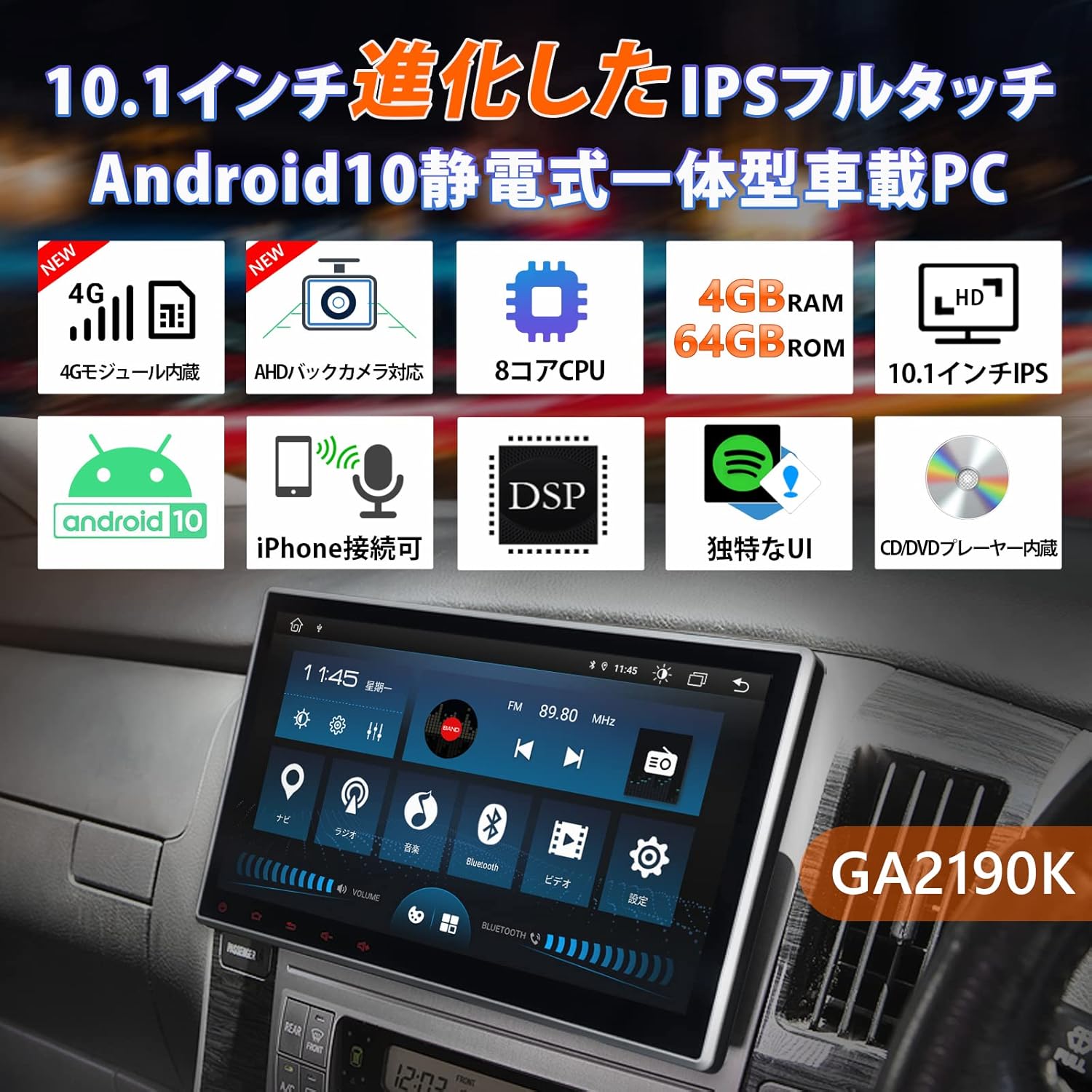
Figure 6: CarPlay and Android Auto interfaces displayed on the unit.
5.4 Mirroring Function
Share your smartphone's screen directly to the GA2190K display:
- Use the built-in 'EasyConnection' app to mirror photos, music, and videos from your iPhone or Android smartphone.
- Supports both wireless and wired connections.
5.5 Дисплей жана колдонуучу интерфейси
The 10.1-inch IPS display offers vibrant visuals and a user-friendly interface:
- IPS Touch Panel: 1024x600 ultra-high resolution for clear images from any viewбурч.
- Unique UI Design: Customizable UI colors to match your preference, providing a personalized experience.
- Multi-Window Display: Run two applications simultaneously on the screen, such as navigation and music.
Видео 5: Бул видеонун үстүнөн камсыз кылатview of the UI and features of a similar EONON unit (GA2198J), demonstrating multi-tasking, app installation, and QLED display capabilities.
Video 6: This video introduces the UI of a similar EONON unit, showcasing split-screen functionality, volume control, media player integration, and day/night mode switching.
Video 7: This video demonstrates various functions of a similar EONON unit (UX7SKJ-PRO-MAX), including map display, music playback, video playback, and system information.
5.6 Audio Features (DSP, Equalizer)
Experience superior sound quality with advanced audio processing:
- Орнотулган DSP: Digital Sound Field Processing with a 56-bit double-precision mode for precise sound signal adjustment.
- 48 тилкелүү графикалык эквалайзер: Customize your audio with a detailed equalizer and 8 preset EQ modes.
- Убакытты тууралоо: Adjust sound field and time delay for optimal listening.

Figure 7: Visual interface for DSP and graphic equalizer settings.
5.7 Навигация
Navigate with ease using various map options:
- Оффлайн карталары: Use a dedicated map card (EONON G3047, sold separately) for navigation without an internet connection.
- Онлайн карталар: Utilize Google Maps or other navigation apps downloaded from the Play Store.
5.8 Кошумча функциялар
- Руль башкаруусу: Connect to your vehicle's steering wheel controls for convenient operation.
- AHD камдык камерасын колдоо: Connect AHD backup cameras (EONON A0126J, A0119N, sold separately) for enhanced parking safety.
- OBD2 диагностикасы: Link with an OBD2 car diagnostic tool (EONON V0056, sold separately) to monitor vehicle data.
- Drive Recorder Mode: Connect drive recorders (EONON R0020, R0019H, R0018H, sold separately) to view footage on the large screen.
- TV Viewing: Connect an external digital tuner (EONON V0050, sold separately) to watch TV in your car.

Figure 8: IPS touchscreen, panel adjustment, and backup camera integration.

Figure 9: ашыкview of navigation, TV, AHD camera, OBD2, drive recorder, and RCA output functionalities.
6. Техникалык шарттар
| Өзгөчөлүк | Спецификация |
|---|---|
| Screen Size | 10.1 дюйм |
| Дисплей түрү | IPS LCD |
| Резолюция | 1024x600 |
| Операция системасы | Android 10 |
| RAM | 4 ГБ |
| ROM | 64 ГБ |
| Процессор | 8-өзөктүү |
| Байланыш | Bluetooth 5.0, Wi-Fi, 4G (SIM card support), USB |
| Тюнер түрү | AM/FM |
| Шайкеш түзмөктөр | Смартфондор |
| Карта түрү | Көчө |
| Өзгөчөлүктөр | Hands-free, CarPlay, Android Auto, Mirroring, DSP, DVD Player |
| Монтаж түрү | Куралдар тактасы |
| Продукциянын өлчөмдөрү | 24.5 x 20.5 x 15.3 см |
| Продукт Салмагы | 3.57 кг |
7. Техникалык тейлөө
To ensure the longevity and optimal performance of your EONON GA2190K, follow these general maintenance guidelines:
- Тазалоо: Экранды жана сыртын тазалоо үчүн жумшак, кургак чүпүрөктү колдонуңуз. Абразивдүү тазалагычтардан же эриткичтерден качыңыз.
- Программалык камсыздоо жаңыртуулары: Regularly check for and install system software updates to ensure stability and access to new features.
- Температура: Аппаратты экстремалдык температурага, түз күн нуруна узак убакытка же жогорку нымдуулукка дуушар кылуудан алыс болуңуз.
- Кабелдик байланыштар: Кабелдик туташуулар коопсуз жана бузулбашы үчүн мезгил-мезгили менен текшерип туруңуз.
8. Кыйынчылыктарды
If you encounter any issues with your EONON GA2190K, please refer to the following common troubleshooting steps:
- Кубат жок: Бардык электр туташууларын жана унаанын сактагыч кутучасын текшериңиз. От алдыруу системасы күйүк экенин текшериңиз.
- Үн жок: Үн жөндөөлөрүн текшериңиз, динамиктердин туташууларын текшериңиз жана туура аудио булагынын тандалганын текшериңиз.
- Сенсордук экран жооп бербейт: Бирдикти өчүрүп күйгүзүп көрүңүз. Эгер маселе чечилбесе, баштапкы абалга келтириңиз (эскертүү: бул колдонуучунун бардык дайындарын өчүрөт).
- Bluetooth/Wi-Fi байланышындагы көйгөйлөр: Ensure Bluetooth/Wi-Fi is enabled on both the unit and your smartphone. Try re-pairing devices or restarting the unit.
- Navigation Problems: GPS антеннасынын туура орнотулганын жана так болушун текшериңиз view of the sky. Check map data for updates.
For more complex issues or if troubleshooting steps do not resolve the problem, please contact Eonon customer support.
9. Кепилдик жана колдоо
Eonon is committed to providing quality automotive electronics. For any product-related inquiries, technical assistance, or warranty claims, please contact our customer support team. Our dedicated team is ready to assist you with any questions or concerns.
Please refer to your purchase documentation or the official Eonon webатайын кепилдик шарттары жана байланыш маалыматы үчүн сайт.

Figure 10: Eonon Brand Logo


