Introduction
This manual provides comprehensive instructions for the setup, operation, and maintenance of your Brydge Microsoft Surface Pro+ Wireless Keyboard. Designed specifically for the Microsoft Surface Pro 8, this keyboard enhances your device's functionality, transforming it into a versatile laptop-like experience.
Продукт бүттүview
The Brydge Microsoft Surface Pro+ Wireless Keyboard is engineered to provide a seamless and productive experience. Key features include:
- Кемчиликсиз шайкештик: Specifically engineered for the Microsoft Surface Pro 8, ensuring a perfect fit and integration.
- Тактык сенсордук тактасы: Equipped with a high-accuracy touchpad to facilitate smooth navigation and control.
- Арткы жарык баскычтары: Features backlit keys to support typing in low-light environments.
- Зымсыз туташуу: Utilizes Bluetooth technology for a cable-free and clutter-free setup.
- Туруктуу курулуш: Built with high-quality materials to provide durability and a premium feel.
- Өндүрүмдүүлүктү жогорулатуу: Transforms the Surface Pro 8 into a laptop-like device, boosting productivity and ease of use.
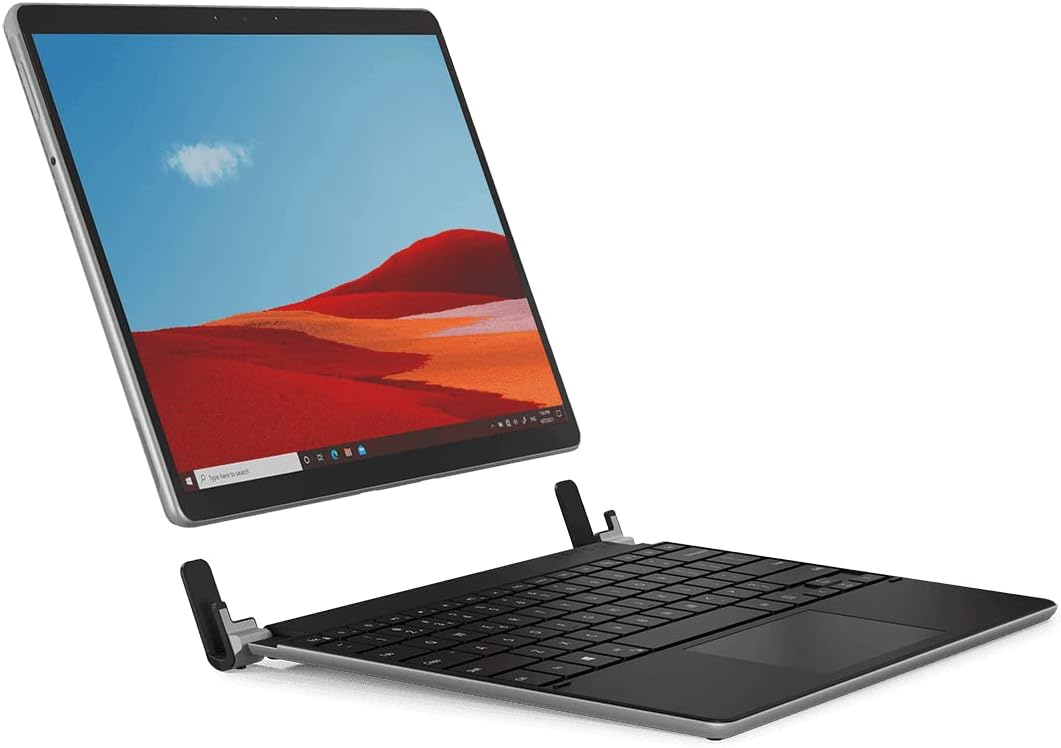
Image: The Brydge Wireless Keyboard seamlessly integrated with a Microsoft Surface Pro, demonstrating its laptop-like functionality.
Пакеттин мазмуну
Пакетиңизде бардык буюмдар бар экенин текшериңиз:
- Brydge Microsoft Surface Pro+ Wireless Keyboard
- USB кабели (заряддоо үчүн)
- Колдонуучунун Колдонмосу (бул документ)
Орнотуу нускамалары
1. Attaching Your Surface Pro
Carefully align your Microsoft Surface Pro 8 with the keyboard's hinges. Gently push the tablet into the hinges until it is securely seated. The design ensures a snug fit, transforming your tablet into a robust laptop setup.

Сүрөт: бир тарап view illustrating how the Surface Pro tablet connects to the Brydge keyboard's hinges.
2. Bluetooth Жупташтыруу
- Ensure your Brydge keyboard is charged (refer to the Charging section).
- Turn on the keyboard by pressing the power button (usually located on the side or top right). The Bluetooth indicator light will begin to flash.
- On your Microsoft Surface Pro 8, navigate to Орнотуулар > Bluetooth жана түзмөктөр.
- Bluetooth күйгүзүлгөнүн текшериңиз On.
- Тандоо Түзмөк кошуу > Bluetooth.
- Locate and select "Brydge Keyboard" (or similar name) from the list of available devices.
- Жупташтыруу процессин аяктоо үчүн экрандагы көрсөтмөлөрдү аткарыңыз. Клавиатурадагы Bluetooth индикатор жарыгы ийгиликтүү жупташтырылганда катуу күйөт.
Video: An official demonstration of the Brydge SP+ keyboard, showcasing its integration and use with the Microsoft Surface Pro 8. This video highlights the physical attachment and general functionality.
Иштөө нускамалары
Баскычтопту колдонуу
The Brydge keyboard provides a full QWERTY layout with dedicated function keys for media control, screen brightness, and other common tasks. Typing on the keyboard is similar to a standard laptop keyboard, offering a comfortable and responsive experience.

Image: A user's hands actively typing on the Brydge keyboard, demonstrating its ergonomic design and ease of use.
Арткы жарык баскычтары
The keyboard features adjustable backlighting for comfortable typing in various lighting conditions. Use the dedicated backlight keys (often found on the function row, e.g., Fn + F10/F11 or similar icons) to cycle through brightness levels or turn the backlight off.
Precision Touchpad
The integrated precision touchpad supports multi-touch gestures for intuitive navigation. Common gestures include:
- Бир манжа менен басуу: Сол чыкылдатуу.
- Эки манжа менен таптаңыз: Оң чыкылдатыңыз.
- Эки манжа менен сыдыруу: Өйдө же ылдый жылдырыңыз.
- Чымчып чоңойтуу: Чоңойтуу же кичирейтүү.
For a full list of supported gestures, refer to your Microsoft Surface Pro's operating system settings.

Сүрөт: деталдуу view of a hand interacting with the precision touchpad, highlighting its size and responsiveness.
Заряддоо
To charge your Brydge Wireless Keyboard, connect the provided USB cable to the keyboard's charging port and the other end to a USB power source (e.g., a computer USB port or a USB wall adapter). The charging indicator light will show the charging status. A full charge typically takes approximately 2-3 hours.
Техникалык тейлөө
To ensure the longevity and optimal performance of your Brydge keyboard:
- Тазалоо: Баскычтопту жана сенсордук тактаны тазалоо үчүн жумшак, түксүз чүпүрөктү колдонуңуз. өжөр белгилери үчүн, бир аз гampчүпүрөктү суу же жумшак, абразивдүү тазалагыч менен жууп салыңыз. Ашыкча нымдуулуктан сактаныңыз.
- Сактагыч: When not in use, store the keyboard in a clean, dry environment. If attached to your Surface Pro, ensure it is closed to protect the screen and keys.
- Суюктуктардан алыс болуңуз: Ички компоненттерге зыян келтирбөө үчүн клавиатураны суюктуктардан алыс кармаңыз.
- Этияттык менен мамиле кылуу: While durable, avoid dropping the keyboard or applying excessive force to the keys or hinges.
Проблемаларды чечүү
If you encounter issues with your Brydge Wireless Keyboard, please refer to the following common solutions:
| Көйгөй | Мүмкүн чечим |
|---|---|
| Баскычтоп Bluetooth аркылуу туташпай жатат. |
|
| Ачкычтар жооп бербей жатат. |
|
| Сенсордук такта жооп бербейт же туура эмес. |
|
| Арткы жарык иштебейт. |
|
Техникалык шарттар
| Өзгөчөлүк | Деталь |
|---|---|
| Продукциянын өлчөмдөрү | 11.77 x 9.17 x 1.26 дюйм |
| Элемент Салмагы | 2.35 фунт |
| Модель номери | BRY70312 |
| Бренд | Бридж |
| Шайкеш түзмөктөр | Microsoft Surface Pro 8 |
| Байланыш технологиясы | Bluetooth |
| Keyboard Description | Зымсыз |
| Ачкычтардын саны | 78 |
| Камтылган компоненттер | USB кабели |
Кепилдик жана колдоо
Brydge products are designed for durability and performance. For warranty information and technical support, please visit the official Brydge webсайтка же кардарларды тейлөөгө кайрылыңыз. Кепилдик дооматтар үчүн сатып алганыңыздын далилин сактаңыз.
Official Brydge Webсайт: www.brydge.com


