Introduction
The HTC True Wireless Earbuds 2 offer a seamless audio experience with advanced features designed for comfort and convenience. These earbuds utilize the latest Bluetooth 5.1 technology for instant pairing and stable connections across various devices. Enjoy extended listening times, intuitive touch controls, and a comfortable, ergonomic fit for all-day use.

Image: HTC True Wireless Earbuds 2 in their pink charging case, showcasing компакт дизайн.

Image: A display of HTC True Wireless Earbuds 2 in three available colors: white, black, and pink.
Видео: Аткаминерview of the HTC True Wireless Bluetooth Earbuds, highlighting key features and design.
Кутуда эмне бар
Your HTC True Wireless Earbuds 2 package includes the following items:
- HTC True Wireless Earbuds 2 (Left and Right)
- USB-C заряддоо кабели
- Rubber Eartips (Two pairs: Large and Small sizes, in addition to the pre-installed medium size)
- Заряддоо кутусу
Video: An unboxing video for the HTC True Wireless Earbuds 2, showing the contents of the package.
Жайгашуу
1. Кулакчындарды жана кутуну кубаттоо
Before first use, ensure both the earbuds and the charging case are fully charged. Connect the provided USB-C cable to the charging port on the case and plug the other end into a compatible USB power source. The indicator light on the case will show charging status. A full charge provides up to 8 hours of listening time for the earbuds and up to 32 hours total with the charging case.

Image: Pink HTC True Wireless Earbuds 2 and their charging case, illustrating the 30-hour combined battery life.
2. Түзмөгүңүз менен жупташтыруу
- Заряддоо кутучасын ачыңыз. Кулакчындар жупташтыруу режимине автоматтык түрдө кирет.
- Түзмөгүңүздө (смартфон, планшет, ноутбук) Bluetooth жөндөөлөрүнө өтүңүз.
- Select "HTC True Wireless Earbuds 2" from the list of available devices.
- Туташкандан кийин, сиз аудио сунушту угасыз жана кулакчындардагы индикатор өзгөрөт.
The earbuds utilize Bluetooth 5.1 for quick and stable connections. They are compatible with iOS, Android, and Windows devices.

Image: A diagram illustrating the quick pairing process and wide compatibility of the HTC True Wireless Earbuds 2 with various devices.
3. Achieving Optimal Comfort
The earbuds are ergonomically crafted for a secure and comfortable in-ear fit. Experiment with the included rubber eartips (small, medium, large) to find the size that provides the best seal and comfort for your ears. A proper fit enhances sound quality and noise isolation.

Image: A woman wearing pink HTC True Wireless Earbuds 2 while working on a laptop, emphasizing the ultra-lightweight comfort and ergonomic design.
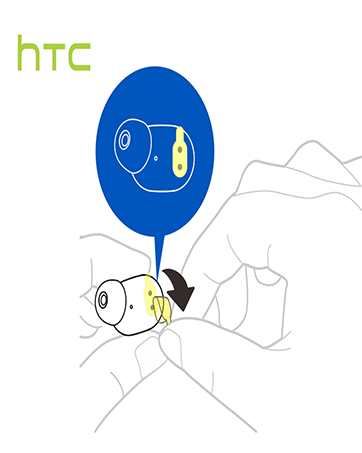
Image: A diagram illustrating the correct method for inserting an earbud to ensure a secure and comfortable fit.
Иштөө нускамалары
Touch Controls
The HTC True Wireless Earbuds 2 feature intuitive touch controls on each earbud for easy management of your audio and calls:
- Ойнотуу/тындыруу: Сол/оң кулакчынды бир жолу таптаңыз.
- Чакырууга жооп берүү: Сол кулакчынды бир жолу таптаңыз.
- Чакырууну токтотуу: Оң кулакчынды бир жолу таптаңыз.
- Чакырууну четке кагуу: Tap and hold left/right earbud for 2 seconds.
- Мурунку трек: Tap and hold left earbud for 2 seconds.
- Кийинки трек: Tap and hold right earbud for 2 seconds.
- Көлөмү: Tap left earbud twice.
- Үнүн азайтуу: Tap right earbud twice.
- Үн Жардамчысын жандыруу: Tap left/right earbud three times.

Image: A visual guide detailing the simple touch controls for the pink HTC True Wireless Earbuds 2.

Image: A visual guide detailing the simple touch controls for the black HTC True Wireless Earbuds 2.
Кулакчындын бир жолу колдонулушу
You can use either earbud independently for mono audio or calls. Simply take one earbud out of the case, and it will automatically connect to your device. This feature allows for versatility depending on your listening needs.

Image: Two smartphones connected to individual pink HTC True Wireless Earbuds 2, showcasing the versatility of using one or both earbuds.

Image: A diagram illustrating the versatility of using one or both black HTC True Wireless Earbuds 2 with different devices.
Техникалык тейлөө
Тазалоо жана кам көрүү
- Кулакчындарды жана заряддоо кутусун жумшак, кургак чүпүрөк менен дайыма тазалаңыз.
- Кулак учтарын алып салыңыз жана зарыл болсо, аларды жумшак самын жана суу менен тазалап, кайра кийерден мурун алардын толук кургап калганын текшериңиз.
- Абразивдүү материалдарды же катуу химиялык заттарды колдонуудан алыс болуңуз.
Суу каршылык
The HTC True Wireless Earbuds 2 are IPX5 waterproof, meaning they are protected against low-pressure water jets from any direction. This makes them suitable for workouts and light rain. However, they are not designed for submersion in water.
Проблемаларды чечүү
If you encounter any issues with your HTC True Wireless Earbuds 2, please refer to the following common solutions:
| Көйгөй | Чечим |
|---|---|
| Кулакчындар жупташкан жок | Ensure earbuds are charged. Place them back in the case, close, then reopen to re-enter pairing mode. Check your device's Bluetooth settings and forget/remove previous connections if necessary. |
| Бир кулактын үнү чыкпайт | Эки кулакчындын тең кубатталганын текшериңиз. Экөөнү кайра кутуга салып, кайра чыгарып көрүңүз. Түзмөгүңүз менен кайра жупташтырыңыз. |
| Тийүү башкаруулары жооп бербейт | Ensure earbuds are clean and dry. Restart your device and re-pair the earbuds. |
| Үн сапаты начар | Adjust the eartips for a better seal. Ensure your device is within the 10m Bluetooth range. Check for interference from other wireless devices. |
Техникалык шарттар
| Өзгөчөлүк | Деталь |
|---|---|
| Модель аты | HTC True Wireless кулакчындары 2 |
| Элемент моделинин номери | HTC TWS3 |
| Байланыш технологиясы | Зымсыз (Bluetooth 5.1) |
| Батареянын иштөө мөөнөтү (наушник) | Бир кубаттоо менен 8 саатка чейин |
| Батареянын иштөө мөөнөтү (заряддоо кутусу менен) | 32 саатка чейин |
| Заряддоо корпусунун батареясынын сыйымдуулугу | 500 мАч |
| Сууга туруктуулук деңгээли | IPX5 (Сууга туруктуу) |
| Башкаруу түрү | Touch Control (Volume, Play/Pause, Call Management, Voice Assistant) |
| Кулак жайгаштыруу | Кулакта |
| Жыштык диапазону | 20-20,000 Гц |
| Элемент Салмагы | 2.82 унция |
| Продукциянын өлчөмдөрү | 1.71 x 1.71 x 1.36 дюйм |
Кепилдик жана колдоо
HTC provides a 12-month warranty for the True Wireless Earbuds 2. For any support inquiries or warranty claims, please contact HTC customer service through their official webпродукт сатылып алынган сайт же сатуучу.
Көбүрөөк маалымат алуу үчүн расмий иш сапары менен HTC дүкөнү Amazon'до.


