1. Киришүү
The Sena Parani A10 is a sleek, low-profile Bluetooth headset designed for motorcycle helmets. It allows riders to connect to their smartphone for various on-the-go features, including listening to music and making phone calls. The A10 also supports Bluetooth Intercom, enabling communication with up to three other Parani users within an effective range of up to 1 km (0.6 mi). Featuring a built-in LCD screen, the device provides quick visual updates on essential functions such as battery capacity, frequency, and volume level, ensuring a superb audio experience backed by Sena's quality.
2. Кутуда эмне бар
- Parani A10 Headset Unit
- Wired Microphone (for this specific model)
- Динамик топтому
- Cling Clamp Комплект
- USB заряддоо жана маалымат кабели
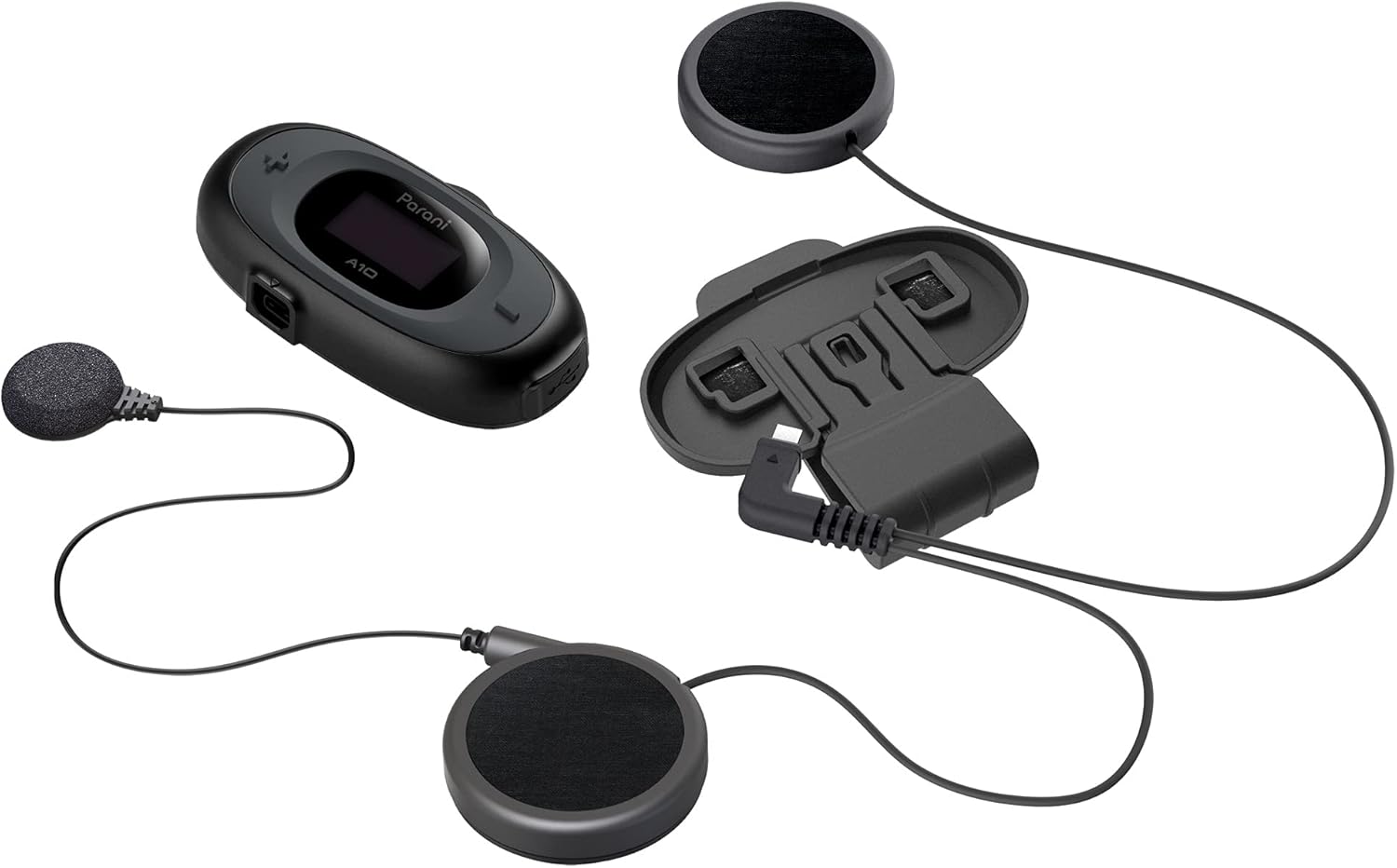
Image: All components included with the Parani A10 Wired Mic version, laid out for clear identification.
3. Продукциянын өзгөчөлүктөрү
- 4 тараптуу Bluetooth Домофон: Connects with up to three other Parani users.
- 2-way HD Intercom: Provides high-definition audio for two-person communication.
- Домофон диапазону: Up to 1 km (0.6 mi) in open terrain.
- LCD экран: Displays device settings, battery status, and current mode.
- Bluetooth 5.1: For stable connection to smartphones.
- Смартфон интеграциясы: Allows music listening, GPS navigation, and phone calls.
- Зымдуу микрофон: Designed for full-face helmets.
- Активдүү ызы-чууну жокко чыгаруу: Так үн үчүн фондук ызы-чууну азайтат.

Image: The Parani A10 unit, highlighting its integrated LCD screen and control buttons.
4. Орнотуу колдонмосу
4.1 Гарнитураны заряддоо
Before first use, fully charge the Parani A10. Connect the supplied USB cable to the headset's charging port and to a USB power source (e.g., computer USB port or USB wall adapter). The LED indicator will show charging status. A full charge takes approximately 2.5 hours.
Батареянын иштөө мөөнөтү: 8 саатка чейин сүйлөшүү убактысы.
4.2 Installation in Helmet
The Parani A10 is designed for easy installation in most motorcycle helmets. Follow these steps:
- Негизги блокту орнотуу: Монтаждоо clamp kit to the left side of your helmet. Ensure it is firmly attached. Slide the Parani A10 main unit onto the clamp ал ордуна чыкмайынча.
- Динамиктерди орнотуу: Attach the speakers to the inside of your helmet, aligning them with your ears. Most helmets have designated pockets for speakers. Use the provided hook-and-loop fasteners if necessary.
- Микрофондун орду: For the wired mic version, route the microphone cable and position the microphone near your mouth, inside the helmet's chin bar. Ensure it is not obstructed and does not interfere with helmet closure.
- Кабелдерди туташтыруу: Plug the speaker and microphone cables into the corresponding ports on the main Parani A10 unit.

Image: The Parani A10 unit securely attached to the side of a motorcycle helmet, ready for use.
5. Иштөө нускамалары
5.1 Күйгүзүү/өчүрүү
- Күйгүзүү: басып, кармап туруңуз Борбор баскычы 1 секундга.
- Өчүрүү: басып, кармап туруңуз Борбор баскычы 5 секундга.
5.2 Үндү тууралоо
- Көлөмүн жогорулатуу: басыңыз (+) Баскыч.
- Көлөмдү азайтуу: басыңыз (-) баскычы.
5.3 Phone Pairing & Calls
- Жупташтыруу: With the A10 powered off, press and hold the Борбор баскычы for 10 seconds until the LED flashes red and blue, indicating pairing mode. On your smartphone, search for Bluetooth devices and select "Parani A10".
- Чакырууга жооп берүү: басыңыз Борбор баскычы.
- Чакырууну аяктоо: басып, кармап туруңуз Борбор баскычы 2 секундга.
- Чакырууну четке кагуу: басып, кармап туруңуз Борбор баскычы for 2 seconds when a call comes in.
5.4 Музыканы ойнотуу
- Ойнотуу/тындыруу: басыңыз Борбор баскычы.
- Кийинки трек: басып, кармап туруңуз (+) Баскыч 1 секундга.
- Мурунку трек: басып, кармап туруңуз (-) баскычы 1 секундга.
5.5 Домофондук байланыш
The Parani A10 supports 4-way Bluetooth Intercom. For detailed pairing instructions with other Parani units, refer to the full manual available on the Sena website. Basic 2-way intercom pairing:
- Ensure both A10 units are powered on.
- On both units, press and hold the Борбор баскычы for 5 seconds until the LED flashes green rapidly.
- The units will automatically pair and establish an intercom connection.

Image: The Parani A10 headset with its wired microphone and speakers, illustrating the full audio system.
6. Техникалык шарттар
| Өзгөчөлүк | Деталь |
|---|---|
| Модель аты | Parani A10 |
| Байланыш технологиясы | Зымсыз (Bluetooth 5.1) |
| Домофон диапазону | 1 кмге чейин (0.6 миль) |
| Max Intercom Users | 4-way Bluetooth Intercom |
| Батареянын иштөө мөөнөтү (сүйлөшүү убактысы) | 8 саат |
| Заряддоо убактысы | 2.5 саат |
| Noise Control | Активдүү ызы-чууну жокко чыгаруу |
| Frequency Response | 10000 Гц |
| Сезимталдуулук | 20 Гц |
| Элемент Салмагы | 7.7 унция |
| Продукциянын өлчөмдөрү | 7.36 x 4.57 x 2.48 дюйм |
| Материал | Пластик |
| UPC | 885465012665 |
| Элемент моделинин номери | A10-P03 |
7. Техникалык тейлөө
- Тазалоо: Аппаратты жумшак менен сүртүңүз, гamp кездеме. Катуу химиялык заттарды же абразивдүү тазалагычтарды колдонбоңуз.
- Сактагыч: Колдонбогондо гарнитураны салкын, кургак жерде сактаңыз. Экстремалдуу температурадан сактаныңыз.
- Батареяга кам көрүү: Батареянын иштөө мөөнөтүн узартуу үчүн, батареяны тез-тез толук зарядсыздандырбаңыз. Узак убакытка колдонулбаса дагы, аны үзгүлтүксүз заряддап туруңуз.
- Программалык камсыздоонун жаңыртуулары: Мезгил-мезгили менен Сенаны текшерүү webоптималдуу иштешин жана жаңы функцияларга жетүүнү камсыз кылуу үчүн микропрограммаларды жаңыртуу үчүн сайт.
8. Кыйынчылыктарды
| Көйгөй | Мүмкүн чечим |
|---|---|
| Түзмөк күйбөйт. | Ensure the battery is charged. Connect to a power source and try again after a few minutes. |
| Смартфон менен жупташтыруу мүмкүн эмес. | Ensure the A10 is in pairing mode (LED flashing red/blue). Turn off and on your phone's Bluetooth. Try restarting both devices. |
| Intercom connection issues. | Ensure both units are within range and in intercom pairing mode. Try resetting both units to factory settings and re-pairing. |
| Audio is distorted or too low. | Adjust volume using the (+) and (-) buttons. Check speaker placement in the helmet. Ensure microphone is positioned correctly and not obstructed. |
| ЖК экран бош. | The screen may enter power-saving mode. Press any button to wake it up. If it remains blank, try restarting the unit. |
9. Кепилдик жана колдоо
The Sena Parani A10 Intercom Headset is backed by Sena's quality assurance. For specific warranty details, including coverage period and terms, please refer to the warranty card included with your product or visit the official Sena webсайт.
For technical support, firmware updates, or additional resources, please visit the official Sena support page:
You can also find frequently asked questions and detailed user guides on their webсайт.
10. Расмий продукт Videos
Based on the available information, there are no official product videos from the seller that meet the criteria for embedding in this manual. Please refer to the Sena support website for any available video tutorials or demonstrations.


