Introduction
Welcome to the user manual for your Nothing Ear 1 Wireless Earbuds. This guide provides essential information on setting up, operating, maintaining, and troubleshooting your device to ensure optimal performance and longevity.

Figure 1: Nothing Ear 1 Wireless Earbuds, showcasing their transparent design and in-ear fit.
Кутуда эмне бар
Your Nothing Ear 1 package includes the following components:
- Pair of Nothing Ear 1 Wireless Earbuds
- Зымсыз кубаттоо кутусу
- USB-C Cable
- S, M, L өлчөмдөгү кулактын учтары
- Safety Information & User Guide (this document)
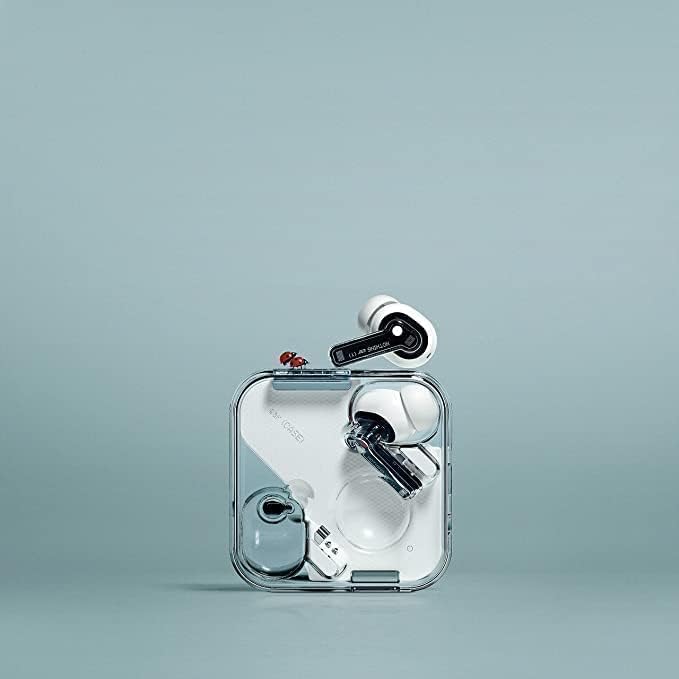
Figure 2: The Nothing Ear 1 earbuds securely placed within their transparent wireless charging case.
Жайгашуу
1. Корпус менен кулакчындарды заряддоо
Биринчи колдонуудан мурун, заряддоо кутусун жана кулакчындарды толук заряддаңыз.
- Кулакчындардын экөөнү тең зарядкага салыңыз.
- USB-C кабелин корпустагы кубаттоо портуна жана кубат булагына туташтырыңыз.
- The indicator light on the case will show charging status. A full charge is indicated when the light remains solid.
2. Түзмөгүңүз менен жупташтыруу
The Nothing Ear 1 earbuds use Bluetooth 5.0 for a stable connection.
- Кулакчындардын заряддоо кутучасында жана капкагы ачык экенин текшериңиз.
- Түзмөгүңүздө (смартфон, планшет ж.б.) Bluetooth жөндөөлөрүнө өтүп, Bluetooth'ду иштетиңиз.
- Select "Nothing Ear (1)" from the list of available devices.
- Туташкандан кийин ырастоо үнү чыгат жана кулакчындар колдонууга даяр болот.

Figure 3: A hand holding the open charging case, ready for pairing or use.
3. Оң кулак учтарын тандоо
For optimal sound quality and active noise cancellation, choose the ear tips that provide the best seal and comfort.
- Experiment with the included S, M, and L size ear tips.
- A good fit will feel secure and block out most ambient noise even before active noise cancellation is enabled.
Кулакчындарды иштетүү
Кулакчын тагынуу
Gently insert the earbuds into your ears, ensuring a snug and comfortable fit. The earbuds are designed for extended wear.

Figure 4: A user demonstrating the proper way to wear the Nothing Ear 1 earbuds.
Touch Controls
The Nothing Ear 1 features intuitive touch controls on each earbud:
| Акция | Control |
|---|---|
| Ойнотуу/Тыныгуу | Бир таптоо |
| Кийинки трек | Оң кулакчынга эки жолу тийүү |
| Мурунку трек | Triple tap (left earbud) |
| Чалууга жооп берүү/аяктоо | Бир таптоо |
| Чакырууну четке кагуу | Узак басуу |
| ANC/Тунук режимин которуу | Long press (customizable via app) |
| Үнүн жогорулатуу/төмөндөтүү | Swipe up/down (customizable via app) |
For advanced customization of touch controls, download the Nothing Ear (1) app from your device's app store.
Активдүү ызы-чууну жокко чыгаруу (ANC) жана ачыктык режими
The Nothing Ear 1 features Active Noise Cancellation to reduce ambient noise and Transparency Mode to allow you to hear your surroundings.
- Активдүү ызы-чууну жокко чыгаруу: Ideal for noisy environments, it actively blocks out external sounds.
- Ачыктык режими: Allows you to hear your surroundings without removing the earbuds, useful for conversations or awareness.
Switch between modes using the customizable touch controls or through the Nothing Ear (1) app.
Техникалык тейлөө
Кулакчындарды жана кутучаны тазалоо
Үзгүлтүксүз тазалоо үн сапатын жана гигиенаны сактоого жардам берет.
- Кулакчындарды жана кубаттоочу кутуну сүртүү үчүн жумшак, кургак, түксүз чүпүрөктү колдонуңуз.
- Кулак учтары үчүн аларды кулакчындардан чыгарып, жарнама менен тазалаңызamp чүпүрөк, анан кайра кийер алдында кылдат кургатып.
- Абразивдүү материалдарды, спиртти же химиялык тазалоочу каражаттарды колдонуудан алыс болуңуз.
- Кулакчындардагы жана кутудагы кубаттоо контакттары таза жана кургак экенин текшериңиз.

5-сүрөт: деталдуу view of a single Nothing Ear 1 earbud, highlighting areas for cleaning.
Сактагыч
Кулакчындарды коргоо жана кубаттоо үчүн колдонулбаган учурда аларды кубаттоо кутучасында сактаңыз.
Проблемаларды чечүү
| Көйгөй | Мүмкүн себеп | Чечим |
|---|---|---|
| Кулакчындар жупташкан жок | Bluetooth off, out of range, or pairing mode not active. | Ensure Bluetooth is on, earbuds are in case with lid open, and within range. Try forgetting the device on your phone and re-pairing. |
| Бир кулактын үнү чыкпайт | Low battery, earbud not properly seated, or connection issue. | Place both earbuds in the case, close the lid for 10 seconds, then open to reset. Ensure both are charged. Clean charging contacts. |
| Poor sound quality / ANC not effective | Improper ear tip fit, dirty earbuds, or environmental interference. | Try different ear tip sizes for a better seal. Clean earbuds, especially the mesh. Move away from strong electromagnetic interference. |
| Кулакчындар заряддалбай жатат | Dirty charging contacts, faulty cable/charger, or case battery low. | Clean charging contacts on both earbuds and case. Try a different USB-C cable and power adapter. Ensure the charging case itself is charged. |
| Тийүү башкаруулары жооп бербейт | Убактылуу программалык камсыздоонун бузулушу же тийүү бетинин кирдеши. | Restart the earbuds by placing them in the case and closing the lid. Clean the touch sensitive area on the earbuds. Check the Nothing Ear (1) app for firmware updates. |
If problems persist, refer to the official Nothing support webсайтка же кардарларды тейлөөгө кайрылыңыз.
Техникалык шарттар
- Модель аты: Nothing Ear 1
- Модель номери: 2140110007A
- Бренд: Эч нерсе
- Байланыш технологиясы: Зымсыз (Bluetooth)
- Bluetooth версиясы: 5.0
- Ызы-чууну көзөмөлдөө: Активдүү ызы-чууну жокко чыгаруу
- Форма фактору: Кулакта
- Башкаруу түрү: Touch Control
- Батареянын иштөө мөөнөтү: Up to 5 hours (earbuds), extended with charging case
- Аудио драйвер түрү: Динамикалык драйвер
- Item Weight (Earbud): Болжол менен 0.176 унция (5 грамм)
- Product Dimensions (Case): 0.93 x 2.31 x 2.31 дюйм
- Ташуу кутусунун материалы: Пластик же алюминий
- Камтылган компоненттер: Wireless Charging Case, USB-C Cable, Ear tips (S, M, L)
- Шайкеш түзмөктөр: Smartphones, Laptops, Desktops, Tablets, Smart Speakers, Televisions, Car Audio Systems, Cellphones
Кепилдик жана колдоо
For detailed warranty information and customer support, please visit the official Nothing webсайтка же түздөн-түз кардарларды тейлөөгө кайрылыңыз. Кепилдик дооматтар үчүн сатып алганыңыздын далилин сактаңыз.
Онлайн колдоо: nothing.tech/pages/support


