1. Коопсуздук нускамалары
Please read these safety instructions carefully before using the product. Keep this manual for future reference.
- Бул продукт ички колдонуу үчүн гана иштелип чыккан. Нымдуулукка же экстремалдык температурага дуушар кылбаңыз.
- Түзмөктү ачууга же өзгөртүүгө аракет кылбаңыз. Бул кепилдикти жокко чыгарып, коопсуздукка коркунуч келтириши мүмкүн.
- Аппаратты балдардан алыс кармаңыз.
- Use only the provided micro-USB cable for charging.
- LED жарык булагын түз карабаңыз.
2. Пакеттин мазмуну
Пакетте бардык буюмдар бар экенин текшериңиз:
- ANSMANN Under-Cabinet Light M
- Micro-USB заряддоо кабели
- Instruction Manual
3. Продукт бүтүп калдыview
The ANSMANN Under-Cabinet Light M is a versatile, rechargeable LED lamp designed for various indoor applications. It features a motion sensor, adjustable color temperatures, and a slim design for discreet placement.

Image 1: The ANSMANN Under-Cabinet Light M, showcasing its sleek, white design and integrated motion sensor.
Негизги өзгөчөлүктөрү:
- PIR Кыймыл сенсору: Automatically activates the light when motion is detected in low-light conditions.
- Twilight Sensor: Ensures the light only activates in dark environments, conserving battery life.
- Жөнгө салынуучу түс температурасы: Choose between 3 color temperatures (cool white, neutral white, warm white) or activate all LEDs for maximum brightness.
- Кадамсыз күңүрттөө: Adjust brightness by holding down the control button.
- Кайра заряддалуучу батарея: Integrated battery for cordless operation, charged via micro-USB.
- Магниттик орнотуу: Easy installation and removal with a magnetic strip.

Image 2: Diagram illustrating the Micro-USB Port, On/Off button, and PIR motion sensor on the device.
4. Орнотуу жана орнотуу
The Under-Cabinet Light M offers flexible installation options using its integrated magnetic strip.
Магниттик орнотуу:
- Identify a suitable, clean, and dry surface for installation (e.g., inside a cabinet, under a shelf).
- The light comes with a fixed magnetic strip on its back. For non-metallic surfaces, use the included adhesive strip.
- Peel off the protective film from the adhesive strip and firmly press it onto the desired surface.
- Attach the Under-Cabinet Light M to the adhesive strip. The magnetic connection will hold it in place.
Сүрөт 3: Жакын пландан view of the magnetic strip and the removable adhesive strip, demonstrating the mounting mechanism.

Сүрөт 4: Мисample of the under-cabinet light installed in a modern kitchen setting, providing illumination over a countertop.
5. Операция
The Under-Cabinet Light M offers intuitive control for its lighting functions.
Күйгүзүү/өчүрүү:
- Locate the On/Off button (refer to Image 2).
- Press the button once to turn the light on or off.
Түс температурасын жөндөө:
- With the light on, short press the control button repeatedly to cycle through the 3 available color temperatures: cool white, neutral white, and warm white.
- A fourth press will activate all LEDs for maximum brightness.
Караңгылатуу функциясы:
- To adjust the brightness, press and hold the control button. The light will gradually dim or brighten. Release the button when the desired brightness level is reached.
Motion and Twilight Sensor:
- When the light is in motion sensor mode, it will automatically turn on when movement is detected within its range.
- The integrated twilight sensor ensures that the motion sensor only activates the light in dark environments, preventing unnecessary illumination during daylight hours.
6. Заряддоо
The Under-Cabinet Light M is equipped with a rechargeable battery for convenient cordless use.
- When the battery is low, the light output may decrease or the light may not turn on.
- Gently detach the light from its magnetic mounting surface.
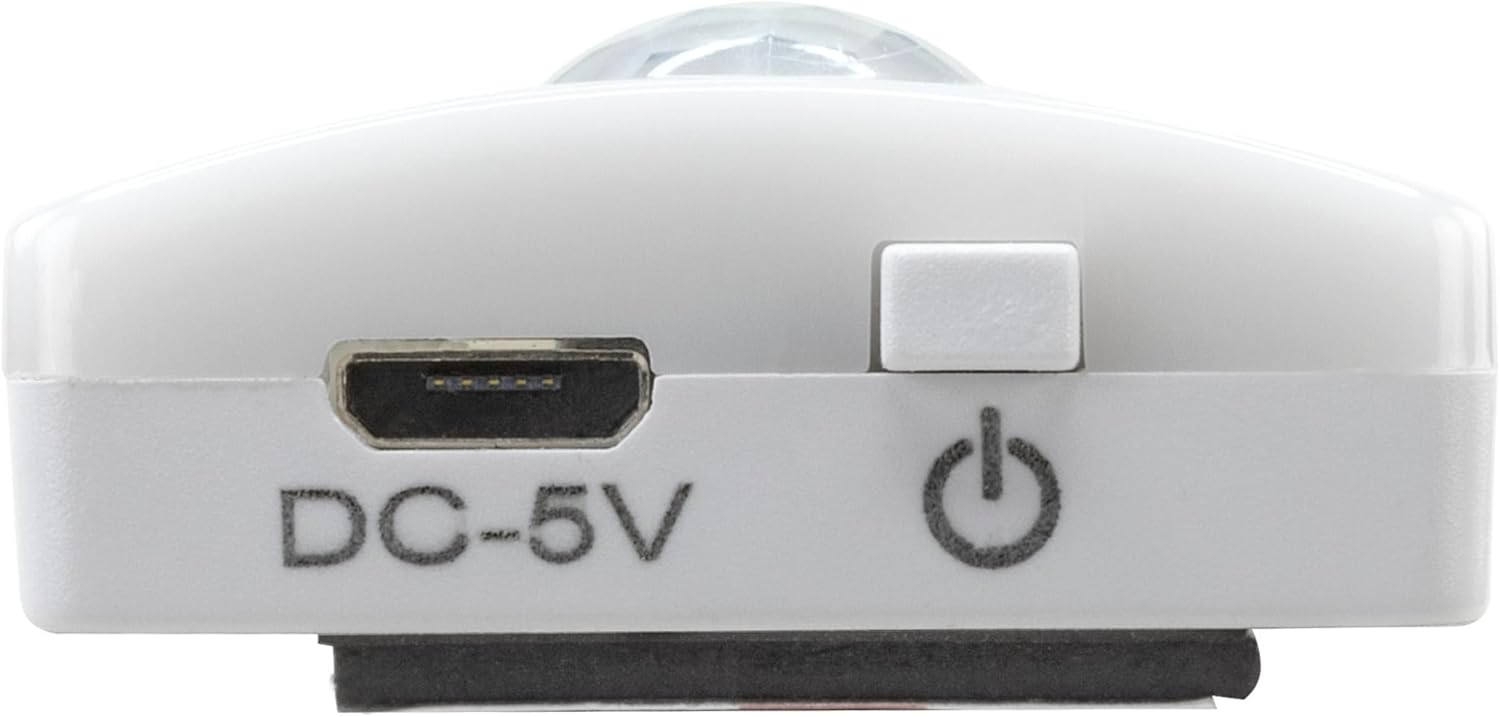
- Connect the provided micro-USB cable to the micro-USB port on the light (refer to Image 2).
- Connect the other end of the micro-USB cable to a suitable USB power source (e.g., USB wall adapter, computer USB port).
- An indicator light will show the charging status (e.g., red for charging, green for fully charged).
- Once fully charged, disconnect the cable and reattach the light to its mounting surface.

Сүрөт 5: Детальдуу view of the Micro-USB charging port and the On/Off button, essential for charging and operation.
7. Техникалык тейлөө
To ensure the longevity and optimal performance of your Under-Cabinet Light M, follow these simple maintenance guidelines:
- Clean the light regularly with a soft, dry cloth. Do not use abrasive cleaners or solvents.
- Ensure the motion sensor lens is kept clean and free from obstructions for proper function.
- Store the light in a cool, dry place if not in use for extended periods.
8. Кыйынчылыктарды
If you encounter issues with your Under-Cabinet Light M, refer to the following common problems and solutions:
| Көйгөй | Мүмкүн себеп | Чечим |
|---|---|---|
| Жарык күйбөйт. | Батарея түгөнүп калды. | Charge the light using the micro-USB cable. |
| Кыймыл сенсору кыймылды байкабай жатат. | Ensure the sensor is clean and unobstructed. Check if the environment is dark enough for the twilight sensor to activate. | |
| Жарык заряддалбайт. | Кабель же кубат булагы туура эмес. | Try a different micro-USB cable or USB power adapter. |
| Кубаттоо порту кир. | Gently clean the micro-USB port with a dry, soft brush. | |
| Жарык бүлбүлдөп же күңүрт. | Батарея аз. | Аппаратты кайра заряддаңыз. |
Бул чечимдерди колдонуп көргөндөн кийин көйгөй чечилбесе, кардарларды колдоо менен байланышыңыз.
9. Техникалык шарттар
| Өзгөчөлүк | Деталь |
|---|---|
| Модель номери | 1600-0438 |
| Продукциянын өлчөмдөрү | 25L x 3.5W x 1.3H см (9.84L x 1.38W x 0.51H дюйм) |
| Элемент Салмагы | 112 грамм (0.25 фунт) |
| Power Source | Батарея менен иштейт |
| Заряддоо порту | Micro-USB (DC-5V) |
| Материал | Пластик |
| Түс | Ак |
| Орнотуу түрү | Дубалга орнотуу (магниттик) |
| Бөлмө түрү | Dining Room, Kitchen, Wardrobe, Hallway, etc. |
10. Кепилдик жана колдоо
ANSMANN products are manufactured with high-quality standards. For information regarding warranty terms and conditions, please refer to the documentation provided with your purchase or visit the official ANSMANN webсайт.
For technical support or inquiries, please contact ANSMANN customer service through their official channels.


