1. Киришүү
This manual provides instructions for the proper use and maintenance of your Sena Parani A20 Bluetooth Intercom Headset. Please read this manual thoroughly before operating the device to ensure optimal performance and safety.
The Parani A20 is designed for motorcycle communication, offering features such as 4-way Bluetooth intercom, HD 2-way intercom, and smartphone connectivity for music and calls.
2. Пакеттин мазмуну
The Sena Parani A20 package typically includes the following components:
- Parani A20 Headset Unit
- Динамик топтому
- Boom микрофону
- Зымдуу микрофон
- Cling Clamp Комплект
- USB заряддоо кабели
- Колдонуучунун Колдонмосу (бул документ)

Сүрөт: бүттүview of the Sena Parani A20 headset and its included components, such as the main unit, speakers, boom microphone, and wired microphone.
3. Орнотуу жана орнотуу
3.1 Аппаратты заряддоо
Before first use, fully charge the Parani A20 headset. Connect the USB charging cable to the headset and a power source. The charging time is approximately 2.5 hours.
3.2 Гарнитураны орнотуу
The Parani A20 can be mounted to most motorcycle helmets using the included clamp kit. Ensure the mounting location allows for clear access to the controls and does not obstruct helmet functionality.
- Choose a suitable location on the left side of your helmet.
- Securely attach the mounting clamp шлем кабыгына.
- Slide the Parani A20 main unit onto the mounted clamp ал ордуна чыкмайынча.

Image: The Sena Parani A20 headset unit attached to the side of a motorcycle helmet, showing its position relative to the helmet's structure.
3.3 Installing Speakers and Microphones
Install the speakers inside the helmet's ear pockets and route the microphone cable to the front of the helmet. Two microphone options are provided:
- Бум микрофону: Recommended for open-face or modular helmets. Position the microphone close to your mouth.
- Зымдуу микрофон: Suitable for full-face helmets. Secure it inside the chin bar.
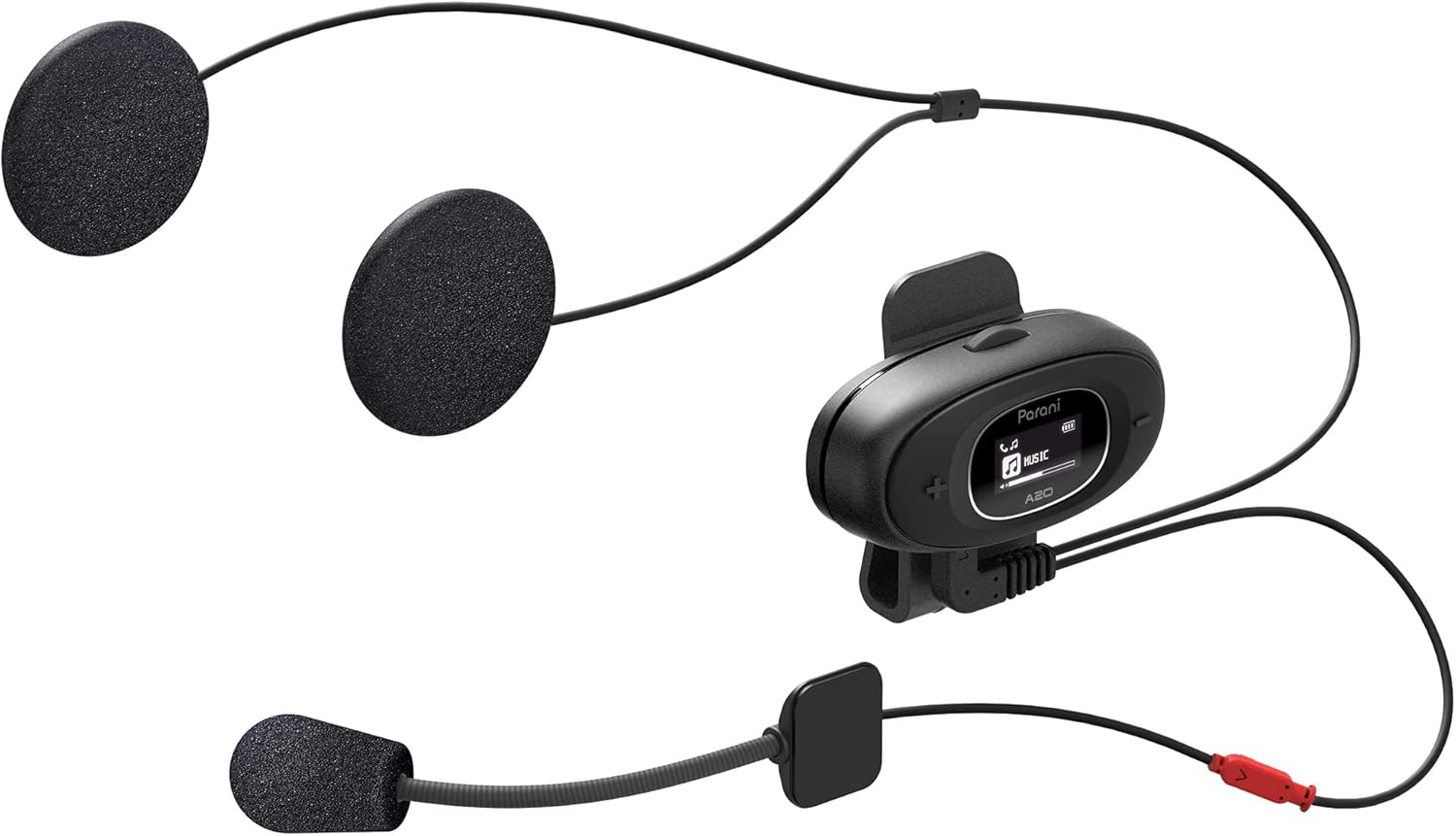
Image: The Sena Parani A20's speakers and both microphone types (boom and wired) are displayed, ready for installation inside a helmet.
4. Иштөө нускамалары
4.1 Күйгүзүү/өчүрүү
- Күйгүзүү: басып, кармап туруңуз Борбор баскычы 1 секундга.
- Өчүрүү: басып, кармап туруңуз Борбор баскычы 5 секундга.
4.2 Bluetooth Pairing with Smartphone
To connect your Parani A20 to a smartphone for music, GPS, or phone calls:
- With the headset off, press and hold the Борбор баскычы for 5 seconds until the LED flashes red and blue, indicating pairing mode.
- On your smartphone, go to Bluetooth settings and select "Parani A20" from the list of available devices.
- Жупташкандан кийин LED көк түстө күйөт.
4.3 Домофондук байланыш
The Parani A20 supports 4-way Bluetooth intercom and HD 2-way intercom with a range of up to 1 km (0.6 miles).
- Домофонду баштоо: баскычын кыскача басыңыз Борбор баскычы to initiate intercom with a paired Parani A20 unit.
- Домофондун аякташы: баскычын кыскача басыңыз Борбор баскычы кайра.
- Multi-way Intercom: Follow the specific pairing instructions in the full manual for connecting multiple units.

Сүрөт: деталдуу view of the Parani A20 unit, highlighting its LCD screen which displays intercom status and battery level, along with the control buttons.
4.4 Музыканы ойнотуу жана үндү башкаруу
- Ойнотуу/тындыруу: басыңыз Борбор баскычы during music playback.
- Көлөмү: басыңыз (+) Баскыч.
- Үнүн азайтуу: басыңыз (-) баскычы.
- The Parani A20 offers exceptional sound quality with enhanced bass and clarity.
4.5 Телефон чалуулар
- Чакырууга жооп берүү: баскычын кыскача басыңыз Борбор баскычы.
- Чакырууну аяктоо: баскычын кыскача басыңыз Борбор баскычы.
- Чакырууну четке кагуу: басып, кармап туруңуз Борбор баскычы 2 секундга.

Image: A motorcycle rider on the road, wearing a helmet equipped with the Sena Parani A20 intercom, demonstrating its use in a riding context.
5. Техникалык тейлөө жана кам көрүү
- Keep the device dry. The Parani A20 is not water-resistant.
- Аппаратты жумшак менен тазалаңыз, гamp кездеме. Катуу химиялык заттарды же эриткичтерди колдонбоңуз.
- Аппаратты колдонбогондо салкын, кургак жерде сактаңыз.
- Кубаттоочу порт чаңдан жана таштандылардан тазаланганын текшериңиз.
6. Кыйынчылыктарды
6.1 Түзмөк күйбөй жатат
- Check battery level. Charge the device for at least 30 minutes.
- Ensure the power button is pressed correctly (hold for 1 second).
6.2 Динамиктерден үн чыкпайт
- Verify that the speakers are correctly plugged into the headset unit.
- Check the volume level on both the headset and your connected smartphone.
- Ensure the headset is properly paired with your audio source.
6.3 Intercom Not Connecting
- Ensure both units are within the specified intercom range (up to 1 km).
- Re-pair the intercom units if connection issues persist.
- Ар кандай тоскоолдуктарды же тоскоолдуктарды текшериңиз.
6.4 Заводдук абалга кайтаруу
If the device is not functioning correctly, a factory reset may resolve the issue. Refer to the full manual for specific instructions on performing a factory reset.
7. Техникалык шарттар
| Модель аты | Parani A20 |
| Bluetooth версиясы | 5.1 |
| Домофон диапазону | 1 кмге чейин (0.6 миля) |
| Домофон түрү | 4-way Bluetooth, HD 2-way |
| Заряддоо убактысы | Болжол менен 2.5 саат |
| Frequency Spectrum | 20 Гц - 20 000 Гц |
| Салмагы | 240 г |
| Өлчөмдөр | 18.7 x 11.8 x 6.4 см |
| Материал | Пластик |
| Суу каршылык | Сууга чыдамдуу эмес |
| Шайкеш түзмөктөр | Mobile phones, Motorcycles |
8. Кепилдик жана колдоо
Кепилдик маалыматы жана техникалык колдоо үчүн расмий Сенага кайрылыңыз webсайтына кириңиз же жергиликтүү дилериңизге кайрылыңыз. Кепилдик талаптары үчүн сатып алганыңызды тастыктаган документти сактап коюңуз.
Онлайн ресурстар: зыярат кылыңыз Сена webсайт for the latest firmware updates, FAQs, and detailed product manuals.
9. Коопсуздук боюнча маанилүү маалымат
- Жол коопсуздугун ар дайым биринчи орунга коюңуз. Түзмөктү сизди алаксытып, унаа айдагандан алыстата тургандай жол менен иштетпеңиз.
- Ensure the device is securely mounted to your helmet.
- Аппаратты экстремалдык температурага же түз күн нуруна узак убакытка калтырбаңыз.
- Балдар жетпеген жерде сактаңыз.


