1. Продукт бүтүп калдыview
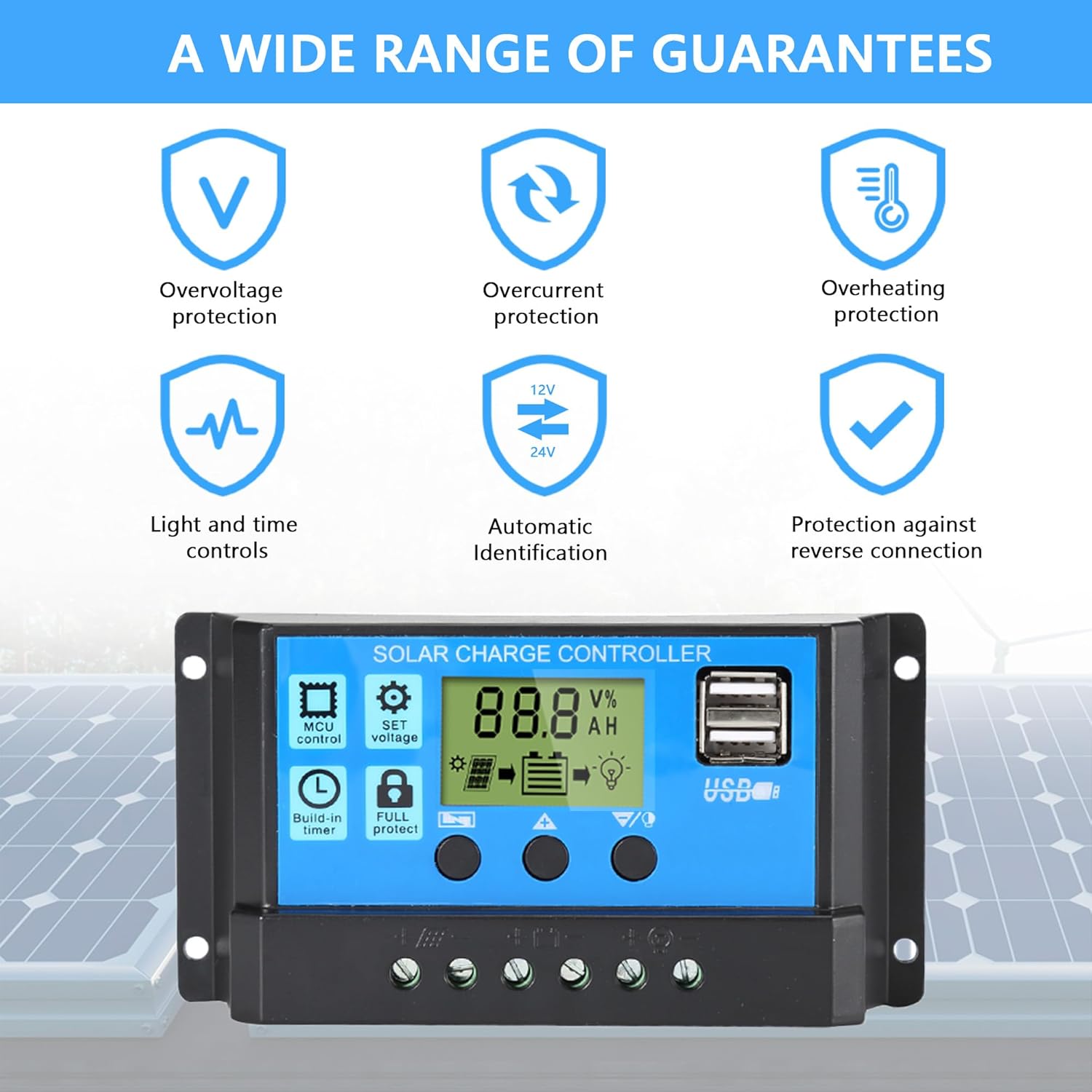
The Anern 30A PWM Solar Charge Controller is designed to manage the power flow from your solar panels to your battery bank, ensuring efficient and safe charging. It features a full 3-stage PWM charge management system, an intuitive LCD display, and multiple protection functions. This controller is suitable for 12V/24V systems and is equipped with dual USB ports for charging external devices.

2. Коопсуздук чаралары
- Ensure all connections are correct before connecting the battery or solar panels.
- Бул контроллер төмөнкүлөр үчүн иштелип чыккан lead-acid batteries only (OPEN, AGM, GEL). Do not use with nickel-hydride, lithium, Li-ion, or other battery types.
- Контроллерди күйүүчү материалдардан алыс, жакшы желдетилген жерге орнотуңуз.
- Avoid direct sunlight and moisture exposure.
- Always connect the battery first, then the solar panel, and finally the load. Disconnect in the reverse order.
- Ensure proper wire gauge is used for connections to prevent overheating.
3. Орнотуу колдонмосу
3.1. Connection Order
- Connect the battery to the charge controller. Ensure correct polarity (+ to + and - to -). The controller will detect the battery voltage (12V же 24V) автоматтык түрдө.
- Күн панелин(лерин) заряддоо контроллерине туташтырыңыз. Туура полярдуулукту текшериңиз.
- Connect the DC load to the charge controller (if applicable). Ensure correct polarity.
Маанилүү: Always follow this connection order to prevent damage to the controller or other components. Disconnect in the reverse order: Load → Solar Panel → Battery.

4. Иштөө нускамалары
4.1. LCD дисплей жана баскычтар
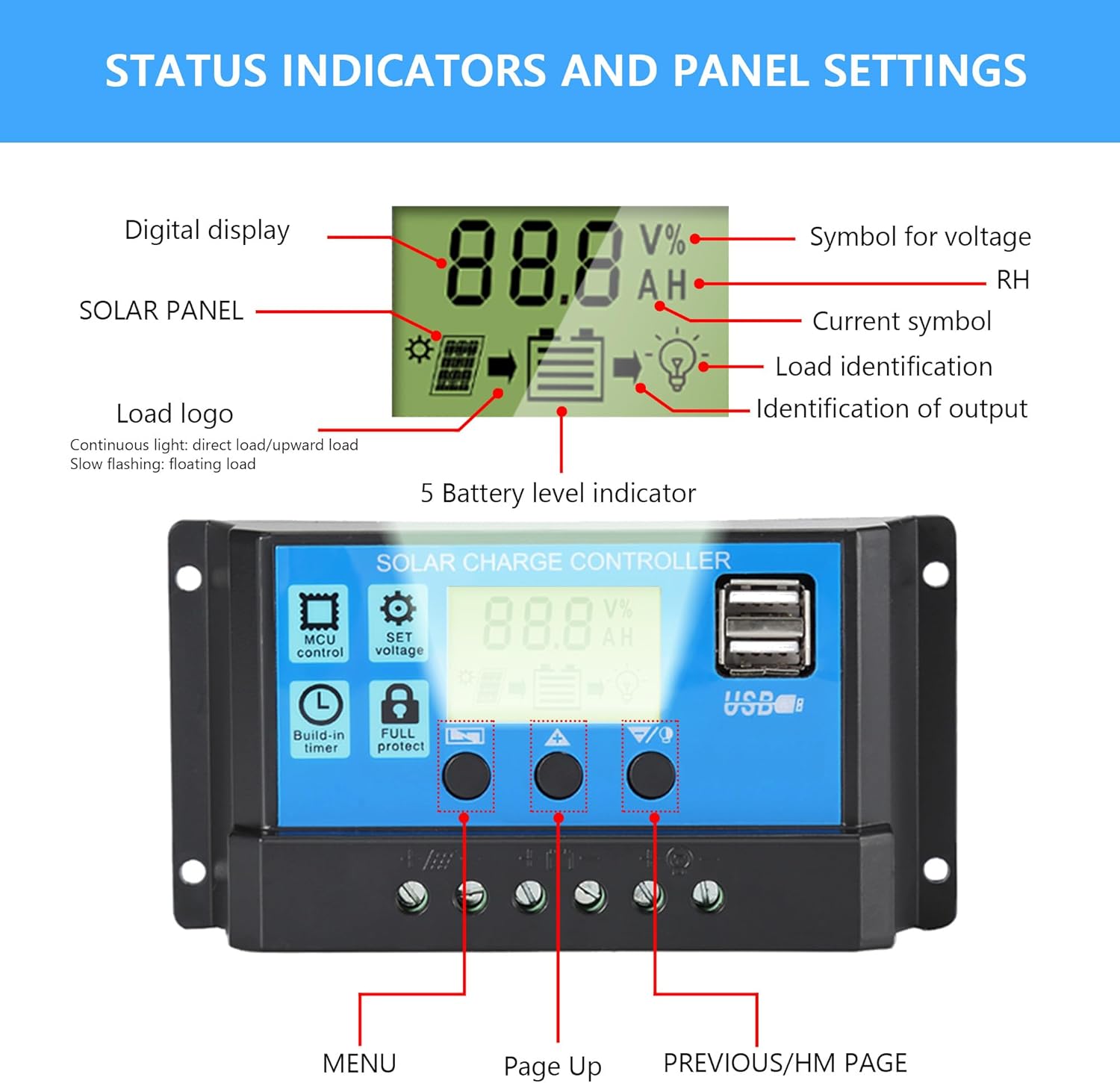
The controller features an intuitive LCD display that shows real-time status and data. There are three buttons for navigation and parameter settings:
- МЕНЮ: Press to browse different display interfaces. Long press to enter/exit settings.
- Өйдө: Press to increase values in settings.
- DOWN/HM: Press to decrease values in settings.
4.2. Параметрлердин Орнотуулары
To adjust parameters:
- көпкө басыңыз МЕНЮ button for 5 seconds to enter the setting mode. The current parameter value will flash.
- колдонуу UP жана DOWN/HM маанисин тууралоо үчүн баскычтар.
- басыңыз МЕНЮ button again to save the setting and move to the next parameter, or long press МЕНЮ for 5 seconds to exit settings.
The controller allows adjustment of various parameters, including:
- Floating Voltage: Томtage at which the battery is maintained after reaching full charge.
- Discharge Switch-off Voltage: Томtage at which the load output is disconnected to protect the battery from over-discharge.
- Discharge Reconnection Voltage: Томtage at which the load output is reconnected after being disconnected due to low battery.
- Батарея түрү: Ensure this matches your connected lead-acid battery (OPEN, AGM, GEL).
- Иштөө режимдери: Configure load control modes (e.g., 24H for continuous output, or timer settings for dusk-to-dawn operation).

4.3. USB кубаттоо
The dual 5V/2A USB ports can be used to charge mobile phones or other 5-voltage devices. These ports provide convenient power for small electronics directly from your solar system.
5. Техникалык тейлөө
Regular maintenance ensures optimal performance and longevity of your solar charge controller:
- Тазалоо: Periodically clean the controller's exterior with a dry cloth to remove dust and debris. Ensure ventilation openings are clear.
- Туташуу текшерүү: Annually inspect all wiring connections for tightness and corrosion. Loose connections can lead to power loss or overheating.
- Курчап турган чөйрө: Ensure the installation environment remains within the specified operating temperature range and is free from excessive moisture or dust.
- Батареянын ден соолугу: Monitor your battery's health and ensure it is suitable for use with the controller.
6. Кыйынчылыктарды
Бул бөлүм сиз кабылышы мүмкүн болгон жалпы көйгөйлөрдү карайт:
- Контроллер күйбөй жатат: Check battery connections and ensure correct polarity. The controller requires battery power to operate.
- Батарея заряддалбай жатат: Verify solar panel connections and ensure they are receiving sufficient sunlight. Check for any shading or damage to panels. Confirm battery type setting is correct.
- Жүктөө иштебей жатат: Check load connections and ensure the load is within the controller's rated current. Verify load working mode settings (e.g., 24H, timer). The controller has built-in overcurrent protection for the load.
- Дисплей каталары: If the display shows unusual readings or error codes, first check all connections. Disconnect and reconnect the battery (following the correct order) to reset the controller.
- Ашыкча разряддан коргоо: Эгерде батареянын томtage drops too low, the controller will disconnect the load to protect the battery. The load will reconnect once the battery voltagе калыбына келет.
- Ашыкча кубаттан коргоо: The controller automatically stops charging when the battery reaches full capacity, preventing overcharging.
7. Техникалык шарттар
| Өзгөчөлүк | Спецификация |
|---|---|
| Бренд | Анерн |
| Модел | 30A PWM Күн зарядын контролдоочу |
| Тtage | 12V/24V Автоматтык сезүү |
| Максималдуу заряд агымы | 30A |
| Дисплей түрү | LCD |
| Заряддоо портунун түрү | Dual USB (5V/2A) |
| Иштөө температурасы | -20°C to +60°C (approx. 6E+1 Degrees Celsius is 60 degrees C) |
| Продукциянын өлчөмдөрү | Узундугу 1.18" x Туурасы 2.76" x Бийиктиги 5.24" (30 x 70 x 133 мм) |
| Элемент Салмагы | 4.2 унция (119 грамм) |
| Материал | Акрилонитрил бутадиен стирол (ABS) |
| Шайкеш батареянын түрлөрү | OPEN, AGM, GEL Lead-acid batteries |
8. Кепилдик жана колдоо
Anern offers a one-year maintenance service for this solar charge controller. If there is a problem with the components of the controller within this period, Anern will provide replacement components.
For technical support or warranty claims, please contact Anern customer service through the platform where you purchased the product or visit the official Anern store page on Amazon: Анерн дүкөнү.


