1. Киришүү
This manual provides detailed instructions for the VTech AM18447 4-Line Corded Base Phone System, including the AM18447 main console and up to three AM18247 corded desksets. This system is designed to manage calls across 1 to 4 telephone lines simultaneously, offering advanced features for efficient communication. Please read this manual thoroughly to ensure proper installation, operation, and maintenance of your phone system.

Image 1: The VTech AM18447 4-Line Corded Base Phone System, showing the main console and three additional corded desksets.
2. Орнотуу
2.1 Системаны таңгактан чыгаруу
Бардык буюмдарды кутудан кылдаттык менен чыгарыңыз. Төмөнкү компоненттердин бар экендигин текшериңиз:
- VTech AM18447 Main Console (Base Unit)
- Up to three VTech AM18247 Corded Desksets
- Power Adapters for each unit
- Телефон линиялары
- Corded Handsets and Coiled Cords
2.2 Connecting the Main Console (AM18447)
- Connect one end of the coiled handset cord to the handset jack on the main console and the other end to the handset.
- Plug one end of the telephone line cord into the LINE 1 jack on the back of the main console and the other end into a telephone wall jack. Repeat for LINE 2, LINE 3, and LINE 4 if you have multiple lines.
- Connect the power adapter to the POWER jack on the main console and plug the other end into an electrical outlet.
- If using DSL service, ensure you use a DSL filter (not included) for each telephone line to prevent interference.
2.3 Connecting Additional Corded Desksets (AM18247)
Each AM18247 deskset connects to the main console wirelessly. Follow these steps for each deskset:
- Connect one end of the coiled handset cord to the handset jack on the deskset and the other end to the handset.
- Connect the power adapter to the POWER jack on the deskset and plug the other end into an electrical outlet.
- The deskset will automatically register with the main console upon power-up. If registration fails, refer to the troubleshooting section.
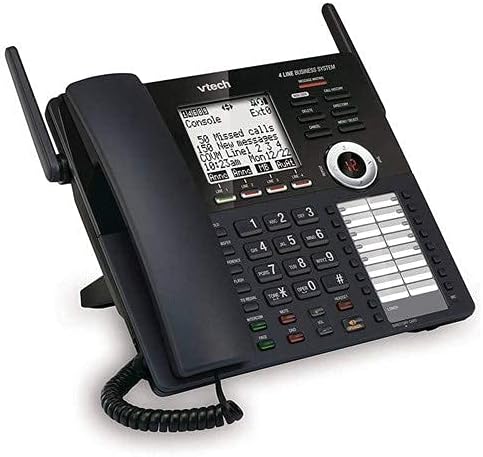
Сүрөт 2: деталдуу view of the VTech AM18447 main console, highlighting the display, keypad, and line indicators.
2.4 Battery Installation for Power Failure Operation
The main console requires 4 AAA batteries (not included) for power failure operation, allowing basic functionality during a power outage. Locate the battery compartment on the underside of the main console, insert the batteries according to the polarity markings, and replace the cover.
3. Иштөө нускамалары
3.1 Чакыруунун негизги функциялары
- Чакыруу: Телефонду көтөрүңүз же басыңыз СПИКЕР button. Select an available line (LINE 1-4) if not automatically selected. Dial the number.
- Чалууга жооп берүү: Телефонду көтөрүңүз же басыңыз СПИКЕР телефон шыңгырганда баскычын басыңыз.
- Чалууну аяктоо: Телефонду кайра бешикке салыңыз же басыңыз СПИКЕР кайра баскычын.
- Кармап туруу: Чалуу учурунда, басыңыз БЕРҮҮ чалууну күтүүгө коюу үчүн баскыч. Чакырууну алуу үчүн жаркылдаган сызык баскычын басыңыз.
- Кайра терүү: басыңыз РЕДИАЛ button to redial the last 10 numbers called.
3.2 Динамик
The system features a full-duplex speakerphone, allowing both parties to speak and be heard simultaneously. To use, press the СПИКЕР button during a call or to initiate a call without lifting the handset.
3.3 Санариптик жооп берүү системасы
The integrated digital answering system records up to 180 minutes of messages, announcements, and memos.
- Чыгуучу жарыяны жаздыруу: Access the answering system menu and follow voice prompts to record your personalized message.
- Билдирүү ойнотуу: басыңыз ОЙНОО/ТОКТОТУУ баскычы. Колдонуу ӨТКӨРҮҮ to advance, КАЙТАЛОО to replay, and ЖОК to remove messages. Variable speed playback is available through menu options.
- Memo Recording: Record personal memos for later playback.
- Алыстан кирүү: Access your messages from an outside line by dialing your phone number and entering your remote access code.
- Private Mailbox: Configure private mailboxes for individual users.
3.4 Чалуучуну аныктоо / Чакырууну күтүү
The system stores up to 50 names and numbers in the Caller ID history.
- Viewing Caller ID: Use the navigation buttons to scroll through the Caller ID log.
- Чалуу күтүүдө: When on a call, a tone indicates an incoming call. Press the FLASH чалуулардын ортосунда которулуу үчүн баскыч.
3.5 Телефон китепчесинин каталогу
Телефон китепчесинин каталогунда 100гө чейин аттарды жана сандарды сактаңыз.
- Киргизүүнү кошуу: Access the phonebook menu, select 'Add New Entry', and enter the name and number.
- Тез терүү: Assign frequently called numbers to speed dial locations (up to 32).
3.6 Intercom, Call Transfer, and Conferencing
- Домофон: басыңыз ИНТЕРКОМ button and select the desired station to initiate an internal call.
- Чалууларды которуу: Тышкы чалуу учурунда, баскычын басыңыз Трансфер, select the internal station, and then hang up to complete the transfer.
- 4 тараптуу конференция: Connect up to four parties (internal and external) on a single call. Refer to the menu for specific steps.
3.7 Система орнотуулары
Access the setup menu to customize various settings.
- Тил: Select English, Spanish, or French for the display menu.
- Ringers: Choose from 10 polyphonic ringers, assignable per line.
- Автоматтык тейлөөчү: Enable or disable the auto attendant feature for each line.
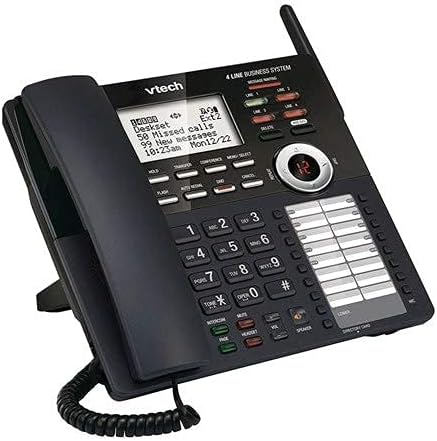
Сүрөт 3: Бурчтуу view of the VTech AM18447 main console, providing a clear perspective of its ergonomic design and button layout.
4. Техникалык тейлөө
To ensure the longevity and optimal performance of your VTech phone system, follow these maintenance guidelines:
- Тазалоо: Wipe the phone surfaces with a soft, slightly damp кездеме. Катуу химиялык заттарды же абразивдүү тазалагычтарды колдонбоңуз.
- Жайгашкан жери: Place the phone system in a dry area, away from direct sunlight, heat sources, and excessive moisture.
- Күч: Ensure all power adapters are securely plugged into working electrical outlets.
5. Кыйынчылыктарды
If you encounter issues with your VTech phone system, try the following solutions:
- Терүү үнү жок:
- Check all telephone line cord connections.
- Кубат адаптери бекем сайылганын текшериңиз.
- Test the telephone line with another phone.
- Бирдикке кубат жок:
- Verify the power adapter is correctly connected to the unit and a working electrical outlet.
- Check the electrical outlet with another device.
- Автожооп берүүчү система жаздырбай жатат:
- Автожооп берүүчү системанын күйүп турганын текшериңиз.
- Check if the memory is full; delete old messages.
- Чалуучунун ID көрсөтүлбөйт:
- Телефон операторуңуздун Caller ID кызматына жазылганыңызды текшериңиз.
- Verify the phone line connection.
- Deskset Not Registering:
- Ensure the deskset is powered on.
- Refer to the main console's menu for manual registration options if automatic registration fails.
6. Техникалык шарттар
| Өзгөчөлүк | Деталь |
|---|---|
| Продукциянын өлчөмдөрү | 9 x 5.7 x 8.8 дюйм |
| Элемент Салмагы | 2 фунт |
| Батареялар талап кылынат | 4 AAA batteries (for power failure operation) |
| Өндүрүүчү | Vtech |
| Бренд | VTech |
| Түс | Кара |
| Телефон түрү | жоон |
| Материал | Пластик |
| Power Source | Электр зымдары |
| Терүүчү түрү | Жалгыз баскычтоп |
| Жооп берүү системасынын түрү | Санарип |
7. Кепилдик жана колдоо
VTech products are manufactured with high-quality components and are designed for reliable performance. For specific warranty information, please refer to the warranty card included with your product packaging or visit the official VTech webсайт.
For technical support, troubleshooting assistance, or to inquire about replacement parts, please contact VTech Customer Service. Contact details can typically be found on the VTech webсайтында же продуктунун таңгагында.


