Introduction
The Antec Symphony 360 ARGB AIO liquid cooler delivers a cooling solution with unique ARGB lighting. The mirror ARGB lighting bar gives a subtle and beautiful color scheme. Specifically designed using EPDM+IIP high-density tubes and 14 dense cooling fins, the Symphony ARGB not only extends its lifespan but also enhances the entire cooling performance. The Symphony ARGB is ready to bring you a brand-new user experience.
Продукт бүттүview
Компоненттер
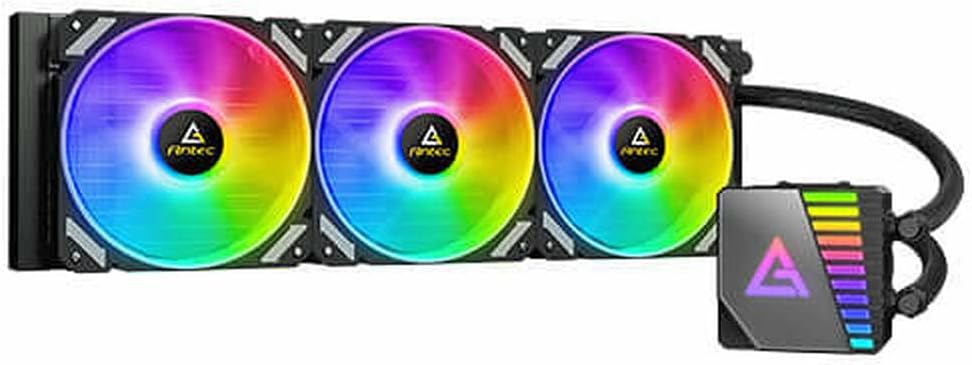
The Antec Symphony 360 ARGB Liquid Cooler showcasing its vibrant RGB fan illumination and pump unit.

The Antec Symphony 360 ARGB Liquid Cooler with its fans in a non-illuminated, white state.
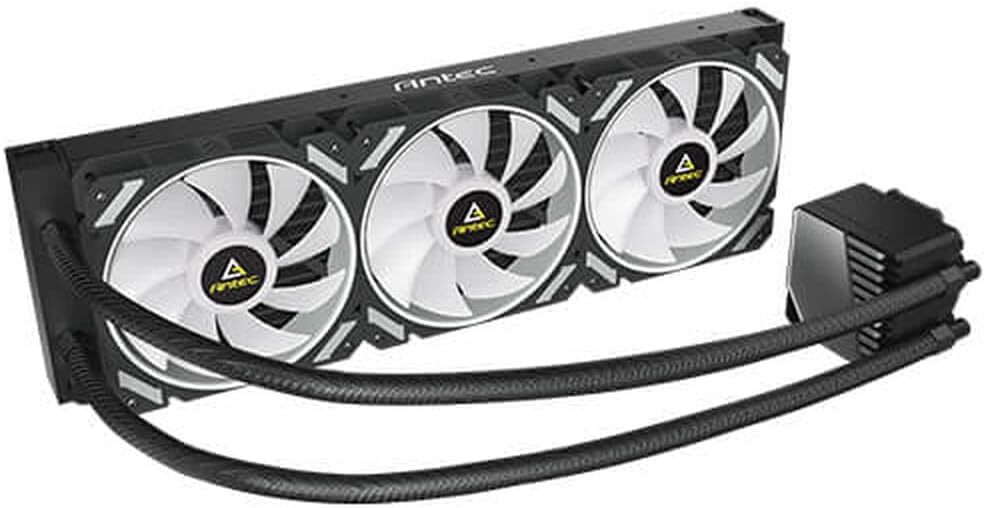
An angled perspective of the cooler, highlighting the radiator, fans, and durable tubing.

Жогортон ылдый view of the Antec Symphony 360 ARGB Liquid Cooler, showing the three fans and pump unit layout.

А деталдуу view of the radiator section, featuring the Antec branding and fan mounts.

Another perspective shot emphasizing the design of the fan blades and the radiator's structure.

A close-up of the pump unit, showcasing its mirror ARGB lighting bar with a dynamic rainbow effect.

А тарап view of the radiator, illustrating its slim profile and dense fin array for efficient heat dissipation.

The underside of the pump unit, revealing the polished copper cold plate designed for optimal thermal transfer from the CPU.
Орнотуу нускамалары
Баштоодон мурун
- Ensure your motherboard and PC case are compatible with a 360mm radiator.
- Unpack all components and verify contents against the packing list.
- Gather necessary tools: screwdriver, thermal paste (if not pre-applied).
- Refer to your motherboard's manual for CPU socket type and mounting bracket requirements.
Орнотуу кадамдары
- CPU розеткасын даярдаңыз: Install the appropriate backplate and standoffs for your CPU socket (Intel/AMD) onto the motherboard.
- Радиаторду орнотуу: Secure the 360mm radiator to an available mounting location in your PC case (typically top or front) using the provided screws. Ensure proper airflow direction.
- Install the Fans: Attach the three 120mm ARGB fans to the radiator using the included fan screws. Pay attention to the fan's airflow direction (usually blowing through the radiator).
- Термикалык пастаны колдонуу: If the cold plate does not have pre-applied thermal paste, apply a small pea-sized amount to the center of your CPU's integrated heat spreader (IHS).
- Насос/муздак плитаны орнотуу: Carefully align the pump's cold plate with the CPU and secure it to the standoffs using the retention bracket and thumb screws. Apply even pressure.
- Кабелдерди туташтыруу:
- Connect the pump's power cable to the motherboard's dedicated AIO_PUMP or CPU_FAN header.
- Желдетүүчү кубат кабельдерин энеңиздеги же желдеткич контроллериңиздеги жеткиликтүү желдеткичтерге туташтырыңыз.
- Күйөрмандардын ARGB кабелдерин туташтырыңыз жана энелик платаңыздагы шайкеш 3-pin 5V ARGB башына же ARGB контроллерине насосту.
- Кабелдик башкаруу: Туура аба агымын жана таза түзүлүштү камсыз кылуу үчүн бардык кабелдерди тыкан өткөрүңүз.
Иштөө нускамалары
Once installed, the Antec Symphony 360 ARGB Liquid Cooler operates automatically to maintain optimal CPU temperatures. The pump and fans will adjust their speed based on CPU load and temperature, as controlled by your motherboard's BIOS/UEFI settings or dedicated fan control software.
For ARGB lighting control, use your motherboard's RGB synchronization software (e.g., ASUS Aura Sync, MSI Mystic Light Sync, GIGABYTE RGB Fusion, ASRock Polychrome Sync) or the included ARGB controller (if applicable) to customize lighting effects and colors.
Техникалык тейлөө
- Чаңды тазалоо: Periodically clean dust from the radiator fins and fan blades using compressed air or a soft brush. This helps maintain optimal cooling performance.
- Түтүктөрдү жана байланыштарды текшерүү: Visually inspect the tubing and connections for any signs of leaks or damage. While AIO coolers are sealed, regular checks are recommended.
- Желдетүүчү ызы-чуу: If fans become excessively noisy, check for dust buildup or ensure they are securely mounted.
- Насостун ызы-чуусу: A slight hum from the pump is normal. Excessive gurgling or grinding noises may indicate air bubbles or an issue with the pump. Refer to the troubleshooting section.
Проблемаларды чечүү
- Жогорку CPU температурасы:
- Ensure the pump is running and connected to the correct header (AIO_PUMP or CPU_FAN).
- Verify fans are spinning and oriented correctly for airflow.
- Check if the cold plate is making proper contact with the CPU and thermal paste is applied correctly.
- Радиатордун сүзгүчтөрүндөгү чаңды тазалаңыз.
- ARGB жарыктандыруу жок:
- Confirm ARGB cables are securely connected to the motherboard's 3-pin 5V ARGB header or controller.
- Энелик платаңыздын ARGB программасы туура орнотулганын жана конфигурацияланганын текшериңиз.
- Check for any physical damage to the ARGB cables or connectors.
- Pump Noise (Gurgling/Grinding):
- This can indicate air bubbles in the loop. Try gently tilting your PC case while the system is running to help move air bubbles to the radiator.
- Ensure the pump is not the highest point in the loop, if possible, to prevent air from settling in the pump.
- If noise persists and performance is affected, contact Antec support.
- Айланбаган күйөрмандар:
- Check fan power cable connections to the motherboard or fan controller.
- Verify fan speed settings in BIOS/UEFI or fan control software.
Техникалык мүнөздөмөлөр
| Өзгөчөлүк | Спецификация |
|---|---|
| Бренд | Antec |
| Модель номери | 0-761345-74044-9 |
| Муздатуу ыкмасы | Суюктук (AIO) |
| Радиатордун өлчөмү | 360мм |
| Fan Size | 120мм (x3) |
| Ызы-чуу деңгээли | 36 дБ |
| Кубат туташтыргычынын түрү | 4-Pin |
| Тtage | 12 вольт |
| Ватtage | 150 ватт |
| Материал | Алюминий |
| Шайкеш түзмөктөр | Иш такта |
| Элементтин өлчөмдөрү (LxWxH) | 12.87 x 8.5 x 6.22 дюйм |
| Элемент Салмагы | 3.53 унция |
Кепилдик жана колдоо
Antec products are designed for reliability and performance. For specific warranty terms and conditions, please refer to the warranty information provided with your product packaging or visit the official Antec website. For technical support, troubleshooting assistance, or to inquire about replacement parts, please contact Antec customer service through their official support channels.
Көбүрөөк маалымат жана колдоо булактарын таба аласыз Amazon'догу Antec дүкөнү.


