1. Introduction to the WatchGuard Firebox M690
The WatchGuard Firebox M690 is an enterprise-grade network security appliance engineered for midsize and distributed enterprises. It addresses the challenges of securing networks amidst rapid growth in bandwidth, encrypted traffic, video usage, and connection speeds. This appliance offers flexibility through its ability to add network modules, allowing for increased port density and adaptability as network requirements evolve. The Firebox M690 serves as a central hub for managing and providing layered security for all communications between the head office and remote sites, integrating seamlessly with WatchGuard's Unified Security Platform for comprehensive, multi-layered protection.
2. Продукт бүтүп калдыview жана Негизги өзгөчөлүктөрү
The Firebox M690 is designed with automation at its core, enabling IT teams to manage security efficiently. It provides a robust defense against various threats, including ransomware, viruses, malicious applications, and botnets.
Негизги өзгөчөлүктөрү:
- Scalable Network Modules: Features empty bays for adding network modules, allowing customization of port configurations (e.g., 8 x 1 Gb copper, 4 x 1 Gb copper, 4 x 1 SFP, 2 x 1 SFP+, or 4 port multispeed ports) to meet evolving network needs.
- Comprehensive Threat Protection: Utilizes a full arsenal of scanning engines to protect against ransomware, viruses, malicious apps, and botnets.
- Centralized Security Management: Functions as a central hub for managing and providing layered security across corporate headquarters and remote sites.
- Automation Core: Enables cloud deployment, threat blocking, signature updates, and malware detection/elimination with minimal manual intervention.
- Толук коопсуздук топтому: Includes AI-powered malware protection, enhanced network visibility, endpoint protection, cloud sandboxing, DNS filtering, and direct threat action from WatchGuard Cloud.

Сүрөт 2.1: Алдыңкы view of the WatchGuard Firebox M690 appliance, showing various ports and indicators.

Figure 2.2: WatchGuard Firebox M590 and M690 appliances stacked, illustrating their compact form factor.
3. Баштапкы орнотуу
This section outlines the basic steps for setting up your WatchGuard Firebox M690 appliance. For detailed configuration, refer to the WatchGuard documentation portal.
3.1 Таңгактан чыгаруу жана текшерүү
Carefully unpack the Firebox M690 and inspect it for any physical damage. Ensure all components listed in the packing slip are present.
3.2 Физикалык орнотуу
- Стойкага орнотуу: If rack-mounting, secure the appliance in a standard 19-inch rack using the provided rack-mount kit. Ensure adequate ventilation around the unit.
- Кубат туташуу: Connect the power cord(s) to the appliance and then to a grounded electrical outlet.
- Тармактык байланыштар: Connect your network cables to the appropriate interfaces on the Firebox M690. Typically, the 'External' interface connects to your internet service provider (ISP) or upstream router, and 'Trusted' interfaces connect to your internal network segments.
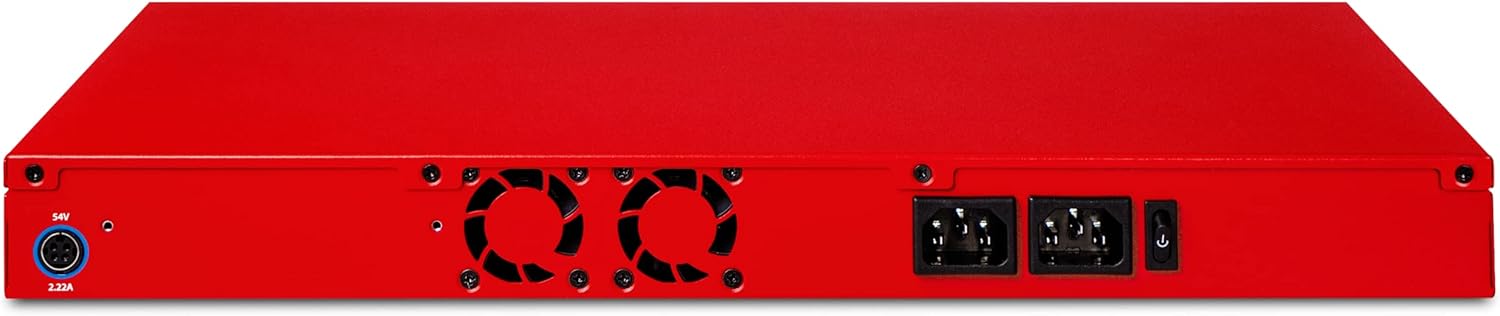
3.1-сүрөт: Арткы view of the WatchGuard Firebox M690, showing power inputs and cooling fans.
3.3 Баштапкы конфигурация
After physical installation, power on the appliance. Access the Firebox management interface via a web browser or WatchGuard System Manager (WSM) to perform initial network configuration, license activation, and basic security policy setup. Refer to the WatchGuard Quick Start Guide for detailed steps on initial access.
4. Иштетүү жана башкаруу
The WatchGuard Firebox M690 is managed through its web UI or WatchGuard System Manager (WSM), providing comprehensive control over network security policies, monitoring, and reporting.
4.1 Security Features Overview
The Firebox M690 offers a wide array of security features to protect your network:
| Категория | Өзгөчөлүк | Description |
|---|---|---|
| Firewall | Мамлекеттик пакетти текшерүү | Monitors the state of active connections and uses this information to determine which network packets to allow through the firewall. |
| TLS Decryption | Inspects encrypted traffic for hidden threats. | |
| Application Proxies | HTTP, HTTPS, FTP, DNS, TCP/UDP, POP3S, SMTPS, IMAPS, Explicit Proxy | Provides deep packet inspection and content filtering for various application protocols. |
| Коркунучтан коргоо | DoS Attacks, Fragmented & Malformed Packets, Blended Threats | Defends against various forms of network attacks and complex threats. |
| Чыпкалоо параметрлери | Browser Safe Search, Google for Business | Enforces safe browsing policies. |
| VPN | Site to Site VPN | IKEv2, IPSec, Policy and Route Based Tunnels, TLS hub and spoke for secure branch office connectivity. |
| Remote Access VPN | IKEv2, IPSec, L2TP, TLS for secure remote user access. | |
| Көрүнүү | Logging and Notifications | WatchGuard Cloud & Dimension, Syslog, SNMP v2/v3 for comprehensive logging and alerts. |
| Отчет берүү | WatchGuard Cloud includes over 100 pre-defined reports, executive summary and visibility tools. | |
| Сертификаттар | Коопсуздук | Pending: Common Criteria, FIPS 140-3. |
| Коопсуздук | NRTL/CB. | |
| Network | IPv6 Ready Gold (routing). | |
| Hazardous Substance Control | WEEE, RoHS, REACH compliance. | |
| Networking | SD-WAN | Multi-WAN failover, dynamic path selection, jitter/loss/latency measurement. |
| Динамикалык Маршрутизация | RIP, OSPF, BGP. | |
| Жогорку жеткиликтүүлүк | Active/passive, active/active. | |
| QoS | 802.1Q, DSCP, IP Precedence. | |
| Traffic Management | By policy or application. | |
| IP дарегин дайындоо | Static, DHCP (server, client, relay), PPPoE, DynDNS. |
Figure 4.1: Detailed table of WatchGuard Firebox M690 security, visibility, certification, and networking features.
5. Техникалык тейлөө жана жаңыртуулар
Regular maintenance ensures the optimal performance and security of your Firebox M690 appliance.
5.1 Микропрограмма жаңыртуулары
WatchGuard regularly releases firmware updates that include new features, security enhancements, and bug fixes. It is crucial to keep your Firebox M690 firmware up-to-date. Firmware updates can be managed through the WatchGuard Cloud or WatchGuard System Manager.
5.2 Configuration Backups
Regularly back up your Firebox configuration. This allows for quick restoration of your settings in case of an issue or during migration to a new appliance. Backups can be performed via the web UI or WSM.
5.3 Monitoring and Logging
Utilize WatchGuard Cloud and Dimension for real-time monitoring and detailed logging. Regularly review logs and reports to identify potential security incidents, network anomalies, or performance issues. Configure alerts for critical events to ensure prompt response.
6. Жалпы көйгөйлөрдү чечүү
This section provides general guidance for troubleshooting common issues you might encounter with your Firebox M690. For more complex problems, refer to WatchGuard's official support documentation or contact technical support.
6.1 Байланыш маселелери
- Интернетке кирүү жок: Verify physical cable connections, check ISP status, and review external interface settings (IP address, gateway, DNS). Ensure firewall policies allow outbound traffic.
- Ички тармакка кирүү: Confirm internal interface configurations (IP address, DHCP server), check internal cabling, and verify firewall policies between internal networks.
6.2 Иштин натыйжалуулугунун төмөндөшү
- Slow Throughput: Check CPU and memory utilization on the Firebox. Review traffic monitor for high bandwidth consumers. Consider optimizing security policies or upgrading network modules if consistently high utilization is observed.
- Application Latency: Investigate specific application proxies or security services that might be causing delays. Ensure proper QoS (Quality of Service) policies are configured for critical applications.
6.3 Management Access Problems
- Кирүү мүмкүн эмес Web UI/WSM: Verify the management interface IP address and ensure your management station is on a network segment allowed to access the Firebox. Check for any local firewall rules blocking access.
- Паролду унуттум: Follow WatchGuard's password recovery procedures, which typically involve connecting via the console port for a factory reset or password override.
7. Техникалык шарттар
The WatchGuard Firebox M690 is designed for high performance and reliability in demanding enterprise environments. Below are its key technical specifications.
| Спецификация | Нарк |
|---|---|
| ASIN | B09J9YGLCR |
| Элемент моделинин номери | WGM69000803 |
| Өндүрүүчү | WatchGuard |
| Модель аты | Firebox M690 |
| Байланыш технологиясы | Ethernet |
| Операция системасы | Fireware |
| Коопсуздук протоколу | WPS |
| Порттардын саны | 4 (base configuration, expandable with modules) |
| Башкаруу ыкмасы | App (WatchGuard Cloud) |
| Сунушталган Колдонуулар | Коопсуздук |

Figure 7.1: Throughput and capacity comparison between Firebox M590 and M690, highlighting the M690's higher performance metrics.
8. Understanding Security Suites
WatchGuard offers various security suites to enhance the protection capabilities of your Firebox M690. The Total Security Suite provides the most comprehensive protection.
8.1 Total Security Suite
The Total Security Suite builds upon the Basic Security Suite by adding advanced features crucial for modern threat landscapes. It includes:
- AI-powered Malware Protection: Advanced detection and prevention of sophisticated malware.
- Enhanced Network Visibility: Deeper insights into network traffic and security events.
- Endpoint Protection: Extends security to endpoints within your network.
- Булут кум чөйрөсүндө иштөө: Isolates and analyzes suspicious files in a secure cloud environment to detect zero-day threats.
- DNS чыпкалоо: Зыяндуу программаларга кирүүнү бөгөттөйт websites at the DNS level.
- Threat Detection & Response (TDR): Correlates network and endpoint security events for comprehensive threat hunting and remediation.
- IntelligentAV: Advanced antivirus capabilities.
- WatchGuard Cloud Visibility Data Retention: 30 days of data retention for detailed historical analysis.

Figure 8.1: Comparison of security features included in WatchGuard's Support, Basic Security, and Total Security suites.
9. Колдоо жана Кепилдик маалыматы
WatchGuard provides comprehensive support services to ensure the continuous operation and security of your Firebox M690 appliance.
9.1 Техникалык колдоо
For technical assistance, WatchGuard offers various support plans, including Standard Support and Gold Support (available with Total Security Suite). Support typically includes access to technical engineers, software updates, and hardware replacement services. For specific details on your support plan, refer to your purchase agreement or the WatchGuard webсайт.
9.2 Продукциянын кепилдиги
Information regarding the product warranty for your WatchGuard Firebox M690 can be found in the documentation included with your appliance or on the official WatchGuard website. Warranty terms typically cover hardware defects and are subject to the terms and conditions of your purchase.
Figure 9.1: Image representing WatchGuard's support offerings.
For the latest documentation, software downloads, and support resources, please visit the official WatchGuard webсайт: www.watchguard.com