1. Киришүү
The thinkcar VENU-i Pro TPMS Programming Tool is a professional device designed for comprehensive Tire Pressure Monitoring System (TPMS) service. It enables users to diagnose, activate, relearn, and program TPMS sensors, ensuring optimal tire performance and safety. This tool is an essential companion for automotive technicians and enthusiasts working with modern vehicle TPMS.
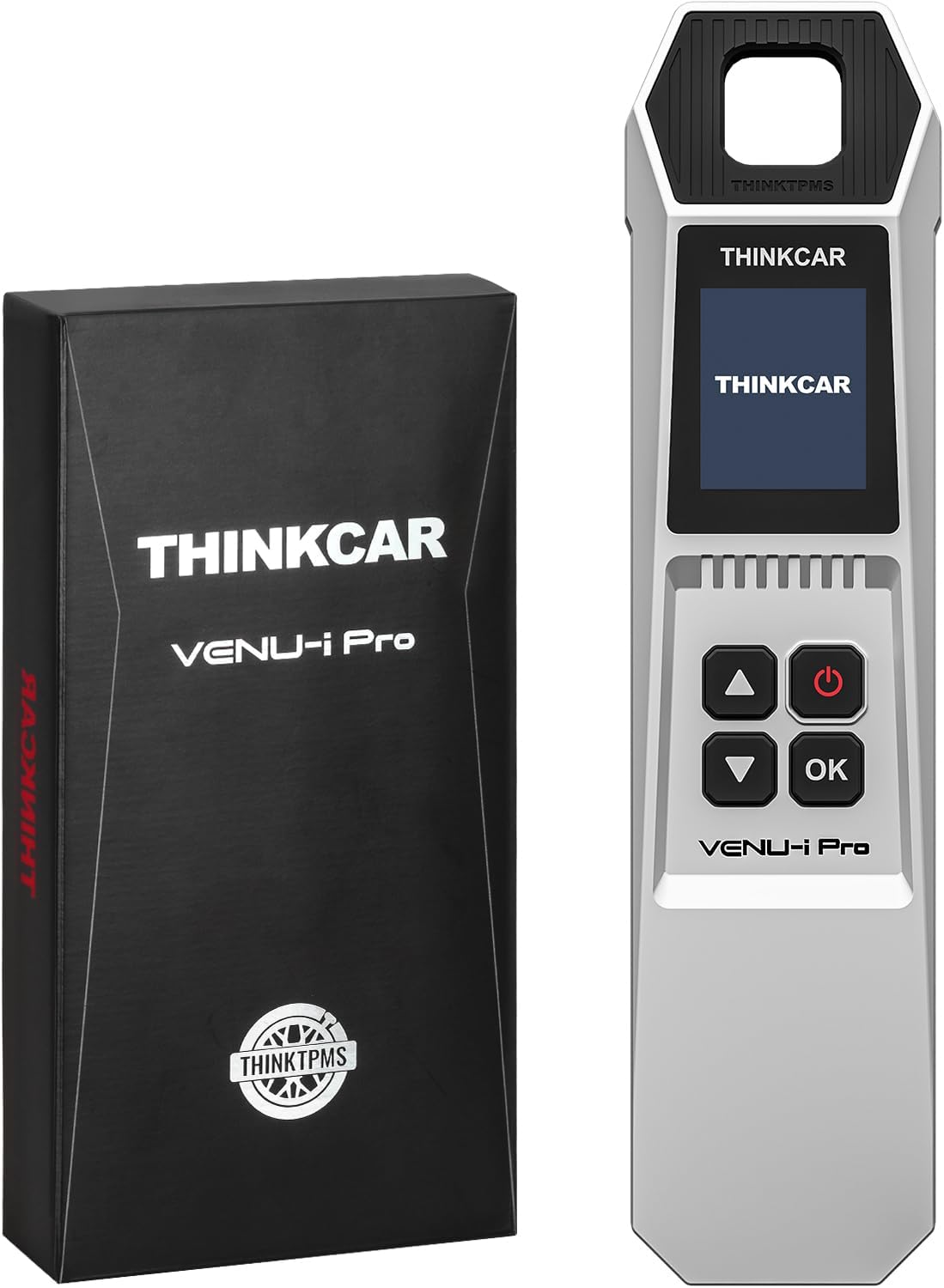
Figure 1: The VENU-i Pro TPMS Programming Tool and its retail packaging.
2. Кутуда эмне бар
Upon unboxing your VENU-i Pro TPMS Programming Tool, please ensure all the following items are present:
- VENU-i Pro TPMS Relearn Tool
- Заряддагыч
- USB кабели
- Көрсөтмө (бул документ)
3. Орнотуу жана активдештирүү
The VENU-i Pro does not operate independently. It requires connection to a compatible THINKCAR diagnostic tablet or Thinkdiag Bluetooth scanner. Follow these steps for initial setup and activation:
- Аппаратты заряддоо: Connect the VENU-i Pro to the provided charger and USB cable to ensure it has sufficient power.
- Колдонмону орнотуу:
- For Android devices, download and install the i-VENU APP.
- For iOS devices, download and install the Thinkdiag+ App.
- Колдонуучунун каттоо эсебин түзүү: Open the installed app and create a user account using your email address.
- Bluetooth аркылуу туташуу: Link the VENU-i Pro directly with your device via Bluetooth within the application.
- Pair with Diagnostic Tool: For full functionality including reading/clearing codes, activating, programming, and relearning TPMS sensors, connect the VENU-i Pro with a compatible THINKCAR diagnostic tablet (Thinktool pro/pros/pros+) or Kingbolen K-series scanner (K7/K8/K10).
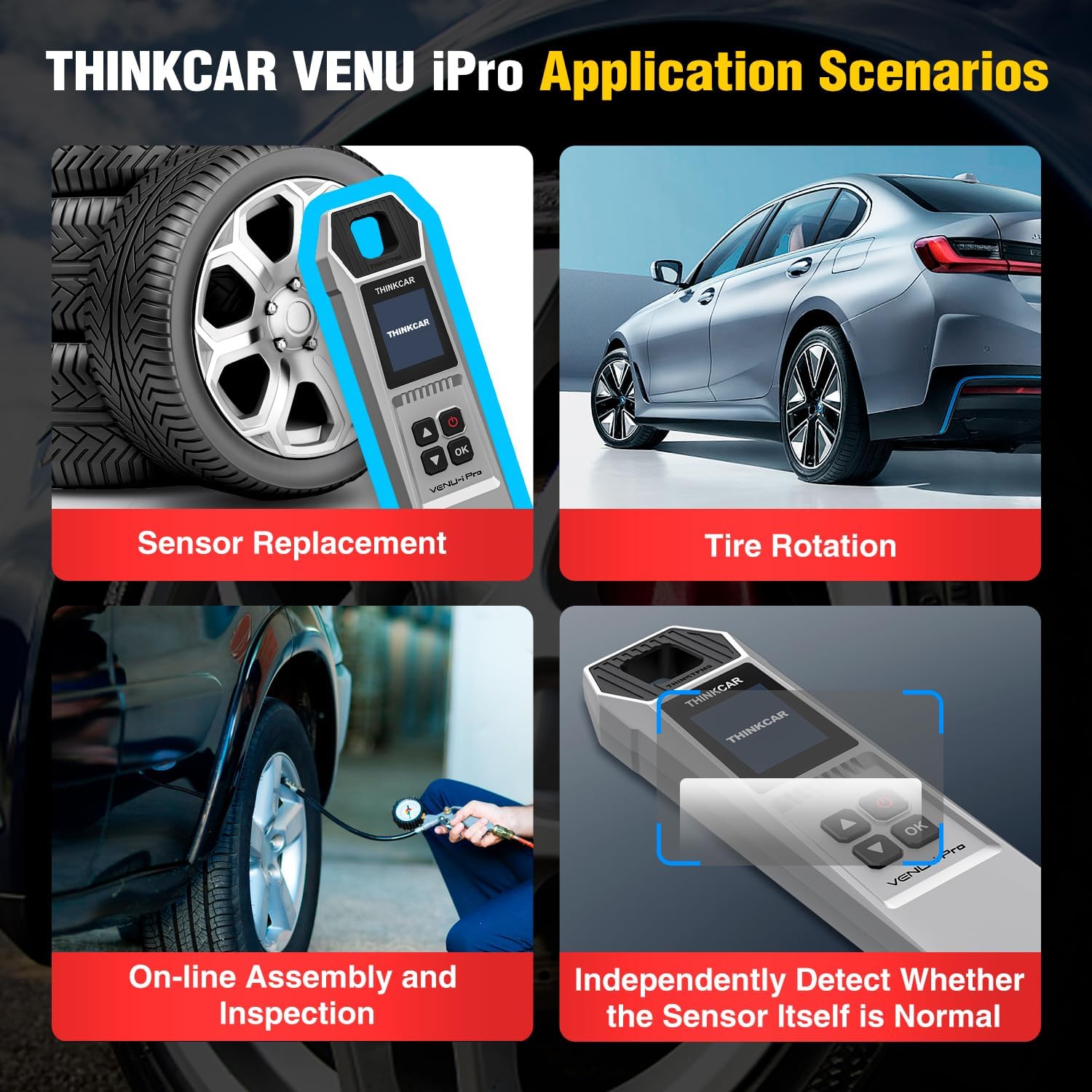
Figure 2: Connection methods for the VENU-i Pro, including smartphone applications and compatible diagnostic scanners.
4. Operating the VENU-i Pro
The VENU-i Pro offers a comprehensive suite of TPMS functions. Below are the primary operations:
4.1. TPMS Sensor Activation, Reading, and Programming
The tool activates and reads tire pressure information by receiving low-frequency or high-frequency signals from TPMS sensors. It can then be used to program new sensors.
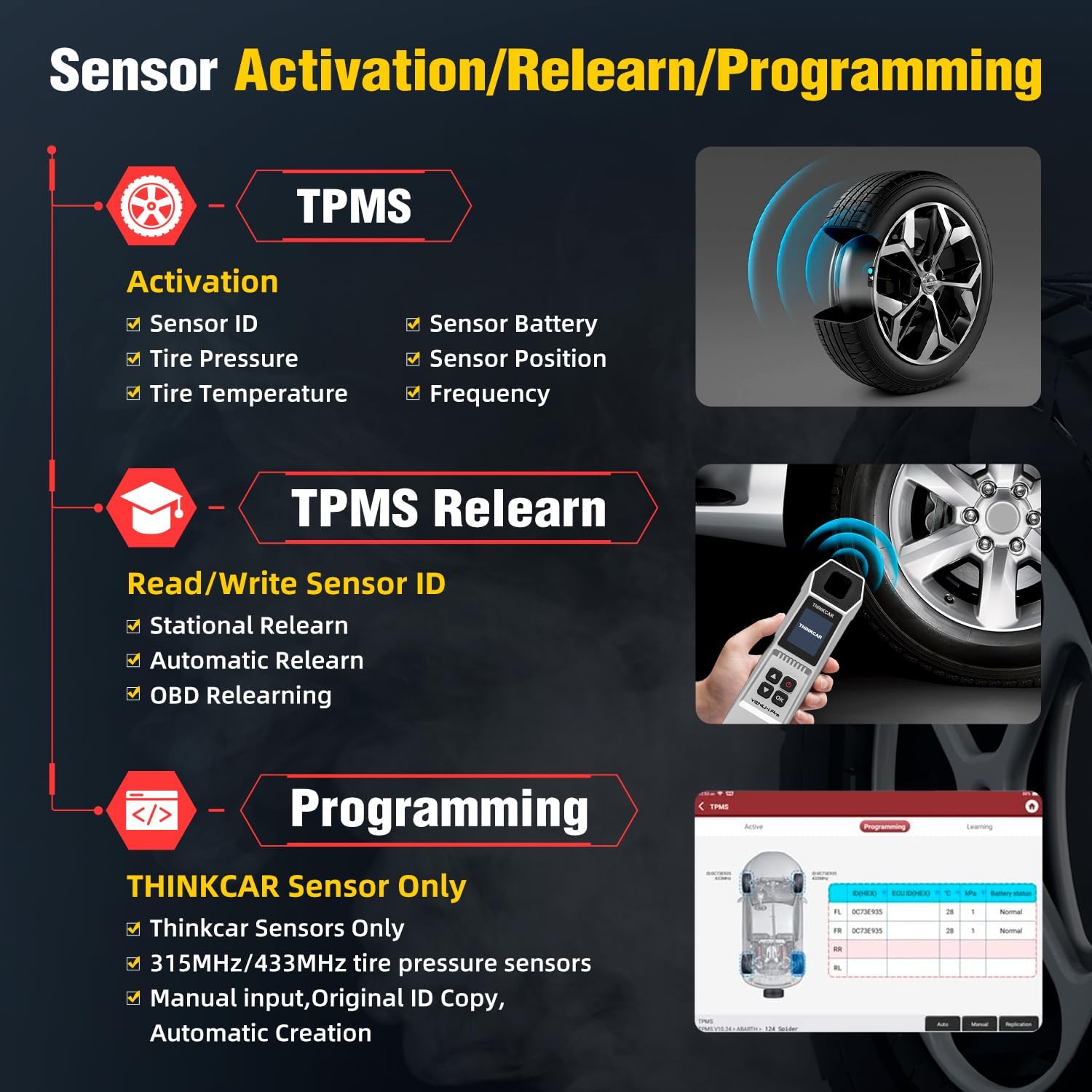
Figure 3: ашыкview of TPMS Activation, Relearn, and Programming capabilities.
4.1.1. TPMS Sensor Programming
Reprogram THINKCAR and original car make TPMS sensors with unlimited times using one of four options:
- OBD тарабынан көчүрүү: Pull the old sensor ID stored in OBD compliant vehicles and write it directly into a new THINKCAR sensor.
- Активдештирүү боюнча көчүрүү: Activate the damaged sensor that can still send signals, get its ID, and then program a new sensor.
- Auto Create: Use the TPMS tool to generate a new and matched sensor ID.
- Manual Create: Manually write the original sensor ID into a new THINKCAR sensor.

Figure 4: Visual guide to TPMS sensor programming methods.
4.2. TPMS Tire Pressure Monitor System Relearn
This advanced TPMS relearn tool offers step-by-step guidance in all three sensor position relearn modes:
- Автоматтык кайра үйрөнүү
- Стационардык кайра үйрөнүү
- OBDII Relearn
Use it to quickly restore your vehicle’s TPMS function after air pressure adjustment, tire rotation/disassembling/modification, or sensor replacement.
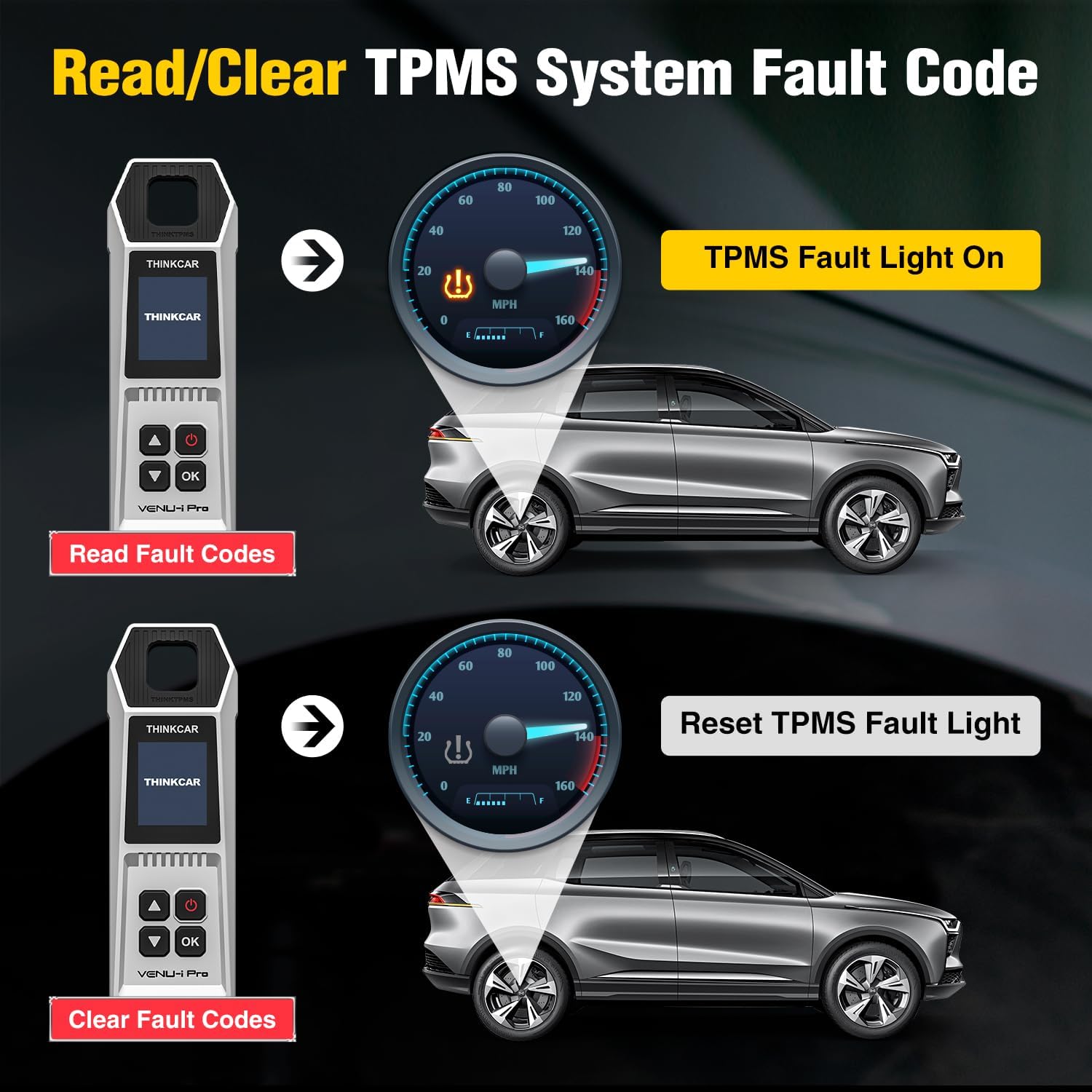
Figure 5: The three primary methods for TPMS relearn.
4.3. Full-featured Tire Pressure Diagnosis
The VENU-i Pro is designed to activate, read, and check known OBD2 TPMS sensors, providing status and health information such as sensor ID, tire pressure, tire temperature, battery status, and sensor frequency. It can also read and clear TPMS system codes and warning lights.
Figure 6: Process of diagnosing and clearing TPMS fault codes.
4.4. Колдонуу сценарийлери
The VENU-i Pro is suitable for various automotive scenarios where TPMS maintenance is required:
- Сенсорду алмаштыруу
- Тирдин айлануусу
- On-line Assembly and Inspection
- Independently Detect Whether the Sensor Itself is Normal

Figure 7: Common uses for the VENU-i Pro TPMS tool.
4.5. Унаа шайкештиги
The VENU-i Pro supports a wide range of car makes, covering over 98% of vehicles equipped with TPMS systems globally. Compatibility may vary for different car makes and models. For vehicles with indirect TPMS systems, only the TPMS "learning" function is supported. For direct TPMS systems, full functions including activation, programming, relearn, and diagnosis are available.

8-сүрөт: Мисamples of car manufacturers supported by the VENU-i Pro.
5. Техникалык тейлөө
To ensure the longevity and optimal performance of your VENU-i Pro TPMS Programming Tool, follow these maintenance guidelines:
- Тазалыкты сактоо: Аппаратты жумшак, кургак чүпүрөк менен сүртүңүз. Абразивдүү тазалагычтарды же эриткичтерди колдонуудан алыс болуңуз.
- Туура сактоо: Куралды күн нурунан жана экстремалдык температурадан алыс салкын, кургак жерде сактаңыз.
- Кадимки заряддоо: Charge the device regularly, even when not in use, to maintain battery health.
- Программалык камсыздоо жаңыртуулары: The VENU-i Pro offers lifetime free updates. Regularly check for and install software updates via the i-VENU or Thinkdiag+ app to ensure compatibility with new vehicle models and access to the latest functions.

Figure 9: The VENU-i Pro benefits from lifetime free software updates.
6. Кыйынчылыктарды
If you encounter issues while using the VENU-i Pro, consider the following common troubleshooting steps:
- Түзмөк күйбөй жатат: Ensure the device is fully charged. If it still doesn't power on, try a different USB cable or charger.
- Туташуу маселелери: Verify Bluetooth is enabled on both the VENU-i Pro and your diagnostic tablet/phone. Ensure the device is within range. Restart both devices and try reconnecting.
- Sensor Not Activating/Reading: Ensure the sensor is within close proximity to the VENU-i Pro. Check the sensor's battery status. Verify the correct sensor type and frequency are selected in the software.
- Программалык камсыздоонун тоңуп калышы/кыйрашып калышы: Ensure your diagnostic tablet/phone has sufficient memory and is running the latest version of the i-VENU or Thinkdiag+ app. Close other background applications.
- Туура эмес окуулар: Ensure the tool's software is up-to-date. Calibrate the tool if a calibration option is available in the software.
For persistent issues, please refer to the support section for contact information.
7. Техникалык шарттар
| Өзгөчөлүк | Деталь |
|---|---|
| Бренд | ойлонуучу машина |
| Модел | THINKCAR VENU-i Pro TPMS tool |
| Өндүрүүчү бөлүгүнүн номери | VENU-i Pro TPMS Program Tool |
| Элемент Салмагы | 1.23 фунт |
| Продукциянын өлчөмдөрү | 11.81 x 8.27 x 1.97 дюйм |
| Келип чыккан өлкө | Кытай |
| Операциялык системанын шайкештиги | Requires Thinkdiag/Thinktool/KINGBOLEN K Products, Original car make and Thinkcar TPMS sensors |
| Display Resolution | Based on the connected device you use |
| Automotive Fit түрү | Universal Fit |
| UPC | 768297576782 |
8. Кепилдик жана колдоо
thinkcar offers a 30-day return promise for new replacements or refunds. For any doubts about how to use this TPMS Tool, technical assistance, or warranty claims, please contact the seller directly. Prompt help will be offered to ensure your satisfaction with the product.


