1. Киришүү
This manual provides essential information for the setup, operation, and maintenance of your Donner DDP-100 88-Key Weighted Action Digital Piano. Please read it thoroughly to ensure proper use and to maximize your instrument's lifespan.
Негизги өзгөчөлүктөрү:
- 88 Fully-Weighted Keys: Designed to precisely match finger strength changes, restoring the feel of an acoustic piano for stable and responsive touch.
- Реалдуу үн: Features a pure tone sampled from real acoustic grand pianos, utilizing AWM sampling technology for realistic and excellent sound quality.
- Ар тараптуу байланыш: Supports MP3 input, external sound systems, and headphones for varied practice and performance needs.
- Интеграцияланган Ampөмүр берүүчү: Камтылган amplifier for direct sound output.
- Жөнөкөй дизайн: Wooden cabinet with a sliding key cover for key protection and a modern aesthetic.
- 128-ноталуу полифония: Ensures complex musical passages can be played without notes cutting off.

Figure 1: The Donner DDP-100 Digital Piano in white, showcasing its full 88-key keyboard, integrated music stand, and three foot pedals.
2. Орнотуу нускамалары
2.1 Пакеттен чыгаруу жана компоненттерди текшерүү
Carefully unpack all components from the packaging. Ensure all items listed below are present:
- Donner DDP-100 Digital Piano Unit
- Furniture Stand
- Кубаттуу адаптер
- Жылдырма ачкыч капкагы
- Үч педалдык бирдиги
- Музыкалык эс алуу
2.2 Ассамблея
- Assemble the Furniture Stand: Follow the instructions provided with the furniture stand to securely assemble its components.
- Attach the Piano Unit: Carefully place the DDP-100 digital piano unit onto the assembled furniture stand. Secure it using the provided screws or fasteners.
- Connect the Pedal Unit: Locate the pedal unit cable and connect it to the corresponding port on the underside of the piano unit.
- Музыкалык эс тутумду орнотуу: Insert the music rest into the designated slots on the top panel of the piano.
- Кубат адаптерин туташтыруу: Plug the power adapter into the DC IN port on the piano's rear panel, then plug the adapter into a wall outlet.

Figure 2: Dimensions of the Donner DDP-100 Digital Piano, illustrating its compact design for home integration.
3. Иштөө нускамалары
3.1 Күйгүзүү/өчүрүү жана үндү башкаруу
- Күйгүзүү: Locate the 'POWER' button on the left side of the keyboard. Press it to turn on the piano. A red indicator light will illuminate.
- Үндү тууралоо: Use the 'VOLUME' knob to adjust the overall sound level. Turn clockwise to increase volume, counter-clockwise to decrease.
- Өчүрүү: Press the 'POWER' button again to turn off the piano.
Видео 1: Бүттүview of the Donner DDP-100 Digital Piano, demonstrating power on, volume control, and key action.
3.2 Пианинодо ойноо
- Салмакталган ачкычтар: The 88 fully-weighted keys provide a realistic piano feel, with heavier touch in lower registers and lighter touch in higher registers.
- Педальдар: The three pedals (soft, sostenuto, sustain) allow for expressive playing, similar to an acoustic grand piano.
- Үн сапаты: The DDP-100 features a single, high-quality grand piano tone, sampled for authenticity.

Figure 3: Diagram illustrating the graded hammer action of the 88 weighted keys, providing a realistic playing experience.
3.3 Headphone Mode
For private practice, connect headphones to the 3.5mm headphone jack located on the rear panel. This mutes the internal speakers, allowing you to play without disturbing others.

Figure 4: Demonstrating the headphone mode for silent practice, ideal for shared living spaces.
3.4 Тышкы түзмөктүн туташуусу
The rear panel of the DDP-100 offers various ports for connecting external devices:
- MP3 интерфейси: Connect an MP3 player for audio playback.
- USB Transmission Interface: MIDI маалыматтарды өткөрүү үчүн компьютерге туташыңыз.
- Audio Interface (IN/OUT): Connect to external audio systems or recording devices.
- Туруктуу педалдык розетка: For connecting the included three-pedal unit.
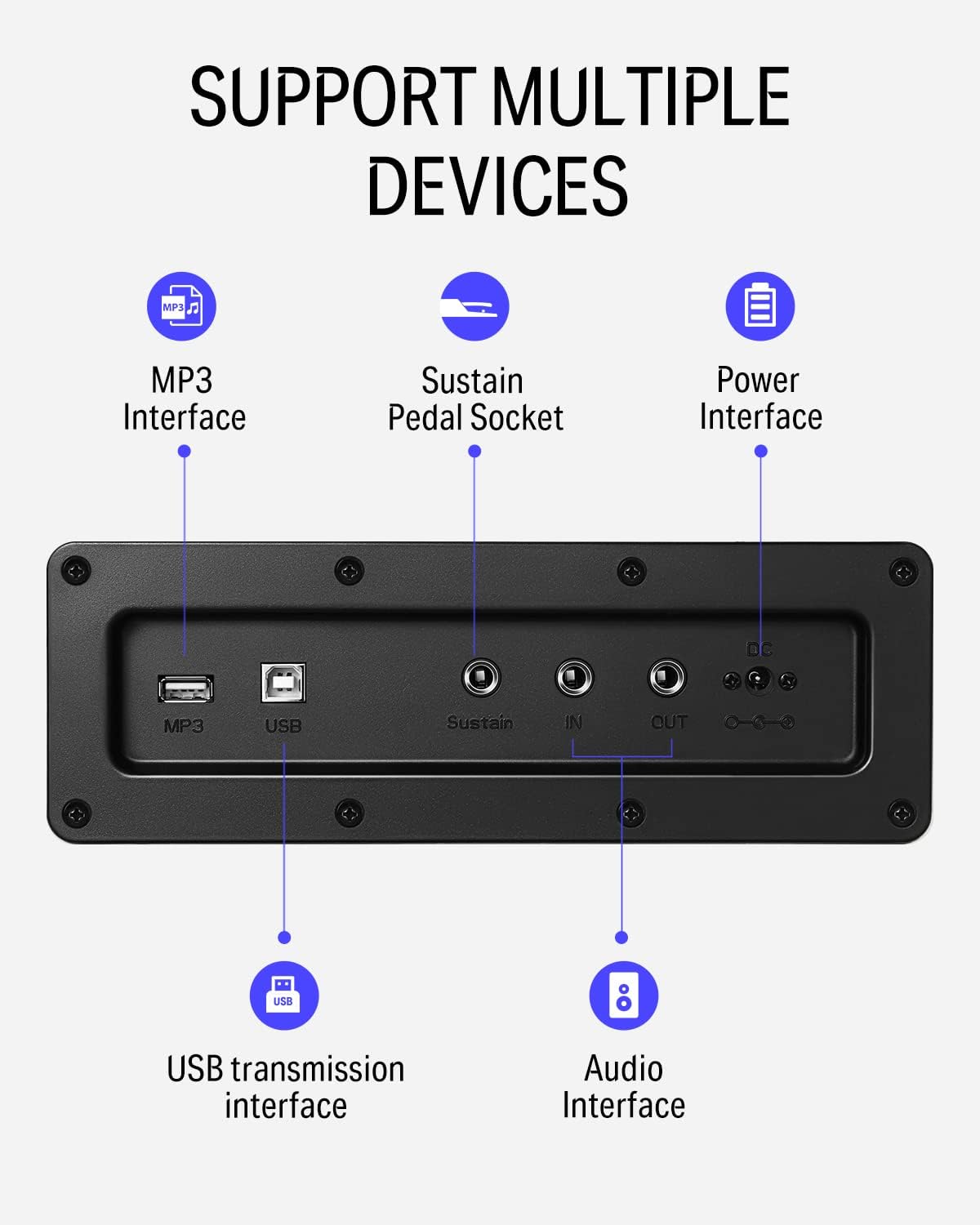
5-сүрөт: Детальдуу view of the rear panel connectivity options, including MP3, USB, Sustain, and Audio In/Out ports.
Video 2: Demonstrates the versatility of the DDP-100 when connected to other devices, such as DJ equipment.
4. Техникалык тейлөө
4.1 Тазалоо
- Use a soft, dry cloth to wipe the surface of the piano.
- өжөр кир үчүн, бир аз гampкездемени суу жана жумшак, абразивдүү эмес тазалоочу каражат менен сүртүңүз. Ашыкча нымдуулуктан алыс болуңуз.
- Do not use chemical solvents, alcohol, or abrasive cleaning agents, as these can damage the finish.
4.2 Сактоо жана кам көрүү
- Keep the piano away from direct sunlight, heat sources, and excessive humidity to prevent damage to the wood and electronic components.
- Use the sliding key cover to protect the keys from dust and spills when not in use.
- Avoid placing heavy objects on the piano.
5. Кыйынчылыктарды
5.1 Үн жок
- Кубат адаптери ишенимдүү туташтырылган жана пианино күйгүзүлгөнүн текшериңиз.
- Check the volume knob and ensure it is turned up.
- If headphones are connected, disconnect them to enable internal speakers.
- If connected to an external sound system, check the system's volume and connections.
5.2 Ачкычтар жооп бербейт
- Пианино күйүп турганын текшериңиз.
- If only certain keys are affected, contact customer support.
5.3 Abnormal Sound
- Check for loose connections of cables (power, pedals, audio).
- Ensure the volume is not set too high, causing distortion.
- If the issue persists, power cycle the unit (turn off, wait 10 seconds, turn on).
6. Техникалык шарттар
| Өзгөчөлүк | Деталь |
|---|---|
| Бренд | Доннер |
| Модель аты | ДДП-100 |
| Ачкычтардын саны | 88 |
| Ачкыч түрү | Fully-Weighted Action |
| Полифония | 128-Note |
| Үн булагы | AWM Sampling Technology (Grand Piano Tone) |
| Педаалдар | 3-Pedal Unit (Sustain, Sostenuto, Soft) |
| Байланыш | MP3 Interface, USB Transmission, Audio In/Out, 3.5mm Headphone Jack |
| Power Source | Адаптер, электр |
| Продукциянын өлчөмдөрү | 54.33"D x 16.14"W x 33.27"H |
| Элемент Салмагы | 97.7 фунт |
| Дене материалы | Жыгач |
| Түс | Ак |
7. Кепилдик жана колдоо
For warranty information, please refer to the documentation included with your purchase or contact Donner customer support. General customer support is available for assistance with product inquiries, troubleshooting, and service requests.
For additional support, visit the official Donner webсайтка же кардарларды тейлөө каналдарына кайрылыңыз.


