Introduction
The Hubble Nursery Pal Link Premium is a smart video baby monitor designed to provide comprehensive monitoring of your child. It combines a dedicated 5-inch parent unit with smart features accessible via the HubbleClub app, ensuring you stay connected and informed.
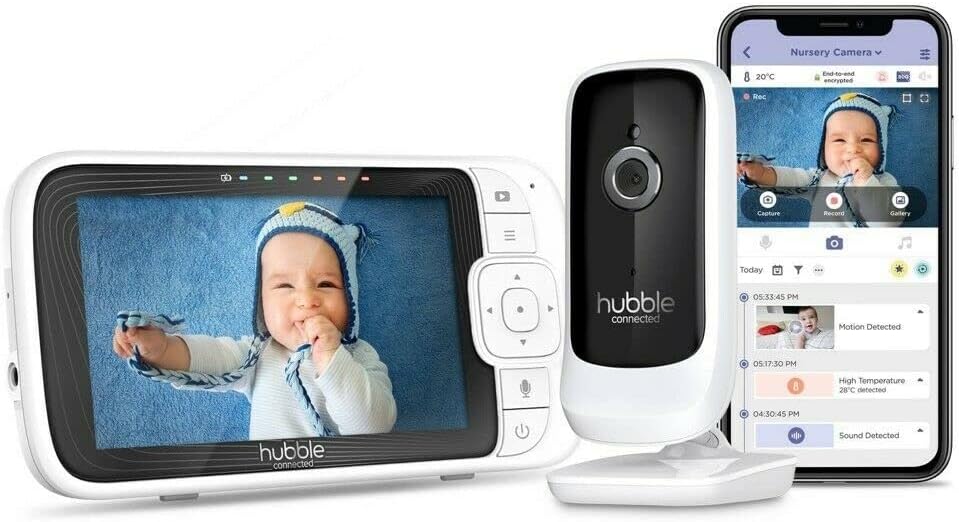
Image: The complete Hubble Nursery Pal Link Premium system, showing the parent unit, camera, and a smartphone displaying the HubbleClub app interface.
Жайгашуу
1. Кутудан чыгаруу жана компоненттер
Бардык компоненттердин бар экенин текшериңиз:
- Parent Unit (5-inch display)
- Baby Camera Unit
- Power Adapters (for both units)
- Quick Start Guide
2. Күйгүзүү
Connect the power adapter to the Baby Camera Unit and plug it into a power outlet. Connect the power adapter to the Parent Unit and plug it into a power outlet. The Parent Unit has a built-in 3000mAh battery for portable use.
3. Pairing Camera and Monitor
The units are typically pre-paired. If not, follow the on-screen instructions on the Parent Unit to pair the camera. Ensure both units are within range.

Image: A close-up of the 5-inch parent unit screen, showing a clear view бешиктеги баланын.
4. App Installation & Setup (HubbleClub)
Download the HubbleClub app from your device's app store. Create an account and follow the in-app instructions to connect your monitor. This enables remote access and additional smart features.
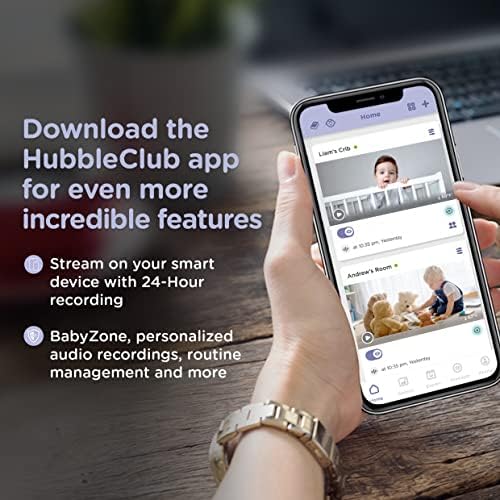
Image: A smartphone screen showing the HubbleClub app, highlighting features like live streaming, 24-hour recording, and BabyZone.
Иштөө нускамалары
1. Parent Unit Functions
- Экран: The 5-inch diagonal color screen provides a live video feed.
- Баскычтар: Navigate menus and control camera functions using the directional pad and menu buttons.
- Эки тараптуу сүйлөшүү: Балаңыз менен камера аркылуу сүйлөшүү үчүн ата-эне блогундагы микрофон баскычын басып, кармап туруңуз.
- Көлөмү: Adjust the audio volume of the parent unit to hear your baby clearly.
- Жарыктык: Оптималдуу экран жарыктыгын тууралаңыз viewжарыктын ар кандай шарттарында.
2. Камеранын функциялары
- Digital Pan, Tilt, and Zoom: Use the parent unit controls or the HubbleClub app to digitally adjust the camera's view.
- Түнкү көрүнүш: The camera automatically switches to infrared night vision in low light, providing a clear black and white image.
- Температура сенсору: Monitors the room temperature and displays it on the parent unit and app.
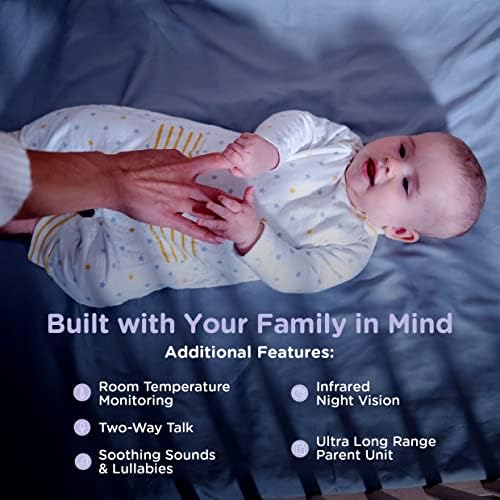
Image: Visual representation of key features including room temperature monitoring, two-way talk, soothing sounds, infrared night vision, and the long range of the parent unit.
3. HubbleClub App Features
The HubbleClub app enhances your monitoring experience with advanced functionalities:
- Live Streaming & 24-Hour Recording: Access a live video feed and review foo жазылганtage from your smart device via Wi-Fi.
- BabyZone: Set virtual boundaries to receive alerts if your baby moves out of a designated area.
- Өсүү трекери: Log and track your baby's sleep, feeding, diaper changes, and growth milestones.
- Parenting Tips & Articles: Access expert advice on sleep, nutrition, and development.
- Motion, Sound, and Temperature Alerts: Receive notifications on your smart device for detected activity or temperature changes.
- Preloaded Lullabies & Audiobooks: Play soothing sounds directly from the app to help your baby sleep.
- Personal Audio Recordings: Record your own voice or songs to play for your baby.
- Акылдуу пландаштыруу: Customize when you receive motion detection notifications.
- Тынчымды алба: Manage notifications to avoid interruptions during specific times.
Video: An official product video demonstrating the features of the Hubble Nursery Pal Link Premium, including two-way talk, night vision, soothing sounds, and the HubbleClub app functionalities like growth tracking and alerts.
4. Диапазон жана байланыш
The monitor offers a 1,000-ft range for reliable monitoring within your home. Wi-Fi connectivity allows remote access and extended features through the HubbleClub app.
Техникалык тейлөө
1. Тазалоо
Wipe both the Parent Unit and Baby Camera Unit with a soft, dry cloth. Do not use abrasive cleaners or solvents.
2. Батареяга кам көрүү
To prolong battery life, avoid extreme temperatures and fully discharge and recharge the Parent Unit battery periodically.
Проблемаларды чечүү
| Маселе | Мүмкүн себеп | Чечим |
|---|---|---|
| No signal/Poor image | Аралыктан тышкары, тоскоолдук, батареянын заряды аз. | Move units closer, reduce interference (e.g., other electronics), charge Parent Unit. |
| No sound/Poor sound | Volume too low, microphone muted. | Increase volume, check microphone settings. |
| Колдонмонун туташуу маселелери | Weak Wi-Fi, incorrect login, app outdated. | Check Wi-Fi signal, re-enter login details, update app. |
Техникалык шарттар
| Өзгөчөлүк | Деталь |
|---|---|
| Модель номери | HCSNPLP-1 |
| Screen Size | 5 дюймдук диагоналдык түстүү экран |
| Video Resolution | 1080p |
| Байланыш | Зымсыз, Wi-Fi |
| Диапазон | 1,000 футка чейин (көрүү сызыгы) |
| Батареянын сыйымдуулугу (Ата-эне блогу) | 3000 мАч |
| Өзгөчөлүктөр | Night Vision, Motion Sensor, Two-Way Talk, Room Temperature Monitoring, Preloaded Lullabies, HubbleClub App Integration |
| Power Source | Батарея менен иштейт |
| Ички/тышкы колдонуу | Indoor |
| Элемент Салмагы | 1.5 фунт |
Кепилдик жана колдоо
For warranty information and technical support, please refer to the official Hubble Connected webсайтына кириңиз же алардын кардарларды тейлөө кызматына кайрылыңыз. Кепилдик боюнча дооматтар үчүн сатып алганыңызды тастыктаган документти сактап коюңуз.


