
Продукт бүттүview
The LEVN Bluetooth 5.0 Headset is designed for professionals and individuals requiring clear communication in various environments, including remote work, call centers, and online classes. It features advanced AI Noise Cancellation technology to minimize background noise, ensuring your voice is heard clearly. With dual connectivity options (Bluetooth and USB dongle) and a long-lasting battery, this headset offers flexibility and reliability for extended use.
Негизги өзгөчөлүктөрү
- AI Noise Cancellation & Mute Function: Advanced ENC technology prevents listeners from hearing your background noise. Features an instant mute button for microphone control during calls.
- Two Connectivity Methods & Wide Compatibility: Connects via Bluetooth 5.0 to computers, cell phones, and other Bluetooth devices, or via the included USB dongle for a more stable, delay-free connection to PCs.
- Long Battery Life & Exclusive Charging Base: Equipped with a 350 mAh battery, providing up to 35+ hours of continuous work time and 110 hours of standby time. Includes a plug-and-play charging base for wireless charging, or use the Type-C charging cable.
- Comfortable Earmuffs & 270° Rotatable Microphone: Soft protein leather earmuffs ensure all-day comfort. The microphone rotates 270° for use on either side and is highly durable.
- Hands-Free Calls & Long-distance Working Range: Offers a wireless working range of up to 33FT/10M (without obstacles), ideal for call centers, Skype, Zoom, Teams, and Webinar platforms.
Кутуда эмне бар
- LEVN Wireless Headset (Black)
- TYPE C заряддоо кабели
- Заряддоо базасы
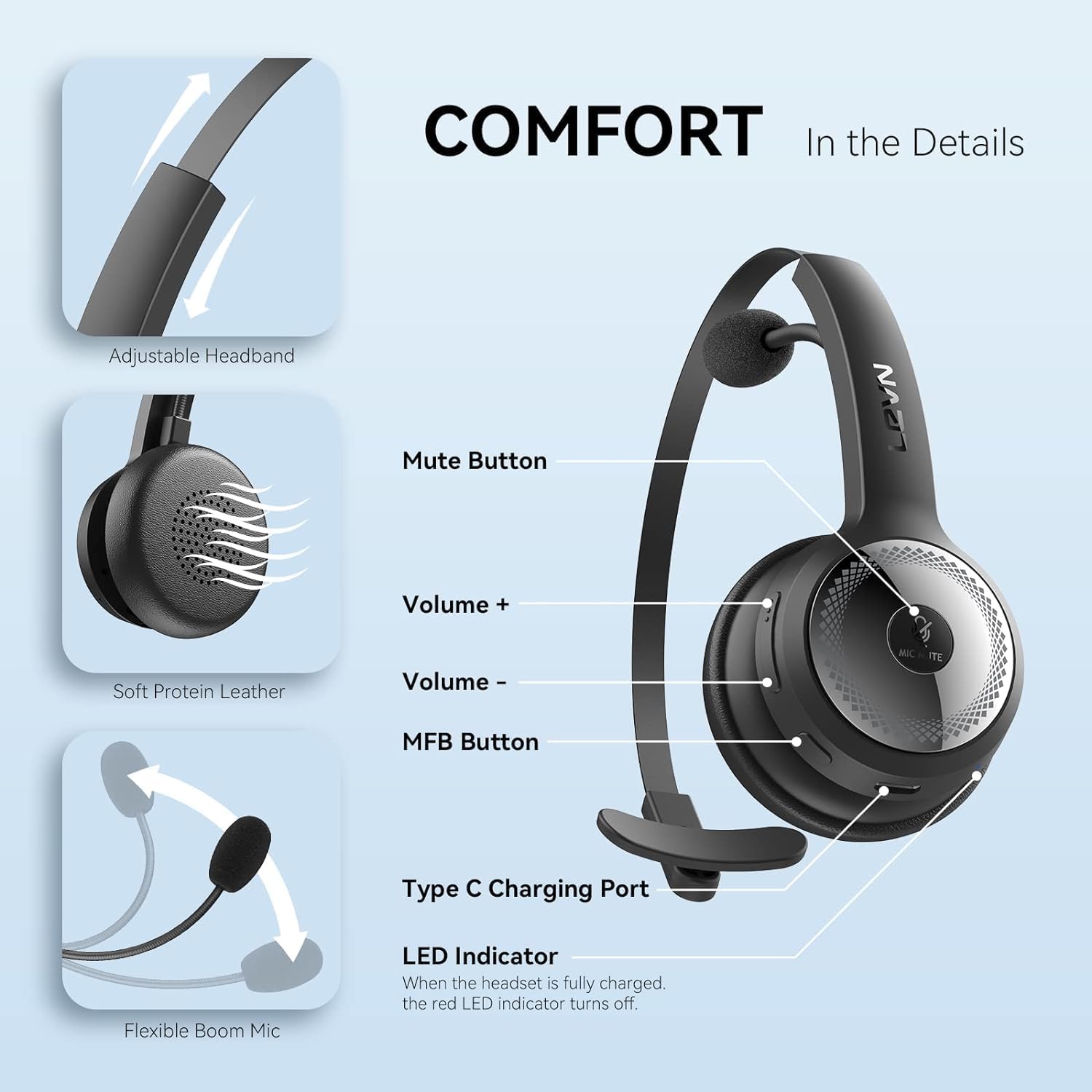
Image showing the LEVN Wireless Headset, Type C Charging Cable, and Charging Base.
Жайгашуу
Гарнитураны заряддоо
The LEVN headset can be charged using two methods: via the included charging base or directly with the Type-C charging cable. Place the headset securely on the charging base, ensuring the contacts align. Alternatively, connect the Type-C cable to the headset's charging port and a power source. A full charge provides up to 35+ hours of talk time.

The headset supports both wireless charging via its base and direct Type-C cable charging.
Түзмөктөргө туташуу
The LEVN headset offers versatile connectivity options:
- Bluetooth байланыш: Turn on Bluetooth on your device (computer, cell phone, etc.) and search for 'LEVN LE-HS010'. Select it to pair.
- USB Dongle Connection (for PC): For a more stable connection with no transmission delay, use the included USB dongle. Plug the dongle into an available USB port on your computer. Ensure your computer's built-in Bluetooth is turned off. The headset will automatically connect to the dongle.

The headset can connect via Bluetooth 5.0 or a dedicated USB dongle for enhanced stability.
Иштөө нускамалары
Controls Overview
The headset features intuitive controls for easy management of calls and audio:
- MFB баскычы: Multi-Function Button for answering/hanging up calls (mobile phones only), entering pairing mode, and turning the headset on/off.
- Көлөм +/-: Аудионун үнүн тууралайт.
- Үнсүз баскычы: Toggles microphone mute during a call.
- LED көрсөткүчү: Provides status updates (e.g., charging, paired).
Деталдаштырылган view of the headset's adjustable headband, soft protein leather earcup, flexible boom mic, and control buttons.
AI Noise Cancellation & Mute Function
The headset incorporates Environmental Noise Cancellation (ENC) technology to effectively reduce ambient noise, ensuring your voice remains clear to the listener. The dedicated mute button allows for quick and easy muting of the microphone during active calls. Please note that the mute function is active only during a call.
Official video demonstrating how to toggle the mute function during a call.

The seamless mute function allows for private moments during calls.
Hands-Free Calls & Working Range
Enjoy the freedom of movement with a wireless working range of up to 33 feet (10 meters) without obstacles. This allows you to move away from your connected device without interrupting your call quality. The headset is optimized for various communication platforms such as Skype, Zoom, Teams, and Webinar, making it a versatile tool for professional and personal use.
Техникалык тейлөө
To ensure the longevity and optimal performance of your LEVN headset, follow these general maintenance guidelines:
- Keep the headset and charging base clean and dry. Wipe with a soft, dry cloth.
- Гарнитураны экстремалдык температурага, нымдуулукка же тике күн нуруна тийгизүүдөн сактаңыз.
- Store the headset on its charging base or in a safe place when not in use to prevent damage.
- Гарнитураны өзүңүз чечүүгө же оңдоого аракет кылбаңыз, анткени бул кепилдикти жокко чыгарышы мүмкүн.
Проблемаларды чечүү
| Маселе | Чечим |
|---|---|
| Headset not connecting via USB dongle. | Ensure your computer's Bluetooth is turned off. Insert the USB dongle into a USB port. Long press the MFB button on the headset for 5-7 seconds to enter pairing mode. The LED on the dongle will flash blue, then turn solid blue when connected. |
| Microphone not working or poor sound quality during calls. | Check the sound settings on both your computer and the conferencing software (e.g., Zoom, Teams) to ensure 'LEVN LE-HS010 Superior' is selected as the default input (microphone) and output (speaker) device. Ensure your computer system and conferencing software are up to date. |
| Battery draining quickly or not charging. | Ensure the headset is properly seated on the charging base, or the Type-C cable is securely connected. The LED indicator on the base should turn red when charging. If the headset is not in use, turn it off to conserve battery life. |
| Cannot mute microphone when not on a call. | The instant mute function is designed to work during an active call. It does not support pre-call muting. |
Техникалык шарттар
| Өзгөчөлүк | Деталь |
|---|---|
| Модель аты | LE-HS010 Superior Black |
| Бренд | ЛЕВН |
| Байланыш технологиясы | Bluetooth 5.0, USB Dongle |
| Noise Control | Sound Isolation (AI Noise Cancellation) |
| Батареянын иштөө мөөнөтү | Up to 35+ hours (talk time), 110 hours (standby) |
| Заряддоо убактысы | 2 саат |
| Зымсыз диапазон | 33FT / 10M (without obstacles) |
| Микрофонду айландыруу | 270° |
| Материал | Faux Leather, Leather |
| Элемент Салмагы | 79 грамм (2.79 унция) |
| Продукциянын өлчөмдөрү | 5.4 x 4.7 x 2.4 дюйм |
| UPC | 702385064751 |
Кепилдик жана колдоо
For any issues encountered during the use of your LEVN Wireless Headset, please contact our professional customer service team. They are dedicated to providing high-quality solutions and support. Specific warranty details may vary; please refer to your purchase documentation or contact LEVN customer support directly for comprehensive warranty information.
You can visit the official LEVN store for more information and support resources: LEVN Store on Amazon


