1. Киришүү
Thank you for choosing the TechniSat DIGITRADIO CD 2GO BT. This portable device combines a CD player with DAB+ and FM radio reception, along with Bluetooth connectivity, offering versatile audio entertainment. This manual provides essential information for the safe and efficient use of your device, including setup, operation, and maintenance.
Please read this manual thoroughly before using the device and retain it for future reference.
2. Коопсуздук маалыматы
Аппаратка зыян келтирбөө же өзүңүзгө зыян келтирбөө үчүн төмөнкү коопсуздук чараларын сактаңыз:
- Аппаратты жамгырдын, нымдуулуктун же экстремалдык температуранын таасиринде калтырбаңыз.
- Аппаратты жылуулук булактарынын жанына же тике күн нуруна коюудан алыс болуңуз.
- Аппаратты ачпаңыз casinг. Бардык тейлөөлөрдү квалификациялуу кызматкерлерге тапшырыңыз.
- Көрсөтүлгөн кубат адаптерин жана батареяларды гана колдонуңуз.
- Иштеп жаткан учурда аппараттын айланасында туура желдетүүнү камсыз кылыңыз.
- Угуунун начарлашына жол бербөө үчүн, узак убакыт бою өтө катуу үн менен угуудан алыс болуңуз.
3. Пакеттин мазмуну
Пакетте бардык буюмдар бар экенин текшериңиз:
- TechniSat DIGITRADIO CD 2GO BT unit
- Наушник
- 2 x BL5C rechargeable batteries
- External power cable (AC adapter)
- Колдонуучунун Колдонмосу (бул документ)
4. Продукт бүтүп калдыview
Familiarize yourself with the main components and controls of your DIGITRADIO CD 2GO BT.

4.1-сүрөт: Фронт view of the TechniSat DIGITRADIO CD 2GO BT, showing the display, navigation buttons (ON/OFF OK, SKIP UP, SKIP DOWN), playback controls (PLAY/PAUSE, STOP/SEARCH), and function buttons (MENU, EQ/BT, MODE).
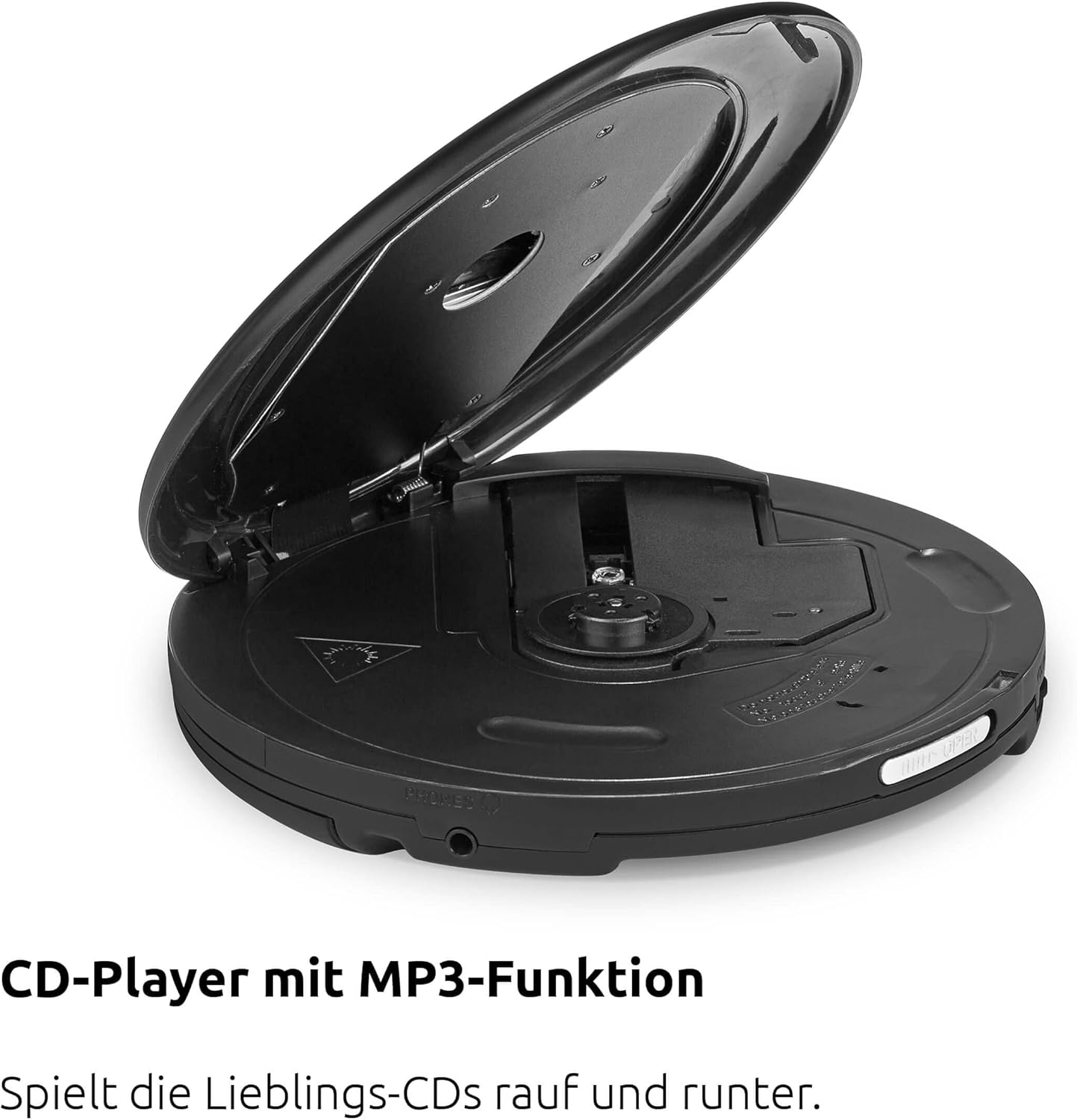
4.2-сүрөт: Жогорку view of the device with the CD compartment open, revealing the CD spindle and loading area. This is where audio CDs, MP3 CDs, CD-R, and CD-RW discs are inserted.

4.3-сүрөт: Side view illustrating the 3.5mm headphone jack, which also serves as the antenna for FM and DAB+ radio reception when headphones are connected.
Башкаруу каражаттары:
- ON/OFF OK: Power on/off, confirm selection.
- ОЙНОО/ТЫНДЫРУУ: Ойнотууну баштоо же тындыруу.
- STOP/SEARCH: Stop playback, initiate station search in radio mode.
- SKIP UP / SKIP DOWN: Skip tracks on CD, navigate menus, tune radio stations.
- МЕНЮ: Меню параметрлерине кирүү.
- Эквалайзер/БТ: Access equalizer settings, activate Bluetooth pairing.
- РЕЖИМ: Switch between CD, DAB+, FM, and Bluetooth modes.
5. Орнотуу
5.1. Батареяны орнотуу
The DIGITRADIO CD 2GO BT operates on two BL5C rechargeable batteries. To install:
- Аппараттын астыңкы жагындагы батарея бөлүкчөсүн табыңыз.
- Батарея уясынын капкагын ачыңыз.
- Insert the two BL5C batteries, ensuring correct polarity (+/-).
- Батарея уясынын капкагын бекем жабыңыз.
5.2. Аппаратты кубаттоо
You can power the device using the included AC adapter or the installed rechargeable batteries.
- AC кубаттуулугу: Connect the external power cable to the DC IN port on the device and plug the adapter into a wall outlet.
- Батарея кубаттуулугу: Ensure the batteries are charged. The device will automatically switch to battery power when disconnected from AC.
5.3. Баштапкы күйгүзүү
басып, кармап туруңуз КҮЙГҮЗҮҮ/ӨЧҮРҮҮ OK button to power on the device. The display will illuminate. If this is the first time powering on, the device may prompt you for initial setup options such as language or perform an automatic DAB+ station scan.
6. Иштөө нускамалары
6.1. CD ойнотуу
The DIGITRADIO CD 2GO BT supports audio CDs, MP3 CDs, CD-R, and CD-RW formats.

6.1-сүрөт: The portable design of the DIGITRADIO CD 2GO BT makes it suitable for on-the-go use.
- CD бөлүктүн капкагын ачыңыз.
- CDди этикеткасын өйдө каратып, шпинделге коюңуз.
- CD бөлүмүнүн капкагын чыкылдаган үн чыкканча бекем жабыңыз.
- басыңыз РЕЖИМ button until "CD" mode is selected.
- басыңыз ОЙНОО/ТЫНЫТТЫРУ ойнотууну баштоо үчүн
- Колдонуу ӨТКӨРҮҢҮЗ жана ӨТКӨРҮҢҮЗ тректердин ортосунда багыт алуу үчүн.
- Басыңыз ОЙНОО/ТЫНЫТТЫРУ to pause, and STOP/SEARCH ойнотууну токтотуу үчүн.
Resume Function: The player will automatically resume playback from the last listened position after being turned off and on again, ideal for audiobooks.
Anti-Shock Protection (ASP): This feature helps prevent playback interruptions during movement, ensuring a smooth listening experience.

6.2-сүрөт: The Anti-Shock Protection (ASP) feature ensures uninterrupted audio playback even during activities like cycling or walking.
6.2. DAB+ Radio
DAB+ (Digital Audio Broadcasting Plus) offers high-quality digital radio reception.

6.3-сүрөт: Enjoy a wide variety of digital radio programs with DAB+ reception.
- Connect the included headphones to the 3.5mm jack; they act as the antenna.
- басыңыз РЕЖИМ button until "DAB+" mode is selected.
- If this is the first time in DAB+ mode, the device will perform an automatic scan for available stations.
- Колдонуу ӨТКӨРҮҢҮЗ жана ӨТКӨРҮҢҮЗ to browse through available DAB+ stations.
- Сүйүктүү станцияңызды сактоо үчүн, баскычын басып, кармап туруңуз МЕНЮ button, navigate to "Preset Store", select a preset number (1-10), and press КҮЙГҮЗҮҮ/ӨЧҮРҮҮ OK ырастоо үчүн.
- To recall a favorite station, press the МЕНЮ button, navigate to "Preset Recall", select the desired preset, and press КҮЙГҮЗҮҮ/ӨЧҮРҮҮ OK.
6.3. FM радиосу
For traditional analog radio reception.
- Connect the included headphones to the 3.5mm jack; they act as the antenna.
- басыңыз РЕЖИМ button until "FM" mode is selected.
- Басыңыз STOP/SEARCH to automatically scan for the next available FM station.
- Же болбосо, колдонуңуз ӨТКӨРҮҢҮЗ жана ӨТКӨРҮҢҮЗ кол менен тууралоо үчүн.
- Сүйүктүү станцияңызды сактоо үчүн, баскычын басып, кармап туруңуз МЕНЮ button, navigate to "Preset Store", select a preset number (1-10), and press КҮЙГҮЗҮҮ/ӨЧҮРҮҮ OK ырастоо үчүн.
- To recall a favorite station, press the МЕНЮ button, navigate to "Preset Recall", select the desired preset, and press КҮЙГҮЗҮҮ/ӨЧҮРҮҮ OK.
6.4. Bluetooth туташуусу
Connect your DIGITRADIO CD 2GO BT to Bluetooth headphones or speakers.
- басыңыз РЕЖИМ button until "Bluetooth" mode is selected. The device will enter pairing mode, indicated by a flashing Bluetooth icon on the display.
- Activate Bluetooth on your external audio device (e.g., headphones, speaker) and set it to pairing mode.
- On the DIGITRADIO CD 2GO BT, press and hold the Эквалайзер/БТ button to initiate a search for nearby Bluetooth devices.
- Select your desired device from the list on the DIGITRADIO CD 2GO BT's display using ӨТКӨРҮП/ТӨМӨН жана менен ырастаңыз КҮЙГҮЗҮҮ/ӨЧҮРҮҮ OK.
- Once connected, the Bluetooth icon will become solid. Audio will now be streamed to the connected device.
6.5. Үндү башкаруу
Adjust the volume using the dedicated volume buttons (often integrated with SKIP UP/DOWN or separate buttons, refer to your device's specific button layout if different from general description). Note that due to European standards, a default volume limitation is active. To deactivate this and increase the maximum volume, press and hold the МЕНЮ button for a few seconds. Navigate through the menu options to find the "Volume Limit" setting and adjust it as desired. Refer to page 17 of the original printed manual for precise instructions on this setting.
6.6. Эквалайзер орнотуулары
Орнотулган эквалайзер менен аудио тажрыйбаңызды ыңгайлаштырыңыз.
- басыңыз Эквалайзер/БТ button (short press) to cycle through preset equalizer modes (e.g., Pop, Rock, Jazz, Classic, Flat).
- Some models may offer a custom equalizer setting, allowing manual adjustment of bass and treble. Consult the device display for available options.
7. Техникалык тейлөө
7.1. Тазалоо
To maintain the appearance and functionality of your device:
- Сыртын жумшак, кургак чүпүрөк менен сүртүңүз.
- Кежир белгилер үчүн, бир аз d колдонуңузamp жумшак жуугуч менен чүпүрөк, андан кийин кургатып сүртүңүз.
- Абразивдүү тазалоочу каражаттарды, эриткичтерди же спиртти колдонбоңуз, анткени алар бетке зыян келтириши мүмкүн.
- Periodically clean the CD lens with a specialized CD lens cleaner disc.
7.2. Батареяга кам көрүү
Батареянын иштөө мөөнөтүн узартуу үчүн:
- Биринчи колдонуудан мурун батарейкаларды толук заряддаңыз.
- Аппарат узак убакыт бою колдонулбаса, агып кетпеш үчүн батарейкаларды алып салыңыз.
- Колдонулган батарейкаларды жергиликтүү эрежелерге ылайык жок кылыңыз.
8. Кыйынчылыктарды
If you encounter issues with your DIGITRADIO CD 2GO BT, refer to the following table:
| Көйгөй | Мүмкүн себеп | Чечим |
|---|---|---|
| Түзмөк күйбөйт. | Батареялар түгөнгөн же туура эмес салынган. AC адаптери туташтырылган эмес же бузук. | Check battery charge and polarity. Ensure AC adapter is securely connected and functional. |
| Наушниктен үн чыкпайт. | Headphones not properly connected. Volume too low. Volume limit active. | Ensure headphones are fully plugged in. Increase volume. Deactivate volume limit (see Section 6.5). |
| CD өткөрүп жиберет же ойнобойт. | CD is dirty, scratched, or inserted incorrectly. CD compartment not closed. | Clean the CD. Ensure it is inserted correctly. Close the CD compartment firmly. |
| Радио кабыл алуу начар (DAB+/FM). | Headphones not connected or poorly positioned. Weak signal in current location. | Ensure headphones are connected and fully extended. Try repositioning the device or moving to a different location. |
| Bluetooth жупташуусу болбой жатат. | Device not in pairing mode. External device too far or not in pairing mode. | Эки түзмөк тең жупташтыруу режиминде жана байланыштын алкагында экенин текшериңиз. Эки түзмөктү тең өчүрүп-күйгүзүп көрүңүз. |
9. Техникалык шарттар
| Өзгөчөлүк | Деталь |
|---|---|
| Модель аты | ДИЖИТРАДИО CD 2GO BT |
| Модель номери | 0000/3970 |
| Бренд | TechniSat |
| Байланыш технологиясы | Bluetooth |
| Өзгөчөлүктөр | Replaceable Battery, Anti-Shock Function, Resume Function |
| Шайкеш түзмөктөр | Наушник |
| Колдоого алынган аудио форматтары | MP3, WMA, AAC |
| Дисктердин саны | 1 |
| Туташтыргыч түрү | 3.5 мм Джек |
| Power Source | 2 x Lithium-ion batteries (included), AC adapter |
| Батарея кайра заряддалуучу | Ооба |
| Колдонуу | Ички жана сырткы |
| Өлчөмдөрү (W x Y x D) | 14 x 2.50 x 14 cm (approximate, from feature bullets) |
10. Кепилдик жана колдоо
For warranty information and customer support, please refer to the warranty card included with your product or visit the official TechniSat webсайт. Ар кандай кепилдик дооматтары үчүн сатып алганыңыздын далилин сактаңыз.
Please note that spare parts availability is currently listed as "unavailable" according to product specifications. Software updates are also listed as "information not available".


