1. Продукт бүтүп калдыview
The DOGNESS Smart Camera Pet Feeder is designed to provide automated feeding for your pets, offering convenience and peace of mind. It features a built-in camera for monitoring, portion control, voice recording, and timer-programmable feeding schedules.

Сүрөт 1.1: Фронт view of the DOGNESS Smart Camera Pet Feeder. The feeder is dark blue and silver, with a camera lens and speaker grille visible on the front panel, and a stainless steel food bowl at the base.

Сүрөт 1.2: The DOGNESS Smart Camera Pet Feeder shown alongside a smartphone displaying the live camera feed from the feeder. This illustrates the remote monitoring capability.
2. Орнотуу
2.1 Пакеттен чыгаруу жана компоненттерди текшерүү
Бардык компоненттерди таңгактан кылдаттык менен алып салыңыз. Төмөнкү нерселердин бар экенин текшериңиз:
- DOGNESS Smart Camera Pet Feeder unit
- Кубаттуу адаптер
- Дат баспас болоттон жасалган тамак-аш идиш
- Көрсөтмө (бул документ)
2.2 Кубат туташтыруу
The feeder can be powered by the included AC adapter or by D-cell batteries (not included) for backup power.
- Connect the AC adapter to the power port on the feeder and plug it into a standard wall outlet.
- For battery backup, open the battery compartment (usually located at the bottom or back of the unit) and insert three (3) D-cell batteries, ensuring correct polarity.
Note: The feeder will automatically switch to battery power in case of a power outage. Wi-Fi functionality may be limited when operating solely on battery power.
2.3 Колдонмону жүктөп алуу жана орнотуу
The DOGNESS Smart Camera Pet Feeder requires the official DOGNESS app for full functionality.
- Издөө "DOGNESS" in your device's app store (Apple App Store for iOS or Google Play Store for Android).
- Download and install the official DOGNESS app.
- Каттоо эсебин түзүү жана кирүү үчүн колдонмодогу көрсөтмөлөрдү аткарыңыз.
2.4 Wi-Fi туташуусу
Connect your feeder to your home Wi-Fi network using the DOGNESS app.
- Смартфонуңуз 2.4 ГГц Wi-Fi тармагына туташкандыгын текшериңиз. The feeder does not support 5GHz Wi-Fi networks.
- Open the DOGNESS app and select "Add Device" or the '+' icon.
- Follow the on-screen prompts to pair your feeder with the app. This typically involves selecting your Wi-Fi network and entering the password.
- The feeder's indicator light will confirm a successful connection.
2.5 Тамак-аш бункерин толтуруу
The feeder has a large capacity for dry pet food.
- Бергичтин үстүнкү бөлүгүндө жайгашкан тамак-аш бункеринин капкагын ачыңыз.
- Pour dry pet food into the hopper. Ensure the food kibble size is appropriate for automatic feeders to prevent jamming.
- Тамак-аштын жаңылыгын сактоо үчүн капкагын бекем жабыңыз.
- Place the stainless steel food bowl into its designated slot at the base of the feeder.
3. Иштөө нускамалары
3.1 Scheduling Meals
Program automatic feeding times and portion sizes through the DOGNESS app.
- Open the DOGNESS app and select your feeder.
- "График" же "Азыктандыруу планы" бөлүмүнө өтүңүз.
- Add new feeding times, specifying the time of day and the number of portions for each meal.
- Save your settings. The feeder will dispense food automatically at the scheduled times.
3.2 Кол менен тамактандыруу
Dispense food instantly using the app or the manual feed button on the unit.
- Колдонмо аркылуу: On the feeder's main screen in the DOGNESS app, locate the "Feed Now" or "Manual Feed" option. Select the desired number of portions and confirm.
- Бөлүм аркылуу: Press and hold the manual feed button (if available) on the feeder for a few seconds to dispense a single portion.
3.3 Voice Recording and Playback
Record a custom message to play at meal times to call your pet.
- In the DOGNESS app, go to the feeder settings.
- Find the "Voice Recording" or "Meal Call" option.
- Follow the prompts to record your voice message.
- The recorded message will play automatically before each scheduled meal.
3.4 Камеранын өзгөчөлүктөрү
Monitor your pet and the feeder's status using the built-in HD camera with night vision.
- Live View: Open the DOGNESS app and select your feeder to access the live camera feed.
- Түнкү көрүнүш: The camera automatically switches to night vision in low-light conditions, providing clear visibility.
- Эки тараптуу аудио: Use the app's microphone and speaker functions to communicate with your pet remotely.
4. Техникалык тейлөө
4.1 Тазалоо боюнча нускамалар
Үзгүлтүксүз тазалоо гигиенаны жана фидердин туура иштешин камсыздайт.
- Food Hopper and Bowl: These components are removable and should be hand washed with mild soap and water. Rinse thoroughly and dry completely before reassembling.
- Негизги блок: Бергичтин сыртын жумшак, d менен сүртүңүзamp cloth. Do not immerse the main unit in water or use abrasive cleaners.
- Ensure all parts are completely dry before adding food or reconnecting power.
Care Instructions: Hand Wash Only for removable food contact parts.
4.2 Refilling Food
Monitor the food level in the hopper and refill as needed to prevent interruptions in feeding.
- The app may provide notifications for low food levels.
- Visually inspect the food level through the transparent section of the hopper.
- Open the lid and add dry kibble, ensuring it does not exceed the maximum fill line.
4.3 Батареяны алмаштыруу
If using battery backup, replace batteries periodically or when the low battery indicator appears.
- Батарея отсегин ачыңыз.
- Remove old D-cell batteries and dispose of them responsibly.
- Insert new D-cell batteries, observing correct polarity.
- Батарея отсегин бекем жабыңыз.
5. Кыйынчылыктарды
This section addresses common issues you might encounter with your DOGNESS Smart Camera Pet Feeder.
| Көйгөй | Мүмкүн себеп | Чечим |
|---|---|---|
| Азыктандыруучу тамак бербейт. |
|
|
| Wi-Fi'га туташпай жатат. |
|
|
| App is unresponsive or crashes. |
|
|
| Camera feed is unclear or unavailable. |
|
|
6. Техникалык шарттар
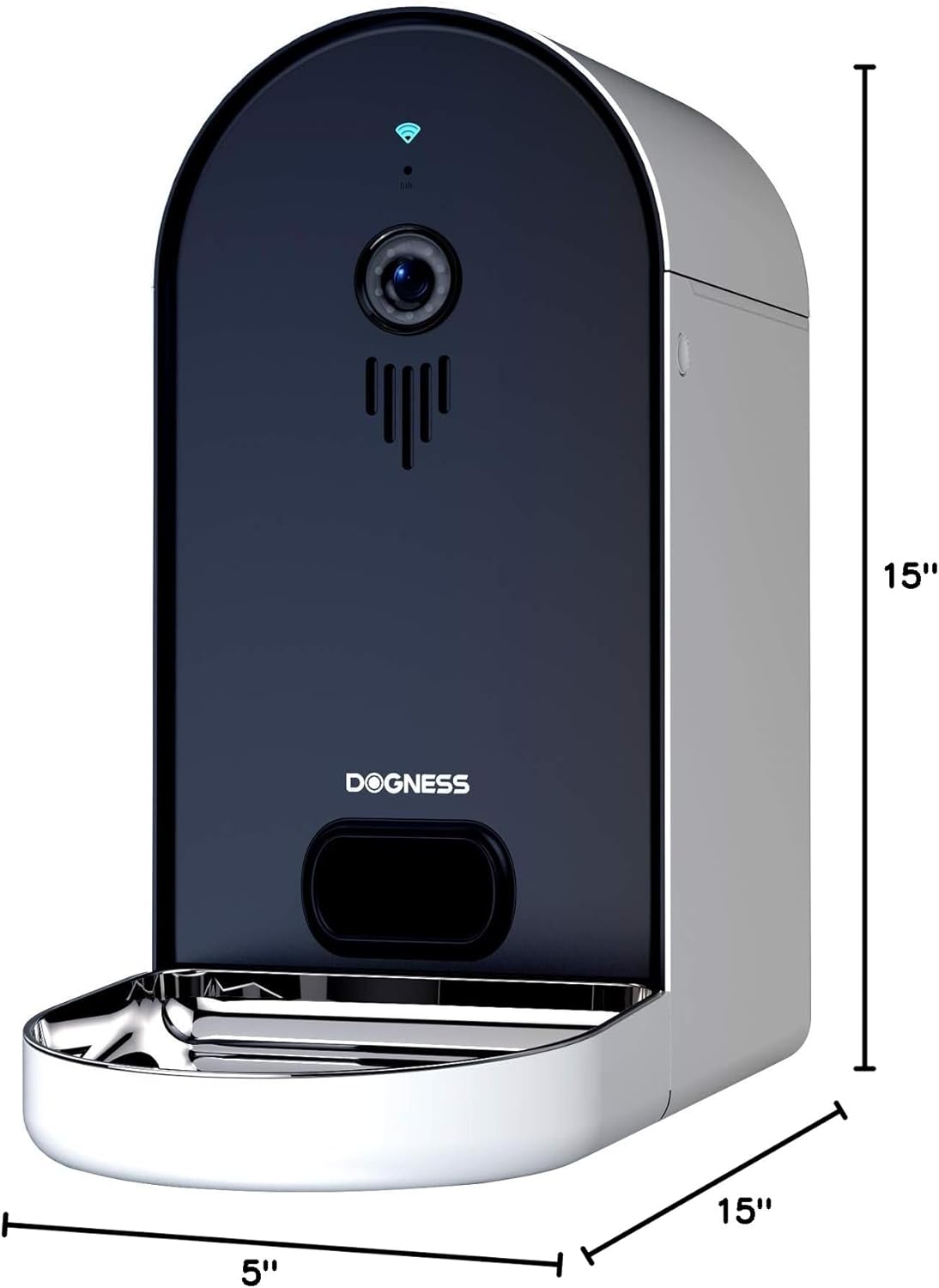
Сүрөт 6.1: Diagram illustrating the dimensions of the DOGNESS Smart Camera Pet Feeder, showing a height of 15 inches, width of 5 inches, and depth of 15 inches.
| Өзгөчөлүк | Деталь |
|---|---|
| Бренд | ИТ |
| Модель номери | B09KBPR7TS |
| Элемент Салмагы | 6.5 фунт |
| Продукциянын өлчөмдөрү (LxWxH) | 15 x 5 x 15 дюйм |
| Максаттуу түрлөр | Ит, мышык |
| Порода боюнча сунуш | Бардык породалардын өлчөмдөрү |
| Сунушталган Колдонуулар | Бир нече үй жаныбарлары |
| Өзгөчөлүктөр | Portion Control, Timer, Voice Recording, Night Vision Camera |
| Care Instructions | Кол менен гана жууса болот (алынуучу бөлүктөр) |
| Wi-Fi шайкештиги | 2.4GHz networks only |
| Power Source | AC Adapter, D-cell Battery Backup |
7. Кепилдик жана колдоо
For warranty information and customer support, please refer to the documentation included with your product or visit the official DOGNESS webсайт. Өндүрүүчүнүн website typically provides detailed warranty terms, registration options, and contact information for technical assistance.
Ар кандай кепилдик дооматтары үчүн сатып алуунун далили катары сатып алуу дүмүрчөгүңүздү сактаңыз.


