Introduction
This manual provides instructions for the operation and maintenance of your SHIDU T7 Karaoke Machine. This portable audio system features a 40W Hi-Fi speaker, a wireless microphone, and multiple connectivity options for an enhanced audio experience.

Figure 1: SHIDU T7 Karaoke Machine, wireless microphone, and remote control.
Пакеттин мазмуну
Сураныч, төмөнкү нерселер үчүн кутучаны белгилеңиз:
- 1 x SHIDU T7 Host Unit
- 1 x UHF зымсыз микрофон
- 1 x Алыстан башкаруу
- 1 x 15V-2A Charger
- 1 x Neutral Black Audio Cable (3.5mm)
- 1 x Neutral Red Live Wire (3.5mm)
- 1 x Microphone USB Charging Cable
- 1 x User Manual/Warranty Card
- 1 x Qualification Certificate
- 1 x Hang Tag
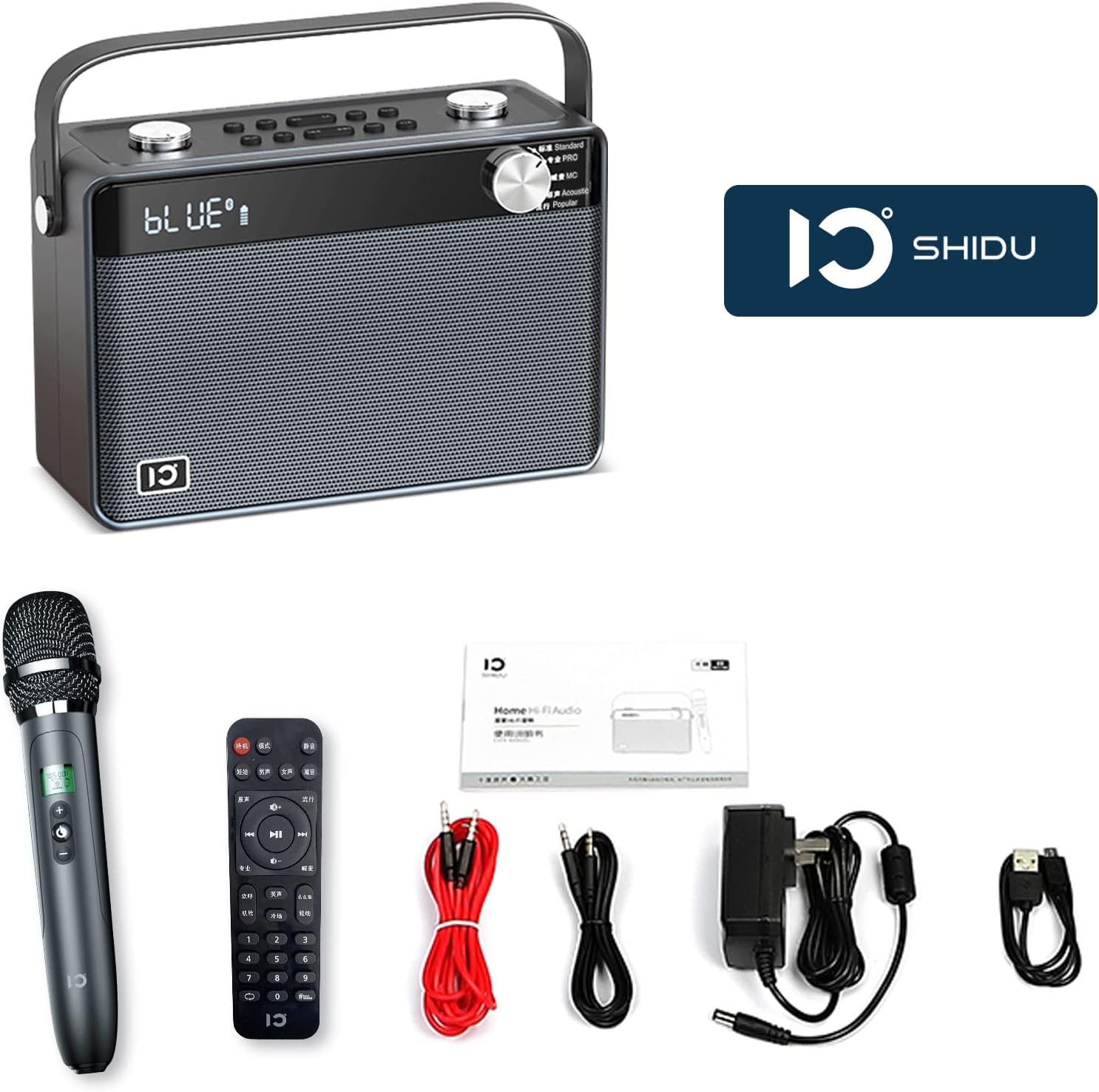
Figure 2: All items included in the SHIDU T7 package.
Продукт бүттүview
Main Unit Controls and Ports

Figure 3: Front panel with equalizer presets and display.
- Equalizer Dial: Select from 5 presets: Standard, Pro, MC, Acoustic, and Popular.
- Volume Dials (Top): Separate controls for microphone and speaker volume.
- Playback Controls (Top): Track navigation and play/pause.
- Voice Presets (Top): 4 voice variations (Baby, Lady, Man, Aged).
- Sound Effects (Top): 3 ambient sound effects (Cheer, Clap, Whistle).
- Phone Controls (Top): For call management when connected via Bluetooth.

Figure 4: Rear panel with various input/output ports.
- ¼” Line In (x2): For connecting external instruments or microphones.
- Микро SD карта слоту: For playing audio from a TF card.
- USB A порту: USB дисктен аудио ойнотуу үчүн.
- 3.5mm AUX In (x2): Тышкы аудио булактарын туташтыруу үчүн.
- 3.5mm AUX Out (x2): For connecting to headphones or other audio output devices.
- DC 15V Power In: Агрегатты заряддоо үчүн.
- Күйгүзүү/өчүрүү: Негизги электр өчүргүч.
Зымсыз микрофон

Figure 5: The wireless microphone with charging indicator.
- Күйгүзүү/өчүрүү баскычы: Power for the microphone.
- Өйдө/ылдый баскычтары: Adjust microphone volume or other settings.
- USB Micro Charging Port: Located at the bottom for recharging the microphone's internal battery.
Алыстан башкаруу
The included remote control provides convenient access to various functions. Note that the remote control labels may be in Chinese. Refer to the main unit's display and buttons for corresponding functions.
Жайгашуу
1. Charging the Unit and Microphone
- Негизги блок: Connect the provided 15V-2A charger to the "DC 15V Power In" port on the rear of the main unit. Plug the charger into a power outlet. The unit will indicate charging status on its display.
- Зымсыз микрофон: Connect the microphone USB charging cable to the USB Micro charging port at the bottom of the microphone. Connect the other end to a USB power source (e.g., a computer USB port or a USB wall adapter). The microphone will indicate charging status.
Note: Fully charge both devices before first use for optimal battery life. The main unit's 4400mAh lithium battery provides approximately 6-8 hours of playtime.

Figure 6: Visual representation of the main unit's battery capacity and the rechargeable microphone.
2. Күйгүзүү
Flip the On/Off switch on the rear panel of the main unit to the "On" position. The display will light up.
Press the On/Off button on the wireless microphone to power it on.
Иштөө нускамалары
1. Bluetooth аркылуу туташуу
- Ensure the SHIDU T7 unit is powered on.
- Смартфонуңузда же башка Bluetooth иштетилген түзмөгүңүздө Bluetooth жөндөөлөрүнө өтүңүз.
- Издөө available devices and select "SHIDU T7" (or similar name) from the list.
- Once connected, the unit's display will indicate a successful Bluetooth connection.
- You can now play audio from your device through the SHIDU T7 speaker.

Figure 7: Connecting the SHIDU T7 to a smartphone via Bluetooth.
2. Using Other Audio Input Modes
- AUX киргизүү: Connect an external audio device (e.g., TV, tablet, MP3 player) to the 3.5mm AUX In port(s) on the rear panel using the provided audio cable. The unit will automatically switch to AUX mode or you may need to select it via the mode button (if available).
- USB/TF картасын ойнотуу: Insert a USB flash drive or a TF (Micro SD) card containing audio files into the respective ports on the rear panel. The unit will automatically detect and play the audio files.
Figure 8: Rear panel showing USB, TF card, and AUX input ports.
3. Зымсыз микрофонду колдонуу
- Ensure the microphone is charged and powered on. It will automatically connect to the main unit via UHF wireless.
- Adjust the microphone volume using the dedicated dial on the top of the main unit or the Up/Down buttons on the microphone.
- Эксперимент менен Voice Presets (Baby, Lady, Man, Aged) and Үн эффекттери (Cheer, Clap, Whistle) buttons on the top panel for various vocal enhancements.
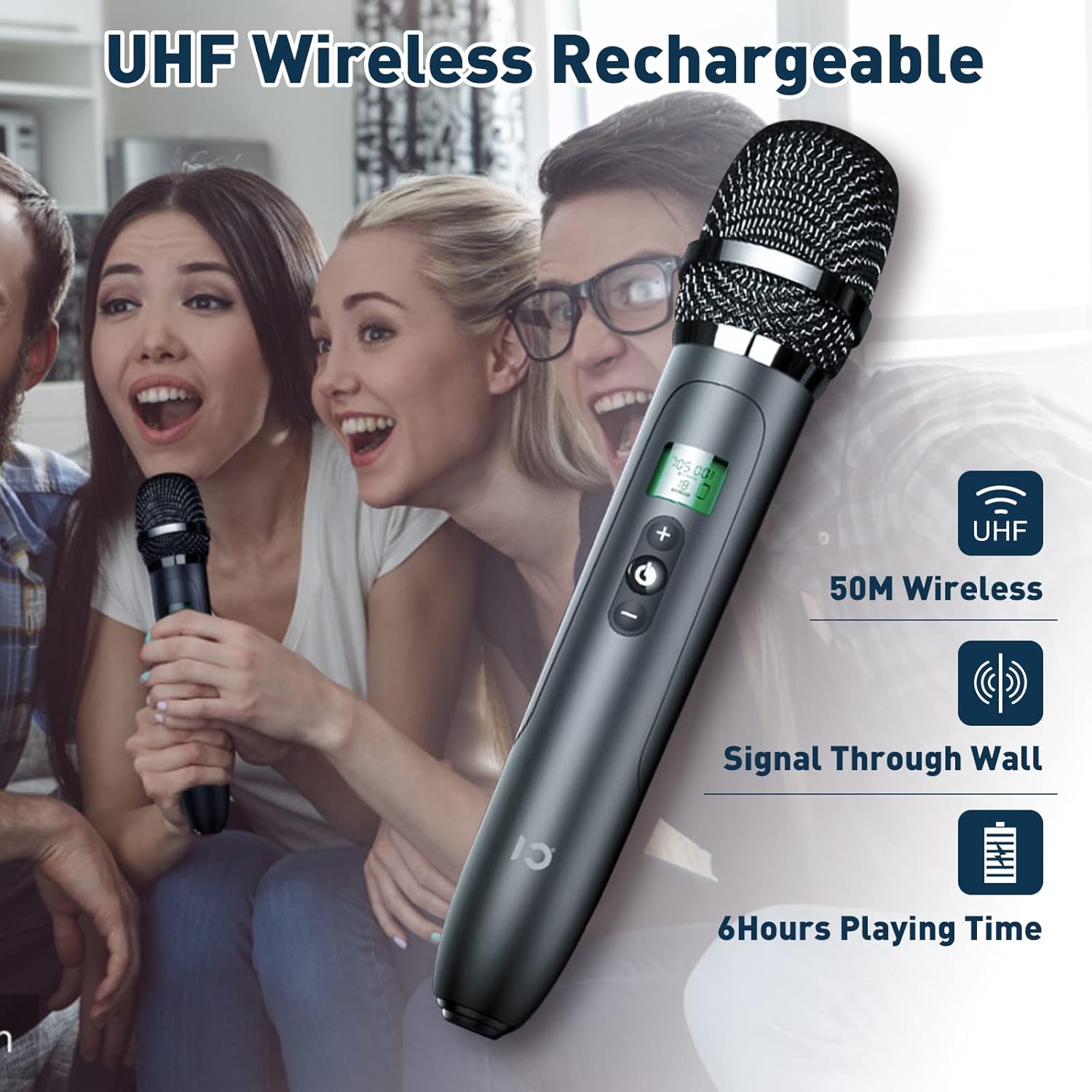
Figure 9: The UHF wireless microphone offers a stable connection up to 15 meters.
4. Үн орнотууларын тууралоо
- Динамиктин үнү: Use the main speaker volume dial on the top panel to adjust the overall output volume.
- Эквалайзердин алдын ала орнотуулары: Rotate the Equalizer Dial on the front panel to select from different sound modes:
- Стандарт: General audio playback.
- Pro: Enhanced professional sound.
- MC: Үндүн тунуктугу үчүн оптималдаштырылган.
- Акустикалык: Natural sound reproduction.
- Популярдуу: Boosted bass and treble for popular music.
Техникалык тейлөө
- Тазалоо: Use a soft, dry cloth to clean the exterior of the unit and microphone. Do not use liquid cleaners or abrasive materials.
- Сактагыч: Аппаратты күн нурунан жана экстремалдык температурадан алыс салкын, кургак жерде сактаңыз.
- Батареяга кам көрүү: To prolong battery life, avoid fully discharging the unit and microphone frequently. Recharge them regularly, even if not in use for extended periods.
Проблемаларды чечүү
| Көйгөй | Мүмкүн себеп | Чечим |
|---|---|---|
| Күч жок | Батарея түгөнүп калды; Кубат өчүргүч өчүрүлгөн. | Charge the unit; Ensure the power switch is in the "On" position. |
| Динамиктен үн жок | Үнү өтө төмөн; Туура эмес киргизүү режими тандалды; Түзмөк туура эмес туташтырылган. | Increase speaker volume; Select the correct input mode (Bluetooth, AUX, USB, TF); Reconnect your audio source. |
| Микрофон иштебей жатат | Microphone is off or uncharged; Microphone volume too low; Out of range. | Charge and power on the microphone; Increase microphone volume; Ensure microphone is within 15m of the main unit. |
| Bluetooth байланышы көйгөйлөрү | Device too far; Bluetooth not enabled on source device; Interference. | Move device closer to the unit; Enable Bluetooth on your device; Disconnect other Bluetooth devices. |
| Алыстан башкаруу жооп бербей жатат | Remote battery depleted; Obstruction between remote and unit. | Replace remote batteries; Ensure clear line of sight to the unit's IR receiver. |
Техникалык шарттар
| Өзгөчөлүк | Деталь |
|---|---|
| Модель номери | T7 |
| Бренд | ШИДУ |
| Чыгуу күчү | 40 Вт |
| Динамик конфигурациясы | 2 x 4.0-inch woolen cone woofer, 2 x 1.5-inch silk diaphragm tweeter |
| Байланыш | Bluetooth 5.0, AUX, USB, TF/SD Card, UHF Wireless Microphone |
| Bluetooth диапазону | 49 фут (15 м) чейин |
| Негизги блоктун батареясы | 4400mAh Lithium Ion (6-8 hours playtime) |
| Микрофондун батареясы | Rechargeable (details not specified, but included) |
| Продукциянын өлчөмдөрү (L x W x Y) | 9.45 x 6.69 x 3.54 дюйм |
| Элемент Салмагы | 7.52 фунт (болжол менен 3.42 кг) |
| Монтаж түрү | Стол үстү |
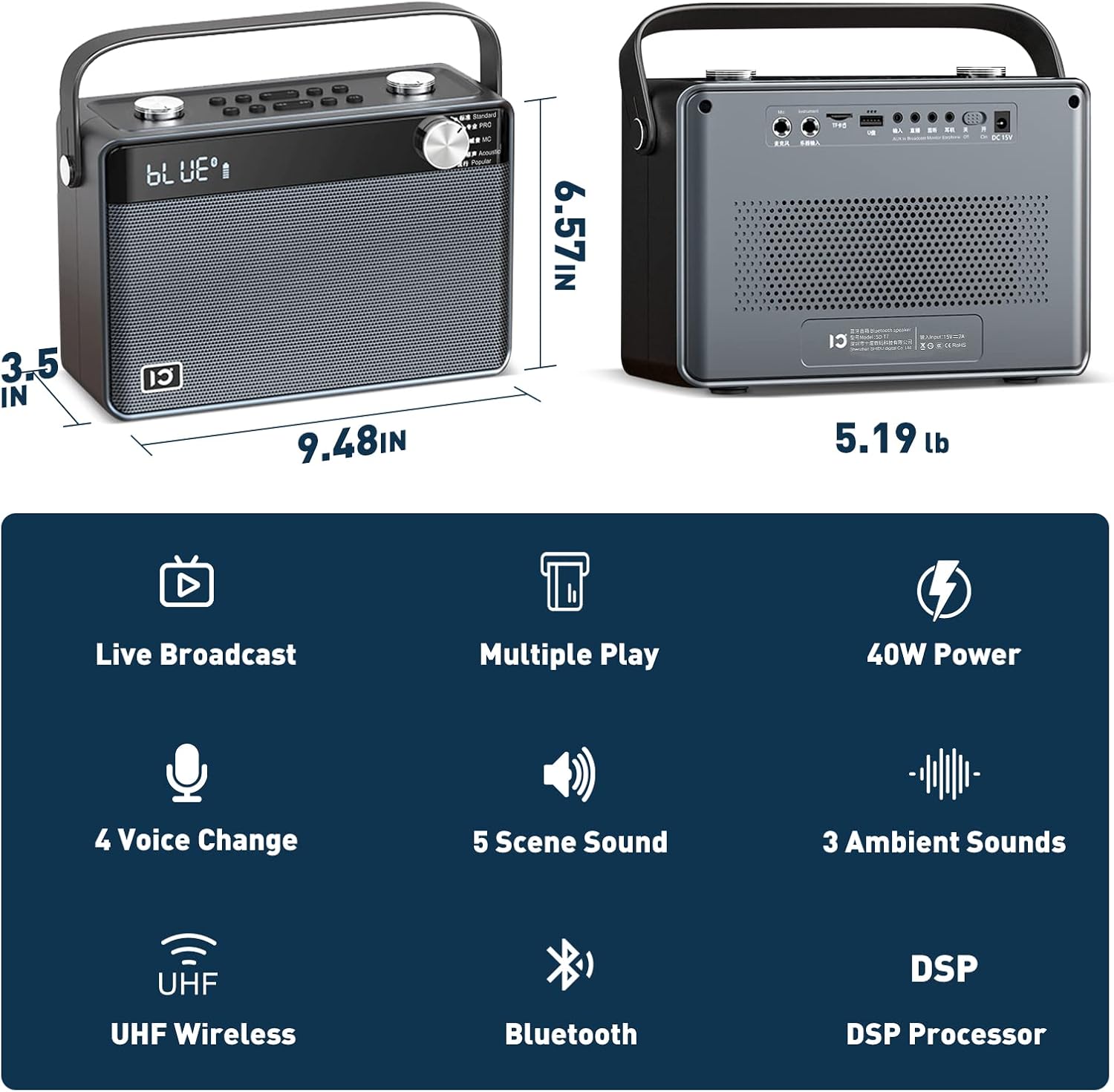
Figure 10: Physical dimensions of the SHIDU T7 main unit.
Кепилдик жана колдоо
The SHIDU T7 Karaoke Machine comes with a standard manufacturer's warranty. Please refer to the included Warranty Card in your package for specific terms and conditions.
For technical support, troubleshooting assistance, or warranty claims, please contact SHIDU customer service through the retailer where you purchased the product or visit the official SHIDU webсайт.
Сиз да зыярат кылсаңыз болот SHIDU Brand Store on Amazon көбүрөөк маалымат жана колдоо булактары үчүн.


