1. Продукт бүтүп калдыview
The idinio® Smart Ceiling Light is an innovative lighting solution designed to integrate seamlessly with your smart home ecosystem. It features an integrated docking station compatible with Amazon Echo Dot (3rd/4th Gen) and Google Nest Mini (2nd Gen), allowing for voice control of both the light and your smart home devices. Its central placement in a room provides optimal conditions for the smart speaker.
This versatile light offers adjustable color temperature from extra warm white (2000K) to neutral white (4000K) for the main light. Additionally, it includes a separately controllable RGB backlight, enabling you to create dynamic color accents on your ceiling. Advanced features such as music synchronization, scheduled on/off times, and simulated sunrise for a biorythmic alarm are also available through the idinio app.

Image: Three idinio smart ceiling lights, showcasing their modern design and how they appear when installed.
2. Кутуда эмне бар
Сураныч, таңгактын ичиндегисин кылдаттык менен текшериңиз. Эгерде кандайдыр бир буюмдар жок болсо же бузулуп калса, кардарларды колдоо кызматына кайрылыңыз.
- idinio® Smart Ceiling Light (x3 for this set)
- Integrated Docking Station
- Монтаждоочу аксессуарлар (бурамалар, дубал сайгычтар)
- Колдонуучунун Колдонмосу (бул документ)
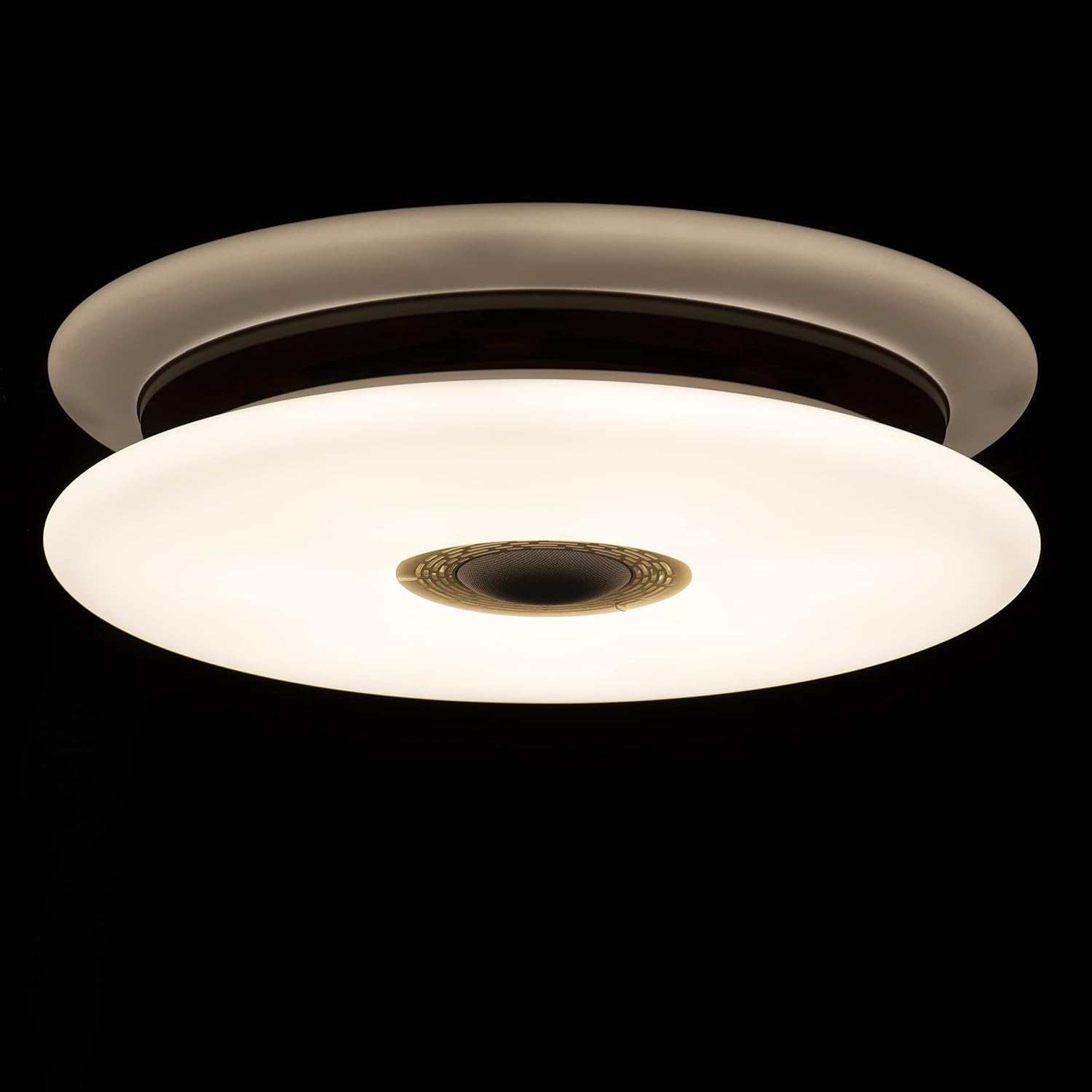
Image: Packaging of the idinio smart ceiling lights, indicating the contents of the set.
3. Орнотуу жана орнотуу
3.1 Коопсуздук чаралары
- Орнотуудан мурун электр өчүргүчтөн электр энергиясы өчүрүлгөнүн текшериңиз.
- Эгер ишенбесеңиз, орнотууну квалификациялуу электрик аткарышы керек.
- Do not connect the light to a dimmer switch not designed for smart lighting.
3.2 Mounting the Ceiling Light
- Автоматтык өчүргүчтөгү негизги кубат менен камсыздоону өчүрүңүз.
- Attach the mounting bracket to the ceiling using the provided screws and wall plugs.
- Connect the electrical wires (Live, Neutral, Earth) from your ceiling to the corresponding terminals on the light fixture. Ensure connections are secure.
- Жарык приборун монтаждоо кронштейнине бекитиңиз.
- Негизги электр менен жабдууну күйгүзүңүз.
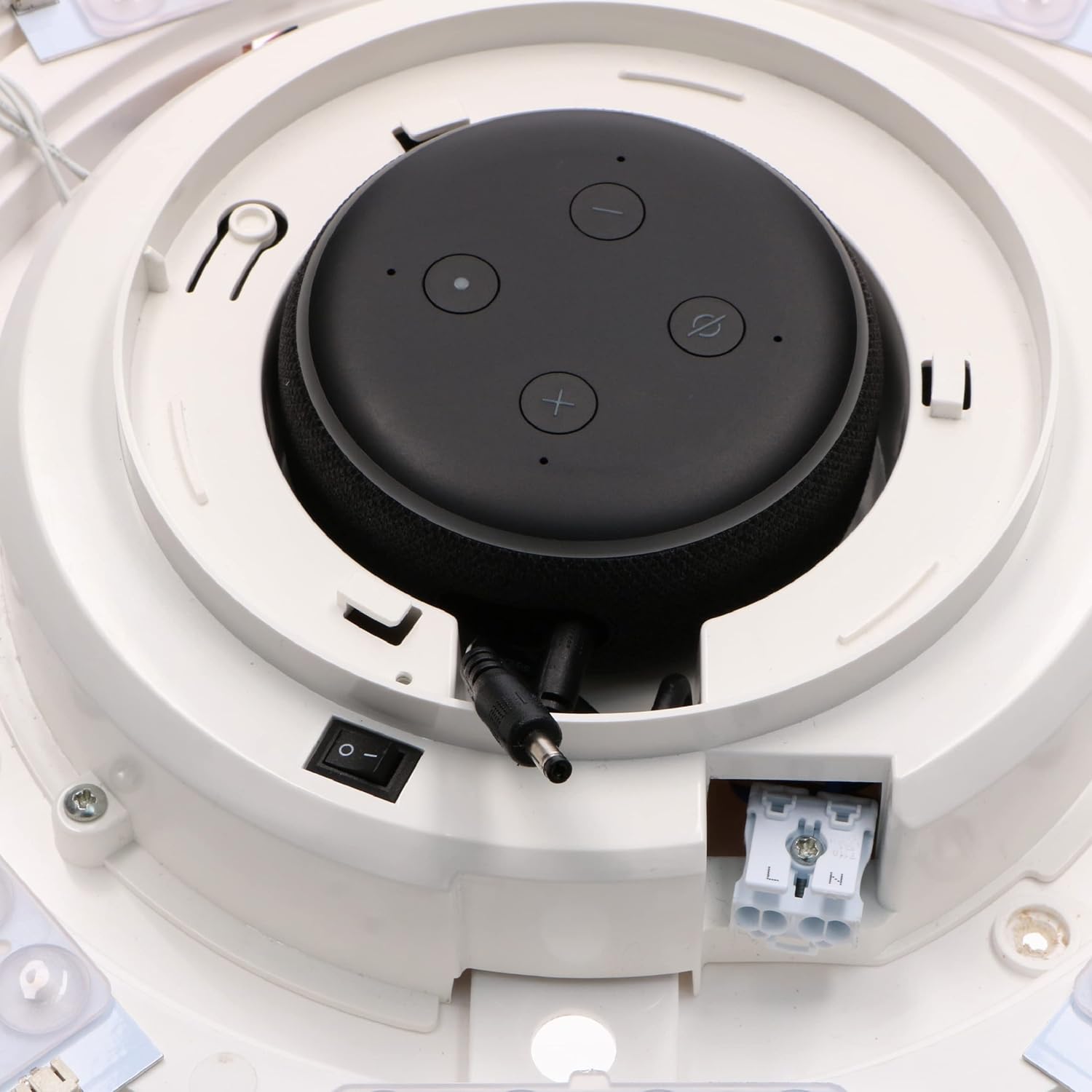
Сүрөт: Ички view of the light fixture showing wiring terminals and LED arrangement.
3.3 Integrating Your Smart Speaker
The idinio Smart Ceiling Light is designed with a central docking station for compatible smart speakers. Different diaphragms are included to ensure a perfect fit and aesthetic integration.
- Select the appropriate diaphragm for your smart speaker (Echo Dot 3rd/4th Gen or Nest Mini 2nd Gen).
- Carefully place your smart speaker into the docking station. Ensure it sits securely.
- Connect the smart speaker's power cable to the integrated power output within the docking station.

Image: Echo Dot 3rd Generation installed.

Image: Echo Dot 4th Generation installed.

Image: Google Nest Mini 2nd Generation installed.

Сүрөт: Ички view with smart speaker installed and connected.
3.4 Колдонмо туташуусу
To unlock the full potential of your idinio Smart Ceiling Light, download the idinio app from the App Store (iOS) or Google Play Store (Android).
- Download and install the "idinio" app on your smartphone or tablet.
- Жаңы аккаунтка катталыңыз же сизде мурунтан эле бар болсо кириңиз.
- Wi-Fi тармагыңыз 2.4 ГГц экенин текшериңиз.
- Follow the in-app instructions to add your new idinio Smart Ceiling Light. This typically involves putting the light into pairing mode (often by cycling power) and confirming its discovery in the app.
- Once connected, you can control the light and integrate it with Amazon Alexa or Google Assistant through the app's settings.
4. Иштөө нускамалары
4.1 Basic Light Control
- Күйгүзүү/өчүрүү: Use the idinio app or voice commands via your integrated smart speaker to turn the light on or off.
- алсыздатуу: Adjust the brightness level from 1% to 100% using the app or voice commands.
4.2 Color Temperature Adjustment (Main Light)
The main light can be adjusted from a warm white to a neutral white tone.
- Open the idinio app and select your ceiling light.
- Navigate to the "White Light" or "Color Temperature" section.
- Adjust the slider or select a preset to change the color temperature between 2000K (warm white) and 4000K (neutral white).

Image: The idinio smart ceiling light emitting light, showcasing its illumination capabilities.
4.3 RGB арткы жарыкты башкаруу
The light features a separate RGB backlight to create ambient color effects on your ceiling.
- In the idinio app, select your ceiling light.
- Go to the "RGB" or "Color" section.
- Choose from a wide spectrum of colors or select dynamic scenes.
4.4 Smart Features via App
- Графиктер: Set timers for the light to turn on/off automatically at specific times.
- Simulated Sunrise: Configure a gradual increase in light intensity to simulate a sunrise for a gentle wake-up.
- Музыкалык башкаруу: Synchronize the light's effects with music playing through your smart speaker.
- Сахна түзүү: Ар кандай маанай же иш-чаралар үчүн ыңгайлаштырылган жарык көрүнүштөрүн түзүңүз.
- Түзмөктү бөлүшүү: Share control of the light with family members through the idinio app.
4.5 Voice Control (with Smart Speaker)
Once your smart speaker is integrated and connected to the idinio app (via Alexa Skill or Google Home integration), you can use voice commands:
- – Alexa, бөлмөнүн жарыгын күйгүз.
- "Hey Google, set the kitchen light to 50% brightness."
- "Alexa, change the bedroom light to warm white."
- "Hey Google, make the office light blue."
5. Техникалык тейлөө
5.1 Cleaning the Light Fixture
To maintain the appearance and performance of your idinio Smart Ceiling Light, follow these cleaning guidelines:
- Always turn off the power supply to the light fixture before cleaning.
- жумшак, кургак же бир аз колдонуу damp cloth to wipe the surface of the light.
- Абразивдүү тазалагычтарды, эриткичтерди же катуу химиялык заттарды колдонбоңуз, анткени алар финишке зыян келтириши мүмкүн.
- Күчтү калыбына келтирүүдөн мурун жарыктын толугу менен кургак экенин текшериңиз.
6. Кыйынчылыктарды
| Көйгөй | Мүмкүн себеп | Чечим |
|---|---|---|
| Жарык күйбөйт. | No power supply; loose wiring; light not paired. | Check circuit breaker. Ensure wiring is secure. Re-pair the light with the app. |
| Wi-Fi'га туташпай жатат. | Туура эмес Wi-Fi сырсөзү; 5 ГГц тармагы; роутерден өтө алыс. | Verify password. Ensure 2.4GHz network. Move router closer or use a Wi-Fi extender. |
| Үн башкаруу иштебейт. | Smart speaker not connected; idinio skill/action not enabled; microphone off. | Check smart speaker connection. Enable idinio skill/action in Alexa/Google Home app. Ensure smart speaker microphone is on. |
| Жарык бүлбүлдөп же өзүн туура эмес алып жүрөт. | Unstable power; interference; faulty unit. | Check power supply stability. Reduce interference from other devices. Contact support if problem persists. |
7. Техникалык шарттар
| Өзгөчөлүк | Деталь |
|---|---|
| Бренд | idinio |
| Модел | Smart Ceiling Light with Integrated Smart Speaker Dock |
| Энергияны керектөө | LED max. 24W / Total max. 45W |
| Тtage | 120 вольт |
| Түс температурасы | 2000K (Warm White) - 4000K (Neutral White) |
| Түстөрдү көрсөтүү индекси (CRI) | 80 |
| Жарык агымы | 1700 Lumens |
| Beam Angle | 120° |
| Lifespan (LED) | 30,000 саат |
| Коргоо түрү | IP20 |
| Материал | Алюминий |
| Байланыш | Wi-Fi (802.11b, 802.11g, 802.11n) 2.4GHz |
| Smart Home платформасы | idinio-App, Google Assistant, Amazon Alexa |
| Smart Home Protocol | Туя |
| Compatible Smart Speakers | Amazon Echo Dot (3rd/4th Gen), Google Nest Mini (2nd Gen) |
8. Кайра иштетүү маалыматы
This product contains electronic components and should not be disposed of with household waste. Please follow local regulations for the proper recycling of electronic products and light bulbs. For more information on recycling light bulbs, please consult your local waste management authority or recycling centers.
9. Кепилдик жана колдоо
For warranty information and technical support, please refer to the warranty card included with your product or visit the official idinio website. You can also contact idinio customer service directly for assistance with product setup, operation, or troubleshooting.
Кардарларды колдоо кызматы менен байланыш: Please refer to the contact details provided on the idinio packaging or official webсайт.


