1. Киришүү
This manual provides essential information for setting up, operating, and maintaining your Intel NUC 11 NUC11PAHi7 Mini PC. Please read this manual thoroughly before using the product to ensure proper functionality and safety.
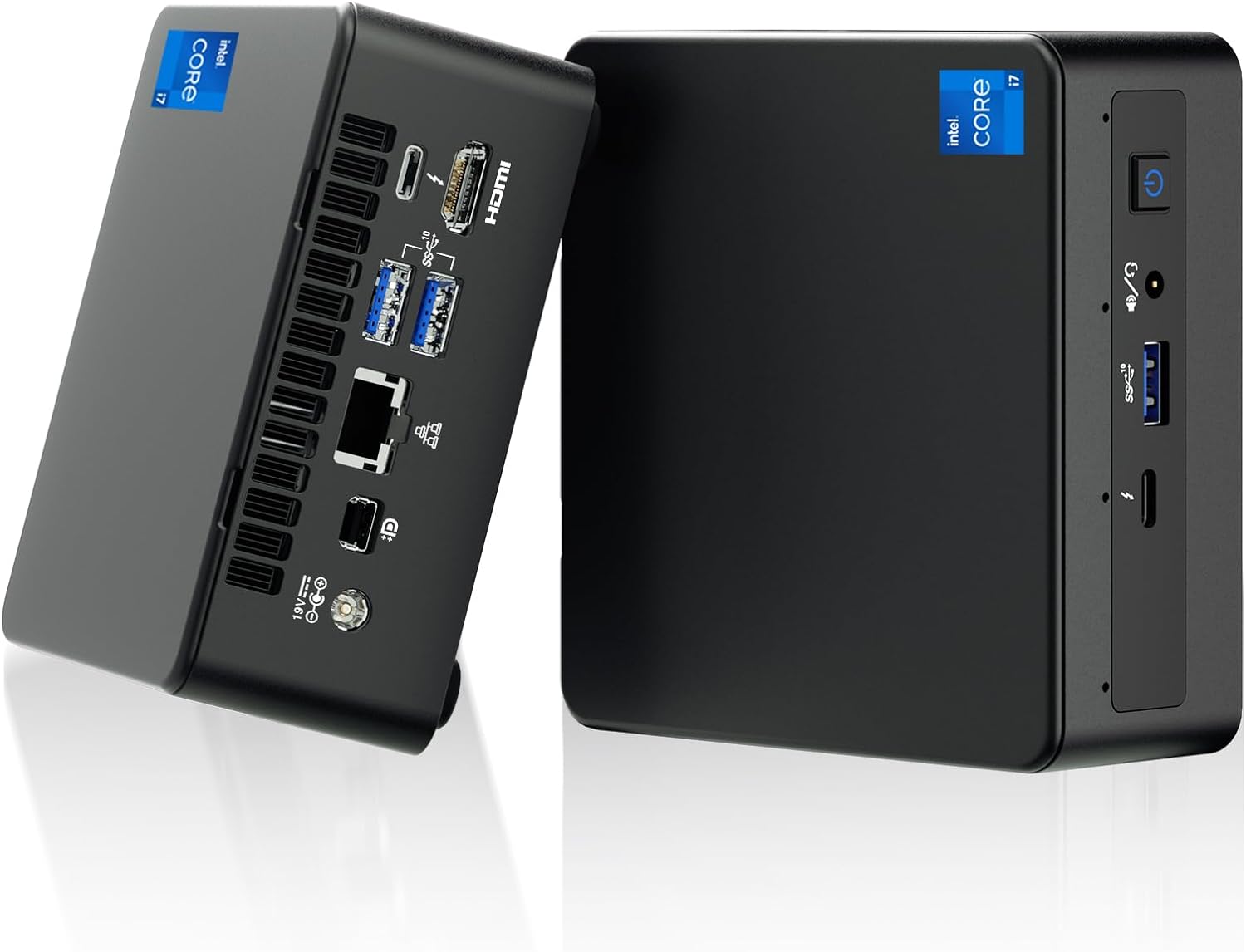
Сүрөт 1: Алдыңкы жана арткы view of the Intel NUC 11 Mini PC, showcasing анын компакттуу конструкциясы жана ар турдуу порттору.
2. Кутуда эмне бар
Орнотууну улантуудан мурун таңгакта бардык компоненттер бар экенин текшериңиз.
- Intel NUC 11 Mini PC
- Кубаттуу адаптер
- US AC Cord
- VESA тоосу
- Mounting Screws and M.2 Screws (10 pieces)
- Instruction Manual
- Safety Information Documents (2 pieces)

Figure 2: All items included in the Intel NUC 11 Mini PC packaging, including the mini PC, power adapter, VESA mount, and documentation.
3. Продукциянын өзгөчөлүктөрү
The Intel NUC 11 NUC11PAHi7 Mini PC offers a range of advanced features for various computing needs.
- Процессор: 11th Gen Intel Core i7-1165G7 (12M Cache, up to 4.70 GHz)
- Графика: Intel Iris Xe Graphics, supporting 4K UHD and quad-screen display.
- Эстутум: 16GB SODIMM DDR4 (3200MHz), dual-channel, upgradeable to 64GB.
- Сактагыч: 512GB M.2 PCIe 2280 SSD, with support for external 2.5-inch 7mm HDD expansion.
- Байланыш:
- Эки Thunderbolt 3 порту
- HDMI 2.0b порту
- Mini DisplayPort 1.4 port
- Three USB 3.1 Gen2 ports
- Intel Ethernet Controller i225-V (Gigabit 2500Mb/s)
- Intel Wi-Fi 6
- Bluetooth 5.2
- UHS-II колдоосу менен SDXC уячасы
- 3.5 мм алдыңкы стерео гарнитура уячасы
- Front consumer infrared port
- Операция системасы: Preinstalled with Windows 11 Pro.
- Кошумча өзгөчөлүктөр: Beam-forming, far-field, quad-mic array with Alexa support, Kensington Lock Ready.

Figure 3: ашыкview of the Intel NUC 11's core specifications, highlighting the i7 processor, Iris Xe graphics, memory, storage, and network capabilities.

Figure 4: Illustration of the various input/output ports available on the Intel NUC 11, including Thunderbolt 3, HDMI, Mini DisplayPort, USB, LAN, and an SD Card slot.
4. Орнотуу колдонмосу
4.1 Баштапкы туташуу
- Дисплейди туташтыруу: Connect your monitor(s) to the HDMI, Mini DisplayPort, or Thunderbolt 3 ports using appropriate cables. The NUC supports up to four displays.
- Перифериялык түзүлүштөрдү туташтыруу: Plug in your keyboard, mouse, and any other USB devices into the available USB 3.1 Gen2 ports.
- Тармак туташуусу: For a wired connection, connect an Ethernet cable to the LAN port. For wireless, ensure your Wi-Fi network is available.
- Кубат туташуу: Connect the power adapter to the DC-in port on the NUC and then plug the AC cord into a power outlet.
4.2 Күйгүзүү
Press the power button located on the front of the unit. The system will boot into Windows 11 Pro. Follow the on-screen instructions for initial Windows setup if this is the first time powering on.
5. Иштөө нускамалары
5.1 Негизги операция
- Операция системасы: Your Intel NUC comes preinstalled with Windows 11 Pro. Familiarize yourself with the Windows interface for daily tasks.
- Көп дисплей орнотуу: Utilize the multiple display outputs (HDMI, Mini DisplayPort, Thunderbolt 3) to extend your desktop across several monitors for enhanced productivity.
- Зымсыз туташуу: Connect to Wi-Fi 6 networks for high-speed wireless internet access. Use Bluetooth 5.2 for connecting wireless peripherals like headphones or keyboards.
- USB and Thunderbolt Ports: Use the USB 3.1 Gen2 ports for high-speed data transfer with external drives and peripherals. The Thunderbolt 3 ports offer even faster data transfer, video output, and power delivery capabilities.

Figure 5: The Intel NUC 11 connected to a monitor, illustrating its advanced networking capabilities with WiFi 6 and Bluetooth 5.2.
6. Техникалык тейлөө жана жаңылоо
6.1 Жалпы тейлөө
- Ашыкча ысып кетпеш үчүн аппаратты жакшы желдетилген жерде сактаңыз.
- Regularly clean the exterior with a soft, dry cloth. Avoid liquid cleaners.
- Ensure software and drivers are updated for optimal performance and security.
6.2 Memory and Storage Upgrades
The Intel NUC 11 allows for memory and storage expansion:
- RAM: The device supports dual-channel DDR4 SODIMM memory, upgradeable to a maximum of 64GB (2 x 32GB, up to 3200MHz).
- SSD: The preinstalled 512GB M.2 PCIe 2280 SSD can be upgraded. Additionally, the unit supports an external 2.5-inch 7mm HDD expansion (not included) for increased storage capacity.
Caution: Before performing any internal upgrades, ensure the device is powered off and unplugged. Refer to the detailed instructions in the Intel NUC technical documentation for proper installation procedures. Removing memory and SSD before aftermarket service is recommended for privacy and security.

Figure 6: Illustration of the internal components, specifically the 512GB M.2 SSD and 16GB DDR4 RAM modules, indicating upgrade potential.
7. Кыйынчылыктарды
Бул бөлүмдө сиз кабылышы мүмкүн болгон жалпы маселелерди чечүү жолдору каралган.
- Кубат жок:
- Ensure the power adapter is securely connected to both the NUC and a working power outlet.
- Электр розеткасынын иштешин башка аспап менен текшерүү аркылуу текшериңиз.
- Дисплей жок:
- Check all display cable connections (HDMI, Mini DisplayPort, Thunderbolt 3) between the NUC and the monitor.
- Монитордун күйгүзүлгөнүн жана туура киргизүү булагына коюлганын текшериңиз.
- Try connecting to a different display or using a different cable.
- Интернет байланышы жок:
- For wired connections, ensure the Ethernet cable is properly connected and your router is working.
- For Wi-Fi, check if Wi-Fi is enabled in Windows settings and if you are connected to the correct network with the right password.
- Restart your router and the NUC.
- Системанын жайлашы:
- Фондо иштеп жаткан керексиз тиркемелерди жабыңыз.
- Жогорку CPU же RAM керектеген процесстер үчүн Task Managerди текшериңиз.
- Windows жана драйверлер жаңыртылганын текшериңиз.
- Consider performing a disk cleanup or defragmentation (for HDDs, not SSDs).
8. Техникалык шарттар
| Өзгөчөлүк | Деталь |
|---|---|
| Процессор | 11th Gen Intel Core i7-1165G7 (2.8 GHz, up to 4.7 GHz Turbo, 4 cores, 8 threads, 12 MB Cache) |
| Графика | Intel Iris Xe графикасы (интегралдык) |
| RAM | 16 GB DDR4 (3200MHz), expandable to 64 GB |
| Сактагыч | 512 GB M.2 PCIe SSD (NVMe PCIe Gen4) |
| Операция системасы | Windows 11 Pro |
| Зымсыз байланыш | Intel Wi-Fi 6, Bluetooth 5.2 |
| Зымдуу туташуу | Intel Ethernet Controller i225-V (2.5 Gigabit) |
| Порттор (Алдыңкы) | 1x USB 3.1 Gen2, 1x Thunderbolt 3, 3.5mm Headset Jack, Power Button |
| Порттар (арткы) | 2x USB 3.1 Gen2, 1x Thunderbolt 3, HDMI 2.0b, Mini DisplayPort 1.4, LAN, DC-in |
| Other Ports/Slots | SDXC slot with UHS-II support, Kensington Security Slot, Front Consumer Infrared Port |
| Өлчөмдөрү (LxWxH) | 4.6 x 4.4 x 2 дюйм |
| Салмагы | 3.1 фунт (болжол менен 1.4 кг) |
| Түс | Кара |

Figure 7: A detailed comparison table outlining the specifications for different Intel NUC 11 Performance Mini PC and Kit configurations, including processor, graphics, memory, and storage options.
9. Коопсуздук маалыматы
Please observe the following safety guidelines to prevent damage to the device or personal injury.
- Use only the provided power adapter and AC cord.
- Аппаратты экстремалдык температурага, нымдуулукка же түз күн нуруна калтырбаңыз.
- Аппаратты жылуулук булактарынын жанына же жакшы желдетилбеген жерлерге коюудан алыс болуңуз.
- Do not open the chassis unless performing authorized upgrades (RAM/SSD) and always disconnect power first.
- Аппаратты суюктуктардан алыс кармаңыз.
- If you encounter any issues, refer to the troubleshooting section or contact support before attempting repairs.

Figure 8: Important safety warnings and precautions provided in multiple languages, covering electrical safety, environmental conditions, and proper usage.
10. Кепилдик жана колдоо
Your Intel NUC 11 Mini PC comes with a comprehensive warranty and support:
- Кепилдик: A 3-year global warranty from Intel and GEEK+ is provided. This includes a 3-year free Warranty Service from Intel for the NUC Barebone part. RAM, SSD, and OS are covered by a three-year warranty provided by GEEK+.
- Колдоо: For issues with the NUC Barebone part, you can contact local Intel NUC after-sales locations directly. For other inquiries or assistance, send a message to GEEK+ for help.
- Купуялык жана коопсуздук: To ensure your privacy and security, it is recommended to remove the Memory and SSD before sending the unit for aftermarket service.
For further assistance, please refer to the official Intel NUC support webсайтка же сатуучуга кайрылыңыз.


